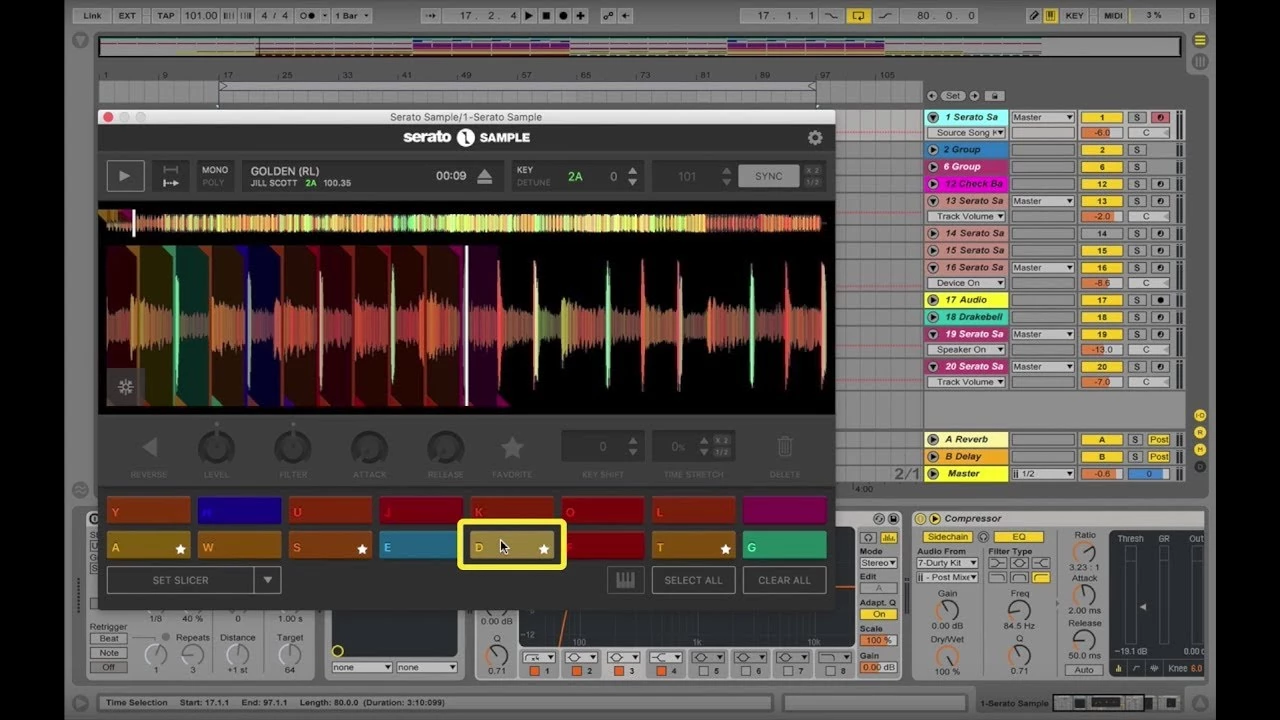
Serato Sample brings the classic hardware sampling workflow directly into modern digital audio workstations as a dedicated plugin. Aimed at beatmakers, electronic producers, and hip-hop artists, this tool strips away the complexity of traditional multi-samplers to focus entirely on fast, musical audio manipulation. Instead of navigating complicated routing matrices or endless modulation menus, producers can simply drop a full stereo audio track onto the main interface and immediately begin chopping, pitching, and rearranging the audio data across a MIDI keyboard or pad controller. The software analyzes the file upon import, calculating the base tempo and harmonic key, which allows producers to bypass the tedious manual setup phase that usually kills studio momentum.
The core task this software solves is the translation of raw audio recordings into playable musical instruments. Historically, sampling workflows required producers to manually slice waveforms on a grid, guess the precise mathematical pitch adjustments needed to match their project, and accept destructive digital artifacts when stretching audio too far. This desktop plugin bypasses those hurdles by integrating the legendary Pitch 'n Time algorithm, allowing producers to radically alter the speed and pitch of an audio file while retaining the natural transients and phrasing of the source material. It locks the imported audio to the host DAW arrangement, ensuring that a looped phrase will stay on the beat even if the global tempo fluctuates during a live performance or arrangement session.
While many digital audio workstations include basic native sampling devices, they typically lack real-time audio separation and intelligent auto-slicing features. By offering dedicated local stem separation directly inside the sampler, producers can isolate specific instruments—like a bassline or a lead vocal—from a fully mixed track, eliminating the need to visit third-party stem extraction websites or bounce files back and forth between different editing utilities. The standalone desktop plugin format matters here because it utilizes the local processor for zero-latency playback, rather than relying on browser-based cloud rendering that introduces lag when triggering slices from a MIDI pad. This direct integration ensures that producers can treat a vocal chop exactly like a drum hit, applying host effects and automation without leaving their primary arrangement window.
Key Features
- Pitch 'n Time Algorithm: Allows extreme time-stretching and pitch-shifting without degrading audio quality. Producers can pitch an imported sample up or down by multiple semitones while locking the tempo exactly to the host DAW project. Unlike standard granular stretching, this algorithm prevents the audio from sounding metallic or smeared, maintaining the punch of drum transients and the natural vibrato of vocal recordings.
- Real-Time Stem Separation: Employs local machine learning models to split imported audio into four isolated output channels: Vocals, Melody, Bass, and Drums. Users can toggle these on and off directly from the plugin interface using dedicated mute buttons. This allows a producer to extract a clean acapella from a finished track or sample a drum break without the original bassline bleeding into the low frequencies.
- Auto-Slice Function: Analyzes the structural transients of the audio file and automatically places slicing markers at musical phrases and rhythmic peaks. This instantly maps playable chops across a connected MIDI controller, saving hours previously spent manually cutting waveforms with a mouse. The user can adjust the sensitivity of the slicing engine to create larger looped sections or microscopic percussive hits.
- Stem Level Automation: Provides individual volume controls and gain staging for the separated audio stems. Producers can automate the mute and gain parameters within their host arrangement window to bring specific instruments in and out of the mix over time. This makes it possible to isolate a melody during a verse and slowly introduce the original drum groove as the track builds toward a chorus.
- Keyboard Mode: Maps a single isolated audio chop across the entire piano roll for polyphonic playback. This turns a single sustained note, a guitar chord, or a vocal stab into a fully playable synthesizer patch. The software automatically shifts the pitch of the slice across the keys while attempting to preserve the original length and timing of the sound.
- Scroll-Wheel Parameter Adjustment: Streamlines the user interface by allowing producers to adjust digital knobs and draggable data fields simply by hovering the mouse cursor and scrolling. This reduces repetitive clicking and dragging, making it much faster to dial in filter cutoffs, attack times, and release envelopes while keeping the cursor stationary.
- Native Controller Integration: Connects directly with external MIDI pad hardware, including native control surface mappings for devices like the AlphaTheta SLAB. This allows tactile control over cue points, waveform scrubbing, and stem isolation without forcing the user to reach for a computer mouse. The visual feedback on supported controllers mirrors the slice points visible on the computer monitor.
How to Install Serato Sample on Windows
- Download the Windows installer package directly from your user account dashboard to your local storage drive, ensuring you have enough free space for the core application and the machine learning models.
- Locate the downloaded ZIP archive in Windows Explorer, right-click the folder, and select "Extract All" to unpack the contents into a temporary directory on your desktop or downloads folder.
- Double-click the extracted executable file to launch the Setup Wizard and carefully review the User License Agreement presented on the first screen.
- Accept the terms and proceed to the component selection screen, where you can check the boxes for VST, VST3, and AAX plugin formats depending on which digital audio workstation you intend to use.
- Confirm the default installation path or specify a custom directory for your dedicated VST folder, ensuring your host software is configured to scan that specific location, then click Install.
- Click Yes if the Windows User Account Control (UAC) prompt appears asking for administrative permission to write the necessary files and registry keys to your local drive.
- Click Finish to close the setup wizard, then launch your host digital audio workstation and force a complete plugin rescan to detect the newly installed sampler.
- Load an instance of the software onto an empty MIDI track and enter your account credentials in the popup window to authorize the machine and complete the initial setup process.
Serato Sample Free vs. Paid
Serato Sample operates on a hybrid software pricing model, giving producers the choice between an ongoing subscription or a permanent, outright purchase. Users who want to test the workflow within their own projects can download the plugin and initiate a free trial, which unlocks all functionality—including stem separation, polyphonic playback, and the time-stretching algorithms—for a limited evaluation period. Once the trial window expires, the plugin interface will lock, and it requires an active license to continue processing audio and loading previously saved project states.
For producers who prefer a predictable, low-cost monthly expense, the software is available as a subscription for approximately $9.99 per month. This subscription tier lowers the immediate financial barrier to entry and ensures the software remains active across your studio machines as long as the billing cycle continues without interruption. Alternatively, beatmakers who dislike recurring fees can purchase a perpetual license for a one-time fee of roughly $149. The perpetual route grants lifetime access to the purchased generation of the software without requiring any ongoing payments, making it a better long-term investment for dedicated studio owners.
An active internet connection is required to authorize the plugin upon its first launch and occasionally verify the license status with the vendor servers. However, once the software is activated and the necessary machine learning models are cached on your local drive, the core processing happens entirely locally on your Windows machine. The CPU-intensive stem separation and real-time audio slicing do not rely on remote cloud servers, meaning you can manipulate audio, trigger MIDI sequences, and bounce tracks while working fully offline in a disconnected studio environment.
Serato Sample vs. Output Arcade vs. Native Instruments Kontakt
Output Arcade functions as a cloud-connected loop synthesizer rather than a traditional audio sampler. It requires a mandatory monthly subscription and focuses heavily on providing users with a constantly updating, curated library of pre-made, tempo-synced loops. Producers should choose Arcade if they want instant inspiration and a massive library of ready-to-play content without having to source, record, or slice their own raw audio files. However, it lacks the ability to drop in your own full songs and isolate specific instruments on the fly.
Native Instruments Kontakt is the industry-standard multi-sampler used primarily for deeply captured acoustic instruments and massive orchestral sound libraries. It requires significant hard drive space, relies on third-party sample library developers, and features a highly complex routing, scripting, and synthesis engine under the hood. It is the best choice for film composers, sound designers, and producers who need realistic, multi-gigabyte piano, string, or brass libraries that behave exactly like their real-world counterparts.
Serato Sample is the better fit for producers who already have their own audio files and want to chop, flip, and manipulate them as quickly as possible within a beatmaking context. Its real-time stem separation and automatic transient slicing make it vastly superior for hip-hop production and electronic remixing, offering a hands-on, MPC-style workflow that neither Arcade nor Kontakt attempts to provide. Instead of relying on pre-packaged loops or massive orchestral gigabytes, it turns any existing MP3 or WAV file into a completely customized playable instrument in a matter of seconds.
Common Issues and Fixes
- Plugin fails to appear in the DAW plugin list. This typically happens if the VST or VST3 file was installed into a custom directory that your host software is not actively monitoring. Open your digital audio workstation's plugin manager, verify that the installation path is explicitly included in the scan list, and force a complete rescan of all installed plugins.
- Audio playback stutters or CPU spikes during stem separation. The local machine learning algorithm requires significant processing power to analyze and isolate instruments from a mixed audio file in real time. To resolve this, increase your audio interface buffer size in the host settings to provide the CPU with more processing headroom, or use the stem separation feature to isolate the sound and then immediately bounce the separated audio to a new raw WAV track to save system resources.
- Sample playback does not match the project tempo. If the imported audio sounds off-beat or drifts away from the metronome, the internal synchronization feature might be disabled. Click the "Host Sync" button inside the upper section of the plugin interface to lock the audio playback engine to the global BPM of your current project arrangement.
- Authorization fails after computer hardware changes. If you replace your motherboard, upgrade your primary hard drive, or reinstall Windows, the plugin may report an invalid or expired hardware license. Open the plugin interface, click the settings gear, sign out of your user account entirely, and log back in to refresh your machine's unique authorization token with the vendor licensing server.
Version Latest — 2025
- Introduced adjustable volume levels for individual stems, allowing independent control over vocals, melody, bass, and drum elements within any sample
- Added full automation support for Stem On/Off toggles and individual stem volume parameters, enabling dynamic control directly from the host DAW
- Integrated native hardware support for the AlphaTheta SLAB controller, providing hands-on access to stem separation, waveform navigation, cue points, and time-stretching functions
- Implemented mouse wheel scrolling functionality for knobs and parameter fields, enabling faster and more intuitive parameter adjustments
- Enhanced the header bar design to provide additional space for displaying file names and control elements
- Repositioned the BPM and Key display widgets within the header interface for improved workflow
- Updated the application typography for better readability
- Added full compatibility with macOS Tahoe operating system
- Resolved a stability issue that could cause the plugin window to crash when closing