Xfer Records Serum functions as a virtual instrument plugin tailored for electronic music production, audio engineering, and specialized sound design. Operating entirely within a digital audio workstation host such as Ableton Live, FL Studio, or Cubase, the software generates audio by scanning through digital wavetables. Unlike traditional analog synthesizers that rely on basic geometric waveforms like sine or square waves, a wavetable engine allows producers to cycle through hundreds of complex, morphing harmonic frames. This structural approach creates evolving, highly textured sounds that form the foundation of modern electronic genres, cinematic soundscapes, and video game sound effects. By focusing strictly on pristine digital oscillators, the instrument ensures that audio remains exceptionally clean and free from unwanted high-frequency aliasing artifacts, even when playing aggressive basslines, detuned chords, or high-pitched leads.
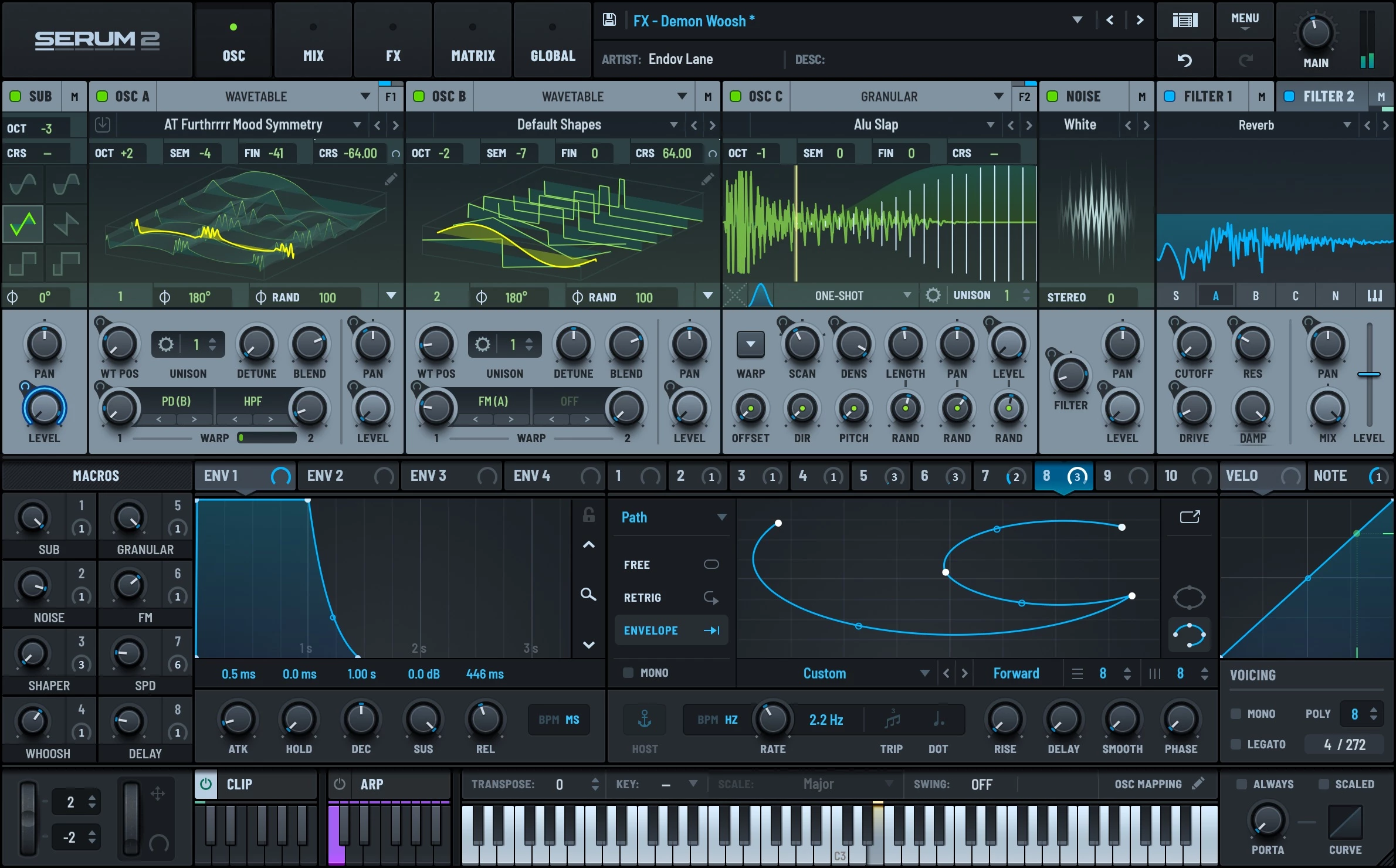
The primary problem this plugin solves is the traditional disconnect between complex synthesis parameters and the user interface. Historically, sound designers had to rely on abstract numerical menus and static knobs to shape audio, making it difficult to understand exactly how an envelope modified a filter or how a low-frequency oscillator changed pitch over time. This application eliminates that guesswork by providing immediate, real-time visual feedback for nearly every parameter on the screen. When a user assigns an envelope to modulate a filter's cutoff frequency, an animated blue indicator physically moves around the knob, displaying the exact range and speed of the change. Similarly, the main oscillator displays render the waveform in two or three dimensions, allowing producers to literally see the harmonic structure shift as they manipulate the warp controls. This direct visual feedback loop makes the technical aspects of sound design far more accessible to beginners while providing veterans with the precise monitoring required for intricate sound architecture.
While many music production tools are experimenting with browser-based interfaces or lightweight mobile applications, advanced audio synthesis still demands dedicated local desktop processing. Generating multiple voices of polyphony, calculating real-time unison detuning across dozens of simultaneous waves, and running complex analog-modeled filter algorithms require significant central processing unit resources. Operating as a native desktop plugin ensures the software can directly access the computer's processor and memory architecture without the latency or compression bottlenecks inherent to web audio protocols. Furthermore, serious music production relies heavily on large libraries of external wavetables, noise samples, and custom preset files. A local Windows installation allows producers to organize gigabytes of custom audio files on fast internal solid-state drives, ensuring instant loading times during intensive studio sessions where network reliance would simply interrupt the creative workflow.
Key Features
- Advanced Wavetable Oscillators: The dual primary oscillators support up to 16 voices of unison each, with precise detune and blend controls. Users can apply various warp modes to the waveforms, including asymmetric bending, sync, windowed quantization, and frequency modulation, fundamentally altering the harmonic structure before the sound ever reaches the filter stage.
- Drag-and-Drop Modulation System: Producers can click and drag from any modulation source, such as an envelope or macro knob, directly onto a destination parameter. A dedicated matrix tab organizes all active routing assignments in a list format, allowing users to quickly adjust modulation depth, invert signals, or assign auxiliary sources like the mod wheel to scale the effect.
- Custom LFO Shape Drawing: The low-frequency oscillator modules provide a grid where users can draw custom modulation shapes. By holding modifier keys, users can snap points to the grid, create curved tension lines, or build stepped sequences, effectively turning the LFO into a customizable rhythmic gate or arpeggiator without requiring external sequencer plugins.
- Extensive Filter Types: The central filter module goes beyond standard lowpass and highpass designs by offering dozens of variations, including comb filters, phasers, flangers, and specialized morphing models. The input routing toggles allow users to send Oscillator A, Oscillator B, the noise generator, and the sub-oscillator through the filter independently or bypass it entirely.
- Built-in Effects Rack: The plugin features a dedicated tab housing ten modular effect units, including spatial tools like the Hyper/Dimension expander and a multiband compressor modeled after classic upward/downward compression techniques. Users can reorder the processing chain by simply dragging the modules up or down in the rack interface to experiment with different signal flows.
- Dedicated Wavetable Editor: Clicking the pencil icon on an oscillator opens a deep editing environment where users can draw single-cycle waveforms manually or generate shapes using mathematical formulas. The editor also permits importing standard audio files, which the engine can intelligently slice into individual frames and crossfade to create entirely new morphing wavetables from existing samples.
How to Install Xfer Records Serum on Windows
- Download the Windows installer executable from your official account dashboard or via the Splice desktop client if utilizing the rent-to-own subscription plan.
- Close your primary digital audio workstation software to prevent file lock errors during the plugin placement process.
- Launch the downloaded setup application, accept the license agreement, and proceed past the initial welcome screens.
- Select the specific plugin formats you require for your system, typically choosing the standard VST3 path (usually located in the C:Program FilesCommon FilesVST3 directory) and the AAX format if you intend to use Pro Tools.
- Choose a destination drive for the core presets folder, which contains gigabytes of essential factory wavetables, noises, and envelope shapes. Keeping this folder on a fast internal solid-state drive is recommended for optimal loading speeds.
- Complete the setup wizard, exit the installer, and open your host music production software.
- Open your plugin manager settings to rescan your directories, instantiate the newly found instrument on a MIDI track, and enter your vendor registration credentials when prompted on the first launch.
Xfer Records Serum Free vs. Paid
There is no fully free tier or permanent freeware version of this synthesizer. The standard perpetual license requires a flat, one-time payment of $189 directly through the developer's website. Purchasing the perpetual license grants the user unrestricted access to the software, the factory library, and historical software updates without any mandatory recurring fees or hidden export limitations.
For producers who prefer a lower barrier to entry, a rent-to-own model is available exclusively through the Splice platform. This option costs $9.99 per month and automatically applies each payment toward the total retail price. Once the user pays the full $189 balance, they receive a permanent authorization token and own the software outright. If a user pauses their monthly payment during the rent-to-own period, the plugin simply stops emitting audio in the host software until the subscription is resumed.
A restricted trial version is available for those who want to test system compatibility and workflow before spending money. The demo functions identically to the paid software but contains a strict time limit, typically silencing the output after roughly 20 minutes of active use. Furthermore, the trial disables the ability to save custom presets or retain settings within a saved digital audio workstation project file, meaning users must bounce their audio to disk immediately if they wish to keep the sounds they generate during the trial period.
Xfer Records Serum vs. Native Instruments Massive vs. Arturia Pigments
Native Instruments Massive defined the earlier era of electronic bass design with its foundational wavetable approach, straightforward routing matrix, and intuitive macro control system. Users might choose Massive for its lower overall CPU consumption on older Windows hardware, or when working within older project files and tutorial templates that specifically rely on its distinct, slightly grittier wavetable scanning. However, its largely static interface lacks the modern visual feedback, custom wavetable importing capabilities, and extreme high-frequency clarity that newer digital instruments provide.
Arturia Pigments offers a wider variety of distinct synthesis engines, including dedicated granular manipulation, harmonic additive engines, and utility layers, all wrapped in an intensely colorful interface. It typically appeals to cinematic composers and ambient sound designers who want a blend of analog-modeled filters, deep random modulation sources, and complex, multi-layered polyrhythmic sequencing capabilities out of the box. The trade-off is that the CPU load can become quite heavy when combining complex granular processing with high-voice-count unison, and the interface can feel denser when performing basic tasks.
Producers generally find Xfer Records Serum to be the more direct option when they require exact control over custom waveform creation and prefer a surgical, highly visual interface with zero hidden parameters. Its straightforward drag-and-drop workflow, ultra-clean oscillator engine, and highly specific built-in effects rack make it a specialized tool for aggressive electronic genres where precise envelope shaping, strict phase alignment, and uncompromised sound quality dictate the final mix.
Common Issues and Fixes
- Preset folder not found error. This warning appears when the core library directory is moved to an external drive or a different folder after the initial installation. To resolve this, locate the configuration text file in your Windows AppData directory and manually update the file path to point to the new drive location, or simply click the prompt within the plugin interface to manually browse for the correct folder.
- Audio dropouts and high CPU load. Playing complex chords with high unison counts quickly taxes the computer processor and causes clicking noises. Fix this by lowering the unison voice count on the oscillators, reducing the global polyphony setting in the bottom right corner of the interface, or lowering the rendering quality setting in the Global tab during the arrangement phase.
- Missing wavetable warnings on shared projects. When sharing project files with collaborators, custom audio imported into the oscillators does not automatically embed inside the preset file by default. You must explicitly export the specific wavetable from the editor menu and share it alongside the project, or bounce the MIDI track to standard audio before sending the session to another computer.
- Rent-to-own background verification failure. The plugin occasionally prompts for a registration code despite having an active monthly subscription, usually due to a background process network timeout. To fix this, close the digital audio workstation entirely, restart the Splice desktop client, verify your internet connection, and log out and back in to force the client to refresh your token before reopening the host software.
Version 2.0.23 — 2025
- Added new Multi-sample, Granular, and Spectral oscillator engines to significantly expand sound design capabilities.
- Introduced a comprehensive Mixer tab featuring dedicated channel strips and flexible routing to three independent FX chains.
- Added a fully-featured Arpeggiator and Clip Sequencer with support for up to 12 programmable patterns.
- Included new "Path", "Lorenz", "Rossler", and "Sample & Hold" LFO modes for more complex modulation shapes.
- Added support for mono tracks when using the Serum FX AU plugin variant.
- Improved the Spectral "Pitch Shift" warp mode quality and renamed the previous algorithm to "Pitch Blend".
- Improved interface workflow with a new shortcut (Alt/Option + F) to toggle an expanded view for the Matrix and FX sections.
- Fixed a crash occurring in the preset browser during manual rescans or after saving a preset.
- Fixed stability issues when importing wavetables with extremely high sample-per-frame counts.
- Fixed an issue where drag-and-drop preset loading failed for files with lowercase extensions.
- Fixed incorrect automation data recall in Logic Pro for sessions saved with previous versions.