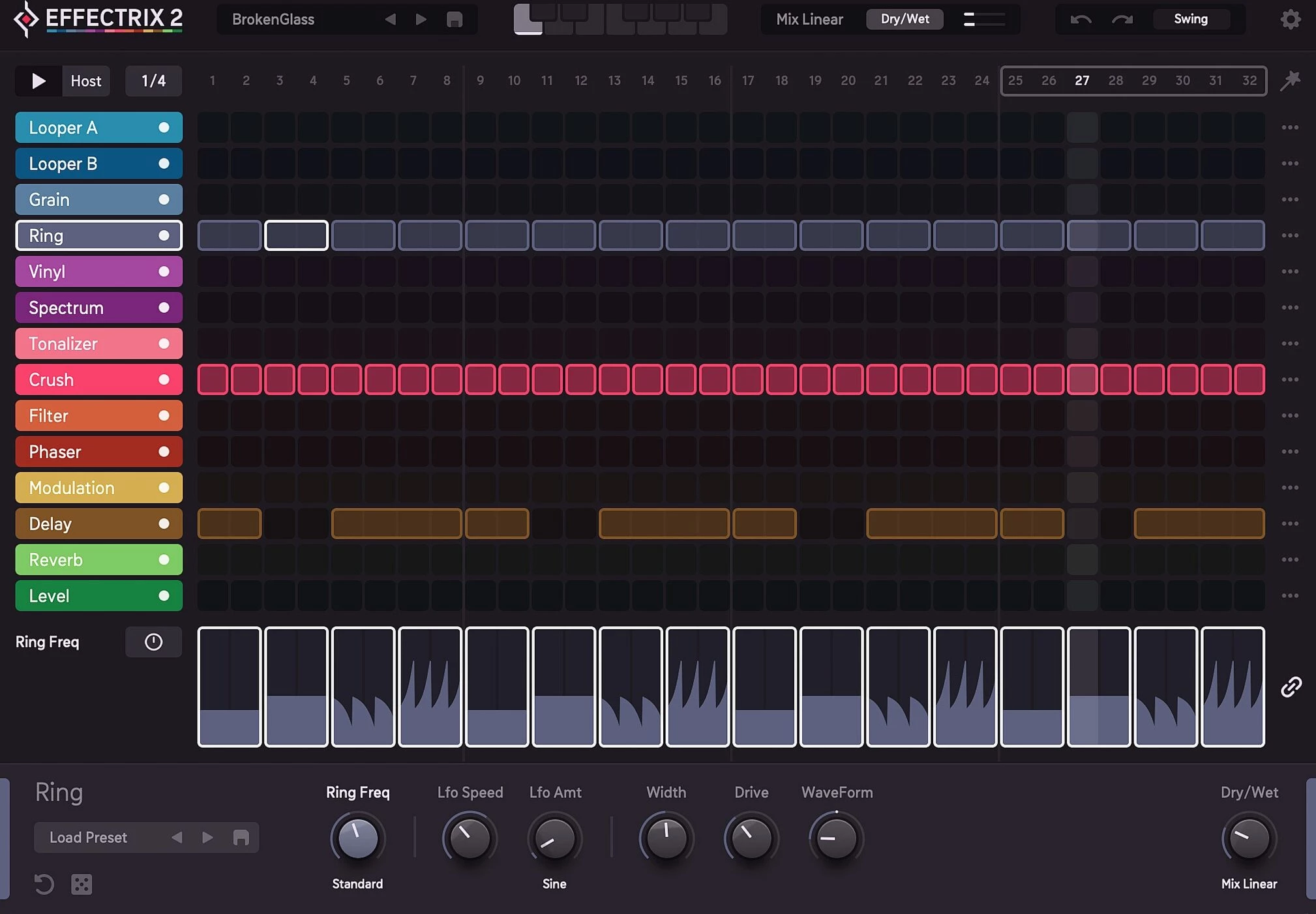
Sugar Bytes Effectrix is a desktop multi-effect sequencer built to transform static audio tracks into rhythmic and glitch-oriented soundscapes. Unlike standard audio processors that apply a constant filter, delay, or reverb over an entire track, this software allows producers to trigger specific digital effects only at exact moments within a loop. By painting colored blocks across a customizable 32-step grid, beatmakers and sound designers can take a standard drum break or a basic synthesizer chord progression and chop it into a complex, stuttering arrangement. The grid acts as a timeline synchronized to the host digital audio workstation, reading the tempo and playback position to guarantee that every tape stop, vinyl scratch, or reverse playback triggers with exact timing.
This tool is targeted at producers working in electronic music, trap, hip-hop, and IDM, where aggressive sound manipulation and micro-editing define the aesthetic. Rather than spending hours manually slicing audio regions, copying snippets, and drawing tedious automation curves to create a beat repeat, a user can simply draw a sequence of blocks to achieve the exact same result. The interface places 14 distinct effects along the vertical axis, allowing for dense audio layering. You can trigger a high-pass filter on the first beat, a bit-crusher on the second, and a reversing looper on the third, completely altering the groove of the original source material. Each block acts as a temporary gate, ensuring that the processing only occurs exactly where intended.
Running this multi-effect environment as a local desktop plugin is necessary for professional music production. Browser-based sequencers cannot handle the computational demands of running 14 simultaneous high-quality digital signal processing algorithms in real time. By installing the software natively on a Windows 10 or Windows 11 workstation, producers gain access to zero-latency performance, direct MIDI hardware routing, and the ability to render audio locally without cloud dependencies. The standalone desktop format ensures that heavy projects containing multiple instances of the sequencer do not suffer from audio dropouts, allowing producers to construct elaborate arrangements with complete stability.
Key Features
- Feature Name: 32-Step Effect Sequencer. The core interface revolves around a 32-step grid where users paint colored blocks to trigger processing exactly where needed. This sequencer locks to the host tempo of your digital audio workstation, featuring adjustable swing parameters and dynamic length controls. By constraining effects to a rigid or grooving grid, you eliminate the messy timing issues associated with manual automation drawing.
- Feature Name: 14 High-Quality Audio Effects. The software includes processing modules such as X-Loop, Vinyl Scratch, Reverse, Tonal Delay, Stutter, Crush, and Phaser. These 14 effects are stacked vertically on the left side, allowing users to layer multiple algorithms on a single step for extreme audio destruction. Dedicated parameter controls for each active effect are located at the bottom of the interface, providing quick access to decay times, filter resonance, and pitch shifting.
- Feature Name: MIDI Note Triggering. Producers can assign up to 12 different effect grid setups to individual MIDI keys across an external keyboard. This allows users to trigger entirely different rhythmic processing chains live during a performance, switching from a basic drum filter to a chaotic stutter fill instantly. Recording these MIDI inputs directly into the piano roll of the host application makes arranging complex track variations remarkably fast.
- Feature Name: Advanced Modulation Tracks. Instead of relying on static effect settings, the software utilizes dedicated modulation lanes to draw parameter changes over the duration of a pattern. You can draw a ramp to shift a filter cutoff from open to closed, or increase a reverb decay smoothly across the sequence. This step-based modulation prevents the audio from feeling rigid, injecting organic movement into digital stutters.
- Feature Name: Dynamic Looping Engines. Manipulate playback in real time with the advanced Looper A and Looper B modules, which allow you to define repeat patterns, gradually shift loop pitch, or change the loop slice size on the fly. These modules are explicitly designed to build custom drum fills and vocal chops without requiring the producer to bounce audio to a sampler. You can apply swing directly to the loop module to ensure the generated stutters match the groove of your percussion.
- Feature Name: Intelligent Randomization. When experiencing producer block or seeking happy accidents, users can apply three different intensity levels of randomization to the grid. You can randomize the entire pattern layout, shuffle a single effect track, or randomize the parameter dials at the bottom of the screen. This allows the software to generate unexpected audio variations, morphing a boring synth pad into an unpredictable rhythmic sequence.
How to Install Sugar Bytes Effectrix on Windows
- Download the official Windows installer package from the vendor website, ensuring you retrieve the latest executable setup file.
- Run the downloaded executable to launch the installation wizard, review the end-user license agreement, and accept the terms for local installation.
- Select the destination folders for the standalone application and the required plugin formats, noting your primary VST directory paths.
- Choose whether to install the AAX plugin format, which is required only if you use Pro Tools as your primary digital audio workstation on Windows 10 or Windows 11.
- Proceed with the installation process until the wizard completes transferring the files, then close the installer and launch your preferred digital audio workstation.
- Open your application's plugin manager or preferences menu and trigger a full plugin rescan to force the software to recognize the newly installed effect modules.
- Open a new or existing session, load an audio track, and select the plugin from your effect insert drop-down menu to open the interface.
- On the initial launch, locate the registration prompt within the plugin settings, enter your purchased license code, and authorize the software for unrestricted offline use.
Sugar Bytes Effectrix Free vs. Paid
Sugar Bytes Effectrix operates under a straightforward commercial pricing model, offering a single paid perpetual license alongside a free 30-day demo version. The trial period is specifically provided to allow music producers and sound designers to test the sequencer within their own hardware and software environments. During this evaluation phase, users can access the full graphical interface, test all 14 effect modules, and explore the extensive factory preset library to see how the software manipulates their specific audio material. However, this demo version enforces strict functional limitations to prevent commercial rendering, typically interrupting audio playback with periodic silence, preventing the saving of custom grid patterns, or disabling offline audio bouncing until a license is secured.
To unlock the software for unrestricted production, customers must purchase the standard paid license, which currently retails for $129 USD. This flat-rate purchase grants a perpetual license for the Windows application and all associated VST and AAX plugin formats, entirely avoiding mandatory monthly subscription models. The price reflects the engineering required to synchronize 14 distinct digital signal processors into a single, cohesive, zero-latency environment.
Once a user purchases the software and registers their unique authorization code within the plugin interface, all trial limitations are lifted. This authorization allows for full offline functionality without requiring constant internet verification. Producers gain the ability to save custom multi-effect patterns, utilize full MIDI routing for live performances, and render out complex audio stems without fear of random volume dropouts ruining the export.
Sugar Bytes Effectrix vs. Illformed Glitch vs. Cableguys ShaperBox
Illformed Glitch is a direct competitor that also utilizes a multi-lane step sequencer to trigger stutters, tape stops, and aggressive digital destruction. Priced lower than the Sugar Bytes offering, it is an attractive entry point for producers on a strict budget who want to experiment with classic IDM sound manipulation. However, its user interface feels older and less intuitive to navigate, lacking the deep, per-step parameter modulation drawing that allows for smoother transitions between chaotic effects.
Cableguys ShaperBox takes a different approach to audio manipulation by focusing on continuous, drawable LFO shapes rather than a hard-step sequencer grid. It allows producers to draw precise volume, panning, time-shifting, and filter curves over an audio signal, making it excellent for sidechaining, volume ducking, and fluid kinetic movement. While ShaperBox excels at envelope shaping and is a staple in modern electronic mixing, it does not function like a traditional multi-effects sequencer where chaotic effect blocks are triggered instantly by live MIDI notes.
Sugar Bytes Effectrix remains the superior choice for producers who want to "play" their effects like a live instrument rather than meticulously drawing mix envelopes. Its ability to store 12 different effect layouts and trigger them instantly via a standard MIDI keyboard gives it a strong workflow advantage for live beat juggling and rapid arrangement building. If you need smooth, graphical LFO ducking for mixing purposes, choose ShaperBox; if you want raw beat slicing and hands-on rhythmic control triggered by MIDI, choose the Sugar Bytes sequencer.
Common Issues and Fixes
- Problem description. Delay compensation sync issues during playback. When loading the sequencer after heavy latency-inducing processors on the same track, the grid may fall out of time with the host tempo. To fix this, adjust your workstation's automatic delay compensation (ADC) settings, or place the sequencer earlier in the signal chain before any lookahead limiters.
- Problem description. No audio output or frozen grid playback. The plugin might produce absolute silence if the global mix settings are incorrectly mapped or if the software remains locked in an unauthorized state. Check the global Mix knob located in the bottom corner of the interface to ensure it is passing signal, and verify your license code is actively registered in the settings menu to remove trial silence restrictions.
- Problem description. Cannot trigger sequences in standard audio editors. Certain audio editors lack the necessary MIDI track routing capabilities to send trigger notes directly to the plugin, preventing pattern switching. If your host application lacks MIDI routing, switch the plugin interface to PLAY mode and use standard host automation lanes to draw in Start and Mode parameter changes instead of relying on piano roll keys.
- Problem description. Missing plugin files after installation. Occasionally, the digital audio workstation will fail to list the sequencer in the effects menu after a successful installation. To fix this, open your host application's plugin manager, verify that the custom folder path you selected during the Windows installation is explicitly listed in the search directories, and execute a full rescan of all installed plugins.
Version Latest — 2025
Based on the latest updates, **Sugar Bytes Effectrix** has evolved into **Effectrix 2**, a major overhaul of the classic effect sequencer. The most recent maintenance updates (v2.0.x) have focused on stability and DAW-specific fixes following the major v2 release.
Version Latest — 2025
- Revamped Effect Sequencer: Introduced a completely redesigned engine with 14 top-quality effects, including new Spectral Delay, Ring Modulator, and granular capabilities.
- Dynamic Signal Flow: Added the ability to drag and drop effects to reorder the signal chain per pattern, allowing for complex custom routing.
- Enhanced Modulation: Implemented a new per-step modulation system, allowing every parameter to be controlled via LFOs, envelope followers, or step-sequenced automation.
- Intelligent Randomization: Added a "Brain" randomization feature with three intensity levels to instantly generate unique effect sequences and modulation curves.
- Looper Upgrades: Expanded looping capabilities with two distinct Loopers (A & B) featuring pitch shifting, reverse, and "endless" sustain modes.
- Stability Improvements: Fixed specific issues with project recall in Bitwig Studio and resolved a bug affecting playback in FL Studio.
- Workflow Fixes: addressed behavior regarding the Undo/Redo history and corrected minor graphical glitches in the new high-resolution interface.