dBpoweramp Music Converter is a specialized audio digitization and transcoding desktop application built for audiophiles, archivists, and audio professionals who demand exact control over format conversion and physical media extraction. While standard media players handle casual audio playback, this dedicated tool provides hardware-level control over optical drives and executes encoding operations in parallel. This specific architecture allows users to process massive music libraries without compromising audio fidelity or corrupting metadata tags. Users rely on it to bridge the gap between legacy physical CD collections and modern digital playback environments, such as network-attached storage devices and automotive infotainment systems.
The desktop-bound nature of this application is essential for practical audio engineering workflows. Cloud-based or browser-only converters simply cannot handle the volume and file size of lossless audio libraries. Uploading hundreds of uncompressed WAV files to a web server for transcoding would take hours and consume enormous bandwidth. Instead, dBpoweramp operates directly inside the Windows environment, processing gigabytes of FLAC, ALAC, or MP3 data entirely on the local storage drive. This offline processing ensures that users maintain exact control over target bitrates, codec parameters, and digital signal processing effects.
Beyond format shifting, the application is chosen for its aggressive focus on workflow speed and exact data verification. The software natively hooks into the Windows operating system, allowing users to trigger batch operations directly from their file manager. By utilizing an extensive database of global optical drive profiles and crowdsourced track signatures, it turns the traditionally frustrating process of rescuing audio from scratched discs and correctly naming obscure tracks into a predictable daily routine.
Key Features
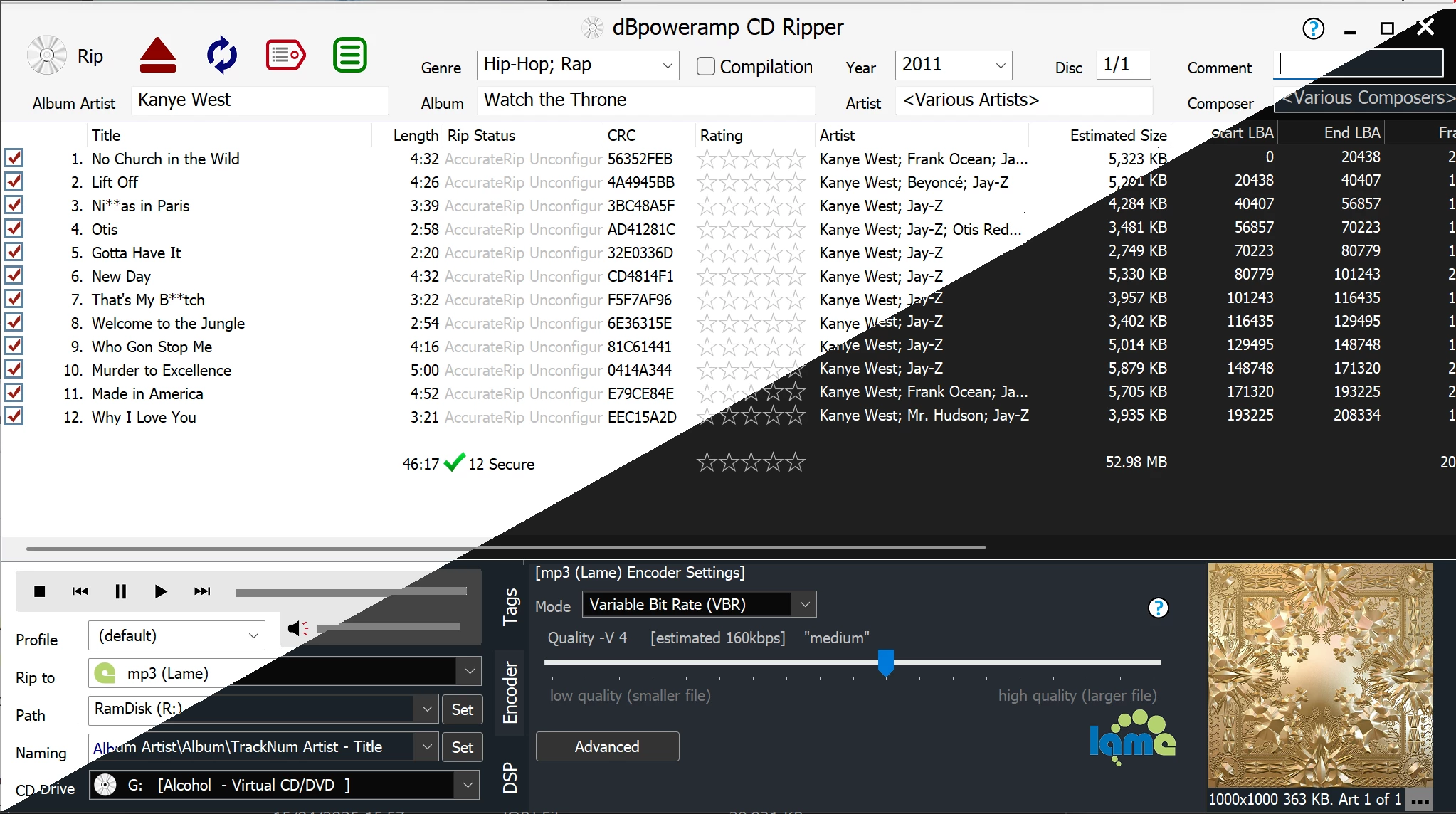
- AccurateRip Verification: This protocol compares the checksum of your locally extracted CD data against a crowdsourced database of rips performed by other users worldwide. If your optical drive encounters a read error, the software alerts you that the resulting file differs from the known secure copy, preventing silent audio glitches from entering your archive.
- Windows Explorer Context Integration: The application binds directly to the operating system shell, adding a dedicated "Convert To" action inside the standard right-click menu. It also introduces dynamic popup information tips, allowing you to hover your mouse over any supported audio file to instantly reveal its sample rate, bit depth, codec history, and exact duration.
- PerfectMeta Data Aggregation: During the extraction or tagging process, the software queries five independent internet metadata providers simultaneously, cross-referencing track titles, release dates, and artist information. This multi-source checking drastically reduces typographical errors and ensures that obscure releases receive correct high-resolution album art before the files are written to disk.
- Simultaneous Multi-Encoder Profiles: You can configure the application to generate two or more distinct file formats from a single source pass. For example, a user can digitize a physical disc and instruct the software to encode a pristine FLAC copy for a home theater network and a compressed AAC copy optimized for a mobile device.
- Parallel Multi-Core Processing: The conversion engine automatically detects the hardware architecture of your processor and distributes individual tracks across all available logical cores. When executing a batch conversion of thousands of files, this parallel processing architecture ensures that the hardware operates at maximum capacity, significantly reducing overall job times.
- Advanced DSP Effects Pipeline: Users can insert a chain of real-time digital signal processing actions into the conversion workflow. This includes applying EBU R128 volume normalization to balance out disparate track volumes, deleting silence from the start and end of tracks, or utilizing the ARDFTSRC algorithm to execute complex sample rate conversions.
How to Install dBpoweramp Music Converter on Windows
- Download the official Windows installer executable directly from the developer's website to ensure you receive the unaltered application package.
- Locate the downloaded executable in your local downloads directory and double-click it to launch the setup routine, accepting the standard Windows User Account Control prompt.
- Review the end-user licensing agreement on the first screen of the wizard and proceed to the destination folder selection, which defaults to the standard Program Files directory.
- Select your preferred installation components on the custom setup screen, paying special attention to keep the Windows Explorer integration checked, as this enables the software's crucial right-click functionality.
- Complete the installation wizard and allow the program to launch its initial configuration interface, which will verify your available system CPU cores and initialize the local codec library.
- Insert a popular, mass-produced commercial audio CD from a major pressing plant into your optical drive to trigger the AccurateRip calibration process, which calculates your specific hardware's read offset value.
- Open the dBpoweramp Control Center from the Start menu to verify that your preferred audio codecs, such as FLAC and MP3, are properly registered and to configure your default output directory.
dBpoweramp Music Converter Free vs. Paid
dBpoweramp Music Converter operates under a commercial licensing model, designed around a fully functional evaluation period rather than a permanently restricted free tier. When users first install the application, it initiates a 21-day trial that unlocks every advanced capability without applying any artificial limitations. During this evaluation window, users have unrestricted access to the multi-core encoding engine, the PerfectMeta data aggregation services, the AccurateRip verification network, and the complete library of DSP effects. This approach allows audio professionals and archivists to test the software's throughput on massive, real-world local directories before making a financial commitment.
Once the 21-day trial period concludes, the software requires the purchase of a commercial license to continue functioning for format conversion and extraction tasks. The developer, illustrate, sells the software as a perpetual license. Users pay a one-time, upfront fee for the current major software package and are not forced into a recurring monthly or annual subscription. Buyers can choose between a single-PC license for individual workstations or a multi-device Family Pack intended for households running several desktop machines. The perpetual license grants access to the specific edition purchased, along with any minor updates that resolve bugs or update codec security.
Because the application relies entirely on direct software sales, it avoids the monetization traps common in freeware utilities. The installation package is guaranteed to be clean, meaning it never installs browser toolbars, hidden adware, or background telemetry trackers. Users do not have to worry about watermarks on their audio files, hidden export limits, or artificial throttling of processor speeds. If a user eventually decides to move to a future major update years down the line, the developer typically offers a discounted upgrade path, though remaining on the purchased software is fully supported.
dBpoweramp Music Converter vs. Exact Audio Copy vs. Foobar2000
Exact Audio Copy (EAC) is a specialized, freeware extraction utility favored by strict archival purists for its aggressive error correction routines on damaged physical media. While EAC is completely free and capable of rescuing audio from heavily scratched discs, its initial configuration curve is steep. Users must manually test gap detection methods, calculate C2 pointer accuracy, and independently download and link command-line encoder binaries like LAME or FLAC. This makes EAC a technical tool that requires significant patience to set up properly before the first successful extraction.
Foobar2000 functions primarily as a lightweight, modular audio playback engine that happens to include built-in format conversion and basic extraction tools. Because it requires very few system resources and is completely free, it attracts users who want a unified library manager and playback environment in one interface. However, out of the box, Foobar2000 lacks native deep metadata aggregation and requires users to manually install third-party plugins to match the functionality of dedicated rippers. Furthermore, it operates entirely within its own application window and does not extend into the Windows shell with native right-click integration.
dBpoweramp Music Converter proves to be the better fit for users who prioritize rapid workflow efficiency, out-of-the-box readiness, and deep operating system integration over acquiring a completely free tool. Its native presence in the Windows Explorer context menu, built-in parallel multi-core processing, and simultaneous multi-format output capabilities make it superior for processing massive batch conversions. It eliminates the lengthy setup rituals required by Exact Audio Copy and bypasses the manual plugin management needed for Foobar2000, delivering a professional-grade extraction pipeline the moment it is installed.
Common Issues and Fixes
- USB optical drive power failure during extraction. When using an external CD or DVD drive, the extraction process may abort, or the application may generate an "incomplete read" error log for the final tracks. Fix this by plugging the drive directly into a high-powered USB port on the motherboard's rear panel rather than an unpowered hub, or by attaching an external power supply.
- Incorrect multi-disc album tagging. The PerfectMeta database occasionally struggles with multi-disc box sets, erroneously tagging the first disc as a standalone "1/1" release instead of "1/3", which causes the resulting files to split into incorrect local folders. Fix this by reviewing the metadata interface before clicking the rip button and manually editing the disc number field to accurately reflect the box set structure.
- AccurateRip configuration stalling on obscure media. The application may refuse to verify your extraction against the database if your specific optical drive offset has not yet been calibrated. Fix this by inserting a popular, mass-produced commercial CD from a major label into the drive, which will prompt the software to automatically calculate and store your correct hardware read offset.
- Missing right-click context menus after OS updates. Following a major Windows operating system update, the essential "Convert To" context menu option may disappear from the Windows shell. Fix this by opening the dBpoweramp Control Center from your Start menu, navigating to the advanced settings, and toggling the Windows Integration shell extension off and then back on to force the registry keys to rebuild.
- DSP effects causing audio clipping. When applying multiple digital signal processing effects in a single batch run, the output files may exhibit harsh audio clipping or distortion if the volume normalization is applied incorrectly. Fix this by accessing the DSP effects chain interface and ensuring that operations like sample rate conversion or equalization are placed before volume normalization in the execution order.
Version Latest — 2025
- Introduced ARDFTSRC, a new high-precision sample rate converter capable of handling arbitrary sample rates with superior quality.
- Added a new option to display conversion results directly through Windows Notifications.
- Enhanced the LAME MP3 encoder configuration to allow the selection of older encoder versions.
- Improved file naming functionality with color-coded syntax elements and a new [origext] token for source extensions.
- Updated CD Ripper with a context menu option to swap Artist and Title fields for compilation tracks.
- Fixed stability issues within the ARDFTSRC resampler and resolved bugs related to Apple AAC metadata branding.
- Resolved an issue where CD Ripper would attempt to read metadata even when the option was disabled.