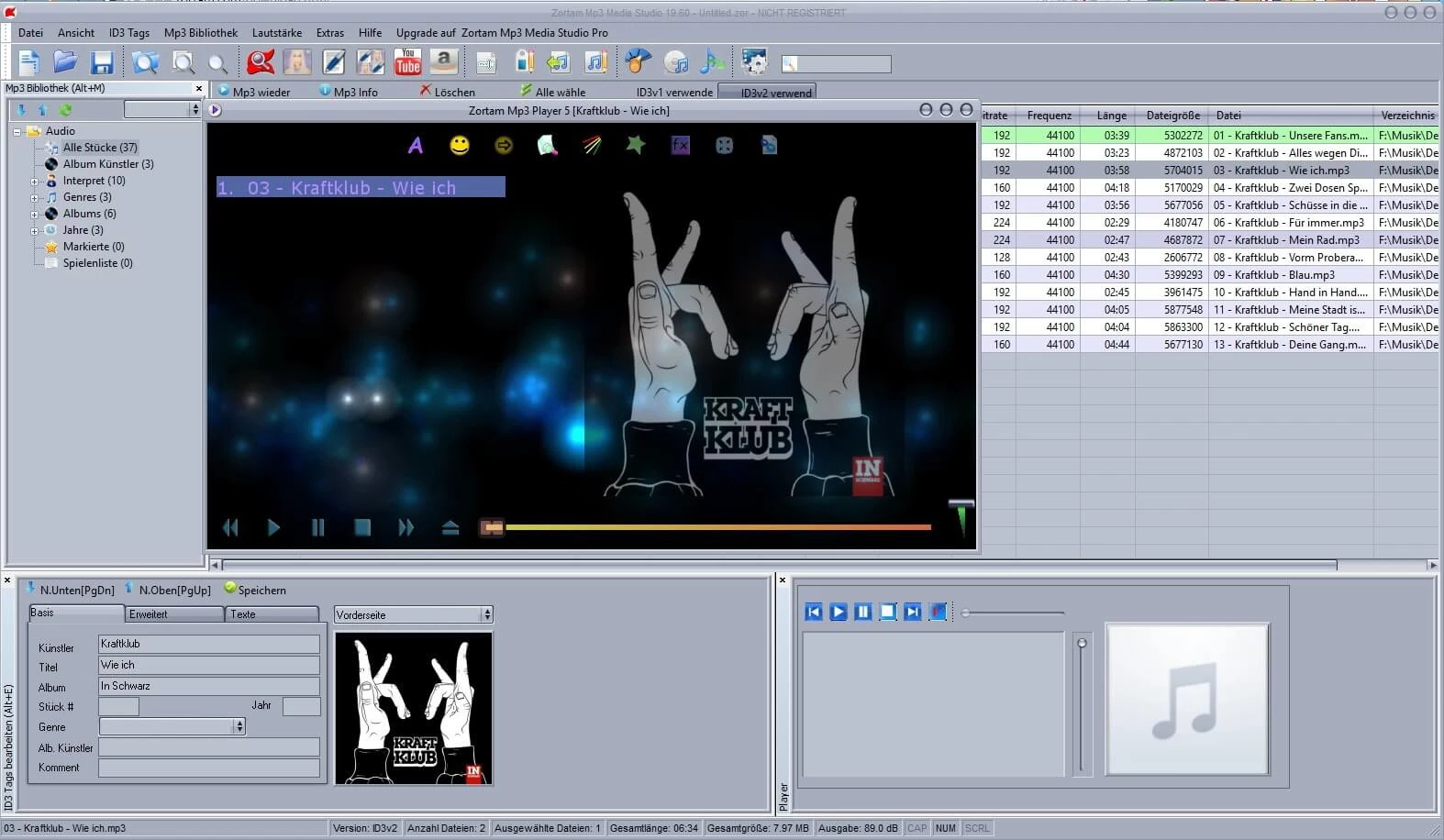
Zortam Mp3 Media Studio Pro is a dedicated audio management suite designed to organize, edit, and standardize large local music libraries. For users holding thousands of digital audio files—such as DJs, radio broadcasters, and digital music collectors—maintaining accurate metadata and consistent audio quality is a difficult manual task. This application solves the problem of messy digital folders filled with "Unknown Artist" labels, missing album artwork, and erratic volume levels. Instead of relying on basic media players that only offer simple track renaming, this utility applies acoustic fingerprinting to identify songs automatically and writes the correct ID3 tags directly into the file headers.
Choosing a desktop application for audio library management is highly practical compared to browser-based utilities or lightweight media players. Web tools cannot securely access, process, or save changes to 50,000 local audio tracks in bulk due to browser security restrictions and upload bandwidth limits. Furthermore, managing metadata requires direct read and write access to the local hard drive to ensure that ID3v1 and ID3v2 tags are permanently embedded in the files. By processing the audio collection locally, users maintain strict control over their directory structures and can execute heavy operations—such as calculating the Beats Per Minute (BPM) or normalizing decibel levels—without relying on an active internet connection for the heavy lifting.
The software targets a very specific workflow. When a user imports a chaotic folder of ripped CDs and downloaded tracks, the application scans the acoustic properties of the audio. It queries an online database to pull the exact track names, release details, high-resolution cover art, and synchronized lyrics. Because it handles batch operations, a user can highlight an entire discography, click a single menu command, and watch the software populate the missing data for hundreds of tracks simultaneously. This eliminates the tedious process of right-clicking individual files in Windows Explorer to edit properties one by one.
Key Features
- Auto Tagging and Audio Fingerprinting: The software scans individual tracks and compares their acoustic profiles against the Zortam Music Internet Database to automatically fill missing ID3v1 and ID3v2 fields. This process identifies the correct artist, genre, year, and track number, overwriting placeholder text like "Track 01" with accurate metadata.
- Batch Cover Art and Lyric Finder: Users can highlight multiple folders at once and instruct the application to download high-resolution album artwork and lyrics in bulk. The software embeds these images and text blocks directly into the audio files, ensuring they display correctly when transferred to hardware media players or DJ mixing decks.
- MP3 Volume Normalizer: This utility scans the entire library and adjusts the playback volume of all files to a specific, custom decibel (dB) target. By standardizing the gain, it prevents the common problem of one track playing quietly while the next track plays aggressively loud, removing the need to manually adjust the volume knob during playback.
- BPM Analyzer: The application calculates the exact Beats Per Minute for each track and saves this numerical value directly to the file's ID3 tags. DJs and fitness instructors rely heavily on this metric to build tempo-matched playlists, ensuring smooth transitions between songs with similar rhythmic structures.
- Advanced CD Ripper: Users can insert physical audio CDs into their optical drives and convert the tracks directly into digital formats like MP3 or WAV. During the extraction process, the ripper communicates with online databases to fetch and embed all relevant album metadata, cover art, and track names before the file is even saved to the hard drive.
- Duplicate Track Finder: The built-in duplicate scanner searches the local storage drives using either the embedded ID3 tags or the raw file information to locate redundant audio files. Users can review the list of identical tracks and delete the duplicates to reclaim valuable hard drive space, keeping the library strictly organized.
- File Renaming via Metadata: Instead of manually typing new file names, users can apply custom formatting rules to rename actual files based on their corrected tags. For example, selecting the format "%artist% - %title%" will instruct the software to instantly rename the physical files on the hard drive to match the embedded metadata structure.
How to Install Zortam Mp3 Media Studio Pro on Windows
- Download the installer archive from our website to your local storage drive, ensuring you save it to a location you can easily access.
- Extract the downloaded ZIP or RAR archive using native Windows Explorer extraction or a dedicated archiving tool to reveal the setup contents.
- Open the newly extracted folder and read the readme.txt file to check for any specific pre-installation instructions or required system dependencies.
- Run the main executable setup file from the extracted folder to launch the installation wizard and accept the end-user license agreement.
- Select your preferred installation directory, keeping the default C:Program Files path unless your specific workflow requires storing applications on a secondary local drive.
- Follow the prompts to generate desktop and start menu shortcuts, then complete the setup process without interrupting the file copying sequence.
- Launch the application from the desktop shortcut; upon the first run, the interface will prompt you to designate a target folder to scan and build your initial music library.
Zortam Mp3 Media Studio Pro Free vs. Paid
Zortam provides its audio management utility in two distinct tiers: a standard free edition and a premium Pro tier. The free edition delivers fundamental tagging capabilities, manual metadata editing, and basic audio playback. This entry-level option is highly suitable for casual users who maintain small digital collections and only need to correct a handful of mislabeled tracks or embed a few missing album covers. The free version does restrict the automated bulk-processing modules, meaning users must handle large libraries with more manual input.
The Pro version unlocks the heavy automation intended for large-scale media management. Paid users gain unrestricted access to batch processing for cover art and lyrics, the custom decibel volume normalizer, and the bulk BPM analyzer. The developer utilizes a lifetime license model for the Pro tier. Rather than charging a recurring monthly subscription, the company requires a one-time payment—often priced around $24.95, though promotional discounts frequently reduce this cost. This single purchase grants the user indefinite access to the software along with future updates.
Transitioning from the free tier to the Pro tier does not require downloading a separate application. Upgrading is handled entirely within the existing interface. Users simply purchase a license, navigate to the buy menu within the application, and enter their registration code. This instantly unlocks the premium modules and removes any batch-processing limitations, allowing immediate access to the advanced normalization and acoustic fingerprinting tools.
Zortam Mp3 Media Studio Pro vs. Mp3tag vs. MusicBrainz Picard
Mp3tag is a highly respected, lightweight metadata editor that excels at manual tagging and complex custom scripting. Users who demand strict control over every single character in their ID3 tags, or those who rely heavily on custom regular expression formatting to organize their files, usually prefer Mp3tag. However, Mp3tag focuses almost entirely on metadata text; it lacks built-in CD ripping capabilities, audio volume normalization, and native synchronized lyric fetching out of the box, requiring users to rely on external plugins or additional software for those tasks.
MusicBrainz Picard is an open-source tagger that relies heavily on acoustic fingerprinting matched against the massive, community-driven MusicBrainz database. It is highly accurate for identifying obscure albums, classical music, and multi-disc box sets. While Picard is excellent for strict, album-oriented sorting, its highly technical interface can be intimidating for average users. Furthermore, Picard strictly handles metadata and folder organization; it does not include extra audio utilities like a YouTube-to-MP3 converter, a BPM analyzer, or an integrated audio normalizer.
Zortam Mp3 Media Studio Pro is the better fit for users who want an all-in-one media management suite rather than just a strict tagging utility. If your workflow requires standardizing audio volume levels for a playlist, calculating BPM for DJ mixing, automatically fetching synchronized lyrics, and ripping physical CDs from a single unified interface, Zortam provides a much broader toolset. It reduces the friction of managing a library by eliminating the need to install and juggle multiple separate audio programs to achieve a finished, performance-ready music collection.
Common Issues and Fixes
- Library scan freezes on massive collections. When attempting to load tens of thousands of audio files simultaneously, the initial directory scan may appear to hang or stop responding. To fix this, break the initial import into smaller, manageable batches by selecting specific parent folders rather than scanning the entire root drive at once.
- Incorrect album art or metadata is applied automatically. The acoustic fingerprinting algorithm may occasionally mismatch a live recording, an acoustic cover, or a club remix with the original studio track. You can fix this by right-clicking the affected audio file, opening the manual tag editor, and pasting the correct database ID or fetching the data via a manual text search for the specific release.
- Volume normalization causes clipping or distortion. If the target decibel level is set too high in the normalizer module, tracks can experience audio clipping during playback. Re-run the MP3 Volume Normalizer on the affected tracks and lower the custom volume threshold to a safer baseline, such as 89 dB or 92 dB, to restore clear audio dynamics.
- Portable version attempts to install to the local drive. The portable installer sometimes defaults to standard Windows directories instead of the target USB flash drive. During the initial setup, you must manually click the browse button and change the destination path directly to your external drive letter to ensure the application remains strictly portable and does not write registry keys to the host machine.
- Changes to ID3 tags do not appear in other media players. Sometimes, newly written tags are saved in the ID3v2.4 format, which older hardware players or specific software cannot read. To resolve this, open the tagging preferences in the application menu and force the software to write tags in the more widely compatible ID3v2.3 format, then re-save the affected files.
Version 33.60 — December 2025
- Introduced a new automatic search dialog to streamline the process of finding and applying metadata.
- Implemented a customizable layout option in the tag editor, allowing users to switch between vertical and horizontal views.
- Resolved a functional issue with the YouTube to MP3 Converter tool to ensure reliable downloads.
- Integrated playback controls directly into the system tray menu for quicker access to media management.