Auburn Sounds Graillon is a dedicated vocal pitch correction and live voice changing plugin built for music producers, sound designers, and live streamers. It operates directly inside a Digital Audio Workstation (DAW) to manipulate audio signals, correcting off-key singing or transforming a standard human voice into a synthesized, robotic lead. By processing audio locally on a desktop system, it bypasses the high latency and file size limits common in browser-based audio editors. Local processing allows users to track and hear vocal changes in real time, a necessity when recording vocalists who need to monitor their tuned voice during tracking.
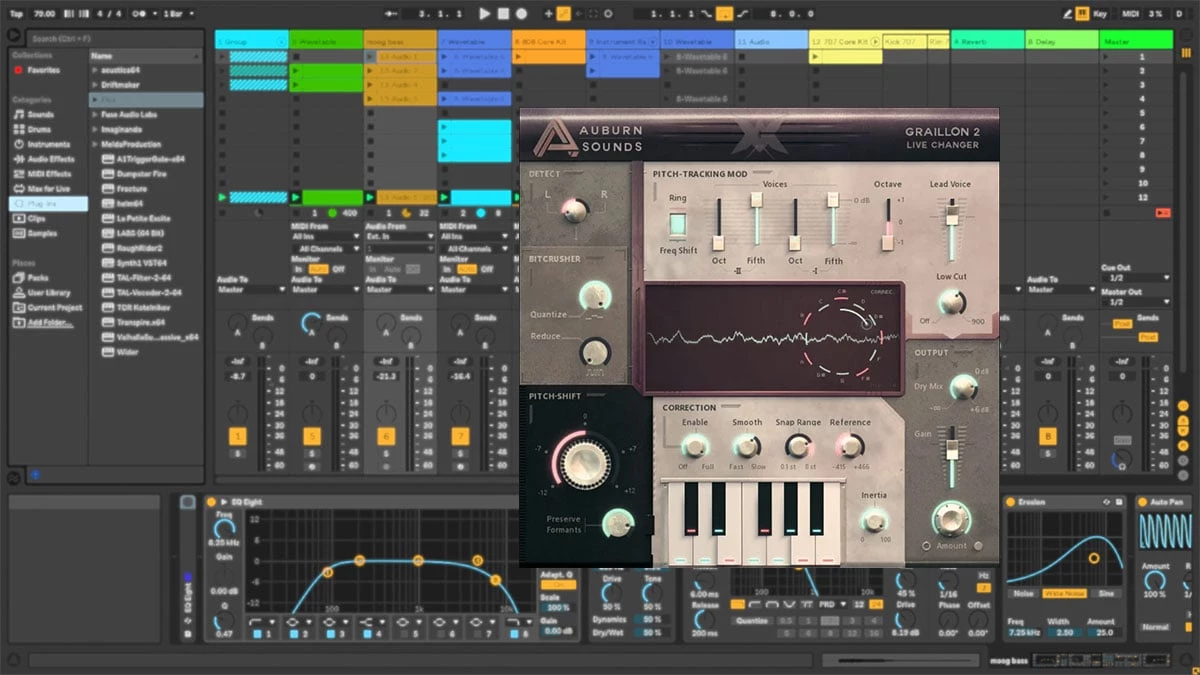
Instead of hiding controls behind complex sub-menus, the plugin relies on a single-window interface tailored for fast parameter adjustments. Producers use it to isolate lead vocals, correct pitch drift, shift formants to alter the perceived throat size of the singer, or apply extreme bitcrushing for lo-fi electronic textures. The layout presents a central waveform display showing the detected pitch, surrounded by dedicated knobs for shifting, correction, and effects. This visual feedback makes it obvious which notes are being triggered and how strongly the correction algorithm is applying its snap.
Its utility extends beyond standard studio recording. The low-latency engines make it highly functional for live performers and broadcasters who need reliable voice modulation without audio dropouts. Because it supports standard plugin formats, it drops easily into Windows tracking environments like FL Studio, Ableton Live, Reaper, and Pro Tools. Whether the goal is transparent pitch stabilization or heavy, synthesized vocal manipulation for electronic music, the tool provides a highly direct control set.
Key Features
- Three Distinct Pitch Engines: Users can switch between the G2, G3, and I1 processing algorithms to match their hardware limits. The G2 and G3 engines prioritize speed and extremely low CPU usage, making them ideal for dense mixes with dozens of audio channels. The I1 engine focuses on preserving bass frequencies for highly natural vocal adjustments but requires significantly more processing power.
- Pitch and Formant Shifting: The interface includes dedicated dials to shift the incoming pitch by up to 12 semitones up or down. A separate formant shift control alters the vocal character, allowing a vocal to sound deeper or higher without changing the actual musical note, preventing the unnatural chipmunk effect.
- Pitch-Tracking Modulation: This specific module uses the tracked pitch of the input signal to modulate the audio, generating gritty harmonic textures. It is frequently used by electronic producers to add harsh, synthetic content to lead vocals, creating robotic growls that standard distortion plugins cannot replicate.
- Integrated Vocal Effects Suite: The plugin contains a built-in compressor utilizing an optimized FET and Opto circuit design, a feedback-design gate, a preamp, chorus, and a bitcrusher. Consolidating these specific tools into one interface reduces the need to load multiple plugins on a single mixer channel.
- Note Snapping and Microtuning: Vocals can be locked to major, minor, or custom scales by clicking directly on the graphical on-screen keyboard. Advanced tuning parameters allow granular adjustments between -100 and +100 cents, enabling producers to write melodies in non-standard musical temperaments.
- Adjustable Correction Dynamics: The Smooth and Inertia controls dictate exactly how aggressively the pitch snaps to the target note. Lowering the Smooth value creates a strict tuning effect typical in modern pop, while increasing the Inertia dial prevents the correction engine from jumping wildly during natural vocal vibrato.
- Real-Time Visual Feedback: The center of the interface features a live scrolling display that visualizes the incoming audio waveform and the exact pitch being detected. This allows users to pinpoint problematic notes visually and verify that the algorithm is grabbing the intended fundamental frequency.
How to Install Auburn Sounds Graillon on Windows
- Download the installer archive directly from our website to your local storage drive.
- Extract the downloaded ZIP archive into a dedicated folder using standard Windows extraction tools.
- Open the extracted folder and read the included datasheet or text file for specific plugin directory requirements and DAW compatibility notes.
- Run the setup executable file to launch the Windows installation wizard. If your DAW is currently open, the installer will prompt you to close it to prevent file writing errors.
- Select your preferred plugin formats during the setup process, ensuring you pick the correct VST3 or AAX paths that match your DAW configuration. The default path for VST3 is typically C:Program FilesCommon FilesVST3.
- Complete the installation wizard and close the setup window.
- Launch your DAW and open your plugin manager to trigger a rescan, ensuring the software is correctly identified in your effects library.
- Drag and drop the newly scanned plugin onto an active audio track to begin processing; the tool functions immediately without requiring external account creation.
Auburn Sounds Graillon Free vs. Paid
Auburn Sounds Graillon operates on a direct freemium model, providing a highly functional base plugin at no cost, accompanied by an optional paid tier for advanced vocal modulation.
The Free Edition includes the core pitch correction engine, pitch-shifting, formant-shifting, and the complete built-in effects suite. Users can access the compressor, gate, preamp, chorus, and bitcrusher without encountering arbitrary time limits or audio watermarks. This tier handles standard vocal tuning and basic voice transformation tasks effectively, making it a permanent fixture for producers who simply need reliable, low-latency pitch snapping on their tracks.
The Full Edition typically retails for approximately $39, though introductory or seasonal pricing occasionally reduces this cost. Purchasing the Full Edition unlocks Pitch-Tracking Modulation, a built-in vocal doubler, and deep micro-tuning capabilities that allow precise note adjustments outside of standard equal temperament. The paid tier is specifically intended for sound designers and producers who require aggressive, experimental vocal textures.
Upgrading to the Full Edition is a simple license unlocking process that does not require installing a completely different piece of software. Users can start a project using the free tier and upgrade later without losing any of their existing mixer channel settings or saved automation data.
Auburn Sounds Graillon vs. Antares Auto-Tune vs. MeldaProduction MAutoPitch
Antares Auto-Tune is the long-established standard for commercial pop and hip-hop production, offering deep graphical pitch editing and highly precise vibrato control. It requires a significant financial investment, typically acquired through a recurring subscription bundle or a high upfront license cost. Auto-Tune is the necessary choice for major studio engineers who need surgical control over every syllable in a lead vocal track. However, its complex graphical interface and high price make it unnecessarily heavy for hobbyists or live streamers who only need immediate, functional pitch correction.
MeldaProduction MAutoPitch is a highly capable free alternative that provides depth, speed, and detune controls, along with basic formant shifting and stereo width processing. While it handles standard scale-snapping well and includes an automatic tuning section, its interface can feel highly analytical and visually cluttered. Furthermore, acquiring it requires downloading and installing a much larger bundle manager just to extract the single plugin. The workflow is functional for mixing engineers, but it lacks specialized texture generation.
Auburn Sounds Graillon is the better fit for producers and performers who want a fast, single-window interface with immediate visual feedback and zero installation friction. Its unique I1 pitch engine and Pitch-Tracking Modulation give it a distinct character that excels in electronic music and aggressive vocal mangling. By avoiding complex bundle installers and expensive recurring subscriptions, it provides a highly direct route to both transparent correction and extreme robotic effects. Users looking for quick workflow results and reliable low-latency live monitoring will find its straightforward knob layout much faster to operate.
Common Issues and Fixes
- Problem description. The plugin interface appears incorrectly scaled or too small to read on high-resolution monitors. Fix: Drag the bottom-right corner of the plugin window to manually resize the user interface. If the interface remains distorted in specific host programs, check your host's high-DPI scaling settings and disable DPI awareness for this specific plugin instance in the wrapper settings.
- Problem description. Audio playback has a noticeable delay or echo when tracking vocals live with the plugin active. Fix: This delay is caused by the hardware buffer size in your host application interacting with heavy processing algorithms. Lower the buffer size to 128 or 64 samples during recording, and ensure you are using the G2 or G3 pitch engine, as the advanced I1 engine introduces internal latency.
- Problem description. The pitch correction sounds too artificial and robotic when trying to achieve a natural, transparent vocal mix. Fix: Increase the Smooth parameter to slow down the transition speed between recognized notes. Additionally, turn up the Inertia dial to prevent the pitch tracker from reacting rapidly to minor micro-fluctuations and breath noises in the raw vocal take.
- Problem description. The software does not appear in the effects library after a successful Windows installation. Fix: Verify that the VST3 file was installed into the correct default Windows directory, typically located at C:Program FilesCommon FilesVST3. Force your host application to perform a full rescan of the plugin database, ensuring it checks that exact folder path.
- Problem description. MIDI input routing fails to control the target pitch, leaving the vocals snapping to the wrong key. Fix: Ensure that MIDI input is actually enabled within the plugin's top menu bar. Check your DAW routing to confirm that a separate MIDI track is actively sending note data directly to the audio channel where the plugin is hosted.
Version Latest — 2025
- Added support for the CLAP plugin format.
- Introduced three distinct pitch engines (G2, G3, and I1) offering different tonal characteristics and processing speeds.
- Implemented a new preset browser system for faster sound selection.
- Added a suite of new vocal-tuned effects including Compressor, Gate, Preamp, and Chorus.
- Improved user interface performance, specifically regarding resizing responsiveness and opening times.
- Added native formant shifting capabilities for altering vocal timbre.
- Fixed graphical interface scaling issues in hosts like Cubase, OBS, and Digital Performer.
- Fixed a crash occurring in Studio One on macOS during window resizing.