Arturia Analog Lab functions as a centralized command center for vintage analog synthesis, classic keyboards, and modern digital sound design. Designed for producers, composers, and performing keyboardists, it provides immediate access to thousands of highly sought-after tones without the friction of managing dozens of separate instrument plugins. Rather than forcing users to open a standalone Minimoog emulation just to find a bassline, and then open a separate Yamaha CS-80 emulation for a brass preset, this software consolidates the audio engines from the expansive V Collection into one unified playing environment. This workflow completely shifts the focus from deep, menu-diving sound design to immediate musical composition.
The software is specifically engineered to solve the concrete job of finding the right sound quickly. Users can search through an enormous factory library using a smart-filter browser, sorting by instrument category, musical genre, specific sound designer, or audio characteristic. Because the underlying synthesizer engines run natively under the hood, the presets sound identical to the dedicated standalone plugins, complete with accurate analog circuitry modeling and vintage effects. The desktop application integrates closely with MIDI controllers, offering pre-mapped macro controls that allow for tactile manipulation of cutoff frequencies, resonance, and envelope shapes right out of the box.
Choosing this application over a generic synthesizer plugin makes sense for musicians who prioritize workflow speed and authentic retro character. While heavy workstation environments often require complex routing and extensive disk space for sample libraries, this tool relies largely on algorithmic analog modeling, which keeps the installation relatively lightweight while maintaining pristine audio quality. Whether you are running it as a VST inside a Digital Audio Workstation on Windows 10 or Windows 11 for studio production, or using the standalone desktop app for a live stage performance, it delivers a focused, highly polished toolkit that bridges the gap between classic hardware history and modern software convenience.
Key Features
- Centralized Preset Browser: The intelligent browsing system allows producers to filter sounds by type, genre, instrument, and sound designer. This eliminates the tedious process of auditioning presets across multiple separate synthesizer windows, keeping the creative momentum flowing during a studio session. Producers can quickly tag favorites and build a reliable library of go-to sounds.
- Studio View Multi-Editing: This mode enables users to combine two distinct presets into a single split or layered multi-instrument preset across the keyboard. Producers can then apply dedicated effects such as chorus, delay, or reverb to the combined signal chain, creating complex textures from simple building blocks. The mixer interface provides clear visual feedback for balancing the two layers.
- Stage View for Live Performance: Designed specifically for gigging musicians, this high-contrast interface organizes setlists and songs into an easy-to-read format. Performers can assign specific presets to MIDI program changes, ensuring reliable, immediate sound switching under stage lighting without touching the computer mouse. It provides a secure, distraction-free environment for live shows.
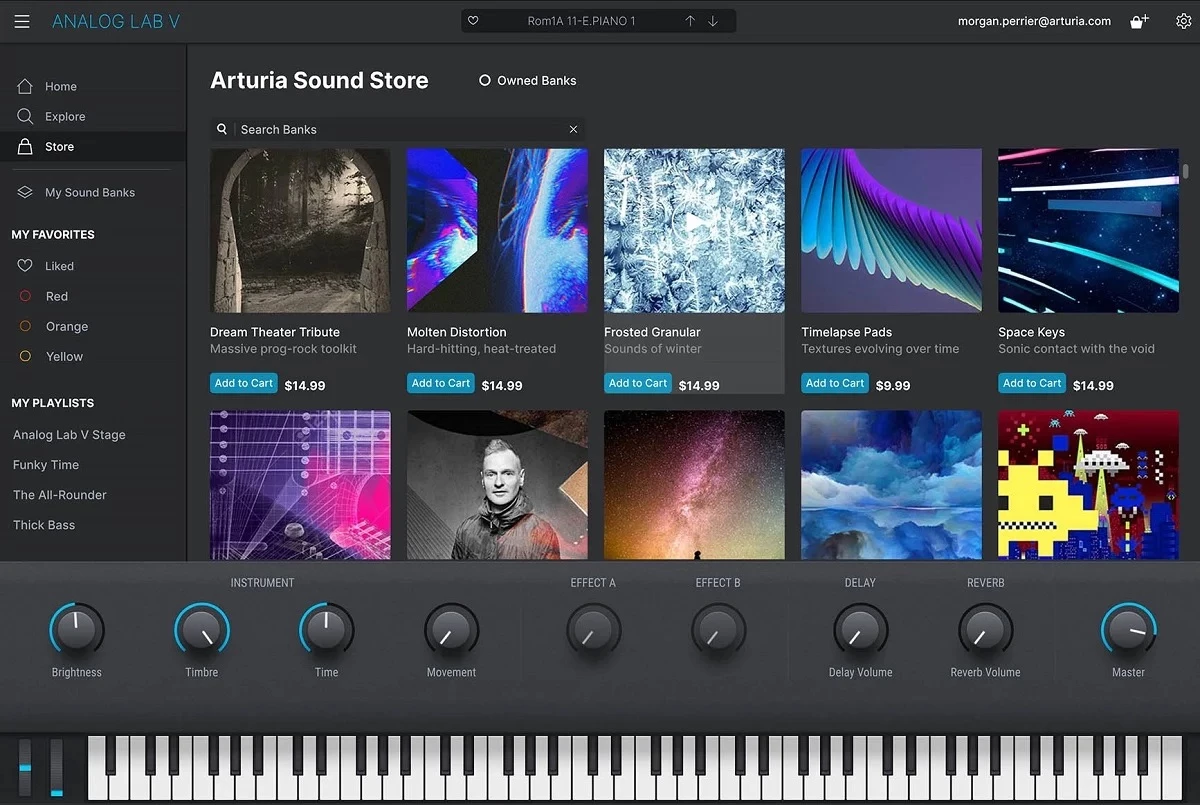
- Hardware Macro Mapping: The interface condenses complex synthesizer architecture into four primary macro knobs (brightness, timbre, time, and movement) alongside dedicated effect controls. These map instantly to Arturia hardware keyboards and can be quickly assigned to third-party MIDI controllers via the built-in MIDI learn function. This tactile approach makes tweaking sounds intuitive rather than overly technical.
- Integrated Sound Store: Users have direct access to a constantly updated marketplace of preset expansions right inside the application. The store allows producers to audition new sound banks and sequence patterns before committing to acquiring them, ensuring the library can grow with changing project demands. It keeps the core software feeling fresh without requiring external web downloads.
- Authentic Circuit Modeling: Instead of relying entirely on static audio samples, the underlying engine utilizes proprietary True Analog Emulation to recreate the unpredictable nature of vintage hardware. This results in warm, organic tones where oscillators drift slightly and filters react dynamically to velocity and polyphony. It captures the essence of classic gear without the physical maintenance issues.
- Custom Playlist Creation: Users can curate their favorite presets into custom playlists, organizing sounds specifically for individual studio projects or live gigs. This feature saves immense time, as producers do not have to rely on memory or scattered session files to recall the exact organ or synth lead they used on a previous track.
How to Install Arturia Analog Lab on Windows
- Download the Arturia Software Center installer package directly from the official vendor website, ensuring you have a stable internet connection.
- Run the downloaded executable file to launch the Windows setup wizard, review the installation options, and follow the on-screen prompts to install the manager to your primary system drive.
- Launch the newly installed Arturia Software Center from your Start menu, wait for it to initialize, and log in using your registered user account credentials.
- Navigate to the "My Products" tab within the dashboard, which acts as a central hub to view all the software licenses tied to your account.
- Click the "Activate" button next to the application name to authorize the software license on your current Windows machine, keeping in mind that the license allows for up to five simultaneous computer activations.
- Click the "Install" button to initiate the download of the core application, the necessary audio engines, and the substantial factory preset library directly to your local storage.
- Once the automated installation completes, open your preferred Digital Audio Workstation and trigger a plugin rescan, or launch the standalone application directly from the Windows desktop to begin playing.
Arturia Analog Lab Free vs. Paid
Arturia structures the software into distinct tiers to accommodate everyone from curious beginners to touring professionals. The entry-level tier, known as the Play edition, is available at no cost and serves as a highly capable introduction to the ecosystem. It includes a curated library of 100 essential presets and basic macro controls. While this tier provides the exact same high-quality audio engine as the premium editions, it restricts deep preset editing and lacks the split or layered multi-instrument capabilities found in the higher tiers. The business model relies on users enjoying the free sounds enough to eventually purchase expansions or upgrade.
The mid-tier Intro edition expands the factory sound library to 500 presets and unlocks more advanced preset browsing capabilities. This tier is frequently bundled at no extra cost with Arturia hardware controllers, such as the MiniLab or KeyLab series, giving hardware owners an immediate jumpstart on music production. It allows for more nuanced control over effects and introduces users to the broader architecture of the software without requiring a standalone software purchase.
For professional producers and sound designers, the full Pro edition requires a paid perpetual license, typically priced around $199, and provides over 2,000 factory presets, complete multi-instrument editing, and the dedicated Stage View for live performances. It is important to note that while the Pro tier offers immense control, absolute access to every single underlying synthesizer parameter—such as complex modulation matrices or raw oscillator tweaking—requires owning the full V Collection suite. The Pro tier acts as a bridge, granting deep panel access only for the specific instrument emulations that the user has already acquired full licenses for.
Arturia Analog Lab vs. Omnisphere vs. Komplete Kontrol
Omnisphere by Spectrasonics is a heavyweight flagship synthesizer renowned for its enormous sample library, cinematic textures, and extraordinarily deep granular synthesis engine. While Omnisphere excels at building entirely new, otherworldly sounds from scratch or manipulating custom imported audio, it requires a massive hard drive footprint and represents a significantly higher upfront financial investment. It is the better choice for film composers, experimental sound designers, and producers who demand limitless internal modulation and are willing to spend hours meticulously crafting entirely unique sonic landscapes.
Komplete Kontrol by Native Instruments serves as a unifying browser and hardware wrapper for the entire Native Instruments ecosystem and compatible third-party plugins. It relies heavily on Kontakt-based sample libraries and complex synthesis engines like Massive and Reaktor. Komplete Kontrol is ideal for producers who already own Native Instruments bundles and want tight integration with Maschine or Kontrol hardware. It is particularly strong for those who need a wide variety of acoustic instruments, orchestral scoring tools, and modern beat-making kits alongside electronic synthesizers.
Arturia Analog Lab is the superior fit for producers who specifically want the authentic, warm sound of vintage analog synthesizers, classic electric pianos, and retro organs without the overwhelming complexity of deep sound design. It is highly focused on immediate playability, offering a lighter interface and an outstanding array of retro-inspired tones. If your primary goal is to quickly dial in a classic Jupiter pad, a Minimoog bass, or an old-school Mellotron without getting bogged down in modulation matrices or sample library management, this software provides the fastest and most inspiring workflow of the three.
Common Issues and Fixes
- Unexpected CPU spikes and audio dropouts occur during playback. Heavy multi-layered presets, especially those utilizing polyphonic analog modeling, can severely strain your system processor. Fix this by increasing the audio buffer size in your DAW or audio interface settings, and click the gear icon in the plugin interface to enable the Multicore processing option to distribute the load across your processor cores.
- Presets fail to load or sound completely silent. This usually happens if the underlying instrument engines are out of sync or missing from the disk. Fix this by opening the Arturia Software Center, verifying that all related plugins are fully updated, and rescanning the library to ensure the main application can locate the required engine files.
- The standalone application crashes immediately on launch. A corrupted preference file or an outdated Windows graphics driver is often the root cause of startup crashes. Fix this by updating your display drivers, or right-click the Arturia Software Center and select the run as administrator option to safely reinstall the core software without permission errors.
- Hardware controller knobs do not respond to macros. If the macro mapping suddenly breaks during a session, the software may have defaulted back to a generic MIDI layout. Fix this by opening the MIDI settings tab in the lower panel and ensuring your specific controller model is actively selected in the device dropdown menu.
- High latency occurs when playing MIDI notes. A noticeable delay between pressing a key and hearing the sound can ruin a performance and make recording impossible. Fix this by opening your Windows audio settings or DAW preferences and switching your audio driver from the default Windows audio to a dedicated ASIO driver, then lowering the buffer size to 256 or 128 samples.
Version 5.12.2.6463 — December 2025
- Added full compatibility for Pigments 7, allowing seamless use of its latest presets and features.
- Introduced visual feedback for modulation ranges on target parameters within Quick Edit V3 instruments.
- Implemented automatic audio device switching to verify and match the current operating system settings.
- Enabled direct audio previews for individual soundbanks within the in-app Store.
- Improved functionality and mapping behavior for generic 9-knob MIDI controllers.
- Fixed a specific crash occurring in Logic Pro when performing undo/redo actions on tracks with AstroLab connected.
- Refined the onboarding process to provide a smoother introduction for new users.