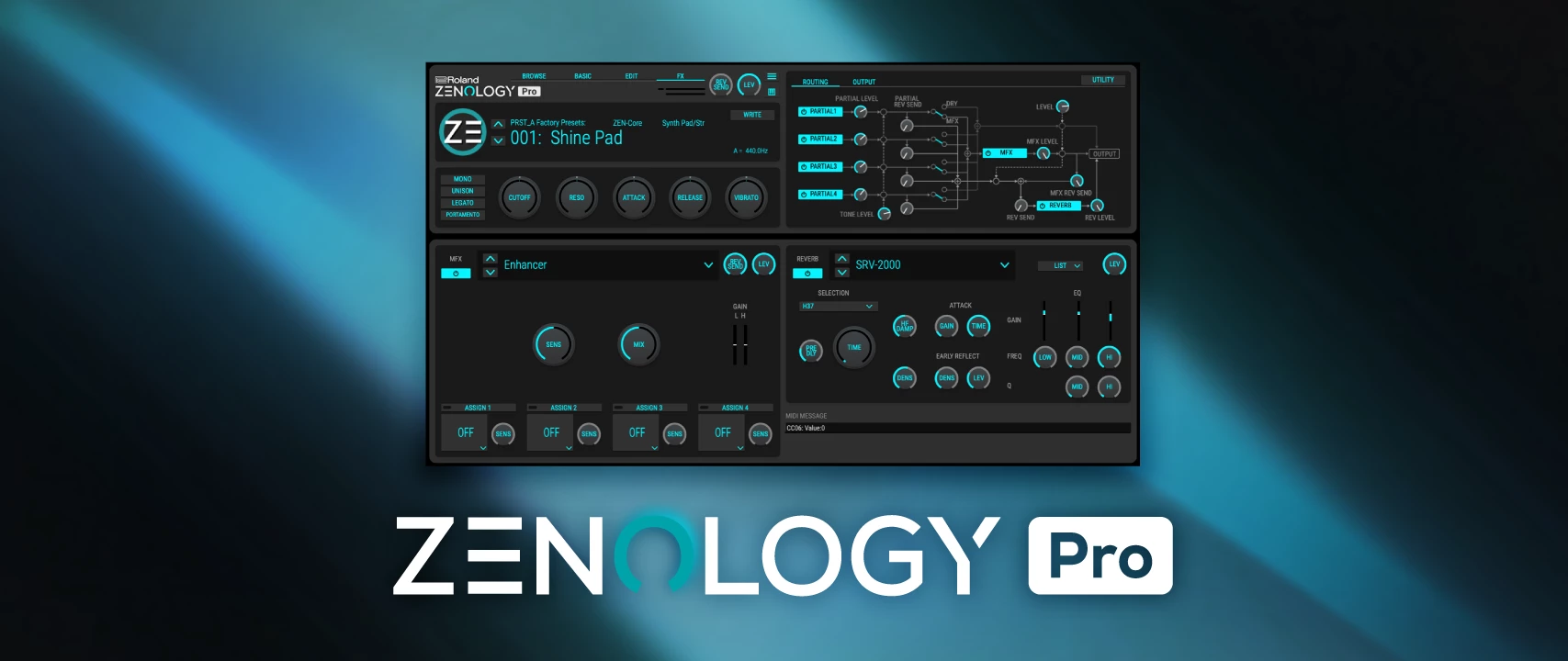
Roland ZENOLOGY Pro operates as a deep virtual instrument environment that drops the company's entire ZEN-Core Synthesis System directly into modern digital audio workstations. Instead of relying on generic digital oscillators, music producers and sound designers use this software to access the exact architectures that drive flagship physical synthesizers like the FANTOM and JUPITER-X. By keeping the processing local on a Windows desktop computer, producers can stack complex polyphonic layers, heavily modulate filters, and run dozens of high-quality effects simultaneously without the latency limitations of browser-based sketchpads or lightweight groove apps.
The software specifically addresses the practical job of bridging historic analog character with modern digital flexibility. When a composer needs a thick, brassy pad for a synthwave track or a sharp, aggressive bass for modern trap production, they can pull from over four thousand factory tones or build sounds from scratch. Because the desktop application supports Model Expansions, users are not just getting rough approximations of vintage gear; they load component-level digital replicas of hardware like the JUNO-106 or SH-101. This allows a producer to maintain a clean, purely digital workflow while achieving the dense, analog-style warmth that typically requires expensive studio equipment and messy cable routing.
Utilizing a dedicated Windows VST3 application matters deeply for heavy project loads. Generic category tools often force users into a single type of synthesis, but this plugin combines virtual analog, advanced pulse-code modulation, and Supersaw generators within a single interface. Users choose it when they need a reliable, low-latency engine that integrates directly into their existing sequencer, retaining instant recall of all parameter states when opening an old project. This practical reliability, paired with a massive library of ready-to-play tones, makes it a foundational instrument for any serious desktop studio.
Key Features
- Four-Partial ZEN-Core Architecture: Every single tone inside the plugin can stack up to four independent synthesizer voices, known as partials. Each partial contains its own dedicated oscillator, filter, amplifier, dual low-frequency oscillators, and equalizer, allowing producers to blend a sampled acoustic attack with a sustained virtual-analog body. This structure means users can design highly complex, evolving textures that shift over time just by holding a single MIDI note.
- Authentic Model Expansions: The software hosts deep architectural replicas of legendary Roland synthesizers, completely transforming the visual interface and sonic behavior to match specific hardware. When loading a JUPITER-8 or JX-8P expansion, the graphical controls change to reflect the exact sliders and buttons of the original front panel. This gives users the precise filter curves and envelope responses of vintage gear without needing multiple separate plugins cluttering the digital audio workstation.
- Massive PCM Waveform Library: Beyond standard analog shapes like sine and square waves, the engine includes over 1,800 pulse-code modulation waveforms derived from historic synthesizer catalogs. Producers can use these digital samples to inject realistic bell, choir, or string transients into electronic tones. This extensive raw material collection eliminates the need to import external audio files just to add a quick organic layer to a synthetic bassline.
- Advanced Modulation and Step LFOs: Creating rhythmic, pulsing movements is handled by eleven different low-frequency oscillator shapes, including tempo-synchronized Step LFOs. Users can draw up to 37 distinct curves per step, mapping these custom rhythmic sequences to filter cutoff, pitch, or panning. This allows for intricate, techno-style rhythmic gating or slow, cinematic parameter sweeping without having to draw tedious automation lines in the host sequencer.
- Integrated Vintage Effects Suite: The plugin contains an internal effects rack featuring over 90 different processors, avoiding the CPU strain of loading external effects chains. Producers can route their sounds through modeled bucket-brigade delays, the iconic CE-1 chorus, or the SDD-320 Dimension D spatial widener directly inside the interface. Saving the tone stores the exact effects state, guaranteeing the sound remains identical regardless of which project file it is loaded into.
- Hardware Exchange Compatibility: Sounds designed within the desktop application can be exported and loaded directly into physical ZEN-Core hardware instruments. A producer can program a complex split-keyboard performance tone on their Windows computer, save the file to a USB drive, and load it into a stage keyboard for a live show. This exact parity ensures that the studio production tone sounds exactly the same through a concert venue PA system.
- Custom Bank and Tone Browser: Managing thousands of sounds requires heavy organization, which the plugin handles through a dedicated, searchable browser window. Users can filter by category, such as Plucked or Bowed, tag specific presets as favorites, and build custom folders for individual recording sessions. This prevents endless scrolling and allows a composer to instantly locate the specific aggressive lead or soft pad needed to finish a track.
How to Install Roland ZENOLOGY Pro on Windows
- Download the installer archive from our website and save it to a local drive on your computer.
- Extract the downloaded archive using a standard extraction tool to create a new folder containing the installation files.
- Open the included readme.txt file to review any specific pre-installation notes or folder path requirements.
- Run the setup executable file from the extracted folder to begin the installation process.
- Follow the on-screen prompts; the installer will automatically place the VST3 plugin files into the default Windows directory located at C:Program FilesCommon FilesVST3RolandZENOLOGY.
- Allow the installer to copy the core library components to your system drive, which may take a few moments depending on disk speed.
- Launch your digital audio workstation and force a plugin rescan so the host software recognizes the newly installed instrument.
- Open the plugin on a MIDI track; upon first launch, a prompt will appear requiring you to sign in with your account credentials to authenticate the local license and unlock the graphical interface.
Roland ZENOLOGY Pro Free vs. Paid
The entry point to the ZEN-Core ecosystem begins with a free tier, typically referred to as the Lite application, which becomes available when simply creating a user account. This unpaid software acts primarily as a sound player, granting access to a small, curated selection of preset tones without the deep editing capabilities required for building sounds from scratch. It is a highly restricted environment intended for absolute beginners who just need a few high-quality sounds without spending money. Producers using the free tier cannot access the four-partial architecture, meaning they cannot layer their own oscillators or adjust internal routing parameters.
Stepping up to the full Roland ZENOLOGY Pro experience requires either a subscription or a perpetual license purchase. The subscription model operates through the company's cloud platform, with the Pro tier priced at $99 annually, granting full synthesizer editing and regular sound pack updates. The Ultimate tier, priced at $199 annually, includes everything in the Pro tier plus unrestricted access to all legendary Model Expansions. For users who strictly refuse subscription models, the core plugin is available as a Lifetime Key purchase, often priced around $229 for the base synthesizer.
Purchasing a Lifetime Key means the software remains permanently active on the Windows machine without requiring monthly check-ins, though users still need to download the authorization manager initially. Specialized bundles, such as the Analog Icons collection, package the perpetual license for the main plugin alongside the JUPITER-8, JUNO-106, SH-101, and JX-8P expansions for a combined price of $499. This pricing flexibility allows a bedroom producer to rent access for a short project, while a professional studio can buy the exact tools they need outright to ensure long-term archive compatibility.
Roland ZENOLOGY Pro vs. Xfer Serum vs. Spectrasonics Omnisphere
Xfer Serum dominates the wavetable synthesizer market by focusing intensely on visual feedback and extreme waveform manipulation. Producers choose Serum when they want to draw their own LFO shapes with total visual clarity, import custom audio files to morph into 3D wavetables, or design highly aggressive, metallic bass sounds common in modern dubstep and neurofunk. While it is an absolute giant for clinical, visual sound design, Serum lacks the vast library of vintage analog filter models and multi-sampled acoustic PCM transients that come standard in hardware-derived workstations.
Spectrasonics Omnisphere is a massive, multi-gigabyte software instrument built around deep psychoacoustic sampling and an incredibly complex granular synthesis engine. A film composer scoring a cinematic project will often rely on Omnisphere for its bizarre, evolving textures, burning piano samples, and unconventional sound sources recorded in unique acoustic spaces. However, Omnisphere requires an enormous amount of hard drive space and heavy CPU resources, making it less ideal for producers who just need classic, mix-ready polyphonic synth stabs without bogging down their entire computer.
Roland ZENOLOGY Pro is the better fit when a producer needs the exact sonic thumbprint of historic electronic music hardware paired with a fast, CPU-efficient workflow. Instead of overwhelming the user with granular processing or purely clinical wavetable drawing, it provides the immediate gratification of authentic JUNO choruses, classic 808-style drum kits, and the specific filter bite of a SH-101. It is the superior choice for someone whose daily work involves pop, synthwave, techno, or trap production, where hardware accuracy, low latency, and a highly organized library of mix-ready tones are the highest priorities.
Common Issues and Fixes
- Plugin fails to appear in the digital audio workstation after installation. This usually happens because the host software is not scanning the correct default Windows directory. Open your sequencer's plugin preferences and verify that C:Program FilesCommon FilesVST3 is included in the scan path, then force a manual rescan of all audio units.
- The graphical user interface is too small to read on high-resolution displays. By default, the interface might load at a fixed physical size that looks tiny on 4K monitors. Click and drag the bottom right corner of the plugin window to resize the interface, or adjust the default scaling percentage in your host application's wrapper settings.
- Installation process stalls and cancels at exactly 100 percent. This error is tied to a broken cached file left over from a previous interrupted update attempt. Navigate to the hidden ProgramDataPackage Cache directory on your system drive, locate the specific product executable, uninstall the ghost file, and run the setup process again.
- Authorization fails and leaves the plugin locked in read-only mode. The background license manager requires an active internet connection to verify your account status during the initial launch. Check your Windows firewall settings and ensure that the authorization helper application is allowed to pass through and communicate with external servers.
- Saved project files reload with MIDI instruments pitched down two octaves. This is a documented interaction bug between certain host sequencers and the core audio engine when sample rates mismatch during the loading phase. To prevent data loss on critical tracks, bounce the affected MIDI regions to audio stems before closing the session, or manually check the master sample rate configuration.
Version Latest — 2025
- New Feature: Added the ability to set the Wave Generator LFO depth specifically to "octave" within the JD-800 model expansion.
- Improvement: Expanded the switch modes for Envelope 1 time keyfollow on the JUPITER-8 model for more precise sound design control.
- Performance: Optimized performance on Apple Silicon Macs to eliminate CPU spiking that occurred in certain usage scenarios.
- Fix: Resolved a crash that occurred when saving a project if a referenced ZENOLOGY Wave Expansion was missing.
- Fix: Corrected an issue where VST3 MIDI polyphonic aftertouch messages were being ignored by the plugin.
- Fix: Fixed a bug in Studio One where the plugin window could not be reopened after being closed.
- Fix: Addressed a visual glitch where the retrigger button polarity was displayed in reverse on the main window.
- Fix: Resolved various UI inconsistencies, including ADSR envelope indicators on JUPITER-8/JUNO-106/JX-8P/SH-101 models.