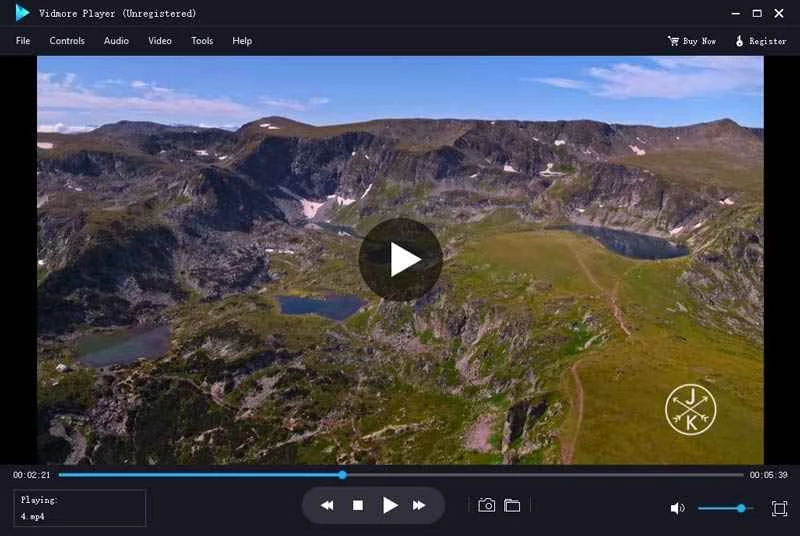
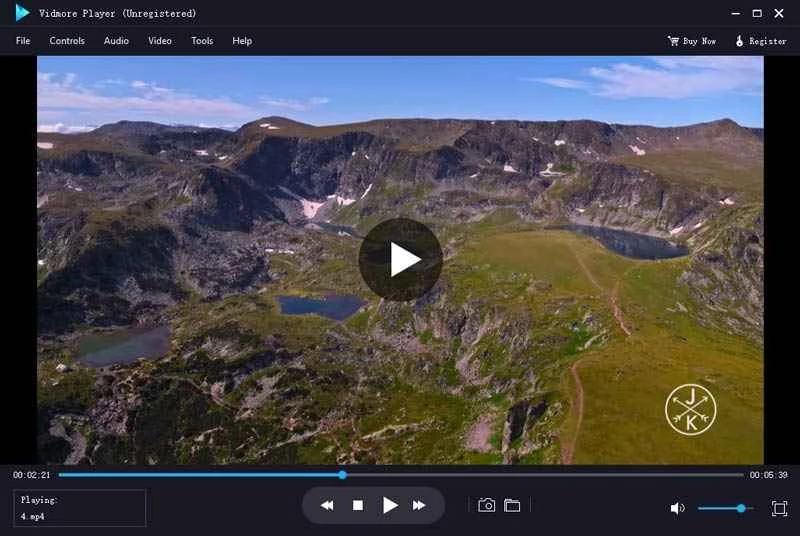
Vidmore Player serves as a dedicated media center for users who need to bridge the gap between physical disc collections and digital video files on modern Windows desktops. While standard video players handle common web formats without issue, they often struggle when confronted with the complex directory structures, encrypted files, and interactive menus found on optical media. This application specifically targets those optical formats, providing a reliable environment for playing Blu-ray discs, DVD folders, and ISO image files while keeping the original navigation menus fully intact.
For users managing localized media archives, home theater setups, or large collections of uncompressed video, relying on a browser-based tool or a lightweight media app is not enough. A dedicated desktop player is required to process high-bitrate video streams and specialized audio codecs without stuttering or dropping frames. Vidmore Player decodes 4K UHD files, 1080p high-definition videos, and lossless audio formats locally, ensuring that output quality remains identical to the original source material. Local processing prevents the compression artifacts that often plague cloud streaming services, ensuring you see the exact pixels stored on your drive.
Furthermore, playing specialized media files requires consistent synchronization between the audio and video streams. Many basic video players experience desync issues when reading heavy uncompressed files directly off an external disc drive. Vidmore Player mitigates this by buffering the data efficiently, ensuring that high-resolution visuals perfectly match the accompanying audio track. This level of playback stability is crucial when viewing intricately edited films or engaging with interactive educational discs where timing is critical.
Choosing this software over a generic category tool makes sense for users who still actively purchase or archive physical media. Instead of forcing users to rip discs or convert ISO files into compressed MP4s using secondary software, the media player reads the raw directory structures directly from the drive. This allows users to retain access to bonus features, alternate audio tracks, and original subtitle streams. It operates as a practical tool for video archivists, film students, and physical media enthusiasts who demand an authentic viewing experience on their computer monitors without spending hours converting files into web-friendly formats.
Key Features
- Optical Media Navigation: Vidmore Player reads the complex directory structures of Blu-ray and DVD discs to preserve the original viewing experience. When you load an ISO file or a physical disc, the software displays the original title menus, chapter selections, and bonus content screens, allowing you to navigate the disc exactly as you would on a standalone hardware player.
- Universal Video Decoding: Beyond physical media, the application processes a wide variety of standalone digital video files without requiring additional codec packs. It handles standard and high-definition formats including MP4, MKV, AVI, WMV, MPEG, M2TS, and VOB, smoothly playing back 4K UHD and 1080p files by utilizing available hardware acceleration.
- Advanced Audio Processing: The software passes through high-fidelity audio streams to your playback hardware to maintain cinematic sound quality. It includes built-in decoding support for complex audio technologies such as Dolby Digital, DTS, AAC, and TrueHD, allowing you to output accurate surround sound to a connected receiver or multi-channel speaker setup.
- Subtitle and Track Control: Users have complete control over the audio and text layers embedded in their media files. The interface allows you to switch between multiple audio channels—such as director commentaries or dubbed languages—and load external subtitle files, adjusting their synchronization if the text does not align perfectly with the dialogue.
- Visual Effect Adjustments: If a video appears too dark or the colors seem washed out, the software provides manual image correction tools. You can navigate to the video effects menu to fine-tune the hue, brightness, contrast, saturation, and gamma levels, correcting poorly mastered files in real-time without permanently altering the source document.
- Snapshot Capture: When you need to save a specific frame from a movie or a video file, the application offers a dedicated screenshot tool. By clicking the snapshot icon or pressing the designated shortcut key during playback, you can instantly grab a high-quality still image and save it directly to your local storage directory.
How to Install Vidmore Player on Windows
- Download the official Windows installer package from the vendor's website to ensure you receive the most recent, secure executable file for your system.
- Locate the downloaded setup executable in your default downloads folder and double-click it to launch the installation wizard.
- Review the end-user license agreement presented by the installer and accept the terms to proceed to the destination folder selection screen.
- Choose the installation directory on your primary Windows drive, or leave the default path provided by the installer, and click next to continue.
- Wait for the setup utility to extract the necessary application files, install the required playback codecs, and write the program shortcuts to your start menu.
- Click the finish button to exit the installer and launch the application for the first time.
- Connect your computer to the internet before your first playback session. According to official documentation, the software requires an active connection while loading a Blu-ray disc, DVD folder, or ISO file to parse the structure. After the initial loading sequence completes, the internet connection is not necessary for continuous playing.
Vidmore Player Free vs. Paid
Vidmore Player operates under a commercial licensing model, offering a free trial version for users to evaluate the software before committing to a purchase. The free trial is explicitly designed to test compatibility with your hardware, your external disc drives, and your specific media files. However, it applies restrictions to the playback experience, often limiting the duration you can watch a disc or inserting a watermark. This structure encourages users to upgrade to the full version for uninterrupted home theater viewing.
For users who require unrestricted access, the vendor provides multiple paid tiers depending on the desired commitment. The subscription model typically costs around $29.90 per month, which automatically renews unless canceled. This option is suitable for users who only need the software for a short-term project, such as reviewing a specific batch of archival discs or verifying the menu structure of a newly burned DVD.
Alternatively, users can purchase a perpetual lifetime license, which frequently retails between $39.95 and $49.50 depending on promotional discounts on the official store. The lifetime license removes all recurring billing and provides continuous access to the software, along with lifetime free updates. Keep in mind that a standard Windows license is strictly tied to the Windows ecosystem. If you attempt to use a Windows registration code on a different operating system, the activation will fail, requiring you to contact customer support for a platform transfer.
Beyond the initial license purchase, the vendor provides technical support to assist users with any playback errors or activation issues they encounter. Customers who opt for the perpetual license also benefit from regular maintenance updates without additional upgrade fees. This ensures that the application remains compatible with future Windows system updates and newly released video codecs. Before buying any license tier, users should thoroughly test their primary disc drives during the trial period to confirm that the hardware communicates correctly with the software.
Vidmore Player vs. VLC Media Player vs. CyberLink PowerDVD
VLC Media Player is a free, open-source application that handles almost every digital video format available and is frequently favored by users looking for a no-cost multimedia tool. However, because of strict licensing restrictions regarding commercial disc encryption, VLC cannot natively play protected Blu-ray discs without requiring the user to manually download and configure third-party decryption libraries. If you want a player that handles physical media right out of the box without manual configuration or command-line troubleshooting, VLC might require too much technical effort.
CyberLink PowerDVD is a heavyweight media center designed for premium home theater setups, offering deep integration with 8K displays, HDR hardware, and cloud media streaming. It contains numerous enhancement algorithms and heavy media organization tools, making it a massive application with a premium price tag. For users who only want to watch a physical disc without setting up a massive media library database or paying for cloud storage features they will not use, PowerDVD can feel bloated and overly complex for everyday desktop use.
Vidmore Player is the better fit when you need a middle ground between the heavy manual configuration of open-source tools and the heavy resource footprint of premium theater suites. It provides native, out-of-the-box support for encrypted optical discs and ISO files without requiring you to hunt for external codec packs, while keeping the interface focused strictly on playback rather than complex media library management.
Common Issues and Fixes
- Problem description: The software fails to load a Blu-ray disc or DVD folder. Ensure that your computer is actively connected to the internet when you first attempt to open the disc. The application requires a network connection to fetch the necessary parsing data and authenticate the disc structure; once the media is successfully loaded into the player, the internet connection is no longer needed for playback.
- Problem description: Registration fails with an invalid license code error. This typically happens due to typographical errors or a platform mismatch. Copy the registration key directly from your purchase email to avoid confusing the letter "O" with the number zero, and verify that you purchased the Windows version, as license codes for other operating systems will not activate the Windows software.
- Problem description: Error code 4001 appears during the activation process. This specific error code indicates that the registration key is locked or has exceeded its allowed number of computer activations. You must contact the official customer support team via email to have them manually reset your registration code for your current machine.
- Problem description: Video plays correctly but there is no sound output. Navigate to the audio track menu within the interface and verify that the correct audio stream is selected. If the file contains a high-definition audio track like TrueHD or DTS, ensure your Windows sound settings are configured to allow audio passthrough to your receiver, rather than attempting to force an unsupported format through standard stereo desktop speakers.
Version 1.1.80 — October 2025
- Improved overall application stability and playback performance.
- Fixed an issue where the player failed to automatically start video playback when opening a file via the right-click context menu.