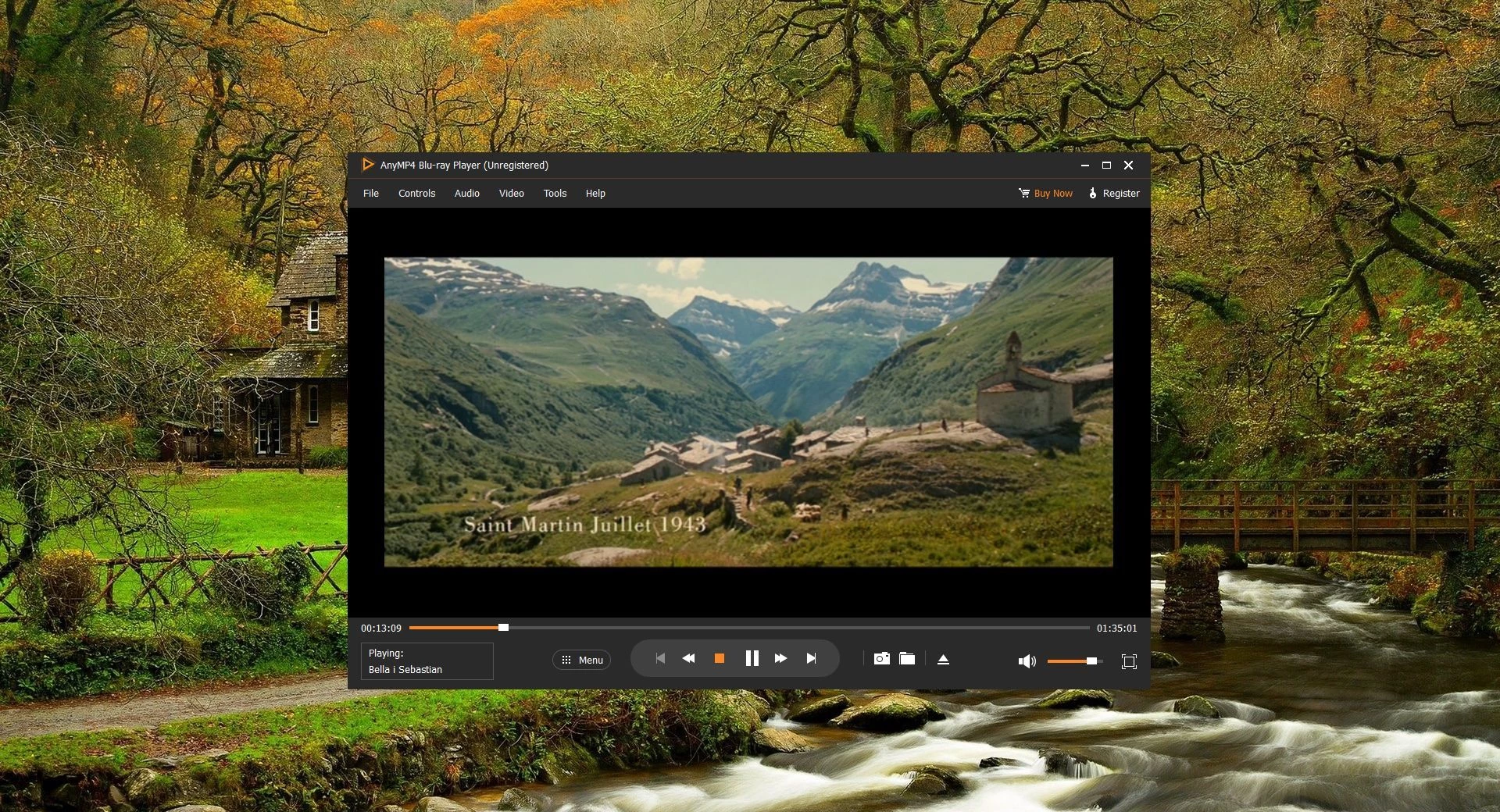
AnyMP4 Blu-ray Player serves as a dedicated desktop environment for reading, decoding, and displaying physical optical media and high-definition digital video files. Modern Windows operating systems lack native support for encrypted commercial optical discs. When users insert a movie into a standard optical drive, the operating system typically prompts them to locate a third-party application to handle the proprietary video format. This application bridges that gap, bypassing the need for an external television setup by transforming a standard computer monitor and optical drive into a fully functioning viewing station. It reads the raw data directly from the drive, decodes the proprietary video streams in real-time, and outputs the resulting display without requiring the user to install extra third-party codec packs.
The software targets physical media collectors, home theater PC builders, and archivists who maintain local libraries of high-definition video files. While standard media players struggle to navigate the complex Java-based menus embedded in commercial discs, this tool successfully parses the original disc architecture. Users can interact with the original menus, select alternate audio streams, view director commentaries, and access bonus features exactly as the studio intended. Furthermore, the application is highly relevant for users dealing with region-locked media. It circumvents regional restrictions at the software level, allowing a computer optical drive to load imported media regardless of geographic origin.
Relying on a dedicated desktop application provides significant advantages over lightweight media players. Decoding an uncompressed high-definition video stream from an optical disc is a resource-intensive process. A native desktop client interfaces directly with the computer hardware, utilizing the graphics processing unit to share the processing load. This hardware acceleration prevents frame drops, visual artifacting, and audio desynchronization during playback. Additionally, handling uncompressed audio tracks requires direct access to the audio hardware interface. A dedicated application manages these high-bandwidth streams effectively, ensuring that both visual and auditory data remain synchronized and clear.
Key Features
- Region-Free Physical Media Playback: The application incorporates internal decryption protocols that bypass regional encoding and standard digital rights management protections. When a user inserts an imported disc from a different geographic region, the software ignores the hardware lock and loads the video directly. This eliminates the need to flash the optical drive firmware or purchase specialized regional hardware.
- ISO Image and Directory Mounting: Users who archive their physical media to local hard drives can open content without relying on external virtual drive mounting tools. The application natively reads BDMV folder structures and ISO image files. Clicking the Open File button allows users to navigate to their archived backup, loading the entire disc menu and video contents exactly as if the physical disc were spinning in the tray.
- Hardware-Accelerated Resolution Upscaling: The software utilizes internal Super Resolution technology, a function that shifts video decoding tasks to the computer graphics card. By analyzing standard high-definition video streams in real-time, the engine upscales the visual data to fit modern 4K resolution displays. This process sharpens edges and clarifies background details without exhausting the computer processor.
- High-Fidelity Audio Passthrough: Handling studio-quality audio requires specific software protocols to prevent audio compression. The application natively supports decoding for TrueHD, DTS-HD Master Audio, and standard surround sound formats. Users can configure the audio settings to output an uncompressed signal directly to an external soundbar or multi-channel receiver via the computer audio interface.
- Broad Digital Format Support: Beyond optical media, the engine acts as a primary handler for high-bitrate local digital files. It decodes demanding compression formats like H.265, HEVC, MKV, M2TS, MP4, and WebM natively. Users avoid the frustration of hunting for obscure Windows codec packs, as the application contains all necessary libraries to render these files upon installation.
- Dedicated Title and Chapter Navigation: The software restores the original interactive experience of physical media playback. Instead of forcing users to guess which raw video file contains the main feature, the interface parses the disc structure to present the original interactive menu. Viewers click through chapter selections, setup menus, and special features directly on the screen.
- Customizable Playback Controls: During active playback, users have granular control over the visual and auditory output. The interface provides dedicated sliders to adjust video hue, saturation, brightness, and contrast. Right-clicking the video frame opens quick-access context menus to switch subtitle tracks or audio languages without interrupting the playback stream.
How to Install AnyMP4 Blu-ray Player on Windows
- Navigate to the official vendor website and download the primary Windows installer package to your local storage drive.
- Double-click the downloaded executable file to launch the setup wizard and accept the User Account Control prompt.
- Review the end-user license agreement and click accept to proceed to the directory configuration screen.
- Select the destination folder on your hard drive where the program files will be written.
- Choose your preferred shortcut options, such as placing a launch icon on the desktop or pinning the application to the Windows taskbar.
- Click the install button and wait for the wizard to extract the necessary video decoding libraries and graphical interface components.
- Once the installation completes, launch the application. You will be prompted to either enter a purchased registration code to unlock full functionality or proceed with the restricted free trial.
- Insert a physical disc into your computer optical drive, click the Open Disc button on the main interface, and select the corresponding drive letter to initiate video playback.
AnyMP4 Blu-ray Player Free vs. Paid
The software is a commercial product that operates primarily on a paid licensing model, though it does offer a limited free trial. The trial allows users to test the application to ensure it communicates properly with their specific hardware. However, unregistered users typically experience restricted playback durations, where the application will stop rendering the video after a certain number of minutes. Additionally, attempting to play local digital files or ISO images through the trial places a visible watermark across the video feed, making it unsuitable for actual movie consumption.
To remove these limitations, users must purchase a license key from the official vendor website. The pricing structure is divided into subscription models and perpetual licenses. A standard monthly subscription starts around $15.60, providing ongoing access to the software as long as the subscription remains active. For long-term usage, a lifetime license is available for a higher upfront cost. This perpetual tier is heavily favored by users building permanent home theater setups, as it eliminates recurring billing while maintaining access to all current features.
Purchasing any premium tier provides significant practical benefits beyond lifting the playback time limits and removing watermarks. Because physical media publishers frequently update their digital rights management protocols, a desktop media player must receive regular software updates to remain functional with newly released titles. A paid license ensures users receive lifetime updates and access to the latest internal decryption databases. Furthermore, registered users gain access to direct technical support, ensuring they can request assistance if a specific disc format fails to load on their specific Windows hardware configuration.
AnyMP4 Blu-ray Player vs. VLC Media Player vs. CyberLink PowerDVD
VLC Media Player is a highly popular, open-source application capable of playing almost any unencrypted digital file format without requiring additional downloads. However, VLC lacks native decryption capabilities for commercial optical discs due to licensing restrictions. When a user attempts to load a retail movie disc into VLC, the software usually fails to bypass the digital rights management, returning a read error. Fixing this requires the user to manually locate, download, and install third-party dynamic libraries and key databases into hidden system folders. AnyMP4 Blu-ray Player handles this decryption internally out of the box, saving the user from dealing with complex directory modifications and manual library updates.
CyberLink PowerDVD is an enterprise-tier media hub designed for elaborate home theater installations, offering features like 8K video output, virtual reality headset support, and heavy media library organization tools. While highly capable, PowerDVD is extremely heavy on system resources and carries a high premium price tag. The interface functions more like a full-screen operating system than a simple video window, which can frustrate users who simply want to open a file and watch a video. Its high cost and background processing requirements make it overkill for standard desktop environments.
AnyMP4 Blu-ray Player sits comfortably between these two extremes, offering the straightforward interface of an open-source tool alongside the reliable, built-in decryption engines of a premium application. It bypasses the tedious manual configuration required by VLC without enforcing the steep pricing and heavy system footprint of PowerDVD. Users looking for a reliable, standalone desktop window to quickly load an imported disc, mount an ISO file, or play an HEVC video will find AnyMP4 Blu-ray Player to be the more practical and focused option.
Common Issues and Fixes
- The software fails to load a newly released commercial disc or displays a read error. This typically happens when the disc contains a newer encryption protocol that the local database does not yet recognize. Ensure your computer is connected to the internet and check for software updates within the application menu to download the latest decryption keys from the vendor server.
- High-resolution video playback stutters, drops frames, or exhibits audio desynchronization. Rendering uncompressed video relies heavily on system resources. Open the application settings panel and verify that Hardware Acceleration is enabled; this shifts the heavy decoding workload from your central processor to your dedicated graphics card, ensuring smoother playback.
- The movie starts with an incorrect language track or is missing necessary subtitles. Optical discs contain multiple embedded audio and subtitle streams. To fix this, right-click anywhere on the active video window, navigate to the Audio or Subtitle context menus, and manually select your preferred localized stream from the provided list.
- Archived ISO image files do not appear when clicking the primary disc loading button. The default optical drive button only scans physical hardware trays. To load a virtual backup, use the Open File button instead to browse your local storage directories, or mount the ISO file using Windows Explorer before launching the application.
- The application does not produce any sound despite the video playing normally. This usually indicates a conflict between the software output settings and the Windows audio mixer. Check the audio output configuration in the application settings to ensure the correct hardware device is selected, particularly if you are trying to pass an uncompressed surround sound signal to an external receiver.
Version 6.5.78 — September 2025
- Added detailed analysis for audio tracks and subtitle language information in general media files.
- Improved performance of 4K Ultra HD playback with enhanced support for H.265 encoding.
- Added new options for Blu-ray playback menus to ensure compatibility with the latest disc formats.
- Fixed a critical crash issue that occurred when attempting to play BDAV discs.
- Optimized overall software stability and resolved minor bugs.