Winamp Pro functions as a dedicated desktop media player and detailed library manager designed for users who want complete control over their local audio files. Instead of relying on web browsers or internet-dependent streaming services, listeners use this application to build extensive playlists, manage specific metadata tags, and configure precise audio output settings. It directly addresses the practical job of organizing massive directories of MP3, FLAC, and WAV files, providing a specialized environment where media collectors can sort, filter, and listen to their offline archives without interruption. Managing tens of thousands of individual tracks requires specialized database tools, and this software provides the exact framework needed to handle sprawling physical storage arrays.
The software caters to audiophiles, DJs, and music archivists who demand hardware-level audio control and an extensively customizable interface. A desktop application matters for these users because web-based alternatives cannot interface directly with external digital-to-analog converters, nor can they support the specialized visualization modules and digital signal processing plugins that desktop software handles. By keeping media playback entirely local, listeners avoid the latency, buffering, and compressed bitrates often associated with online streaming ecosystems. This local processing ensures that the audio quality remains exactly as the original files dictate, free from external compression algorithms.
Furthermore, the application bridges the gap between local file management and curated internet broadcasting. Users choose this tool over generic default operating system players because it offers concrete tools like smart views, rating systems, and integrated SHOUTcast radio directories. The interface allows users to drag and drop nested folders directly into the playlist editor, edit ID3 tags in bulk, and adjust equalizer bands to match their specific speaker hardware. This results in a personalized listening environment that adapts to their exact workflow, proving that dedicated desktop media players still offer distinct advantages over browser-only audio tools.
Key Features
- Feature Name: Media Library Management. Winamp Pro scans local hard drives and external storage to organize audio files using embedded metadata tags such as artist, album, and genre. Users interact with the library tab to build rule-based smart views, making it easy to filter tracks by a specific rating, play count, or date added. This structured approach allows listeners to locate specific albums within thousands of files instantly, avoiding the need to manually browse through Windows Explorer directories. The database scales efficiently, meaning users with large physical archives can retrieve track information without noticeable lag.
- Feature Name: Modular Interface Skins. The application layout can be entirely transformed using different graphical themes applied directly from the options menu. Users can switch between the Bento layout, which combines the media library, playlist, and equalizer into a single unified window, or the classic modular layout featuring independent, detachable panels. This flexibility means the player can sit compactly in the corner of a screen as a thin bar or expand to fill an entire monitor for detailed tag editing. The interface adjustments allow for total control over desktop real estate.
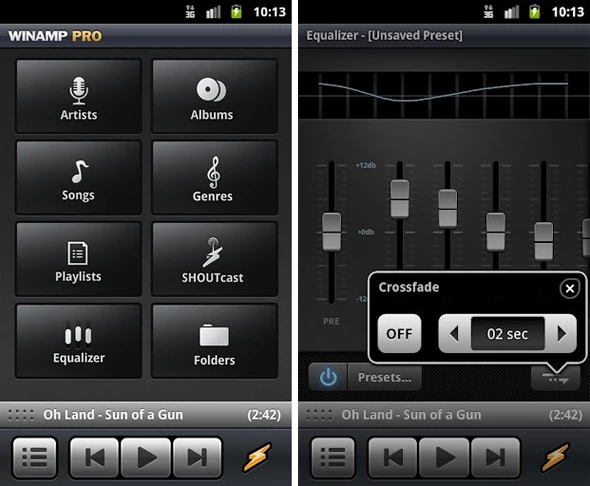
- Feature Name: Granular Equalizer Controls. The built-in equalizer provides multiple frequency bands, allowing listeners to apply precise adjustments to the audio output. Users can load pre-configured profiles tailored for specific music genres like classical, techno, or rock, or they can save their own custom frequency curves to compensate for the acoustic limitations of their desktop speakers. The interface also includes a pre-amp slider to balance the base volume level before the signal hits the main equalizer bands, preventing audio clipping on heavily mastered tracks.
- Feature Name: Third-Party Plugin Architecture. The software accepts external modules to significantly expand its core functionality beyond standard audio playback. These plugins range from digital signal processing add-ons that alter the audio output to input plugins that enable playback for niche video formats and tracker audio files. Users can install specialized visualization studios that react to the frequency spectrum in real time, creating complex graphic patterns that sync perfectly with the playing track. This modularity extends the lifespan of the software indefinitely.
- Feature Name: Integrated Internet Radio Streaming. Beyond managing local files, the interface includes a dedicated directory for accessing SHOUTcast internet radio stations and the Hotmix Radio service. Listeners can browse live broadcasting channels categorized by genre, bandwidth, and region, streaming audio directly through the desktop interface. This eliminates the need to open a web browser to find background music, keeping the entire audio experience centralized in one application. The streams load directly into the primary playlist window for easy access.
- Feature Name: Physical Audio Extraction and Conversion. The application includes a built-in ripping tool for extracting digital audio tracks directly from physical CDs. Users can select specific tracks, retrieve missing album data from online databases, and encode the audio into formats like MP3, AAC, or FLAC for permanent local storage. The tool provides options to set the exact encoding bitrate and output destination, streamlining the process of archiving physical media collections without requiring a separate disc ripping utility.
How to Install Winamp Pro on Windows
- Download the executable Windows installer package directly from the official developer website to ensure you receive the unmodified application.
- Launch the downloaded setup file to initialize the installation wizard, prompting the Windows user account control dialog to grant the necessary system permissions.
- Review the end-user license agreement presented in the initial screen and click the acceptance button to proceed with the primary setup phase.
- Select the destination folder on your local storage drive, typically leaving the default program files directory path unchanged unless you require installation on a secondary drive.
- Choose your preferred installation type from the dropdown menu, deciding whether to include extra components like the visualization studio, specific audio decoders, and additional language packs.
- Configure the file associations in the following screen, carefully checking the boxes for audio formats like MP3, FLAC, and WAV so they automatically open directly with the application when double-clicked in Windows Explorer.
- Review the shortcut creation options to place quick-launch icons on the desktop and start menu, then click the install button to unpack the application binaries and register the necessary dynamic link libraries.
- Finish the setup process and launch the application for the first run, where a configuration screen will appear asking you to select an initial interface skin and specify the root folders for your local music library scanning.
Winamp Pro Free vs. Paid
Historically, the application operated on a tiered model where the standard tier handled basic audio playback while a paid professional tier unlocked specific hardware capabilities. This professional tier provided faster optical disc ripping speeds and native MP3 encoding, requiring users to buy a perpetual license to access the complete suite of media management tools. Users who wanted to back up physical media collections efficiently often found the upgrade fee necessary for their workflow.
Currently, under the Llama Group ownership, the desktop application is distributed entirely free of charge. The previously restricted professional features, including full-speed optical disc ripping and advanced audio encoding, are now integrated directly into the standard free installer. Users no longer need to enter a payment code or purchase an activation license to utilize the full feature set. The desktop program operates as a fully unlocked environment immediately upon installation.
The developer's current business model focuses entirely on a separate web-based creator platform and streaming service, rather than monetizing the legacy desktop software. Because of this shift in strategy, desktop users receive the offline media player without trial limitations, mandatory recurring subscriptions, or audio export watermarks. There are no paywalls hidden within the equalizer settings or the library management tools.
This approach ensures that listeners who strictly want a local file manager are not penalized or forced into online ecosystems. The application remains a standalone offline tool, though users can optionally choose to interact with the new web-based features if they wish to follow specific artists on the developer's online platform. Local listeners can ignore the cloud connectivity completely.
Winamp Pro vs. AIMP vs. MusicBee
AIMP offers an efficient, lightweight audio engine that natively supports WASAPI exclusive mode out of the box, ensuring strict sound output by bypassing the default Windows audio mixer. It features a streamlined interface, excellent resource management, and deep support for modern high-resolution formats without requiring external output plugins. Users should choose AIMP if they want a strictly modern audio player with exceptional default sound quality, a focus on low memory usage, and a clean, tabbed playlist interface that excels at handling multiple separate listening queues simultaneously without interface clutter.
MusicBee excels at organizing gargantuan media libraries, featuring native podcast management, advanced automatic tagging, and synchronization capabilities for external digital audio players. It includes built-in tools to scrape missing album art, lyrics, and artist biographies from web databases, automatically organizing nested folders based on updated ID3 tags. It is the better choice for listeners who want an automated, all-in-one media organizer that can act as a central hub for editing metadata, managing audiobooks, and maintaining perfect consistency across tens of thousands of local files spread across multiple hard drives.
Winamp Pro remains the better fit for users who value its specific ecosystem of legacy plugins, classic visualizations, and distinctive interface skins. Listeners who have relied on its specific layout for years will find the familiar Bento interface, the integrated SHOUTcast radio directory, and the extensive library of user-created visualizers more practical for their daily listening habits. It caters to users who prefer a modular, customizable interface that can be tailored with specific digital signal processing plugins rather than adapting to a rigid, modern library manager that abstracts the underlying folder structures.
Common Issues and Fixes
- Media library memory leaks crash the application. If the application unexpectedly closes when removing multiple items from a large playlist, the local playlist cache might be corrupted. Navigate to the application data folder in Windows, locate the default .m3u8 playlist files, delete them, and allow the application to generate fresh, uncorrupted files upon the next launch.
- Titlebar dragging glitches cause visual overlapping. Users attempting to move the main application window while using the Big Bento skin might experience overlapping configuration panels or a completely unresponsive interface. To resolve this graphical error, open the preferences menu using the keyboard shortcut, switch temporarily to the standard Bento or Classic skin to restore normal window movement, and then reapply your preferred skin.
- Incorrect filetype associations trigger handler errors. The installer occasionally fails to bind specific audio formats properly, resulting in a command handler error when clicking a media file in Windows Explorer. Open the Windows default apps settings menu, locate the specific audio extensions causing the error, and manually reassign them to the application executable to restore normal double-click functionality.
- Silent installation failures occur due to missing dependencies. Running the setup executable with silent command line switches can be completely blocked if the host machine lacks necessary external dependencies. To fix this, run the installer normally through the graphical user interface so the setup wizard can correctly detect, unpack, and register all required visual C++ redistributables before completing the installation.
Version 5.9.2 Build 10042 — April 2023
- Introduced new integration with the online Fanzone platform within the media library.
- Added support for streaming via the Hotmix Radio service.
- Improved Windows 11 compatibility by implementing a more accurate OS detection method.
- Enhanced security by ensuring all DLL files are now digitally signed.
- Updated the internal podcast directory engine to use Qt v5.12 instead of Internet Explorer components.
- Fixed an issue where dragging the titlebar in the Big Bento skin would not function correctly.
- Resolved a bug causing configuration overlaps within the Big Bento interface.
- Corrected a corruption error that occurred when rearranging the order of smart views in the local library.
- Fixed memory leaks identified within the playlist management system.
- Addressed an erroneous filetype association regarding the Winamp Command Handler.
- Added a new option to receive update notifications for Release Candidate builds.