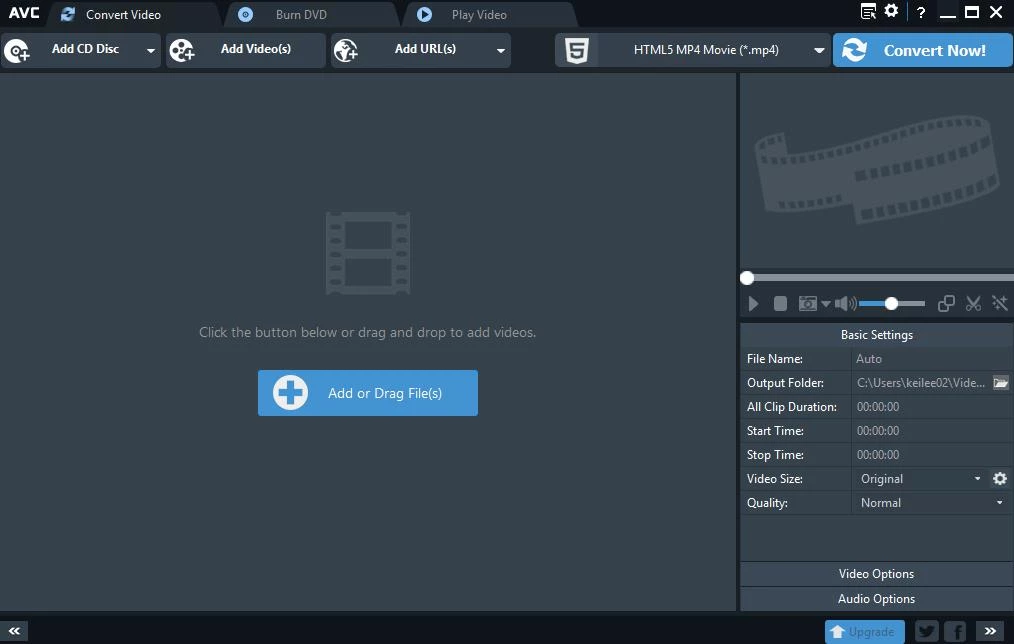
Video file compatibility remains a persistent frustration for anyone managing digital media. A video recorded on a modern smartphone might use a high-efficiency codec that refuses to open on a standard living room television display, or an uncompressed screen recording might be too large to share via email or network drives. Any Video Converter functions as a dedicated local workstation designed to solve these exact friction points. It operates by reading the source media, decoding the existing video and audio streams, and re-encoding them into standard formats that play correctly on target hardware.
Beyond basic file conversion, the application operates as a centralized hub for media acquisition and preparation. Relying on web-based conversion tools often involves uploading gigabytes of data to remote servers, waiting in processing queues, and navigating strict file size limits. A local desktop application bypasses these bottlenecks entirely. It utilizes the hardware inside the local computer to process media directly, ensuring privacy and eliminating upload times. Users can paste a URL from a video hosting site to save the media locally, extract the audio track for a podcast, trim out dead air, and export the final result as a standard MP4 without ever leaving the interface.
The utility serves a wide demographic of computer users. Casual home users rely on it to prepare movie files for offline playback on living room media centers, while educators use it to archive instructional videos from online sources before they disappear. For intermediate video editors, it acts as a lightweight ingest tool to standardize mixed-framerate footage before importing it into heavy timeline editors. By keeping the interface visual and organizing functions into distinct tool modules, the software allows users to execute complex encoding tasks without needing to write command-line scripts or understand the intricate mathematics of video compression.
Key Features
- Format Conversion: The core engine translates video and audio between hundreds of container formats and codecs. Users can input obscure formats like MKV, FLV, or TS and output standard MP4, MOV, or AVI files. The conversion module exposes granular settings, allowing users to define the exact video bitrate, force a constant frame rate, change the output resolution, and select specific audio sample rates before rendering the final file.
- URL Video Downloader: The software includes an integrated network acquisition module for saving online media. By pasting a valid URL from sites like Vimeo, Dailymotion, or various social media platforms, the application queries the server, lists the available resolutions, and saves the file directly to the local hard drive. This eliminates the need to rely on ad-heavy browser extensions for media archiving.
- Built-in Video Editor: A localized timeline workspace provides essential editing controls without the overhead of a multi-track editor. Users can drag the playhead to trim the beginning and end of a clip, split a long recording into separate files, or merge multiple distinct videos into a single continuous file. The module also includes tools to crop out black bars, rotate vertical phone footage, and burn hardcoded subtitles into the video track.
- Hardware Acceleration Support: Video encoding is a mathematically intensive process that can lock up a computer CPU for hours. The application interfaces directly with modern graphics cards, specifically utilizing NVIDIA NVENC and AMD equivalent hardware encoders. By shifting the encoding workload from the CPU to the dedicated media silicon on the graphics card, the software drastically reduces rendering times for high-definition exports.
- AI Video Enhancer: The premium version includes local artificial intelligence models designed to restore and upscale low-resolution media. Instead of simply stretching the pixels, the software analyzes the frames and generates new detail, allowing users to convert standard definition archival footage into sharp 4K files. This process is highly demanding and relies heavily on local GPU memory to process the intermediate data structures.
- Optical Media Tools: For users managing physical disc collections, the software reads unencrypted DVD data and extracts the video and audio tracks into digital files. Conversely, it includes a burning module that takes local digital files and writes them to blank DVD media, complete with basic menu templates, ensuring the resulting disc will play on standard physical hardware.
- Audio Extraction and Processing: The application functions equally well as an audio utility. Users can import a video file and export only the MP3, FLAC, or OGG audio track. Advanced modules in the higher tiers push this further by offering speech-to-text auto-transcription for generating captions, and AI vocal isolation to split a music track into separate instrumental and vocal files.
How to Install Any Video Converter on Windows
- Navigate to the official Anvsoft developer website and download the Windows installer executable. Avoid downloading the setup file from unverified software directories, as third-party mirrors sometimes alter the installation package.
- Locate the downloaded executable in your local file system and double-click it to begin. Windows will present a User Account Control prompt asking for permission to make changes to your device; grant this permission to proceed.
- Read the End User License Agreement presented on the first screen of the setup wizard. Accept the terms to unlock the configuration options.
- Select the destination directory for the application files. The installer defaults to the primary system drive, usually under the standard Program Files directory, which is optimal for most users.
- Review the shortcut creation preferences and ensure no unwanted optional software is checked, then click the install button. The wizard will unpack the core binaries, media libraries, and UI assets to the local disk.
- Once the progress bar reaches completion, exit the setup wizard and launch the application.
- On the first run, the software opens to a modular hub interface displaying different task tiles. If you intend to use the AI enhancement or transcription tools, ensure your computer maintains an active internet connection, as the software will need to download specific machine-learning models before executing those tasks.
Any Video Converter Free vs. Paid
The basic version operates as a genuinely free utility for standard media processing. Users can convert local files between all supported video and audio formats, utilize the basic timeline editing tools, and download network URLs without facing artificial file size limits or intrusive export watermarks. The primary limitation of the free tier is workflow friction; the interface frequently displays promotional prompts suggesting an upgrade to the premium tiers, requiring users to manually dismiss them to continue their tasks.
For users requiring more specific offline workflows, the Pro tier introduces a yearly subscription model priced at approximately $40. This version removes the promotional interruptions and unlocks advanced functionality designed for physical media and presentation work. It enables high-definition screen recording, adds DVD burning templates, and provides advanced custom preset saving so users can lock in exact bitrate and resolution parameters for repetitive batch conversions.
The Ultimate tier, priced at $60 annually or available as a one-time lifetime payment, shifts the focus entirely to artificial intelligence processing. This tier unlocks the AI Video Enhancer for upscaling standard definition footage to 4K, the speech-to-text transcription engine, the AI audio splitter for isolating vocals, and AI Rough Cut, which automatically analyzes long footage to detect scene changes and speaker shifts. These tools demand significant local hardware resources but provide capabilities usually restricted to high-end professional workstations. The paid tiers require a premium license entered directly into the application interface to unlock the restricted modules.
Any Video Converter vs. HandBrake vs. Format Factory
HandBrake is an open-source transcoder focused purely on offline video encoding. It contains no premium tiers and offers highly granular control over x264 and x265 compression parameters. However, HandBrake is strictly a converter; it lacks network URL downloading capabilities, timeline editing tools, and artificial intelligence upscaling. Users who only need to crush file sizes using specific technical parameters often prefer HandBrake, but those looking for a centralized hub to download, trim, and upscale media will find Anvsoft's utility much more practical.
Format Factory is a legacy media conversion tool that handles video, audio, and image files within a single offline interface. It is widely recognized for its sheer variety of output options and completely free business model. Despite its utility, Format Factory features a dated interface, lacks hardware-accelerated AI upscaling tools, and its network download module struggles to maintain compatibility with modern web hosting changes. Any Video Converter offers a much cleaner, modular interface and receives frequent updates to keep its URL parsing engine functional.
Any Video Converter stands out as the superior choice for users who want an all-in-one media station rather than a collection of disparate utilities. Instead of switching between a separate downloader app, an audio extractor, and a command-line transcoder, users can paste a web link, isolate the audio, trim the dead space, and export the file in one unified workspace. The integration of modern AI restoration and transcription modules in the premium tiers further elevates it beyond traditional format-shifting tools, making it a highly capable local processor for mixed-media projects.
Common Issues and Fixes
- Problem description. URL video downloads stall or fail to analyze the network link. Online video platforms frequently update their backend code to discourage third-party downloading. Navigate to the help menu and check for software updates, as the developer regularly releases application updates to restore compatibility with specific hosting site changes.
- Problem description. GPU crashes or out of memory errors occur during AI enhancement. Upscaling source footage using artificial intelligence consumes massive amounts of Video RAM. To prevent crashes, ensure the source video is standard definition or 1080p, close all hardware-accelerated web browsers running in the background, and update your system with NVIDIA Studio or AMD professional display drivers.
- Problem description. Security software quarantines the main application executable. Antivirus programs occasionally flag media downloaders as false positives due to their network acquisition behaviors. Temporarily pause your security software during installation, or manually add the application installation folder to your exception list to prevent the executable from being blocked.
- Problem description. The audio and video tracks fall out of sync after conversion. This typically happens when the source media uses a variable frame rate, which confuses standard encoding engines. In the output configuration panel, change the frame rate setting from "Original" to a constant value like 30fps or 60fps before starting the render process.
Version 9.1.5 — November 2025
Added:
- Timeline editing support for more precise trimming and merging operations.
- MP4 (H.264) specific download option for wider playback compatibility.
- Smarter playlist downloader: allows selection of single files or the entire list.
Improved:
- Refined crop tool interaction for smoother adjustments.
- Enhanced success rate for the video download tool.
- Optimized task queue handling for better batch processing experience.
Fixed:
- Fixed issues with video resolution detection causing conversion failures.
- Resolved false positive flags from certain antivirus software.
- Fixed inaccurate language track matching during video downloads.