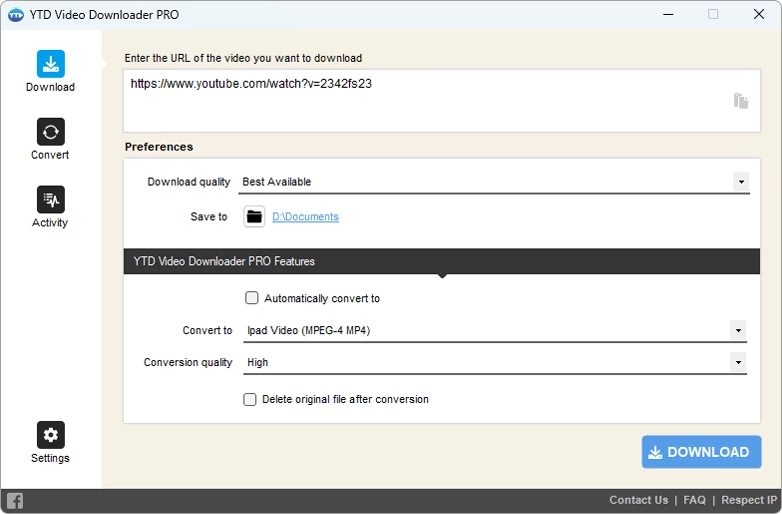
YTD Video Downloader Pro operates as a dedicated desktop application designed to retrieve and convert streaming media from over fifty hosting platforms directly to local storage. It addresses the volatility of online content by allowing users to create permanent offline archives, bypassing the limitations of browser-based extensions that frequently struggle with high-resolution files or complex playlist structures. By moving the extraction process to a standalone Windows environment, the software provides a stable framework for managing large queues and handling extensive conversions without relying on third-party cloud processing. Whether you are an educator archiving documentaries for classroom use, a video editor gathering reference footage, or simply a user looking to preserve personal entertainment, the application offers a predictable, localized workflow.
Unlike web-based extraction tools that depend on remote servers and often impose arbitrary file size limits, this application executes the parsing and conversion tasks entirely on your local machine. It targets individuals who need to reliably extract digital materials without maintaining a constant internet connection during playback. The desktop architecture allows the program to maintain persistent queues, ensuring that lengthy operations continue in the background without browser memory constraints. Furthermore, it integrates the extraction and encoding phases, allowing users to transform raw web streams into standard formats like MP4, MP3, or AVI immediately after the transfer completes. The application provides predefined profiles for specific playback hardware, ensuring that users do not need to manually calculate bitrates or aspect ratios unless they choose to do so.
Beyond basic URL fetching, the software incorporates immediate format shifting and automatic connection recovery. This design ensures that if a network drop interrupts a massive high-definition file transfer, the client resumes the progress from the exact point of failure rather than forcing the user to start the download over from the beginning. For those building offline media libraries for playback on specialized hardware, mobile devices, or editing software, the application centralizes both the retrieval and formatting steps into a single, straightforward dashboard. This localized processing bypasses the restrictions frequently imposed by cloud-based conversion tools, giving users complete control over their local storage and archiving practices.
Key Features
- Batch and Playlist Extraction: Queue multiple URLs or capture entire media playlists in a single operation. The interface allows users to paste a main playlist link and parse all contained videos automatically, preventing the tedious process of copying and pasting dozens of individual page addresses. This is especially useful for downloading episodic content or extensive tutorial series.
- Integrated Format Conversion: Transform raw media into standard formats such as MP4, MOV, WMV, AVI, and MP3 immediately upon retrieval. Users can define the exact output codec, target resolution, and audio bitrate to match the strict playback requirements of specific mobile devices, legacy media center hardware, or car audio systems. The conversion happens locally, utilizing your computer's processing hardware.
- High-Resolution Parsing: Retrieve media in its native quality, supporting options ranging from standard 480p up to 4K and 8K resolutions when the source site provides them. The underlying engine parses the highest available streams and reconstructs them locally without applying arbitrary compression or downscaling, ensuring the final file looks identical to the original broadcast.
- Automatic Download Resume: Recover interrupted transfers without losing progress if the local network disconnects or the host server drops the active connection. The application continuously monitors active queues and automatically restarts partial files exactly where they stalled once connectivity is restored. This prevents bandwidth waste and saves time on massive file transfers.
- Built-In Media Player: Verify downloaded files immediately through the native playback interface before moving them to a permanent library or importing them into editing software. This ensures the selected resolution and audio sync are correct without requiring the user to navigate through file explorers or open a third-party media player just to check the output.
- Multi-Platform Support: Fetch media from over fifty different hosting services, including major social networks, news portals, and dedicated video platforms. The parsing engine adapts to different site structures, allowing users to rely on one consistent desktop interface regardless of where the original media is hosted, standardizing the extraction process across the web.
How to Install YTD Video Downloader Pro on Windows
- Download the official Windows installer package from the verified vendor source to ensure you receive the legitimate, unmodified executable, avoiding third-party software aggregators that might bundle additional unwanted applications.
- Double-click the downloaded setup file to launch the installation wizard and grant administrator privileges if prompted by the Windows User Account Control security prompt.
- Review the End User License Agreement and click to accept the terms to proceed with the configuration phase, which outlines the software's usage policies and network requirements.
- Carefully inspect the subsequent screens, as the default installer frequently includes optional third-party toolbars or search engine modifications; click "Decline" or explicitly uncheck these boxes to prevent unwanted browser changes.
- Choose the destination folder on your local drive, or leave the default path directed to the standard Program Files directory for maximum compatibility with Windows user profiles.
- Click "Install" to extract the application files, write the necessary registry keys, and register the core components with your operating system to enable media association.
- Finish the setup process and launch the application; upon the first run, you can immediately begin pasting URLs into the main interface or enter your subscription credentials in the account menu to unlock the advanced tier capabilities.
YTD Video Downloader Pro Free vs. Paid
The software operates on a strict freemium model, offering a heavily restricted basic tier alongside a paid Pro subscription. The free version allows users to test the core parsing engine and download individual files, but it intentionally limits operations to single, sequential downloads. Users operating on the free tier cannot process bulk links or download entire playlists at once, requiring them to manually input each URL after the previous file finishes. Additionally, the basic version enforces throttled download speeds, which can significantly increase the time required to retrieve large media files depending on the current server load and local network conditions. The free tier also lacks the built-in batch conversion capabilities, meaning users must process each file individually if they need a specific output format. This makes the free version suitable only for occasional, lightweight use.
Upgrading to YTD Video Downloader Pro removes these intentional bottlenecks and unlocks the complete toolset designed for heavy users. The Pro license enables concurrent batch downloading and full playlist extraction, allowing users to walk away while the software populates their local directories with dozens of files simultaneously. It also unlocks the highest possible transfer speeds permitted by your internet service provider and activates the automatic retry and resume functionality. This recovery feature is critical for handling large high-definition files that might otherwise fail and require a complete restart on unstable networks, saving both time and monthly data caps.
GreenTree Applications SRL does not offer a perpetual, one-time purchase license for this application. Instead, the Pro version requires an active subscription, typically billed annually at roughly $29.90, though promotional discounts frequently alter the initial year's cost. Users must maintain this ongoing subscription to retain access to batch processing, premium conversion tools, and the continuous algorithmic updates necessary to keep parsing media from constantly changing website architectures. This recurring revenue model funds the ongoing development required to maintain compatibility with shifting website structures. If a major platform alters its video delivery code, the development team must engineer a response, and this constant maintenance is subsidized by the active subscriber base. If the subscription lapses, the software reverts to the restricted free tier.
YTD Video Downloader Pro vs. 4K Video Downloader vs. Any Video Converter
4K Video Downloader focuses heavily on parsing complex channel layouts and extracting specialized metadata, such as embedded subtitles, 3D video, and 360-degree formats. It is typically the preferred option for users who strictly target massive high-resolution libraries from primary streaming hubs and require highly granular control over proxy setups and smart mode configurations. However, its interface remains strictly focused on extraction, lacking the immediate, broad format-shifting capabilities found in alternative tools. It expects you to play the file in its native format rather than converting it for older hardware, which can be limiting for users with legacy devices.
Any Video Converter places its primary emphasis on extensive local file manipulation rather than solely focusing on web retrieval. It includes advanced timeline trimming, CD ripping, and DVD burning tools alongside its URL fetching capabilities. This configuration makes it ideal for users who need to capture a web clip and immediately edit, crop, or burn it to physical media, but its downloading interface is not as straightforward for users who only want to execute rapid-fire batch link processing. The sheer number of editing features can clutter the interface for users seeking a simple downloader, making the learning curve slightly steeper for basic tasks.
YTD Video Downloader Pro strikes a pragmatic middle ground by prioritizing immediate URL extraction paired with rapid format conversion within a single, uncluttered window. It proves to be the better fit for users who do not require complex timeline editing or specialized subtitle extraction, but simply want a reliable method to paste a batch of mixed-platform links, specify an output format like MP3 or AVI, and let the software handle the entire fetch-and-convert pipeline unattended. It bridges the gap between basic downloaders and heavy video editors.
Common Issues and Fixes
- Installation includes unwanted browser toolbars. The default installer routinely bundles third-party search extensions or adware to subsidize the free version. To fix this, always read the installation screens carefully and explicitly click "Decline" or uncheck the promotional offers before proceeding with the extraction process.
- Downloads stall or fail to initialize. This behavior typically occurs when the source website updates its media delivery algorithm, breaking the application's current parsing logic. To resolve this, ensure your application is updated to the latest build, as the developers frequently release updates to restore compatibility with altered site structures.
- Free version speeds are unusually slow. The basic tier intentionally restricts bandwidth and limits users to one active connection to encourage paid upgrades. To fix this, you must upgrade to the Pro subscription to unlock unrestricted parallel downloading and utilize your full network capacity.
- Long videos split into multiple incomplete files. If a network interruption occurs on the free tier, the software may fail to stitch the temporary data chunks together correctly. Upgrading to the Pro version enables the automatic resume feature, which manages connection drops and compiles the final media file correctly once the transfer completes.
Version 7.6.2.1 — September 2025
- Added support for downloading videos in ultra-high 8K resolution.
- Added capability to download entire video playlists directly from supported streaming sites.
- Improved the advanced download panel to allow easier monitoring of multiple simultaneous downloads.
- Improved reliability with an automatic resume and retry feature for interrupted connections.
- Fixed stability issues where downloads would occasionally fail to restart after a network drop.