Online media archiving requires a dedicated desktop utility to capture, convert, and organize video and audio files locally. YT Saver operates as a centralized control panel for downloading high-resolution media from thousands of different hosting platforms. Instead of relying on browser extensions that frequently break or web-based converters filled with intrusive advertising, users install this desktop application to maintain strict control over their offline media libraries. The software handles everything from single audio tracks to massive channel backups, directly saving the output to designated local directories.
The target audience for this application includes video editors gathering stock footage, digital archivists preserving documentaries before they face platform takedowns, and music enthusiasts building offline FLAC or MP3 collections. By moving the processing load to a dedicated desktop environment, the application utilizes the host computer hardware to manage multiple simultaneous download threads and format conversions. This hardware access prevents the typical browser freezing associated with heavy data transfers and allows for continuous background processing while the user focuses on other tasks.
Choosing a desktop utility over a basic browser plugin alters the archiving workflow entirely. Browser plugins operate within strict security sandboxes, preventing them from accessing local file systems efficiently or managing bulk conversion queues. This software circumvents those limitations by operating independently, providing an integrated browser to handle platform authentication and utilizing multithreaded connections to maximize available bandwidth. Users dictate the exact output folder, the exact audio bitrate, and the precise video container format before the transfer even begins, eliminating the need for secondary post-processing applications.
Key Features
- Batch Playlist and Channel Downloading: Users do not need to manually process individual video links. By pasting a master playlist or channel URL into the input field, the software parses the entire index, generates a checklist of available episodes, and allows the user to download the entire batch automatically to a specified local directory.
- Built-in Web Browser Integration: The interface includes a dedicated browser tab that loads sites directly within the application window. This function is strictly necessary for accessing media that requires user authentication or navigating platforms that hide direct video links behind dynamic page elements.
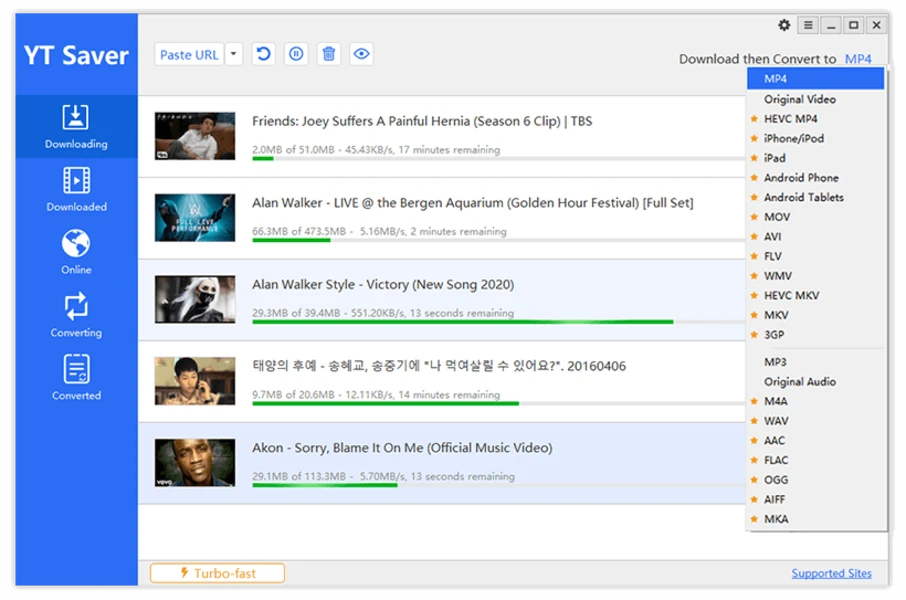
- Format Conversion and Audio Extraction: A drop-down menu labeled "Download then Convert to" provides immediate transcoding options. Users can force incoming media to save as MP4, MKV, MOV, or WMV, or they can strip the video track entirely to extract the audio as a 320 kbps MP3, WAV, FLAC, or OGG file.
- Turbo-Fast Download Mode: Located in the lower-left corner of the main interface, this toggle enables multithreaded network requests. The software opens multiple concurrent connections to the host server, pulling separate chunks of the file simultaneously to saturate the available internet bandwidth and reduce waiting times.
- Private Mode for Secured Files: The application includes a password-protected vault for sensitive media. Once the user configures a master PIN, designated files are saved into an encrypted directory, hiding them from the standard destination folder and preventing default media players on the computer from indexing them.
- Integrated Video Trimming: A built-in cutter allows users to define a specific timecode range before initiating the transfer. By entering a distinct start and end time, the software only captures the necessary segment, conserving local disk space and saving post-editing time when extracting a short clip from a lengthy broadcast.
- In-App Proxy Configuration: For accessing geographically restricted media, the connection settings menu provides manual proxy routing. Users can input a specific HTTP proxy address, port, and authentication credentials, forcing the application to appear as if it is connecting from an approved region.
How to Install YT Saver on Windows
- Download the Windows installer executable from the official vendor website to your local storage drive.
- Double-click the downloaded setup file to launch the installation wizard and grant administrative privileges if prompted by the operating system.
- Read and accept the End User License Agreement displayed on the first screen, then click "Next" to proceed.
- Review the default destination folder, typically located within the Program Files directory, or click "Browse" to select an alternative hard drive path for the application files.
- Click "Install" to initiate the unpacking process, allowing the setup wizard to copy the necessary core files, conversion libraries, and network modules to your system.
- Once the progress bar completes, check the box to launch the application immediately and click "Finish" to exit the installer.
- Upon the initial launch, navigate to the "Preferences" menu via the gear icon to define your default download directory, preferred video resolution, and maximum concurrent task limits before starting your first archive job.
YT Saver Free vs. Paid
The software operates on a strict freemium model. The free tier functions solely as a limited trial environment designed for testing system compatibility and basic interface navigation. Users operating under the free trial mode are restricted to a lifetime maximum of exactly three video downloads and a single playlist transfer. Additionally, the free tier disables the turbo-fast connection mode and restricts access to advanced output formats, forcing users into standard resolutions and basic audio bitrates.
To remove these restrictions, the vendor requires a paid subscription or a perpetual license. The 1-Month Plan costs $9.95, providing short-term access for single-project archiving needs. The 1-Year Plan is priced at $29.95, while the Lifetime Plan requires a one-time fee of $39.95. All three of these standard tiers cover installation on a single computer and unlock unlimited daily downloads, full resolution support up to 8K, and the complete array of video and audio conversion formats.
Users requiring multi-device access must purchase the Family Plan, available for $69.95, which extends the lifetime license to cover between two and five distinct machines. The vendor processes payments through a secure portal and enforces a 30-day money-back guarantee, though official support documentation indicates that refunds require direct communication with the technical assistance team to troubleshoot any application failures prior to approval.
YT Saver vs. 4K Video Downloader vs. YTD Video Downloader
4K Video Downloader operates as a highly specialized utility that prioritizes a minimalist interface and exceptional handling of major video platforms. It utilizes a feature called Smart Mode to apply predefined quality and format settings across all future tasks, making it highly efficient for users who only interact with mainstream streaming sites. However, it lacks an integrated browser for manual site navigation, meaning users must always copy and paste links externally, which creates friction when dealing with hidden content or sites requiring complex login steps.
YTD Video Downloader functions as a legacy utility tailored for users who need a basic, straightforward interface for occasional standard-definition or 1080p archival tasks. It provides an advanced panel for basic conversion tracking and gets the job done for simple MP4 captures. Despite its simplicity, it generally falls short regarding broad platform compatibility, often failing to support the obscure websites handled by modern alternatives, and it lacks the advanced 320 kbps audio extraction tools audiophiles require.
YT Saver proves to be the superior choice when workflow versatility is the primary concern. While 4K Video Downloader handles massive mainstream playlists efficiently, YT Saver provides the built-in browser necessary to authenticate and navigate heavily gated or obscure platforms. The inclusion of an integrated video cutter, a private secure folder, and dedicated proxy settings makes it a much more adaptable utility for digital archivists encountering diverse media hosting environments and strict access controls.
Common Issues and Fixes
- The software fails to parse a copied link or displays a URL error. This typically occurs when a streaming platform updates its background delivery API, breaking the current extraction method. Verify that you have copied the full URL string, then visit the official vendor website to download and install the absolute latest official installer, which usually contains the necessary developer code adjustments.
- Media extraction fails immediately on commercial music videos or paid movie rentals. The application relies on standard decryption methods that cannot bypass the advanced digital rights management restrictions implemented on officially licensed commercial media. You must seek out a dedicated decryption utility designed specifically for locked subscription content, as standard archiving tools will continually reject the request.
- Downloads queue correctly but refuse to start, showing an exceeded limit warning. You have reached the strict three-file limitation hardcoded into the free trial mode. To resume the transfer process and queue additional media, you must purchase a license tier, receive your registration code via email, and enter it into the account activation menu.
- The application consumes excessive CPU resources, causing the computer to stutter. High-resolution 4K and 8K video transcoding demands significant processing hardware. To resolve system slowdowns, open the Preferences menu and reduce the maximum number of concurrent downloading tasks to one or two, allowing the processor to handle files sequentially rather than simultaneously.
- Links from geographically restricted regions return a connection timeout error. The host server is actively blocking your local IP address. Navigate to the Connection tab within the Preferences menu, check the box to enable the in-app proxy, and input a valid HTTP proxy address from the allowed region to route the traffic successfully.
Version 10.10.0 — December 2025
- Implemented an updated download engine that delivers faster speeds and greater stability during multi-threaded tasks.
- Enhanced playlist and channel downloading capabilities to better handle extensive media collections without interruption.
- improved support for processing and converting high-resolution 4K and 8K video files.
- Expanded audio extraction options to support higher bitrate qualities for clearer sound output.
- Refined the user interface to streamline navigation and improve the management of batch downloads.
- Fixed known issues regarding file naming conventions and duplicate link detection.