iTubeGo YouTube Downloader operates as a dedicated desktop application designed to capture, encode, and save streaming media from online platforms directly to local hard drives. Rather than relying on browser extensions or web-based portals that often fail with large files, users install this client to handle media extraction from platforms like YouTube, Vimeo, Facebook, and TikTok. The software targets video editors, digital archivists, content creators, and educators who require permanent offline access to high-definition media without worrying about buffering, sudden video takedowns, or fluctuating internet bandwidth. By moving the download process out of the web browser, the application provides a stable environment for heavy processing tasks that would otherwise cause browser tabs to freeze or crash.
By operating as a standalone Windows client, the software provides significant advantages over lightweight alternatives. It handles intensive network operations such as pulling entire video playlists, extracting high-bitrate audio tracks, and parsing 4K or 8K video streams without interruption. When users initiate a download, the software communicates directly with the hosting server, bypassing the ad trackers commonly found on free web utilities. This direct connection ensures that large batches of files are routed straight to the user’s designated local storage directory. For people building offline reference libraries, the ability to control exact output formats and resolutions before the download begins ensures that the final files are immediately ready for playback or importing into video editing software.
The application also serves as a practical tool for audio extraction, bridging the gap between video streaming sites and personal music libraries. Instead of leaving browser tabs open to listen to podcasts or music channels, users can pull the audio layer and save it locally. This workflow is especially valuable for people who commute through areas with poor cellular reception or who want to transfer media to dedicated offline playback devices. The combination of targeted link parsing, batch queuing, and automated format conversion allows users to build a personalized media archive entirely under their own control, free from the constraints of cloud-based streaming algorithms.
Key Features
- High-Resolution Video Grabbing: Users can select specific output resolutions from a dropdown menu before initiating a download, supporting standard 1080p all the way up to 4K and 8K formats when the source file allows it. The application preserves the original frame rate and visual clarity during the transfer, avoiding the heavy compression often applied by third-party web tools. This is particularly useful for video editors who need the highest possible source quality for b-roll or archival footage.
- Batch Processing and Playlists: By pasting a single playlist or channel URL, the software parses the entire index of videos and displays a checklist of available items. Users can select which specific clips to keep, set sequential file naming conventions, and queue multiple simultaneous downloads without manually pasting individual links. The background manager handles the active downloads sequentially or concurrently based on the settings menu configuration.
- Audio Extraction and Conversion: The tool extracts audio streams directly from video files and saves them as MP3, M4A, WAV, or FLAC files. It supports audio bitrates up to 320 kbps, ensuring that downloaded music tracks, interviews, or podcast episodes retain their acoustic fidelity. This feature eliminates the need to run downloaded video files through a separate audio extraction utility.
- Built-In Desktop Browser: An integrated web browser allows users to navigate directly to target sites from within the application interface instead of using a standard browser. This removes the need to constantly switch windows and copy-paste links, as media can be captured directly from the internal viewing tab. The browser includes basic navigation controls and automatically detects downloadable media on the active page.
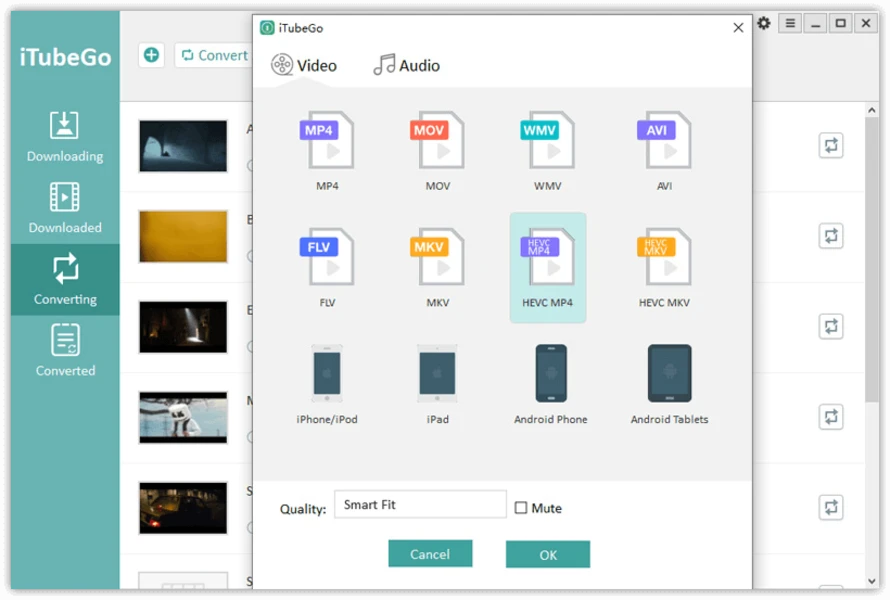
- Format Conversion Engine: Beyond straight downloading, the application includes a converter that changes downloaded files into device-specific formats. Users can select output profiles tailored for specific hardware, such as smartphones, tablets, or legacy media players, by choosing formats like MP4, MOV, and AVI. The conversion happens entirely locally, utilizing the computer's CPU to process the files without uploading them to a cloud server.
- ID3 Tag Preservation: When extracting audio tracks, the software attempts to retain associated metadata such as the track title, artist name, and album artwork. This functionality helps maintain a properly organized digital music library when moving files to external audio players or mobile devices. The software reads the text available on the source page and writes it directly into the file's header data.
How to Install iTubeGo YouTube Downloader on Windows
- Download the official Windows installer package from the vendor’s website or a verified software directory to ensure you receive the unmodified application.
- Locate the downloaded executable file in your local downloads folder and double-click it to launch the setup wizard.
- If the Windows User Account Control (UAC) dialog appears, click "Yes" to grant the installer the necessary administrative permissions to write files to your system drive.
- Review and accept the end-user license agreement, then proceed to the destination folder selection screen.
- Choose the directory where the software will be installed, keeping the default C:Program Files path unless you specifically need to install the program on a secondary storage drive.
- Select your preferred shortcut options, such as creating a desktop icon and adding the program to the Windows Start menu for easier access.
- Click the "Install" button and wait a few moments while the setup wizard extracts the application files and registers the necessary background components.
- Once the process is complete, check the option to launch the application immediately, click "Finish," and navigate to the settings panel on the first run to define your default download directory.
iTubeGo YouTube Downloader Free vs. Paid
The software operates on a freemium model, providing a limited free trial alongside several paid licensing tiers. Users testing the free version can evaluate the core functionality, but they are restricted by strict limits on the total number of downloads and tight caps on playlist extractions. The trial tier acts primarily as an evaluation tool to confirm that the software can successfully parse desired URLs, bypass local network restrictions, and save files locally before the user commits to a purchase.
To remove these restrictions, the vendor offers paid plans, typically structured as monthly subscriptions, annual billing cycles, or a one-time perpetual lifetime license. Purchasing a premium tier unlocks unrestricted batch downloading, full playlist parsing, and access to the highest available resolutions and audio bitrates. The paid version also enables background updates, faster download speeds by opening more concurrent network threads, and access to priority customer support when encountering parsing errors.
Users who need to pull large archives or process media on a daily basis generally find the lifetime license to be the most practical financial option, as it avoids recurring monthly fees. Those who only need to grab a handful of clips may find the trial sufficient, provided their target videos fall within the software's free allocation limits. Pricing and tier structures are managed directly on the vendor's official checkout page, where users enter their registration code into the desktop client to unlock the premium features.
iTubeGo YouTube Downloader vs. 4K Video Downloader vs. YTD Video Downloader
4K Video Downloader focuses heavily on a minimalist interface and exceptional handling of massive YouTube playlists, channels, and subtitle extraction. It is often preferred by users who primarily interact with YouTube and want a lightweight, straightforward utility that parses links rapidly without extra bells and whistles. However, its built-in conversion options are less varied than other desktop suites, relying on a separate application to handle extensive audio extraction or format switching. Users should choose 4K Video Downloader if they want a hyper-focused tool for bulk YouTube parsing.
YTD Video Downloader is one of the oldest names in the category, offering a basic, reliable approach to grabbing standard-definition and high-definition clips. While the free version is heavily restricted and often pushes users toward its premium upgrades, the paid tier does include a built-in media player and standard conversion tools. It is best suited for users with modest download needs who want an all-in-one interface without complex configuration menus. Users should choose YTD if they prefer a legacy tool with a very simple layout.
iTubeGo YouTube Downloader provides the strongest workflow for users who need to pull content from a much wider variety of platforms beyond just YouTube, including social media sites, private video links, and niche streaming platforms. Its inclusion of an internal web browser, high-quality 320 kbps audio extraction, and broader format support makes it the better fit for archivists and power users. When dealing with mixed media from multiple different hosting sites, iTubeGo offers a more unified interface that prevents users from needing to install multiple separate downloading clients.
Common Issues and Fixes
- Problem description: The software fails to parse a video URL or returns an analysis error. This typically happens if the streaming platform updates its background code, changes its API, or if the target video is set to private. Updating the application to the newest release usually restores compatibility, or users can try logging into the platform using the software's built-in browser to access age-restricted or private content.
- Problem description: Download speeds are unusually slow despite a fast internet connection. Network congestion, ISP throttling of specific media servers, or restrictive local firewall settings can throttle the client's network requests. Pausing and resuming the download, or adjusting the maximum concurrent download connections in the application’s settings menu, often improves overall throughput.
- Problem description: Antivirus software flags the installer as a potential threat. Because video downloaders actively intercept and modify network traffic to capture streams, some security suites issue false positive warnings based on heuristic analysis. Downloading the installer exclusively from the official site or a trusted directory and temporarily whitelisting the executable resolves the installation block.
- Problem description: Downloaded audio files are missing ID3 metadata or album artwork. If the source video or audio stream lacks proper tags on the host server, the software cannot extract them during the download process. Users should verify that the original upload contains metadata, or manually edit the tags using a dedicated audio tagging tool after the download completes.
- Problem description: The application repeatedly asks for a registration code. This occurs when the free trial limits have been reached or if the software fails to connect to the vendor's activation server to verify an existing license. Users must ensure they have an active internet connection when entering their purchased code, and check that no firewall rules are blocking the application from verifying the license status.
Version 10.10.0 — December 2025
- Added a new video clipping tool to the built-in browser, allowing users to select and download specific segments of a video.
- Enhanced Turbo-fast batch mode to deliver significantly faster download speeds when processing multiple files simultaneously.
- Improved playlist detection algorithms for more accurate capturing of video lists from YouTube and other supported streaming sites.
- Optimized bulk export functionality to streamline file management and data transfer.
- Fixed various minor bugs and stability issues to ensure smoother application performance.