Adobe Premiere Rush serves as a streamlined video editor designed specifically for online content creators who prioritize speed without sacrificing production quality. This all-in-one application allows Windows users to capture, edit, and share professional-looking videos directly to social platforms. While traditional broadcast editors offer deep granular control that requires significant training to master, this desktop tool bridges the gap by focusing on rapid assembly, built-in templates, and quick exports for modern video hosting services. It strips away the intimidating complexities of high-end cinematic software, delivering a focused toolset that solves the immediate problem of turning raw camera footage into engaging digital content.
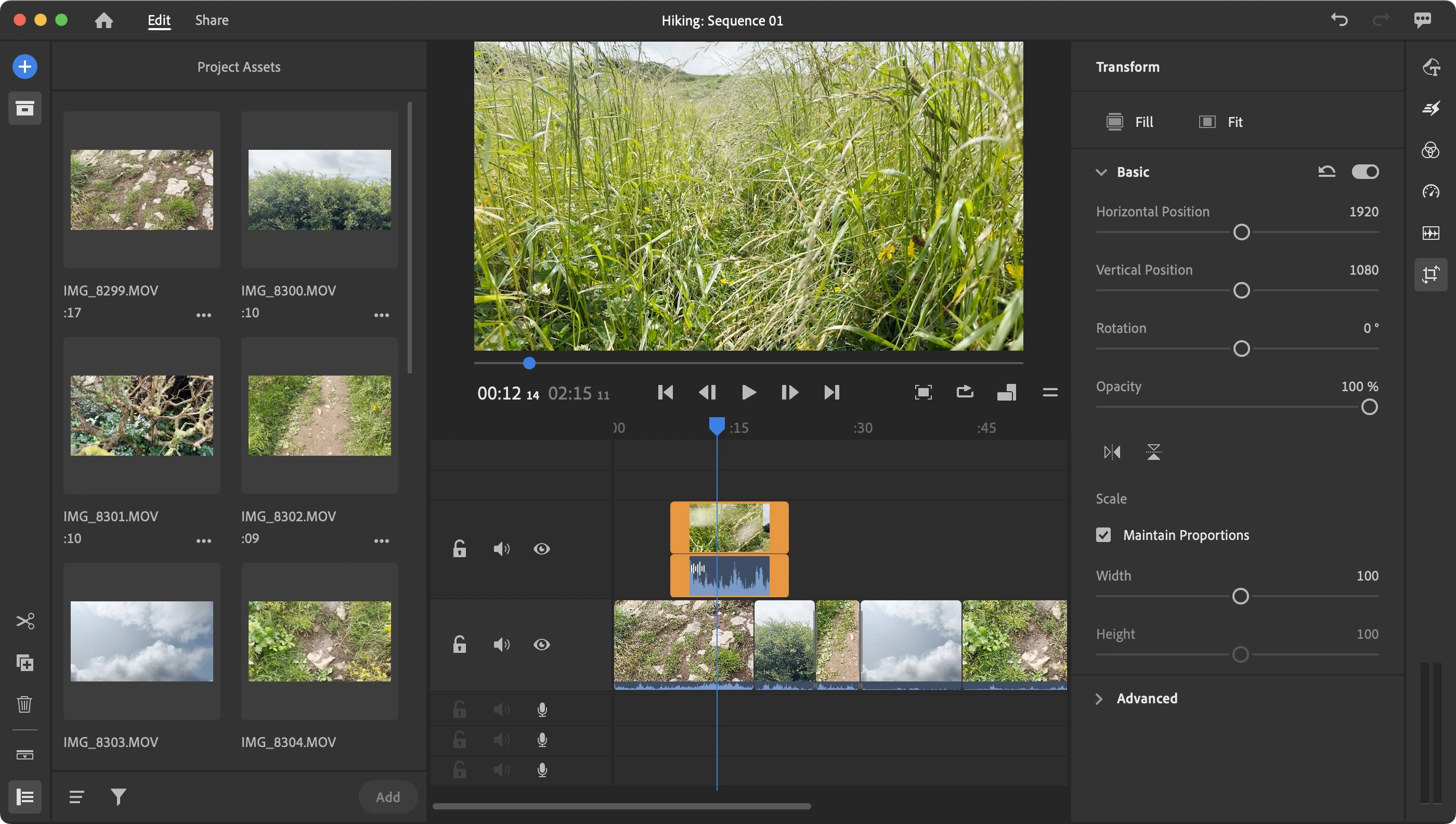
Operating as a standalone desktop application rather than a lightweight browser-only tool allows the software to utilize local hardware acceleration for smoother timeline playback and faster rendering speeds. Editors working with high-resolution source media—such as heavy 4K files from modern cameras—benefit significantly from the dedicated desktop environment. This local processing power handles multiple simultaneous video and audio tracks more effectively than cloud-dependent alternatives. The interface deliberately eliminates complex video routing and heavy technical menus, replacing them with a straightforward magnetic-style timeline that snaps overlapping clips together automatically, keeping the focus on the storytelling process.
By integrating directly with the broader professional creative ecosystem, the application provides a practical entry point into advanced video workflows. Users can tap into extensive libraries of royalty-free audio, apply sophisticated color grading presets, and utilize motion graphics templates without needing any formal background in animation. The software is built to scale alongside the user; when a project outgrows the streamlined toolset, the entire timeline can be exported directly into advanced production environments for final polish. This direct upgrade path makes it a uniquely reliable bridge for growing channels, freelance videographers, and small digital marketing teams who need high output volume today.
Key Features
- Magnetic Timeline Editing: Arrange clips using an intuitive click-and-drag interface that supports up to four separate video tracks and three dedicated audio tracks without leaving awkward blank gaps. The timeline snaps media into place, reducing the manual precision required for basic jump cuts, b-roll sequencing, and fast-paced vlog editing.
- Motion Graphics Templates: Access a library of built-in, professionally designed title sequences, lower thirds, and animated overlays natively within the application workspace. These editable templates allow users to change text inputs, swap fonts, and adjust brand colors directly from the right-hand properties panel without needing to launch a separate animation program.
- Advanced Audio Adjustment: Utilize integrated sound balancing tools powered by automated algorithms to quickly mix dialogue tracks with background music. The intelligent auto-ducking feature automatically lowers the volume of background music tracks whenever human speech is detected on the primary audio track, ensuring that vocal narration remains crisp and intelligible.
- Custom Color Presets: Apply cinematic color grading using one-click aesthetic filters, or take manual control to adjust exposure, contrast, highlights, shadows, and color temperature through the dedicated color panel. The application includes a wide variety of built-in presets designed specifically to mimic classic film stocks, fix poor lighting conditions, and establish consistent visual branding.
- Auto Reframe Workflow: Keep the primary subject perfectly centered when changing video aspect ratios for different social media distribution platforms. The automated reframing tool actively analyzes the movement within the footage and tracks the focal point when switching a standard horizontal widescreen sequence into a vertical or square format.
- Direct Social Export: Connect the application to supported social media accounts to directly publish finished videos without requiring tedious intermediate rendering steps. The export panel includes native options to add custom thumbnails, write video descriptions, and schedule live posts, drastically cutting down the time spent navigating individual platform upload pages.
How to Install Adobe Premiere Rush on Windows
- Navigate to the official vendor website to download the Creative Cloud desktop installer package, which acts as the central hub for managing the installation.
- Launch the downloaded executable file from your local downloads folder and sign in with an active account, or create a brand new profile to proceed with the initial setup.
- Follow the on-screen prompts to install the central desktop manager application, ensuring you grant the necessary system permissions for it to modify local directories.
- Once the manager environment is running, navigate to the main application catalog and locate the specific video editing software in the complete list of available tools.
- Click the designated install button next to the application name to begin downloading the core program files, which will route to your default Windows system drive.
- Wait for the download and extraction process to fully complete; the software strictly requires an active and stable internet connection to verify your account entitlement during this phase.
- Launch the application directly from the Start menu, verify your account credentials on the initial splash screen, and follow the interactive first-run tutorial to familiarize yourself with the workspace and create your first project.
Adobe Premiere Rush Free vs. Paid
The software operates under an accessible freemium model, providing a capable Starter plan for users operating with a basic registered account. This permanent free tier grants substantial access to the core editing toolset, allowing creators to assemble unlimited projects, utilize basic motion graphics templates, and export finished videos in standard high-definition resolutions without adding a mandatory vendor watermark. This makes it a strong choice for students and hobbyists who need reliable trimming and sequencing tools. However, the free tier restricts access to premium audio libraries, advanced synchronization features, and intelligent background processing tools.
For users needing expanded creative capabilities, the application is available through a standalone premium subscription, typically bundled as the Express plan. Upgrading unlocks the complete library of advanced titles, premium overlays, and complex animated graphics that elevate the production value of digital content. The paid subscription also enables critical automated tools like the audio auto-ducking feature, saving hours of manual sound mixing. Subscribing provides an expansion to cloud storage capacity, ensuring that high-resolution project files can be smoothly synced across multiple remote workstations without relying on external hard drives.
Alternatively, the software is fully integrated and included within the broader All Apps subscription and the dedicated professional single-app plan. Users who already subscribe to these industry-standard professional tiers automatically inherit all premium features within the streamlined editor at no additional cost. This licensing structure positions the application as an ideal supplementary tool for professional editors who need to assemble quick daily edits or review rough cuts on a secondary Windows device before moving the timeline into their primary high-end editing suite.
Adobe Premiere Rush vs. CapCut vs. Clipchamp
CapCut dominates the rapid social media editing space by offering an aggressive and modern feature set that includes accurate auto-captions, trending visual effects, and direct integration with native short-form social platforms. The desktop client relies heavily on a template-driven approach, making it exceptionally fast for producing short-form viral content that matches current internet trends. However, its timeline management can feel restrictive for longer narrative formats, and certain advanced export settings are strictly locked behind its premium subscription tier.
Clipchamp provides an accessible, browser-first approach that is also conveniently packaged as a default application in modern Windows operating system environments. It excels at quick corporate presentations, basic trims, and simple screen recording tasks, making it ideal for office workers, educators, and casual users who want to avoid large software installations. Despite its convenience, Clipchamp struggles significantly with heavy multitrack projects and fundamentally lacks the sophisticated color correction and intelligent audio mastering tools found in dedicated local software.
Adobe Premiere Rush remains the distinctly stronger choice for users who want a structured, professional workflow that effectively bridges the gap between basic consumer trimming and high-end broadcast editing. Its clearly superior audio ducking capabilities, customizable motion graphics templates, and direct project migration into professional grading environments make it the ideal desktop client. It perfectly serves ambitious creators who are rapidly outgrowing basic consumer tools but do not yet need the overwhelming interface of a complex production suite.
Common Issues and Fixes
- Timeline playback lags or stutters significantly. This performance bottleneck usually happens when working with heavily compressed 4K files or heavy cinematic formats on older Windows machines that lack sufficient processing power. To immediately improve playback smoothness, navigate to the application preferences menu and enable sequence pre-rendering, or actively transcode your raw source footage into a less compressed, edit-friendly proxy format before importing it into the timeline.
- Export process fails with a sudden rendering error. Export failures frequently occur when an outdated or corrupted graphics driver directly conflicts with the application's hardware acceleration protocols. Open your system device manager to update your display adapter drivers to the latest studio drivers, or temporarily disable hardware-accelerated encoding in the final export settings menu to force a more stable software-only render.
- Premium subscription features appear completely locked. The desktop application sometimes fails to recognize an active premium subscription plan if the background connection to the central account manager is interrupted by a firewall or network drop. To resolve this entitlement issue, close the editor entirely, open the central desktop manager, sign out of your profile completely, restart the manager, and sign back in to force a fresh synchronization of your license data.
- Primary audio track goes completely silent during playback. Sudden audio drops can happen if the editing software loses its exclusive connection to the default Windows audio playback device, especially when switching between wired headphones and wireless speakers. Open the application preferences window, navigate directly to the Audio Hardware tab, and ensure your current output speakers are explicitly selected from the drop-down menu rather than relying on the dynamic system default setting.
- Imported media displays as a solid green screen. This visual corruption typically triggers when the software attempts to decode variable frame rate footage captured by specific smartphone camera applications. To bypass this decoding failure, run the problematic video clips through an external media converter to establish a constant frame rate, and then re-import the newly stabilized files into your active project bin.
Version 2.10 — February 2024
- Improved overall application stability and performance for smoother playback and editing.
- Fixed various bugs and issues reported by users to enhance reliability.
- Optimized export processes for faster video rendering on supported devices.
- Refined timeline interactions to prevent occasional lags during complex edits.