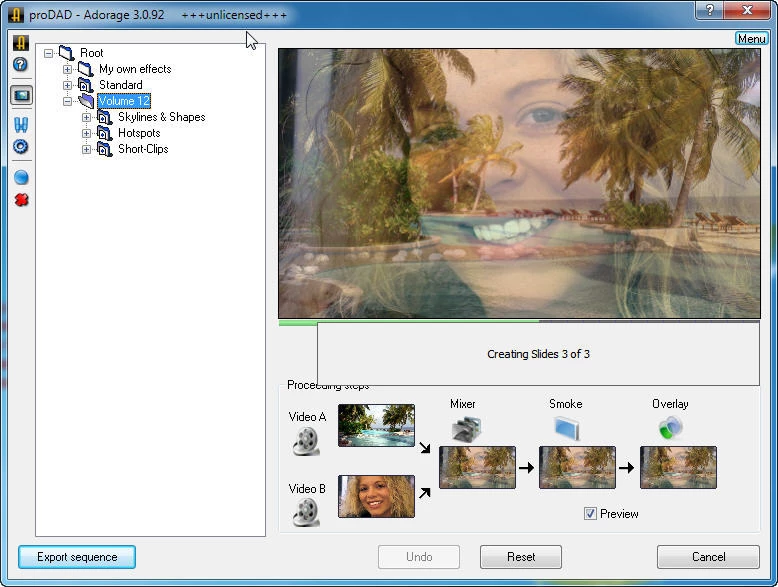
proDAD Adorage serves as a vast, specialized visual effects and transition library designed strictly for Windows-based video editing environments. With a catalog containing over 17,000 distinct preset animations, it targets event videographers, wedding filmmakers, and travel documentarians who need to stylize footage quickly. Instead of relying on the basic crossfades and simple wipes included by default in most editing software, users gain access to a massive database of three-dimensional objects, picture-in-picture layouts, split-screen designs, and thematic framing tools. The tool operates either as an independent desktop application for browsing assets or as a direct plugin integrated into the timeline of major non-linear editors like Premiere Pro, Vegas Pro, and EDIUS.
Editing long-form event coverage often requires dividing a multi-hour project into digestible chapters. A wedding video might transition from morning preparations to the ceremony, and then to the reception. Building a complex transition with floating particles, lighting effects, and alpha-channeled objects from scratch in a node-based compositing tool takes hours of manual keyframing. This software eliminates that manual labor. An editor simply drops the base plugin onto the cut between two video clips, opens the control panel, and selects a pre-rendered animation. The software calculates the alpha transparency and applies the wipe instantly, allowing the editor to process dozens of complex scene changes in a single afternoon without writing any expression code or adjusting motion graphs.
Desktop software remains strictly necessary for this specific type of high-bitrate media work. Browser-based video editors simply cannot handle the sheer volume of data required to composite multi-track high-definition and 4K video files locally. Web tools struggle with latency, storage limits, and rendering bottlenecks. By installing directly onto the local drive, this library utilizes the computer’s local processor and graphics hardware to render transitions in real-time. Editors do not have to upload massive raw camera files to a cloud server, and they do not have to maintain a constant internet connection to access the visual effects. The entire asset database sits on the local disk, ensuring instant retrieval and frame-accurate playback during the editing process. Furthermore, operating locally ensures that sensitive client footage, such as private family events or unreleased corporate material, never leaves the isolated studio environment.
Key Features
- Direct Timeline Integration: Binds natively into Adobe Premiere Pro, Magix Vegas Pro, Grass Valley EDIUS, and CyberLink PowerDirector. Users do not need to export clips to a third-party application; they simply drag the Adorage transition from the host editor's native effects bin onto the timeline, click the custom properties button, and select the specific animation from the pop-up library window.
- Advanced Picture-in-Picture Compositing: Generates complex multi-screen layouts with pre-configured borders, shadows, and motion paths. Editors can display up to two video tracks simultaneously within decorative frames or geometric splits, eliminating the need to manually calculate scale, rotation, and coordinate geometry for each individual video layer on the timeline.
- Thematic Object Transitions: Includes thousands of pre-rendered models like wedding rings, light flashes, and geometric shapes that act as wipes between two separate video clips. The alpha channels and lighting effects are pre-calculated by the developer, ensuring fast timeline playback without requiring the user to adjust wireframes or material textures inside a separate 3D modeling program.
- Global Travel and Map Visuals: Features hundreds of high-definition country flags, continent outlines, and globe animations designed specifically for documentary and vacation footage. Travel vloggers use these highly specific geographic filters to transition visually between different filming locations without building map animations from scratch or buying individual stock footage clips.
- Hardware-Accelerated Rendering: Utilizes local multi-core processor architecture to calculate and render the transition frames quickly. This localized processing prevents the host editing application from locking up or crashing during timeline scrubbing, even when multiple visual filters are stacked on top of a single high-definition video clip in the sequence.
- Standalone Catalog Environment: Provides an independent executable program that lets editors preview the entire massive effects catalog without launching their heavy video editing software. Users can search by category, watch the transition animations loop in a preview window, and write down the specific preset names before applying them to the final cut in their primary editor.
How to Install proDAD Adorage on Windows
- Download the primary Windows installer package from the official proDAD repository or an authorized software distributor and save the file to a local storage drive.
- Execute the setup file and approve the Windows User Account Control prompt to allow the installer to write data to system directories.
- Accept the end-user license agreement and confirm the installation path, leaving the default Program Files directory intact to ensure that host video editors can locate the plugin files later.
- During the setup wizard, monitor the plugin detection screen carefully. The installer scans the local registry for supported video editors, such as Premiere Pro or Vegas Pro, and automatically checks the appropriate boxes to bind the integration files.
- Finish the file extraction process, which copies the vast library of preset textures, models, and transition logic onto the local hard disk.
- Launch your preferred video editing application, open the standard video transitions panel, and locate the newly created proDAD directory.
- Drag the default Adorage crossfade onto the timeline between two clips, click the custom settings button in your editor's effect control window, and enter your purchased license code to remove the demonstration watermark and authorize the software for final export.
proDAD Adorage Free vs. Paid
proDAD Adorage operates purely as commercial software built around a traditional perpetual licensing model. There is no fully free tier available for permanent use, though the developer does provide a demonstration version. The trial allows editors to test the transitions, verify timeline performance, and explore the interface directly within their own projects. However, the trial software places a prominent, visible grid watermark over the video output, rendering it strictly suitable for technical evaluation rather than final client delivery.
To remove the watermark and authorize the software for commercial use, editors must purchase a license. The developer structures the product into specific modular volumes, such as Volume 10 for HD Video Effects or Volume 13 for Festival and Celebration FX. Each individual volume typically costs between forty and fifty dollars. For professional editors who require the entire database, the developer offers an All-in-One package that bundles Volumes 1 through 13. This master bundle usually retails around two hundred dollars and provides a single activation process for the complete library.
The pricing strategy strictly avoids mandatory recurring subscriptions. Once a user buys a specific volume or the All-in-One package, they own that specific build indefinitely. Minor compatibility updates and plugin stability patches are generally provided at no extra cost, though upgrading to a brand-new major volume release in the future requires a new purchase. The software operates entirely offline once installed and registered, meaning editors working on disconnected studio workstations do not face forced cloud account checks or timed validation lockouts.
proDAD Adorage vs. Boris FX Continuum vs. NewBlueFX Transitions
Boris FX Continuum is a heavy, broadcast-tier visual effects suite aimed at compositors and high-end motion graphics artists. It includes advanced planar tracking, chroma keying, and deep particle generation, making it heavily reliant on workstation hardware. Editors should choose Continuum for television broadcast finishing, complex text generation, or deep, pixel-level visual manipulation. Conversely, editors should choose proDAD Adorage when the primary need is dropping hundreds of pre-made, stylized thematic transitions into event videos without building the effects from scratch or managing complex node graphs.
NewBlueFX Transitions provides a modern, tightly integrated set of light leaks, geometric wipes, and three-dimensional transitions that lean heavily into contemporary corporate and social media aesthetics. NewBlueFX utilizes a unified application manager and frequently relies on a subscription model for access to its entire plugin library. It works beautifully for sleek, minimalist commercial edits where editors want subtle, fast-paced motion graphics. However, proDAD Adorage offers a stronger workflow for editors who specifically want a massive, one-time-purchase library filled with highly detailed event motifs, travel maps, or holiday animations that minimalist plugins ignore.
Ultimately, proDAD Adorage remains the better fit for high-volume event, wedding, and travel videographers who require thousands of highly specific, thematic overlays. While both Boris FX and NewBlueFX serve corporate or broadcast markets that tolerate subscription fees and require technical compositing tools, Adorage prioritizes sheer volume and immediate application. Its strict perpetual licensing and offline nature make it an economical, long-term asset for independent studios that need to turn around long-form documentary cuts quickly.
Common Issues and Fixes
- Plugin fails to appear in the video editor. This usually happens if the non-linear editor was updated or reinstalled after the Adorage installation, breaking the local file path. The fix is to run the standalone Adorage updater tool or reinstall the software entirely, which forces the installer to rescan the system and place the correct plugin files into the new host application directories.
- Exported video contains a large grid watermark. The software is currently running in trial mode because the license information was not applied or was reset during a machine transfer. Open the timeline, select the Adorage transition, click the custom properties button to open the main interface, and manually input the purchased license string to authorize the machine for clean exports.
- Playback stutters heavily when applying multiple particle transitions. High-definition object transitions consume significant system memory and processor cycles, causing the timeline to lag on older machines. The fix is to lower the timeline preview resolution within the host video editor or pre-render the transition segment locally before attempting to scrub through the complex visual effect.
- Interface glitches or black boxes appear on older operating systems. On environments like Windows 7, the operating system's visual styling can conflict with the plugin window rendering. Navigate to the Windows advanced system settings and disable the Desktop Composition mode to restore proper window rendering within the effect properties panel.
Version 3.0.135 — September 2025
- Expanded compatibility with the latest Windows 11 updates and recent 64-bit NLE host applications (such as Adobe Premiere Pro, EDIUS, and Vegas Pro).
- Optimized the internal rendering engine to deliver faster processing speeds for high-definition and 4K video projects.
- Improved the management and integration of the "All-in-One" library, ensuring smoother access to the complete collection of over 17,000 filters and transitions (including the Worldwide Effects package).
- Fixed minor stability issues that could occur during plugin initialization or when applying complex split-screen effects in specific editing environments.