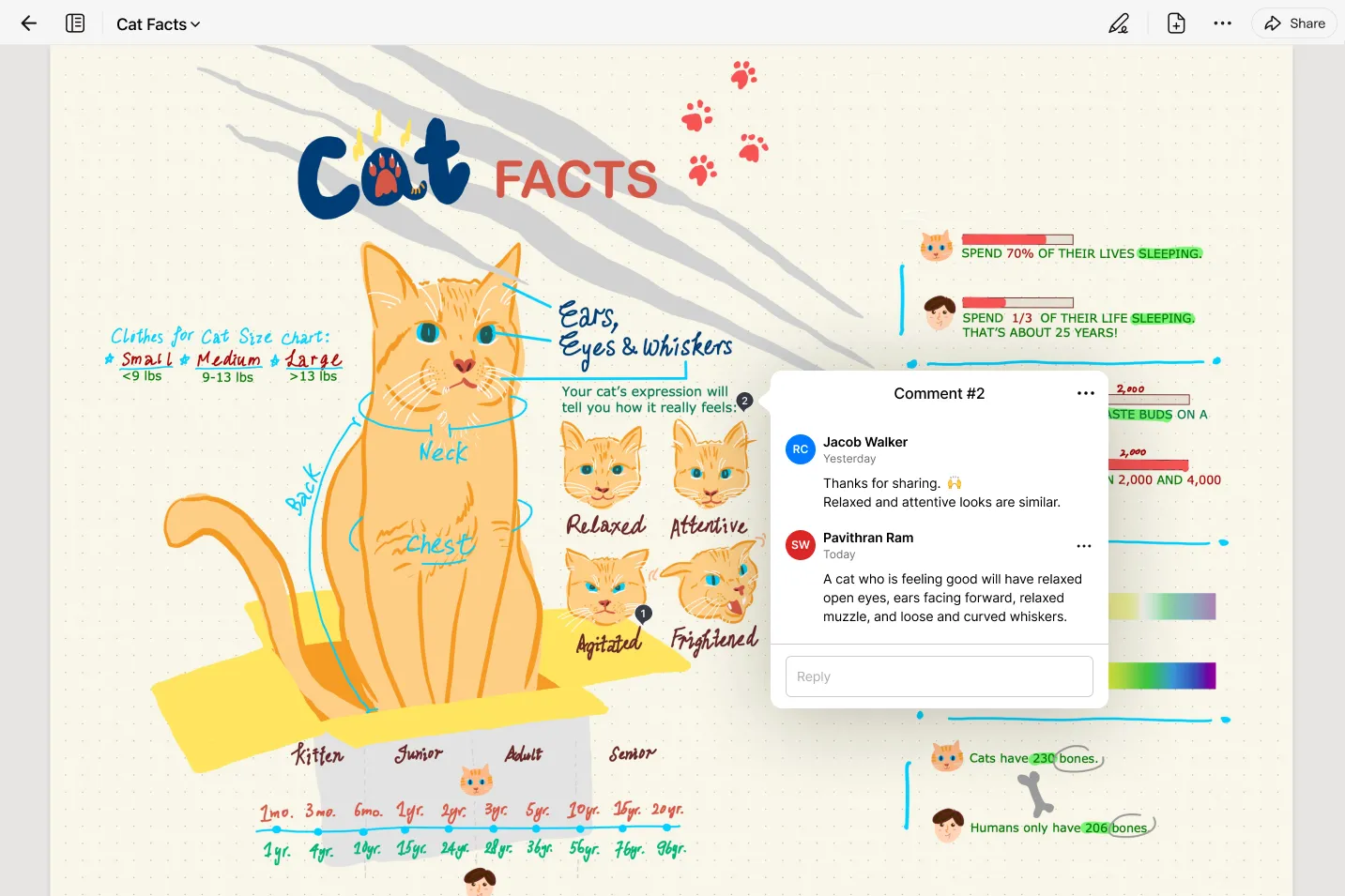
Goodnotes for Windows transforms a standard desktop computer or 2-in-1 device into a dedicated digital paper environment, built specifically to capture handwritten notes, complex diagrams, and annotated documents. For students capturing lecture material, professionals mapping out project timelines, or creatives sketching initial concepts, the software provides a tactile, visually organized workspace that mimics physical notebooks. Rather than relying on rigid text boxes or clunky formatting menus, users interact directly with a blank canvas using an external pen tablet or a built-in touchscreen stylus. This direct input method bridges the gap between the flexibility of real paper and the organization of a digital file system.
While many text editors and documentation tools focus on keyboard input, this application prioritizes the stylus experience. Users manage their work through a visual library of notebooks, each customizable with specific cover designs and interior paper styles. When working on a Windows 10 or Windows 11 machine, the interface scales neatly across large monitors or portable touchscreen displays, allowing for precise control over ink weight, color, and placement. The software handles large imported documents, enabling users to write directly on top of slides, reports, and digital books without altering the original text structure. A dedicated zoom window feature magnifies a specific part of the page, making it much easier to write neatly and precisely, even if using a stylus on a smaller tablet screen.
Choosing a dedicated handwriting application over a generic note tool fundamentally changes how information is processed and retained. By utilizing spatial memory, visual cues, and freeform drawing, individuals can structure their thoughts naturally. The application syncs this visual data across connected accounts, ensuring that a quick sketch made on a portable tablet is immediately accessible on a desktop workstation. This combination of fluid input, structured organization, and continuous cloud access creates a highly efficient environment for anyone who thinks better with a pen in hand.
Key Features
- Feature Name: Custom Pen Profiles. The application includes three distinct writing tools: a Fountain Pen, a Ball Pen, and a Brush Pen. The Fountain and Brush options respond dynamically to physical pressure applied to the stylus, altering the thickness of the stroke based on user input. Users can adjust dedicated sliders for tip sharpness and pressure sensitivity to match their specific handwriting style or drawing technique.
- Feature Name: Notebook Templates and Marketplace. Creating a new notebook presents users with over fifty standard paper templates, including Cornell layouts, graph grids, dotted grids, and standard ruled lines. The built-in marketplace expands this selection, offering specialized planner layouts, aesthetic covers, and custom page designs. This allows users to match the digital paper format directly to the task, whether they are graphing mathematical equations or writing a daily journal.
- Feature Name: Draw and Hold Auto-Shapes. Creating geometric figures does not require navigating through menus or inserting pre-drawn clip art. Users simply draw a rough circle, square, triangle, or line, and hold the stylus tip against the screen for a second at the end of the stroke. The software automatically snaps the rough ink into a mathematically perfect shape, accelerating the creation of charts and diagrams.
- Feature Name: Lasso Selection Tool. Editing handwritten ink is faster than working with physical paper thanks to the Lasso Tool. By drawing a loop around any written word, custom drawing, or imported image, users can detach that specific element from the underlying page. The selected item can then be moved to a different line, scaled up or down to fit a tight margin, copied to another notebook entirely, or completely recolored without affecting the surrounding notes or the background template.
- Feature Name: Audio Recording and Transcription. During lectures or meetings, users can activate the built-in microphone tool to record room audio while simultaneously taking notes. The application synchronizes the audio playback with the creation of the ink strokes, so tapping on a specific handwritten word jumps the audio track to the exact moment that word was written. Advanced computational features also provide live transcription of the spoken words.
- Feature Name: Real-Time Cloud Collaboration. By generating a secure sharing link, users can invite colleagues or classmates to view and edit a notebook simultaneously. When multiple people access the shared document, their ink strokes and textual additions appear on the canvas in real time. This function requires an active internet connection and is managed through the user's primary account sign-in.
How to Install Goodnotes for Windows on Windows
- Download the official Windows installer package directly from the vendor's website or retrieve it through the Microsoft Store application.
- Locate the downloaded installation file in your default downloads folder and double-click it to initiate the setup wizard.
- When the User Account Control prompt appears, grant the necessary administrative permissions to allow the software to write files to your local storage.
- Follow the on-screen prompts to confirm the installation directory, which defaults to your primary system drive under the standard application files folder. You can opt to create a desktop shortcut during this phase for quicker access.
- Once the installation completes, launch the application from the Start menu or the newly created desktop shortcut.
- On the first run, the application will require you to sign in using a verified Google, Microsoft, or Apple account to authenticate the software and initialize the cloud syncing framework.
- Review the initial setup screens, which may ask for system permissions to access your microphone for audio recording features, and create your first customized notebook to reach the main dashboard.
Goodnotes for Windows Free vs. Paid
The application operates on a freemium model, providing a basic tier at no cost with strict limitations on capacity and export capabilities. Users on the free tier can create and manage a maximum of three notebooks in their library. While they have access to the standard pen tools, basic shapes, and default templates, any documents exported as PDFs will feature a visible watermark generated by the application. Additionally, the free tier limits the file size of imported documents and restricts access to advanced computational features, keeping the application confined to basic local note-taking rather than massive document management.
Upgrading to the standard paid subscription, priced at $6.99 annually, removes the primary workflow bottlenecks. This tier grants the ability to create an unlimited number of notebooks and increases the document import size limit to 250GB, accommodating large reference textbooks or extensive slide decks. Exported files no longer contain watermarks, ensuring professional delivery of marked-up documents. Paid users also gain subscriber-special access to the internal marketplace for premium templates and covers.
For users who require cross-platform access and enhanced computational tools, the Pro subscription is available for $9.99 annually. This top-tier plan extends access beyond the PC, allowing users to log into the same account on mobile tablets and web browsers while maintaining synchronized notes. The Pro tier also unlocks advanced capabilities, including tools for solving handwritten equations and extended credits for audio transcription. There is no perpetual, one-time purchase option available for the PC application; maintaining the premium features requires an ongoing annual subscription.
Goodnotes for Windows vs. Microsoft OneNote vs. Xournal++
Microsoft OneNote provides a distinctly different approach by utilizing an infinite digital canvas rather than fixed-size pages. It is deeply embedded in the Microsoft ecosystem, relying on OneDrive for storage and offering full feature access completely free of charge. It features tools like ink-to-text conversion and audio recording natively. Users should choose OneNote if they rely heavily on typing text alongside basic ink annotations, prefer a limitless scrolling workspace to organize sprawling research, and want native integration with other Office applications. However, OneNote lacks the structured, aesthetic notebook feel and specialized paper templates that traditional handwriting enthusiasts prefer.
Xournal++ is a free, open-source application designed strictly for desktop environments, heavily favoring PDF annotation and functional ink recording without requiring an account. It stores all files locally, ensuring total privacy and independence from cloud subscriptions or forced updates. Users should choose Xournal++ if they want a lightweight, offline-only tool to mark up academic papers or fill out forms without paying a recurring fee. The interface is highly technical and dense, lacking the polished template marketplace, audio synchronization, and visual library organization found in commercial alternatives.
Goodnotes for Windows is the better fit for users who want a highly visual, page-based organizational system that directly mimics physical notebooks. While it requires an annual subscription for serious use and mandates an online account login, its highly responsive pressure sensitivity controls, specialized educational templates, and intuitive Lasso manipulation make it a more natural environment for dedicated stylus users. It excels when deployed on a touchscreen Windows tablet or paired with an external drawing board, offering a focused, distraction-free environment specifically tailored for the act of handwriting rather than general data collection.
Common Issues and Fixes
- Problem description: Pen pressure fails to alter stroke thickness. Verify that you have selected the Fountain Pen or the Brush Pen from the top toolbar, as the standard Ball Pen is designed to ignore pressure data. Once the correct tool is selected, tap the tool icon again to open its settings and ensure the pressure sensitivity slider is moved above 50%.
- Problem description: The canvas registers accidental marks from your resting hand. Open the More menu represented by the three dots in the top right corner, and select Stylus & Palm Rejection. Adjust the sensitivity setting to Low or Medium; setting it to High can sometimes cause the software to ignore thin stylus tips along with your palm.
- Problem description: Exported documents contain a visible application logo. This is a deliberate restriction applied to the free tier of the software. To remove the watermark from exported PDFs or printed pages, users must upgrade to the paid annual subscription tier.
- Problem description: The application refuses to synchronize notes with mobile devices. Ensure that you are logged in using the exact same authentication method (Google, Microsoft, or Apple account) across all devices. Keep in mind that cross-syncing infrastructure relies on the cloud, so check your firewall settings to ensure the application is allowed to communicate with external servers.
- Problem description: The automatic shape tool triggers when writing normal text. This occurs when you pause your stylus on the screen at the end of a regular letter stroke. To stop this behavior, tap the Pen Tool icon to open the pop-up options and disable the Draw and Hold toggle.
Version Goodnotes 6 (Latest Stable) — December 2025
Added:
- AI Math Assistance: Now detects equations and helps correct errors directly on the canvas.
- Scribble to Erase: New gesture support to quickly remove text by scribbling over it.
- New Templates: Added 2026 digital planners and seasonal stickers to the Marketplace.
Improved:
- Synchronization: Faster sync intervals between Windows and iOS devices.
- Rendering Engine: Smoother ink flow and reduced latency for Surface Pen users.
- UI scaling: Better adaptation for high-DPI Windows displays.
Fixed:
- Resolved an issue where large PDF imports would occasionally freeze the app.
- Fixed a login persistence bug requiring frequent re-authentication.
- Corrected text alignment issues when converting handwriting to typed text.
Security:
- Updated library dependencies to address minor security vulnerabilities.
- Enhanced data encryption protocols for notebook synchronization.