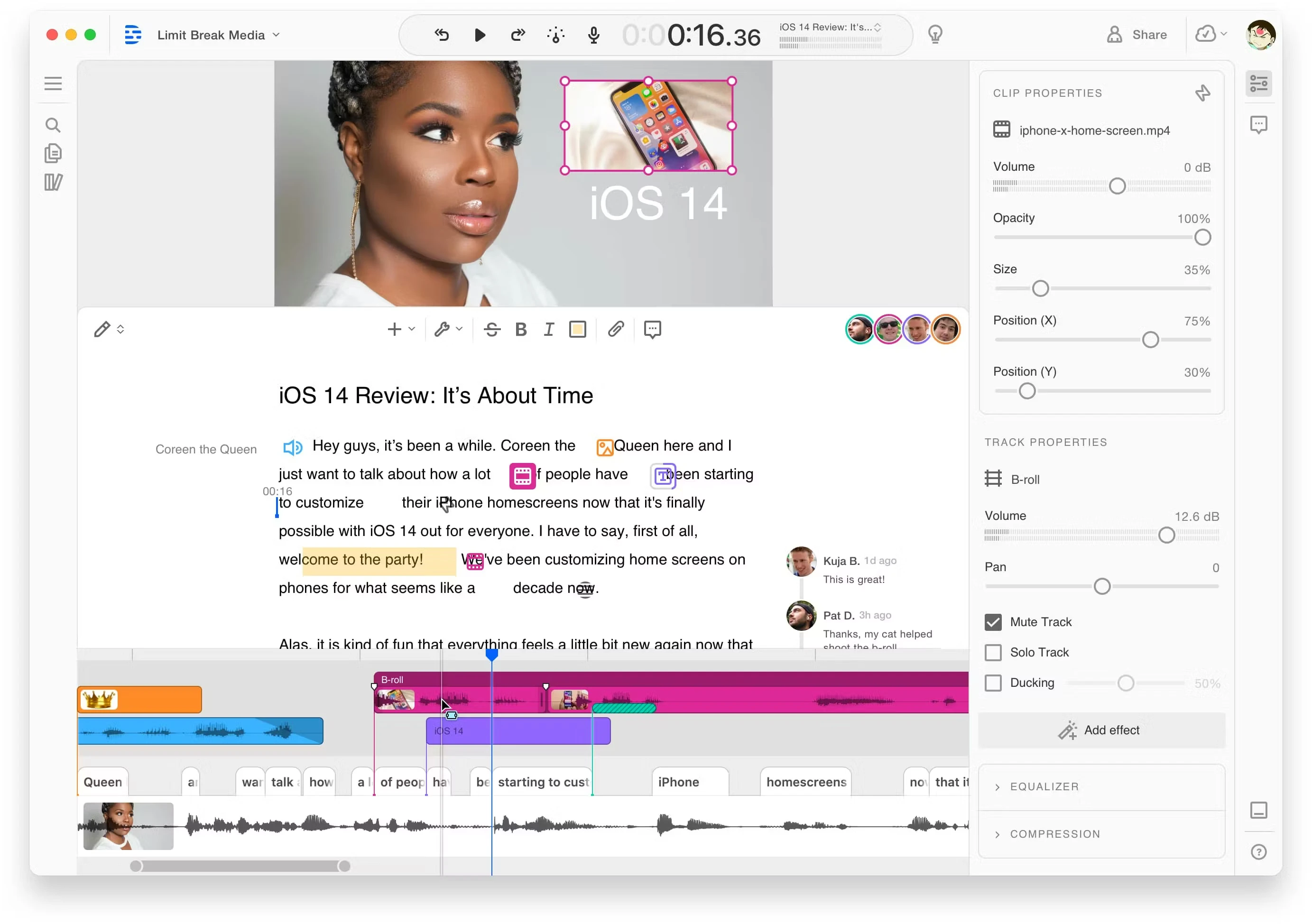
Descript is an audio and video editing application that operates differently than traditional media production tools by functioning like a word processor. Instead of forcing editors to scrub through a timeline to locate specific soundbites, the software automatically transcribes imported media files and links the text directly to the underlying audio and video. When an editor highlights a sentence in the generated transcript and presses the delete key, the application instantly removes the corresponding media segment from the project. This text-centric approach allows creators to quickly assemble rough cuts, rearrange interview questions, and trim out mistakes by simply copying and pasting paragraphs within the script interface.
The application specifically targets podcasters, video educators, internal corporate communications teams, and interviewers who process high volumes of spoken-word content. For these users, traditional non-linear editors often introduce unnecessary friction, requiring precise playhead positioning and manual razor-tool slicing to remove pauses or stutters. This software automates the transcription phase upon file import, assigns speaker labels to different voices, and maps every word to a specific timecode. As a result, content creators can edit a multi-camera podcast or a lengthy webinar recording by reading the dialogue rather than listening to the entire recording in real time. The focus remains strictly on narrative structure, allowing users to sculpt their story entirely through the text editor before refining the final pacing.
While the developer provides a browser-based version, the Windows desktop application remains the necessary choice for stable, heavy-duty production work. The local desktop environment grants the application direct access to local file systems, allowing for faster ingestion of large raw video files without waiting for a cloud upload to finish first. Furthermore, the desktop client manages local caching, ensuring smooth playback and scrubbing of high-resolution video that might otherwise cause a web browser to stall or consume excessive system memory. The native application also provides a much more reliable connection to local hardware, ensuring that external USB microphones, audio interfaces, and webcams remain synchronized when utilizing the built-in screen recording tools for local capture.
Key Features
- Text-Based Editing: Modifying the auto-generated transcript directly dictates the arrangement of the underlying media. Editors highlight words or paragraphs, press delete, and the corresponding audio and video segments vanish from the playback sequence. The interface supports standard word processing commands, allowing users to cut a paragraph and paste it elsewhere to restructure the narrative flow entirely.
- Studio Sound: This audio restoration filter acts as an aggressive noise gate, equalizer, and room echo remover tied to a single intensity slider. It applies an acoustic enhancement model that isolates human speech from background interference, making budget microphones or unconditioned recording rooms sound closer to treated studio environments. Editors can dial back the intensity percentage if the isolation effect sounds too artificial.
- Overdub Voice Generation: Editors can generate synthetic speech based on their own uploaded voice profile to fix minor recording errors. By typing new words directly into the transcript, the software synthesizes the audio to correct misspoken phrases without forcing the creator to record the line again in a physical studio. This tool requires the user to read an explicit consent script to prevent unauthorized voice generation of other speakers.
- Filler Word Removal: A dedicated search interface scans the entire transcript for common verbal crutches such as repeated stuttered words or hesitation sounds. Users review these instances in a dedicated side panel and can choose to remove them globally with one click or review them individually. The software allows the editor to delete both the text and the audio, or simply replace the audio with a silent gap to maintain natural room tone.
- Integrated Screen Recording: The application includes a localized capture tool to record the computer desktop, a connected webcam feed, and microphone audio simultaneously. The resulting capture immediately opens as a new transcribed project ready for text-based cutting, completely bypassing the need for third-party screen capture software. The recorder uploads files in the background while capturing, meaning editing can begin almost immediately after hitting stop.
- Word Boundaries and Timeline: Although the primary workspace is text-centric, a traditional multitrack timeline sits at the bottom of the interface for fine-tuning. Editors can drag the left or right edges of specific words in the timeline to adjust the exact frame where a cut occurs. This hybrid approach allows users to manage background music tracks, adjust audio crossfades, and precisely trim clip boundaries when the automated text edit feels too abrupt.
How to Install Descript on Windows
- Download the official Descript Windows installer package directly from the vendor's website to your local storage drive.
- Launch the downloaded executable file to initiate the setup process; ensure your computer maintains a stable internet connection because the initial download is merely a lightweight bootstrapper client.
- Wait for the installer to download the full application payload in the background, which may take anywhere from a few seconds to several minutes depending on your network bandwidth.
- Allow the software to finish unpacking; the setup process writes the application files directly to your Windows user directory and does not prompt for a custom installation path or drive letter.
- Watch for the application to launch automatically once the local files are successfully written, at which point it will require external authentication to proceed.
- Interact with the new browser tab that automatically opens, prompting you to log in to an existing account or register a new user profile on the platform.
- Return to the desktop application interface after the browser hands the authentication token back to the local client, allowing you to access the dashboard and import your first local media file.
Descript Free vs. Paid
Descript operates on a freemium business model tied to a mandatory cloud account, meaning all users must register to access the interface. The Free tier acts primarily as an evaluation tool, allowing prospective buyers to test the text-based editing workflow with a strict allowance of one hour of transcription per month. Projects exported on this tier are artificially capped at a 720p maximum resolution and include a permanent vendor watermark burned into the video. This makes the free version suitable for exploring the user interface, testing the accuracy of the transcription engine, and verifying hardware compatibility, but it is not viable for publishing final, professional content.
To remove the watermark and increase monthly processing limits, users must upgrade to one of the paid subscription tiers. The Hobbyist plan is the entry-level paid option, providing a modest increase to 10 hours of monthly transcription and bumping the export resolution cap to 1080p. For serious video producers, the Creator tier expands the transcription allowance to 30 hours per month and unlocks full 4K video exports without any branding restrictions. These paid tiers also allocate specific monthly limits for AI functions, meaning heavy users of the voice cloning and audio enhancement tools must monitor their usage to avoid hitting artificial software caps.
For larger editorial teams and corporate environments, the Business and Enterprise tiers introduce shared workspaces, multi-user permissions, and centralized brand asset libraries. Multiple editors can collaborate within the same project simultaneously, much like working in a shared online document. It is critical to understand that the vendor relies entirely on recurring subscription payments. There is no perpetual, one-time purchase license available; if a user cancels their subscription, their account reverts to the restricted free tier, disabling high-resolution exports and advanced audio processing tools immediately.
Descript vs. CapCut vs. Adobe Premiere Pro
CapCut targets creators focused on rapid, visual-heavy edits optimized for short-form vertical platforms. It features a traditional, track-based timeline loaded with an enormous library of trending visual effects, transitions, auto-captions, and sticker overlays. The interface is specifically designed to output fast-paced video quickly, prioritizing flashy visual engagement over deep structural narrative editing. Users looking to assemble quick montage sequences, sync cuts to a music beat, or apply aggressive visual filters will find CapCut significantly more attuned to those specific social media formats.
Adobe Premiere Pro operates as a professional-grade non-linear editor built for complex visual storytelling, strict color grading, and intricate multi-layered compositing. It requires editors to navigate a technical timeline, manually manage media bins, and understand professional codec workflows. The software provides granular control over every single frame and audio channel, making it the expected standard for cinematic projects, television production, and heavy documentary workflows where editors need strict control over motion graphics, masking, and third-party audio plugins.
Descript provides a much more efficient workflow when the project revolves around the spoken word, such as long-form podcasts, unscripted interviews, or talking-head educational tutorials. By allowing the user to edit the video by deleting text, it bypasses the tedious process of scrubbing through an hour-long timeline just to find and cut out verbal mistakes. Creators should choose Descript when their primary goal is structuring a clear narrative dialogue quickly, provided they do not require the heavy visual effects library of CapCut or the precise, frame-by-frame color correction tools found in Premiere Pro.
Common Issues and Fixes
- Projects fail to load or display a persistent spinning wheel. This usually indicates that the application has lost communication with the cloud synchronization servers. Press the Ctrl+R shortcut to reload the application window, or verify that your local network firewall is not blocking the necessary vendor domains.
- Harsh audio spikes occur after deleting filler words. The automated transcript boundaries sometimes slice too closely to adjacent, required words. To resolve this, open the bottom timeline and manually drag the clip edges to restore the clipped consonants, or fix the spelling errors in the transcript text before applying the bulk deletion tool.
- The built-in screen recorder crashes or stops capturing early. This behavior often happens when the local storage drive is nearly full, as the recorder requires significant temporary space. Ensure you have at least 20 gigabytes of free space on your system drive, and avoid plugging both a high-resolution webcam and a USB microphone into the same unpowered USB hub.
- The software interface states you are offline despite an active internet connection. Strict corporate firewalls, VPNs, or aggressive antivirus software often block the application's background communication processes. Whitelist the application in your security software or clear the local cache by navigating to the Help menu, selecting Debug, and clicking Reset App Data to force a fresh connection.
Version 82 — February 2026
- Upgraded the macOS Quick Recorder to upload files dynamically while recording, enabling instant playback and replacing the Quick Editor with streamlined "Record and Share" and "Record and Edit" modes.
- Enhanced the "Find Good Clips" AI feature to be faster and more dependable, adding new capabilities to prompt the AI for specific topics, clip lengths, and the total number of clips desired.
- Added the ability to adjust the volume of Gap Clips containing Room Tone directly across Sequences.
- Decluttered the Editor interface by removing repetitive AI speaker labels and renaming highlight colors to straightforward names (e.g., changing Sand to Yellow and Rose to Red).
- Introduced a red dot visual indicator in the Media Library that appears whenever sorting or filtering options are currently active.
- Addressed a visual glitch where privately published videos would temporarily flicker while still processing in the background.
- Fixed multiple software bugs, including an issue with playheads jumping when inserting animations, copied media incorrectly pasting as blue text-to-speech, and scrolling errors on shared transcript pages.