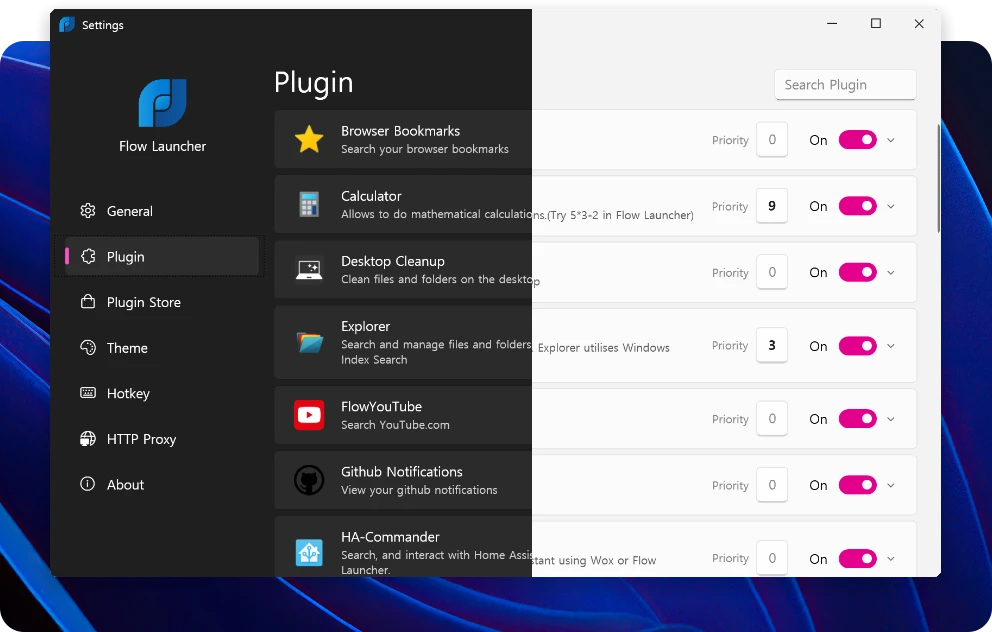
Searching for scattered documents, navigating hierarchical folders, and reaching for the mouse to open applications can significantly disrupt a computer user's focus. Flow Launcher is a keyboard-driven desktop search utility and application launcher designed to eliminate these physical and mental context switches entirely. By pressing a predefined global hotkey, users summon a minimalist, centered search bar that floats over their current active window. This overlay allows them to instantly type commands, locate hidden files, launch programs, or perform specific web queries without ever touching a mouse. Originally inspired by utilities like Apple's Spotlight or the Alfred productivity app, this open-source Windows application completely replaces the default, often sluggish, operating system search menu with an immediate, plugin-extensible interface built for speed.
Professionals, software developers, and keyboard-heavy workers choose this standalone desktop application because it operates with extremely low latency compared to web-based dashboards or heavy graphical interfaces. Because it runs locally as a lightweight background process, it hooks directly into local file indexers, registry entries, and system-level commands. When you type into the interface, the software parses your text in real time, matching strings against installed applications, local file paths, and active browser bookmarks. Instead of opening a web browser to translate a foreign word, or launching a dedicated calculator program to solve a complex equation, users simply type their query directly into the floating overlay.
The value of a dedicated desktop launcher becomes apparent when managing a high-volume workflow. Clicking through the traditional Start Menu or navigating deep into the Control Panel requires visual scanning and precise mouse movements, taking seconds away from the actual task. Flow Launcher distills these actions into pure keystrokes. When the desired task is complete, or the necessary application is launched, the interface vanishes instantly, allowing workers to maintain their flow state and keep their screens entirely clear of unnecessary toolbars or windows. By centering the interaction entirely on the keyboard, the software tightens the loop between having an intention and executing it on a Windows machine.
Key Features
- Instant Application and File Search: Trigger the default Alt+Space hotkey to immediately type application names or document titles. The tool integrates natively with the third-party "Everything" search engine indexer, allowing for near-instant retrieval of files across large, multi-terabyte local drives without waiting for the default Windows index to catch up.
- Extensive Command-Line Plugin Store: Type "pm install" directly into the search bar to browse and download community-built extensions. Verified plugins allow users to control Spotify playback, search Obsidian text vaults, manage Windows clipboard history, check GitHub notifications, or execute direct YouTube and Steam searches directly from the desktop overlay.
- System and Shell Command Execution: Control operating system states without clicking through the Start menu or Control Panel menus. Users can type "sleep", "restart", or "shutdown" to immediately execute system power states, or run batch files and PowerShell commands directly from the text field as an administrator or alternative user.
- Inline Calculator and Converter Tools: Perform quick mathematics, hex value lookups, or unit conversions directly within the text input field. Pressing Enter copies the final result directly to the Windows clipboard for immediate pasting into documents, design tools, or code editors without opening a separate calculator app.
- Visual Customization and Themes: Match the visual interface to your desktop aesthetic using the built-in theme manager. Users can modify the search bar's width, font size, border thickness, animation speed, and color scheme, or select from dozens of community-made dark and light themes that scale cleanly on high-resolution and multi-monitor displays.
- Web Search Aliases and URLs: Create custom trigger letters to execute searches on specific websites straight from the desktop. For example, typing "g [query]" can open a Google search in your default browser, while "w [query]" queries Wikipedia. Users can also type direct URLs to launch their default browser instantly.
- Advanced Context Menus: Selecting a file result does not just open it; users can press specific modifier keys to open the containing folder, copy the file path, or run an executable as an administrator. This provides full file management capabilities without ever needing to open the standard File Explorer window.
How to Install Flow Launcher on Windows
- Download the standard executable setup package from the official project website or their repository release page. For users who prefer command-line package managers, you can also open your terminal and type
winget install "Flow Launcher"orchoco install Flow-Launcherto pull the latest binaries. - If using the traditional executable, double-click the installer package to launch the setup process. The application will automatically install into the local user directory profile without requiring system-wide administrator privileges, keeping the installation contained.
- Once the initial file extraction finishes, the application will launch automatically and prompt you to configure basic first-run preferences.
- Select your preferred display language and review your default hotkey combination. The default is Alt+Space, but this can be modified to Ctrl+Space, Win+Space, or another combination to avoid conflicts with other software.
- Review the setup prompt regarding file indexing. To get the fastest file search performance, the launcher will ask if you want to integrate with the "Everything" file indexing service. If you rely on deep, instant file searches across multiple drives, accept this installation step so the launcher can hook into its database.
- Configure how the application handles system startup. By default, it will add an entry to your Windows startup sequence so the launcher is always available immediately after logging in.
- The setup process will complete, and the application interface will minimize to the system tray. A small icon will appear indicating it is running quietly in the background, ready to listen for your assigned hotkey.
Flow Launcher Free vs. Paid
Flow Launcher is distributed entirely as a free and open-source project. There are no paid tiers, enterprise licenses, restricted features, pro editions, or trial limits whatsoever. Users who download the software have immediate, unrestricted access to the entire core application, the advanced theme builder, the local settings menus, and the complete library of community-made plugins without ever encountering watermarks or subscription prompts.
Because the project is maintained by a dedicated community of developers and volunteers, its ongoing development and hosting are funded entirely through voluntary community donations. Users who find value in the utility and wish to support continuous updates, server costs for the plugin store content delivery network, and general maintenance can choose to become financial sponsors. This sponsorship is handled transparently through platforms like OpenCollective or GitHub Sponsors.
This community-driven business model ensures that the software remains accessible to all Windows users while deliberately avoiding the aggressive monetization strategies often seen in proprietary utility software. There are no advertisements injected into the search results, no forced account creation or sign-in requirements, and the application does not collect user keystrokes or search data to sell to third parties. This commitment to local, offline processing preserves both daily workflow efficiency and absolute user privacy.
Flow Launcher vs. Microsoft PowerToys Run vs. Keypirinha
Microsoft PowerToys Run is an application launcher integrated directly into the official Microsoft PowerToys utility suite. It shares a highly similar visual interface and underlying architecture to Flow Launcher, as both tools evolved from a common open-source predecessor called Wox. PowerToys Run is an excellent choice for users who already have the Microsoft PowerToys suite installed for other features, like FancyZones or the screen color picker, and prefer to minimize the number of background applications running on their system. However, because it is bundled into a larger suite, PowerToys Run offers fewer standalone customization options, slower visual updates, and a significantly smaller ecosystem of third-party plugins.
Keypirinha is another highly respected, standalone portable launcher designed specifically for advanced users and programmers. It relies heavily on text-based configuration files rather than graphical settings menus, and its plugins are written predominantly in Python 3. Keypirinha is extraordinarily fast and lightweight, making it ideal for software developers who want strict control over every variable and do not mind editing syntax files manually to change behaviors. The tradeoff is that it lacks the modern, user-friendly graphical interface, drag-and-drop mechanics, and rich visual theme engine that casual desktop users typically prefer when customizing their setup.
Flow Launcher stands out as the best middle ground for users who want deep functionality without sacrificing ease of use. It provides the extensive third-party plugin ecosystem and deep visual theme customization that PowerToys Run lacks, while offering a much friendlier graphical settings menu and out-of-the-box experience than Keypirinha. It is the optimal fit for anyone seeking a highly extensible, standalone desktop search bar that looks modern, integrates cleanly with local file indexes, and works reliably immediately after installation without requiring a deep dive into configuration text files.
Common Issues and Fixes
- Plugin Store shows no results. This usually happens when the application temporarily fails to connect to the external content delivery network that hosts the plugin list. To fix it, open the launcher and type the built-in command "Reload Plugin Data" or "Restart Flow launcher" and hit Enter to force the application to refresh its network connection.
- Missing shortcuts prompt appears on startup. This is a known issue where the launcher attempts to index invalid or broken desktop shortcuts left behind by uninstalled programs. To resolve this, carefully review the specific shortcuts flagged in the error dialogue, manually delete the dead links from your Windows desktop or Start Menu folders, and ensure you are running the most recent update of the application.
- File search is slow or missing specific documents. The default Windows Indexer can sometimes fail to report files quickly or ignore certain directories entirely. Fix this by installing the standalone "Everything" desktop application from Voidtools, then verify in Flow Launcher's plugin settings that the Everything plugin is enabled and configured as the primary local file search engine.
- The launcher does not open when pressing Alt+Space. This typically indicates a hotkey conflict with another running application, such as a terminal window or media player that has reserved the same input combination. Open the application by clicking its icon in the Windows system tray, navigate to the Settings menu, and assign a new global hotkey combination such as Shift+Space or the Windows Key.
- Plugin commands throw error messages. Certain plugins require specific runtimes like Python or Node.js to function properly. If a newly installed plugin fails to execute, read the plugin's documentation on its code repository to verify if you need to install Python or another framework on your Windows machine, and ensure the paths to those executables are correctly set in the launcher's settings.
Version 2.0.3 — November 2025
- Upgraded the underlying framework to .NET 9.
- Introduced a theme selection tool directly within the System plugin.
- Enhanced the Explorer plugin by allowing users to rename Quick Access Links, copy file names directly from search results, view folder details in the preview panel, and check file size and age via tooltips.
- Added a new private mode capability for queries made through the Web Search plugin.
- Improved the overall performance of image icon loading and the built-in process killer.
- Added support for keeping multiple search records pinned on top of other desktop windows.
- Updated the Calculator plugin to seamlessly handle both commas and periods as thousand separators.
- Introduced a safety confirmation prompt when deleting Quick Access Links or removing excluded Windows Index paths.
- Implemented a new filtering system to sort installed plugins by their architecture type (such as Python, Node.js, or .NET).
- Expanded internationalization by adding the Serbian (Cyrillic) language option and updating existing translations.
- Enabled custom aliases for system commands, allowing users to trigger actions like system shutdowns using personalized trigger words.
- Improved the user interface for adding action keywords and refined the delete button behavior in the Program plugin.
- Added new developer API functions, including the ability for plugins to detect dark mode, enforce minimum Flow Launcher versions, and trigger custom-button dialog messages.
- Fixed an indexing bug in the Program plugin that occurred if the main launch hotkey was repeatedly pressed during application startup.
- Fixed a navigation bug in the Explorer plugin that caused irrelevant files to appear while browsing a directory path.
- Resolved an issue where the Dialog Jump feature would fail to execute when triggered from a root directory.
- Addressed system stability by implementing proper error handling for Desktop Window Manager (DWM) composition crashes.