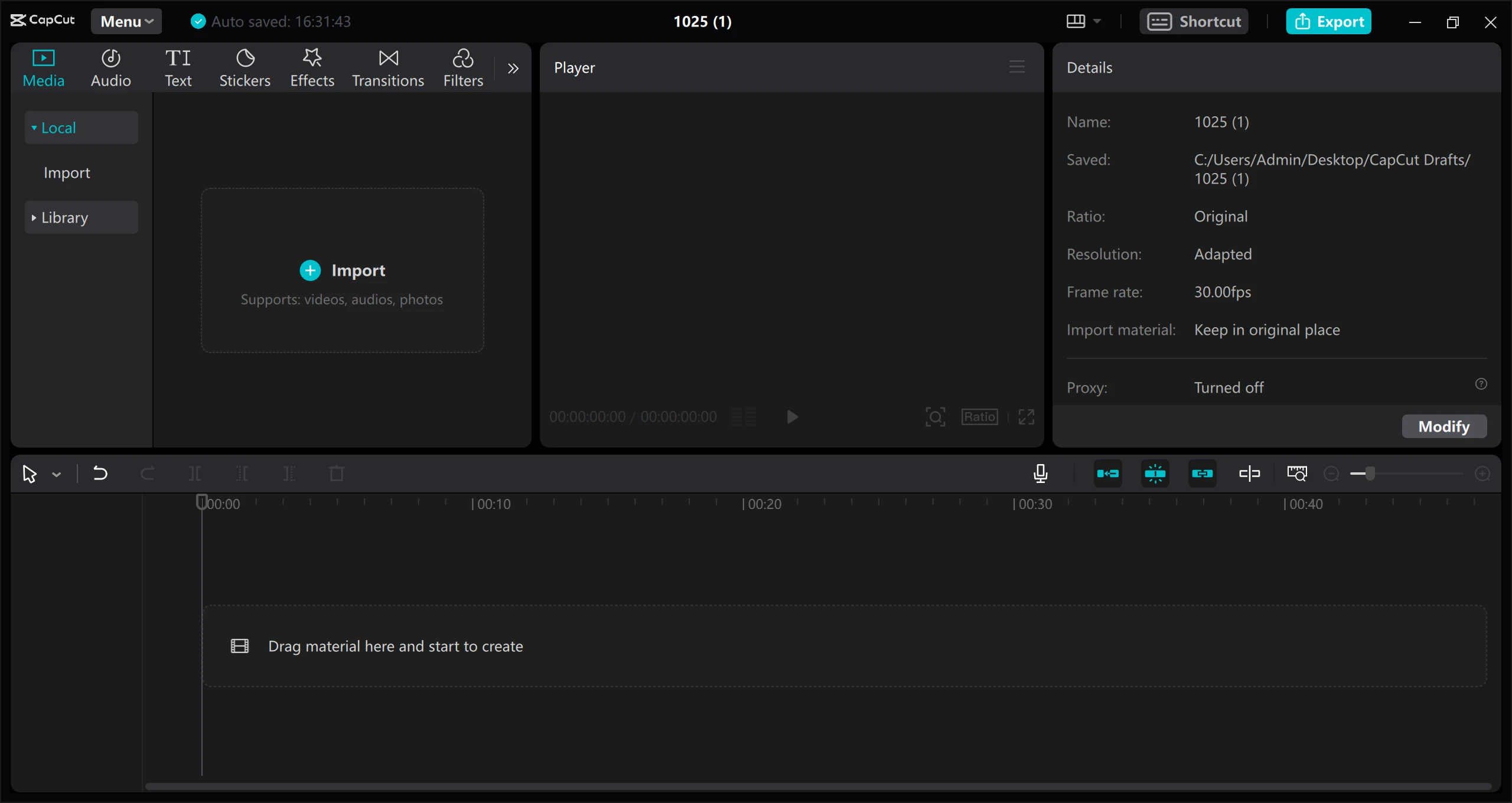
CapCut Desktop Pro is an advanced video editing application tailored for content creators who need professional production tools without the steep learning curve of traditional cinema software. Originally recognized for short-form content creation, the desktop environment brings hardware-accelerated rendering, complex timeline management, and a vast library of digital assets directly to Windows computers. By moving the editing process to a desktop interface, users gain access to precise keyboard shortcuts, frame-by-frame mouse control, and the ability to manage massive 4K media files that would otherwise overwhelm lighter, browser-based alternatives.
The software serves digital marketers, social media managers, and YouTube creators who require fast turnaround times for high-resolution video projects. It solves specific production bottlenecks, such as converting horizontal camera footage into vertical aspect ratios, stabilizing shaky B-roll, normalizing varying audio levels, and burning highly stylized subtitles directly into the video feed. Instead of switching between separate programs for audio noise reduction, color grading, and text generation, editors handle the entire pipeline within a single workspace.
The desktop application specifically utilizes local computing resources, relying on the graphics processing unit to render visual effects and handle artificial intelligence tasks locally. While browser-only editors struggle with timeline lag when managing multiple layers of high-bitrate video, this software maintains a responsive preview window. Editors can comfortably stack several tracks of 10-bit color footage, apply adjustment layers, and trigger local models for background removal or voice isolation without waiting for remote server-side processing queues.
Key Features
- AI Auto-Captions: The application uses a built-in speech recognition engine to transcribe spoken audio and automatically generate text nodes on a dedicated subtitle track. Users can open the text properties panel to adjust font styles, add stroke outlines, modify text shadows, and apply animation presets such as typewriter or karaoke highlighting. These generated subtitles dynamically adjust to the timeline pacing and can also be exported independently as SRT, VTT, or ASS files for use on external video hosting platforms.
- Smart Background Removal: Located within the video properties panel, the cutout tool uses edge detection models to separate subjects from their surroundings without requiring a physical green screen or specialized lighting. Editors can activate the auto-cutout function for human figures or use a custom brush tool to manually isolate specific objects within the frame. This functionality allows creators to easily composite talking heads over gameplay footage, insert synthetic backgrounds, or place subjects into entirely new virtual environments.
- Advanced Motion Tracking: The tracking menu provides specific controls to pin text, graphics, or visual effects to moving elements within the video frame. Users draw a bounding box around a face, hand, or moving vehicle, and the software analyzes the pixel movement across the timeline to generate accurate tracking data. This mathematical data then automatically moves the attached digital asset to follow the exact path of the tracked subject, adjusting for scale and rotation changes as the subject approaches the camera.
- Precision Keyframing: The timeline incorporates dedicated diamond-shaped keyframe nodes for manually animating clip parameters over time. Editors can set custom start and end points for scale, position, rotation, clip opacity, and specific audio volume levels. This enables exacting control over digital zoom effects, manual audio ducking during complex dialogue sequences, and custom motion graphics animations across multiple overlapping tracks, ensuring that visual adjustments happen exactly on the intended beat of the background music.
- Speed Ramping and Optical Flow: The speed adjustment tab offers both standard fixed-rate timing modifications and curve-based speed ramping using visual timeline nodes. For editors slowing down standard framerate footage, the optical flow frame interpolation engine analyzes the clip and synthesizes new in-between frames. This advanced processing results in artificially smooth slow-motion playback that avoids the choppy, staggered appearance typical of basic timeline stretching applied to standard 30 or 60 frame-per-second media.
- Audio Processing Toolkit: The right-side audio panel includes specific toggle switches for loudness normalization, vocal isolation, and dynamic background noise reduction. The vocal isolation tool extracts human dialogue frequencies while actively suppressing background music, street traffic, or wind noise, while loudness normalization ensures all timeline clips adhere to a consistent output decibel target. This built-in processing eliminates the need to route audio tracks through a separate digital audio workstation for basic dialogue cleanup and mastering.
How to Install CapCut Desktop Pro on Windows
- Download the official Windows installer package directly from the vendor website or retrieve it through the digital storefront.
- Launch the downloaded setup executable, which will prompt a User Account Control dialog asking for administrative permission to make changes to your device.
- Review the installation wizard options, including the software privacy agreement, and specify the destination folder path on your local storage drive.
- Click the install button to begin unpacking the application files into the designated directory, which may take a few minutes depending on your drive speed.
- Once the installation wizard finishes, start the application using the newly created desktop shortcut or by searching for it in the Windows start menu.
- During the first run, the software will perform an initial environment test to optimize playback settings based on your specific processor and graphics card capabilities.
- Sign in using your preferred account credentials to synchronize your cloud storage projects, retrieve saved templates, and validate your active subscription status.
CapCut Desktop Pro Free vs. Paid
The software operates on a freemium business model, providing a highly capable base application alongside an optional premium subscription tier. The free version allows users to access the primary multitrack timeline, basic trimming tools, standard transitions, and manual text generation. Users on the free tier can even apply premium visual effects and advanced tools to their timeline for testing purposes. However, attempting to export a project that contains these premium elements will trigger a block, requiring the user to either manually remove the restricted assets or pay for an upgrade to process the final video file.
Upgrading to the Pro tier unlocks the complete feature set, removing all export restrictions on premium visual effects, specialized transitions, and advanced text templates. The paid subscription grants access to hardware-accelerated 4K resolution exports at high frame rates, alongside the complete artificial intelligence toolkit. This includes unrestricted use of auto-captions, professional background removal, and advanced noise reduction tools that save hours of manual editing time compared to traditional frame-by-frame masking.
Pricing for the subscription depends on the chosen billing cycle, typically structured around monthly or annual payments. The monthly plan generally ranges from $9.99 to $19.99, while the annual commitment is often priced between $74.99 and $179.99, depending on regional pricing and active promotional discounts. Purchasing directly through the vendor website avoids markup fees sometimes applied by third-party application stores. The paid tier also increases the included cloud storage allowance to 100GB, allowing editors to back up larger project files and synchronize complex timelines across different workstations without immediately running out of server space.
CapCut Desktop Pro vs. Adobe Premiere Pro vs. DaVinci Resolve
Adobe Premiere Pro targets traditional broadcast and film editors who rely on deep integration with other creative suite applications. It provides extensive workspace customization, advanced color space management, and proxy workflows designed to handle massive raw camera files. However, it demands a higher recurring subscription cost and a significantly steeper learning curve, making it overkill for editors who primarily produce short-form vertical content and need quick turnaround times.
DaVinci Resolve serves as an industry-standard environment for high-end color grading and professional audio post-production. While it features a highly capable free version and operates on a perpetual one-time purchase model for its studio tier, it requires a discrete graphics card with high video memory to run smoothly. Its complex, node-based interface for visual effects can easily overwhelm casual users who just want to quickly splice clips, apply LUTs, and add animated text.
CapCut Desktop Pro is the better fit for digital marketers, content creators, and fast-turnaround social media editors who prioritize speed and built-in assets. It bypasses the complexity of traditional node networks and nested sequences by offering ready-to-use templates, instant formatting tools, and a straightforward interface. When a project requires quick jump cuts, automatic subtitling, and immediate application of trending visual effects, this software delivers the final export much faster than the heavier cinematic alternatives.
Common Issues and Fixes
- Network Error or Session Expired on login. This often happens when a local authentication token becomes corrupted, creating a conflict with the server profile. To fix this, open the associated smartphone application, change your account password to force a server-side token refresh, and then log into the desktop application again with the new credentials.
- Application fails to launch or opens to a black screen. The software occasionally hangs on startup due to specific regional format settings in the operating system. A reliable workaround is to open the Windows Time and Language settings, temporarily change the display language to English (US), launch the editor successfully, and then revert to your preferred language.
- Timeline playback lags or drops frames. Processing high-resolution media with multiple adjustment layers can overwhelm the preview engine, especially on older processors. Resolve this by clicking the player settings icon and lowering the preview quality, or by enabling proxy mode to temporarily replace heavy 4K files with lower-resolution placeholders during the editing process.
- Auto-captions appear out of sync with spoken dialogue. The speech recognition engine can misalign text blocks if the timeline contains overlapping background music or loud sound effects during the initial scan. Fix this by muting all auxiliary audio tracks, deleting the flawed text track, and generating the auto-captions again using only the isolated vocal layer.
Version 8.1.1.3417 — February 2026
- Added generalized feature upgrades and underlying tweaks to help creators produce higher-quality video content more efficiently.
- Improved performance of the overall user interface to deliver a smoother, more responsive timeline editing experience.
- Fixed issue with video trimming and resolved several known backend bugs to ensure greater application stability.