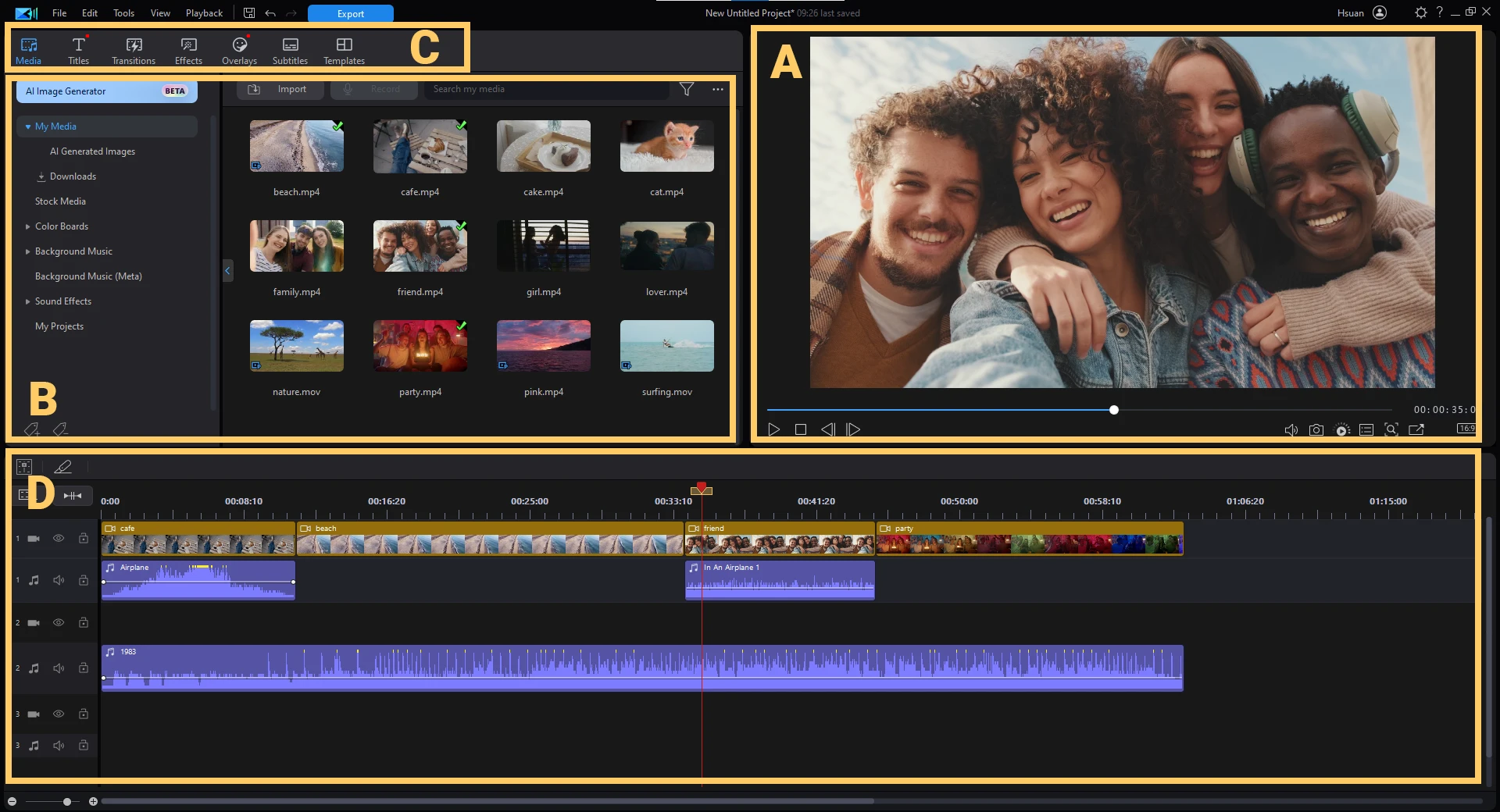
CyberLink PowerDirector is a desktop video editing application tailored for content creators, vloggers, and hobbyist videographers who need precise timeline control paired with automated production tools. Instead of relying on basic templates or restrictive browser-based editors, this software provides a full multi-track environment for cutting, grading, and mixing media. It bridges the gap between entry-level consumer tools and complex studio suites, giving users the ability to handle high-bitrate media and multi-camera shoots without requiring an advanced degree in post-production. Content creation has shifted heavily toward high-resolution formats and fast turnaround times, and relying on lightweight mobile apps often introduces frustrating limitations when working with complex audio routing or exact frame-by-frame cuts. A dedicated desktop environment provides the screen real estate and processing headroom necessary for serious media assembly.
For practical workflows, the software solves the friction of manual masking, tracking, and audio syncing by applying local artificial intelligence models directly to the timeline. Users editing high-resolution aerial footage, gaming captures, or multi-angle interviews can process large files locally, utilizing their system's central processing unit and graphics card rather than waiting for heavy cloud uploads. The desktop environment ensures timeline scrubbing remains responsive, and local rendering means users can quickly export massive media files straight to their storage drives. When editors attempt to manage hour-long gaming recordings or dense travel montages, browser-based alternatives frequently crash or suffer from severe input lag. By installing the application directly on a Windows system, editors bypass web browser memory limits and gain direct access to their hardware's rendering capabilities. This approach minimizes dropped frames during playback and ensures that heavy visual effects render predictably.
Furthermore, the application caters to both rigid, traditional editing methodologies and modern, rapid-fire social media formats. The workspace adapts to vertical aspect ratios for platforms that prioritize portrait orientation, ensuring that text titles and motion graphics remain within safe viewing zones. Editors can arrange multiple timelines, nest sequences within one another to keep large projects organized, and apply non-destructive color corrections that do not permanently alter the original source files. This flexibility makes it a practical choice for independent creators who handle every aspect of their production pipeline, from initial ingest and audio leveling to the final rendering pass.
Key Features
- Shadow File Proxy Editing: High-efficiency video coding and ultra-high-definition clips require immense processing overhead, which can bring capable computers to a crawl. To solve this, the software generates low-resolution working files in the background to keep the timeline responsive during scrubbing and cutting. Upon final export, the engine automatically swaps these proxies for the original high-quality source media to preserve maximum visual fidelity.
- Automated Motion Tracking: Manually keyframing moving objects frame by frame is a tedious task in video post-production. Editors can instead pin graphics, text bubbles, or visual effects to specific elements within the frame, and the application automatically plots the necessary tracking points as the object moves. This utility is especially useful for blurring sensitive information like license plates or attaching floating name tags to subjects in motion.
- Smart Cutout and Masking: The built-in Mask Designer includes dedicated tools to isolate subjects from their backgrounds even when the footage was not shot against a green screen. Editors brush over a subject to create custom alpha masks, utilizing edge-detection algorithms to cleanly separate the foreground from the background. This simplifies inserting text layers behind people, creating custom picture-in-picture composites, or replacing dull skies with dynamic time-lapses.
- Speech-to-Text Transcription: Located within the Subtitles Room, this automated utility listens to the spoken dialogue on the primary audio track and generates timed subtitle blocks. It removes the necessity of manually typing out every word and adjusting the length of text clips to match the speaker's cadence. Editors can quickly review the generated text, correct specific spelling mistakes, and export the captions natively with the video file.
- Multicam Designer: Managing multiple camera angles for interviews or live music performances typically requires tedious manual syncing on the timeline. This feature allows editors to synchronize up to four different video sources simultaneously using the natural audio waveforms recorded by each camera. Once aligned, users can play the unified timeline and click on the different camera angles in real time to record a live-switched sequence.
- Action Camera Center: Action cameras often introduce distinct visual artifacts, such as severe fisheye lens distortion and extreme shaking from handheld use. This dedicated workspace consolidates specialized correction profiles to flatten curved horizons and smooth out chaotic camera movements automatically. Editors can also utilize speed ramping controls to instantly transition from real-time playback into slow motion to highlight specific moments of action.
- Integrated Color Match: Filming a single scene with different cameras often results in mismatched color temperatures and exposure levels, making the final edit look jarring. The Color Match tool analyzes a selected reference frame and automatically adjusts the color values of the target clips to ensure a uniform look across the sequence. This baseline correction saves editors from manually tweaking color wheels for every single shot, allowing them to focus on creative grading.
How to Install CyberLink PowerDirector on Windows
- Navigate to the official CyberLink website and download the initial installer package for the Windows operating system.
- Run the downloaded executable file to launch the setup manager, which prompts you to select a temporary download directory and fetches the full application payload.
- Review and accept the End User License Agreement to proceed with the core software configuration.
- Select your preferred installation directory; installing the software and its associated media cache folders on a solid-state drive is recommended to ensure fast media access.
- Allow the setup manager to extract the files and complete the installation, which simultaneously installs the companion application manager used for future updates.
- Launch the video editor from your desktop shortcut and sign in with an active user account to verify your license tier and activate the rendering codecs.
- Open the companion application manager before starting your first sequence to selectively download extra visual effects, title templates, and artificial intelligence modules.
CyberLink PowerDirector Free vs. Paid
The software utilizes a tiered licensing model designed to accommodate varying budgets and professional requirements. The entry point is a free edition known as Essential. This unpaid tier allows users to thoroughly test the core timeline, experiment with basic transitions, and export finished files to their local drive. However, exports generated from the free version include a visible watermark burned into the video, and access to the most advanced artificial intelligence tools, high-end encoding formats, and premium effects is strictly limited. The Essential tier serves primarily as an extended trial environment for new users to evaluate the interface and confirm their system's hardware performance before making a financial commitment.
For complete access to the editing suite, users must choose between a recurring subscription model and a one-time perpetual license. The subscription tier, priced at approximately $70 annually, provides continuous updates to the core software engine as soon as they are developed. More importantly, this tier unlocks all artificial intelligence modules and grants unlimited, direct access to massive integrated stock media libraries provided by Shutterstock and Getty Images. Editors can drag stock video clips, background music, and sound effects directly into their timeline without paying individual licensing fees. Because of these ongoing additions, the subscription model requires periodic internet checks to validate the active account status.
Alternatively, editors who prefer avoiding recurring payments can purchase a perpetual license, which is typically priced between $100 and $140 depending on whether the buyer selects the Ultra or Ultimate package. The perpetual option provides lifetime access to the exact set of tools available at the time of purchase. While perpetual users can edit indefinitely without paying again, this model does not receive ongoing major feature updates in subsequent years. Additionally, it completely omits the unlimited cloud stock library access provided by the subscription plan, meaning users must source their own supporting footage and audio tracks or purchase them separately.
CyberLink PowerDirector vs. Wondershare Filmora vs. Adobe Premiere Elements
Wondershare Filmora targets absolute beginners and social media content creators who prioritize speed over deep technical control. Its interface relies heavily on large, colorful icons, drag-and-drop animated templates, and heavily simplified color-grading sliders. While it is undeniably easier to pick up for a first-time editor trying to quickly assemble a vlog, it intentionally restricts granular control over complex multi-track audio routing and detailed custom masking. When an editor needs to manually keyframe an intricate visual effect or manage a dozen different audio stems for a short film, Filmora's simplified approach can feel constraining, making the transition to advanced workflows difficult.
Adobe Premiere Elements provides a traditional, structured editing environment designed specifically for home users and family hobbyists. It divides the workspace into Quick, Guided, and Expert modes, actively holding the user's hand and helping novices learn the basics of post-production step by step. Currently offered with a three-year term license rather than a monthly subscription, it appeals heavily to casual editors who dislike recurring fees. However, its core rendering engine and automated toolset do not evolve as quickly as cloud-connected alternatives. Editors dealing with highly compressed action camera formats or those wanting the latest background removal features often find Premiere Elements lagging behind the current technical curve.
CyberLink PowerDirector occupies the strategic middle ground between absolute beginner tools and intimidating professional suites. It offers a highly customizable interface and significantly faster local rendering speeds for high-resolution footage compared to its direct competitors. It is the better choice for creators who have outgrown simplified timeline restrictions but want to avoid the steep learning curves and heavy hardware demands of studio-grade cinema applications. The inclusion of aggressive proxy generation, automated motion tracking, and advanced multicam syncing gives it a distinct operational advantage for intermediate workflows where efficiency and output quality are equally prioritized.
Common Issues and Fixes
- Laggy timeline playback with high-resolution files. If scrubbing through ultra-high-definition or high-efficiency video coding media causes the preview window to freeze, the system is struggling to decode the heavy compression in real time. Go to Edit, then Preferences, and open the General tab to enable the "Shadow files" option. This forces the application to generate low-resolution proxies in the background, keeping the timeline smooth while preserving the original files for the final export.
- Audio goes out of sync after cutting clips. Standard deletion leaves an empty gap in the timeline, and manually sliding clips to close the gap often misaligns the surrounding audio tracks. To fix this behavior, highlight the clip and use the Ripple Delete function by pressing Ctrl and Delete. This action removes the clip and automatically snaps all remaining video and audio tracks together, keeping the entire sequence properly synchronized.
- Missing premium transitions or title templates. Users frequently notice that advertised effects and templates are absent from the effects library after a fresh installation because the base installer intentionally omits them to save download time. Open the companion application manager and ensure you are signed in to your active account. From there, you can manually download the specific effect packs and title bundles tied to your license tier.
- Hardware acceleration fails during export. If the rendering process takes an exceptionally long time and relies entirely on the central processor while ignoring the graphics card, the timeline is not utilizing hardware encoding. Ensure your display drivers are fully updated to the latest available version. Then, navigate to the Hardware Acceleration preferences menu and explicitly check the boxes to enable OpenCL and hardware decoding for your specific graphics architecture.
- Quality loss when exporting specific media wrappers. Exporting specific container formats like MKV with mismatched settings can severely degrade visual fidelity or cause playback errors on certain devices. Ensure the export parameters in the Produce tab exactly match the original source bitrate and resolution. Alternatively, select a high-quality standard preset utilizing the widely compatible H.264 or H.265 codec to ensure smooth playback without artifacting.
Version 2026 v24.2.1412.0 — February 2026
- Improved the reliability and overall stability of AI-powered editing tools.
- Enhanced GPU hardware acceleration to provide smoother operation and better performance.
- Boosted timeline responsiveness for quicker navigation and more fluid editing.
- Ensured greater software compatibility with the most recent Windows operating system updates.
- Applied general optimizations to speed up both video rendering and exporting processes.