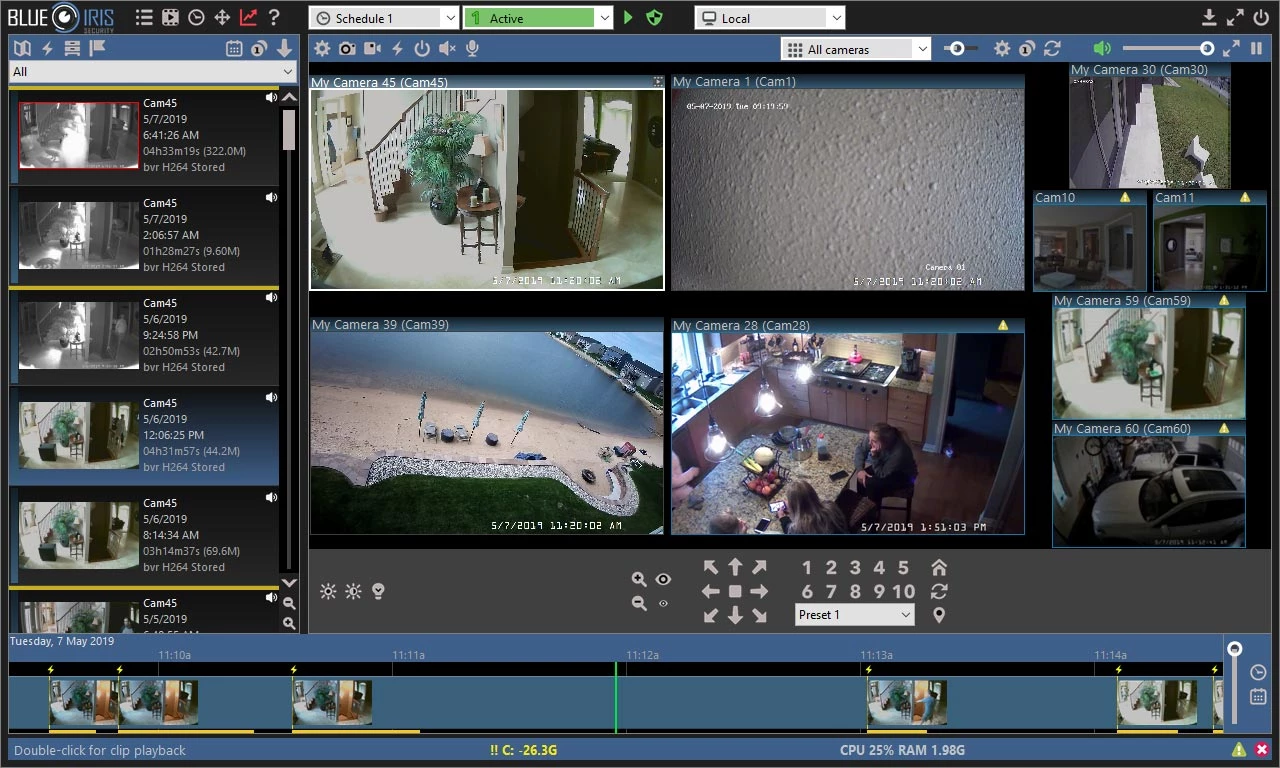
Turning a standard Windows PC into a dedicated network video recorder requires software that can handle constant network traffic and heavy disk writing without crashing. Many proprietary security cameras lock hardware into closed ecosystems, forcing buyers to use specific cloud services and pay monthly data fees to review their own property footage. This video management application breaks that dependency by allowing system builders to mix and match ONVIF-compatible IP cameras, routing all video feeds locally to a single desktop interface. It acts as the central brain of a surveillance network, ingesting RTSP streams, managing storage drives, and executing complex motion logic offline.
Users building a custom network video recorder often choose a dedicated desktop application over web-only equivalents because of the raw processing demands of video decoding. When a property has dozens of 4K cameras streaming simultaneously, the host machine must rapidly decode the video, analyze the frames for movement, and write the data directly to physical platters. A native Windows application interfaces directly with the hardware, utilizing processor-specific graphics capabilities to offload the work. This keeps the physical footprint of the security system completely local, ensuring that video history remains accessible even if the external internet connection goes down.
Administrators rely on this environment to filter out the noise of traditional motion detection. Instead of triggering an alert every time a tree branch blows in the wind, the application passes video frames to local machine learning models that identify specific objects. This turns a generic stream of video into an actionable database of events. Homeowners use it to monitor driveways and entryways, while retail managers use it to cover point-of-sale systems and inventory rooms. By retaining total control over the storage paths and alert conditions, operators avoid the limitations of consumer-grade smart cameras and build a monitoring station tailored exactly to their physical environment.
Key Features
- Direct-to-Disk Recording: Bypasses processor-heavy re-encoding by writing the raw video stream straight to your physical storage drives. This preserves the original image quality from the camera and lowers processor overhead. The software saves these streams in a proprietary BVR format, which writes data sequentially to prevent file corruption if the host machine experiences a sudden power loss during an active recording.
- Sub Stream Processing: Pulls a low-resolution secondary video feed from your network cameras to handle interface rendering and background motion detection. The system only calls upon the high-resolution primary stream when recording an event to disk or when a user maximizes a specific camera tile. This dual-stream approach makes it possible to run dozens of cameras on modest hardware without overwhelming the central processor.
- CodeProject.AI Integration: Replaces basic pixel-change motion detection with local machine learning models that identify specific objects in the frame. You can configure the software to only trigger an alert when a person, vehicle, or animal crosses a designated zone. This eliminates false alarms caused by moving shadows, rain, or blowing leaves, ensuring that push notifications only fire for actual security events.
- Customizable Alert Logic: Provides granular control over how and when the system dispatches notifications based on scheduled profiles. Operators can route specific camera alerts to an email address, trigger an external siren via a command script, or send a snapshot directly to a mobile device. The interface allows users to define quiet hours, group cameras by zone, and set mandatory artificial intelligence confidence thresholds before an alert is considered valid.
- Integrated Web Server (UI3): Hosts an internal portal that allows administrators to view live grids, scrub through playback timelines, and adjust camera settings from a web browser. The server runs entirely on your local network, meaning it does not require an external cloud service to function. Users can expose this portal securely to the outside world by configuring a local virtual private network, granting remote access without third-party data harvesting.
How to Install Blue Iris on Windows
- Download the official Windows installer package from the vendor's website and locate the executable file.
- Launch the setup application, grant administrative privileges, and accept the end-user license agreement.
- Select your destination folder. The default path on the primary storage drive is recommended for the core application files.
- Check the box to install the application as a Windows Service so the background engine runs automatically upon system boot.
- Finish the setup process, launch the desktop console, and enter your purchased license key or select the trial button.
- Right-click the empty layout grid and select the option to add a new camera, entering the local IP address and credentials.
Blue Iris Free vs. Paid
The software offers a 15-day free trial that allows administrators to test compatibility with their network cameras and explore the interface. During this evaluation period, the application places a visible watermark over all live and recorded video feeds. However, the trial does not restrict camera counts, resolution limits, or configuration menus, giving system builders an accurate representation of how the software will perform under load before committing to a purchase.
For a permanent deployment, users must purchase a one-time perpetual license. The vendor splits the licensing into two main tiers based on capacity. The Lite edition is heavily restricted, allowing a user to connect only a single camera. This tier costs roughly half the price of the full software and is generally only used for simple webcam recording or a single doorbell stream. The Full edition unlocks the software's true capacity, allowing the host machine to manage up to 64 independent camera streams simultaneously, provided the underlying hardware can handle the processor and disk input demands.
Because the license is perpetual, buying the software grants you ownership of that specific build forever, with no mandatory monthly subscription required to keep the background engine running. The initial purchase includes one year of basic support and software updates. Once that year expires, the application continues to function normally. If users want to download newer builds with updated features or bug fixes after the first year, they can purchase an annual Basic or Extended maintenance plan. Choosing to skip the maintenance plan simply locks the installation to the last eligible release date, keeping the local network operational without recurring fees.
Blue Iris vs. iSpy Agent DVR vs. Milestone XProtect
iSpy Agent DVR is a web-centric video surveillance tool designed to run across multiple environments, forcing users to manage their camera layouts entirely through a browser interface. While the base software is free to download and run locally, it locks critical functionality—such as remote access, push notifications, and smart home integrations—behind a monthly premium subscription. Choose iSpy if you prefer a containerized deployment and do not mind paying an ongoing subscription fee for off-site alerts, but stick with Blue Iris to manage everything via a native Win32 application and avoid recurring notification fees.
Milestone XProtect Essential+ provides a strictly regulated, enterprise-grade architecture that is free for deployments of up to eight cameras. It offers strict auditing, deep corporate compliance rules, and a stable background engine, but the setup process is notoriously complex and requires heavy enterprise database prerequisites. Choose Milestone if you are testing an environment for a corporate deployment and have strict auditing requirements, but switch to Blue Iris for a more accessible interface, broader camera brand compatibility, and the ability to scale beyond eight cameras without paying enterprise licensing costs.
Ultimately, Blue Iris strikes the best balance for dedicated home security builders and small businesses operating on Windows 10 or Windows 11. It sidesteps the recurring monthly fees of iSpy by utilizing a one-time perpetual license model, while offering an easier configuration curve than the rigid corporate structure of Milestone XProtect. Its direct integration with local machine learning models and flexible direct-to-disk recording makes it the most practical choice for users who want total control over their surveillance data without outsourcing processing to the cloud.
Common Issues and Fixes
- Processor usage spikes to maximum capacity causing the system to lag. Enable "Direct-to-Disk" recording in the camera settings to stop the application from re-encoding the video feed. Additionally, configure the camera's sub stream settings so the interface only decodes low-resolution video for background motion detection.
- False alerts constantly trigger from shadows, rain, or insects. Install the local CodeProject.AI module and configure your alert rules to require artificial intelligence confirmation. Specify the exact object classes you want to detect, such as "person" or "car," to ignore irrelevant environmental pixel changes.
- Recorded BVR files become corrupted or fail to load in the playback timeline. Windows Defender or third-party antivirus software may be scanning the large video files as they are being actively written to the physical platter. Add an exclusion in your security software for the exact folder paths where the application stores its database and video clips.
- Camera streams randomly drop out and display a "No Signal" color bar. Ensure the camera's local IP address is set to static in your router's DHCP reservation list. If the network dynamically reassigns a new IP address after a router reboot, the desktop application will lose the communication path and fail to pull the stream.
Version 6.0.0.1 — December 2025
Added:
- Native HTTPS/SSL support built-in (replaces Stunnel dependency)
- Support for up to 128 cameras (increased from 64)
- Support for Sonoff (eWeLink) DIY switches for home automation control
- Native H.264 streaming support between linked Blue Iris systems
- Digest authentication option for enhanced security
- Support for SysLog log output
Improved:
- User Interface updated with 'dark mode' aesthetic and Windows 11 font rendering
- Database format updated to Version 6 for better robustness and backup efficiency
- Camera auto-cycle algorithm optimized for smoother viewing
- Hardware assisted video decoding/encoding (Intel QVS/OneVPL, Nvidia NVENC) moved out of beta