PDF Cracker allows users to instantly regain control over their digital documents by removing restrictive security settings from Adobe Acrobat PDF files. This specialized utility focuses on decrypting protected files that prevent essential tasks, such as printing, copying text, or editing content. When a document creator applies an owner password, the resulting file can be opened and read, but internal permissions block further interaction; the print button remains greyed out and selecting text for the clipboard is disabled. It is important to distinguish this from a 'user password', which blocks the file from being opened at all. This software targets owner restrictions. If a file requires a user password just to open, you must supply that initial password first before the utility can strip the secondary owner restrictions. The resulting duplicate file behaves identically to an unprotected document.
For professionals working in legal, human resources, or financial sectors, handling restricted documents is a frequent hurdle. Internal archives often contain older contracts, invoices, or records where the original owner password is long forgotten, making it impossible to print physical copies for filing or copy data snippets into new reports. Instead of manually retyping pages of text or relying on inaccurate optical character recognition scans to recreate a locked file, users can run the original document through this utility. The application parses the underlying structure and rewrites the security headers, allowing workers to extract the exact text, layout, and images without damaging the original formatting.
Choosing a dedicated desktop application for this task offers strict privacy advantages over browser-based alternatives. Web services require users to upload their sensitive files to external cloud servers, which violates data compliance policies in many corporate, government, and medical environments. Because this application operates entirely on the local hard drive, no data is transmitted over the internet during the decryption process. The software ensures that confidential information remains strictly within the local machine, providing a secure, compliant method for bypassing local printing and copying restrictions without exposing private data to third-party web hosts.
Key Features
- Instant Restriction Removal: The application targets the specific security headers that disable the print, copy, and edit menus in standard viewer applications. By rewriting these headers locally, it produces an exact copy of the original file without the restrictive owner permissions. Users can immediately open the output file and perform tasks that were previously blocked by the creator.
- Local Offline Processing: All decryption tasks execute entirely on the local machine without requiring an active internet connection or cloud connectivity. This offline architecture prevents sensitive data, such as financial records or legal contracts, from being uploaded to external servers. Corporate users maintain strict adherence to internal data privacy policies while processing their confidential files.
- Standalone Architecture: The utility functions independently of Adobe Acrobat Pro or the free Reader application. It relies on its own internal processing engine to parse and rewrite the document structures from the ground up. Users save local disk space and avoid the need to install or maintain large third-party viewer dependencies just to complete their decryption tasks.
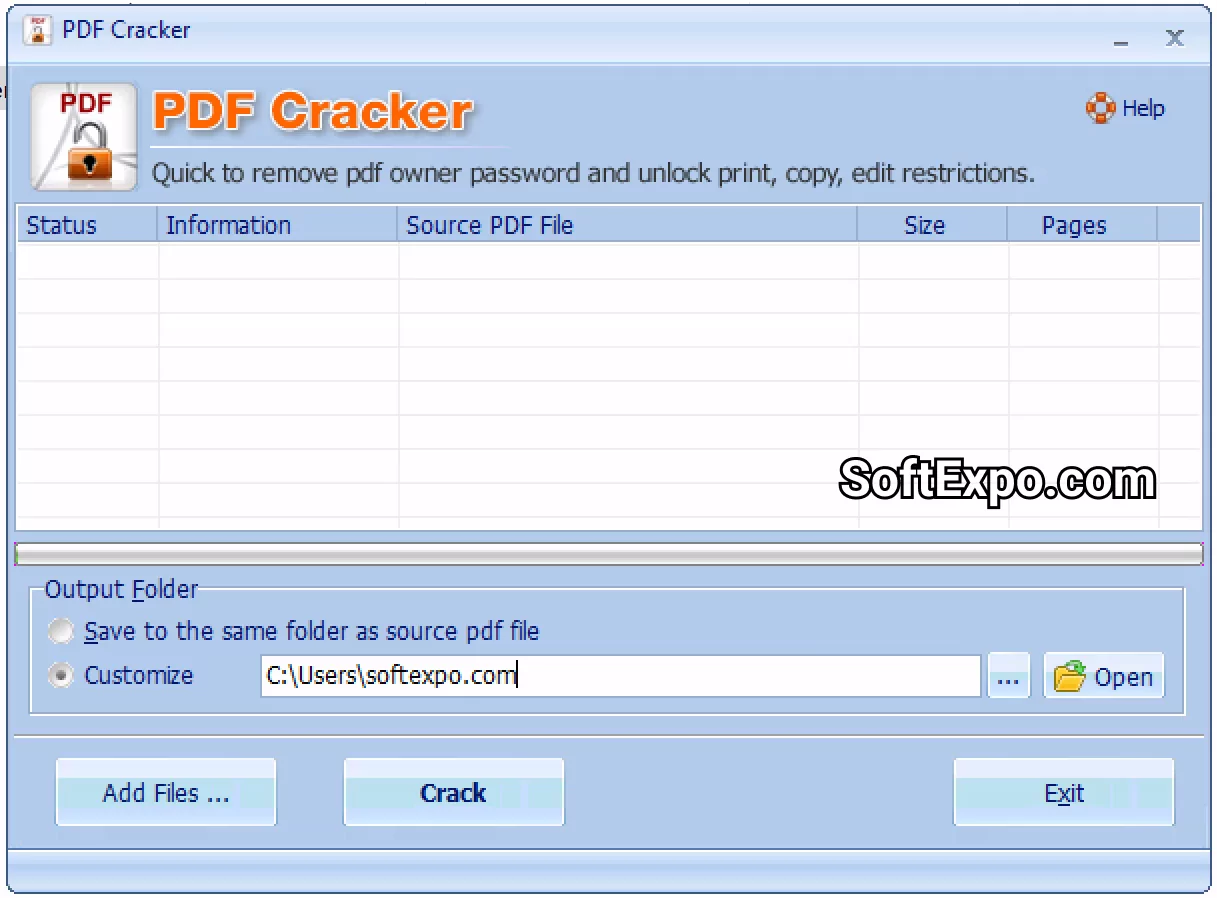
- Batch Processing Capability: Users can load entire folders containing dozens of restricted documents into the main interface queue at once. The application sequentially processes the entire list in a single operation, directing the unlocked files to a specified output folder. This bulk approach drastically reduces the manual effort required when auditing large archives of locked records.
- Broad Standard Support: The software handles multiple generations of document encryption standards to ensure high compatibility with legacy files. It successfully parses 40-bit RC4, 128-bit RC4, and standard AES encryption methods applied by older and newer creation tools. Documents formatted under older Acrobat specifications are supported natively by the internal processing engine.
- Preserved Document Integrity: Stripping the security layer does not alter the underlying text or graphical content in any way. The software maintains the exact layout, including embedded fonts, vector graphics, raster images, and interactive form fields. The resulting file looks and prints exactly like the locked original, simply with the digital permission barriers permanently removed.
How to Install PDF Cracker on Windows
- Download the Windows installer package from the designated official source to a local folder on your storage drive.
- Locate the downloaded executable setup file and double-click it to launch the installation wizard. If prompted by Windows User Account Control, grant the necessary administrator permissions to allow the installation to proceed.
- Read and accept the End User License Agreement displayed on the first screen of the wizard to continue the setup process.
- Choose the destination folder for the application files. The wizard defaults to the standard Program Files directory, but you can click the browse button to select an alternative local drive or custom folder if needed.
- Select your preferred shortcut options, such as placing an application icon on the desktop or creating a dedicated folder in the Start menu, to ensure quick access to the utility.
- Click the install button to begin extracting and copying the necessary application files to your selected directory. This local file transfer completes quickly due to the minimal disk footprint of the utility.
- Click finish to close the setup wizard. You can now launch the application directly from your newly created desktop shortcut and begin adding restricted documents to the processing queue.
PDF Cracker Free vs. Paid
PDF Cracker is distributed under a trial licensing model, allowing users to install the application and test its interface before committing to a purchase. The trial edition provides access to the core decryption engine, enabling users to verify that the software can successfully handle their specific document formats and encryption types. However, this unpaid tier typically imposes output restrictions, such as only decrypting the first few pages of a document or applying a visible watermark to the resulting file. These limits ensure users can validate the local workflow while reserving complete, unhindered processing for licensed customers.
Upgrading to the paid tier requires purchasing a commercial license, which removes all trial restrictions permanently. Licensed users gain the ability to process documents of any length without page limits, missing data, or inserted text watermarks. The fully licensed software also unlocks the practical utility of the batch processing feature, allowing users to queue and decrypt hundreds of files in a single run without manual interruption or prompt limits.
Because the application relies entirely on local processing rather than cloud infrastructure, the paid tier is generally offered as a perpetual license. This means users pay a one-time fee to use the software indefinitely, avoiding the recurring monthly subscription costs associated with many web-based document management platforms. For corporate environments requiring installation across multiple workstations, the vendor typically offers volume licensing arrangements on their official store page to accommodate larger deployments.
PDF Cracker vs. VeryPDF PDF Password Remover vs. Smallpdf
VeryPDF PDF Password Remover is a comparable desktop utility that also focuses on eliminating owner restrictions locally. It provides a similar set of decryption capabilities and supports a wide range of legacy and modern encryption standards. Users often select VeryPDF when they need specific command-line parameters to automate processing through backend scripts or external applications. While VeryPDF excels in automated enterprise environments, its interface can feel slightly more complex for casual users who simply want to drag and drop files into a visual window.
Smallpdf takes an entirely different approach by offering a web-based suite of document tools, including a dedicated unlocker accessible through a browser. Users navigate to the website, upload their locked file to the cloud, and download the processed result moments later. This hosted approach is convenient for individuals who only need to process a single file and do not want to install any local software. The main drawbacks are the strict reliance on an active internet connection, file size limits for free users, and the privacy implications of sending sensitive documents to external servers.
PDF Cracker is the better fit for users who require strict local privacy but prefer a simple, graphical interface over text-based command-line utilities. It bypasses the privacy risks and subscription models of cloud services like Smallpdf by keeping all data parsing strictly on the local hard drive. At the same time, it provides a more straightforward, visual workflow than VeryPDF, making it highly accessible for human resources, legal, or accounting professionals who need to unlock archives quickly without learning command-line syntax.
Common Issues and Fixes
- Problem description: The application asks for a password before processing can begin.
The tool is designed to remove owner restrictions (which block printing and editing), not user passwords (which block opening the file entirely). If the document requires a user password to open, you must type that password into the prompt. Once the file is unlocked for viewing, the utility will automatically strip away the secondary owner restrictions. - Problem description: The decrypted output file fails to open or shows corruption errors.
This often happens if the output directory is set to the exact same location and filename as the original document, causing an overwrite conflict during saving. To fix this, always configure the software to save the processed files into a separate output folder, or append a new suffix to the filename to preserve the original locked file intact. - Problem description: Windows Defender or third-party antivirus flags the installation executable.
Security software frequently flags password removal and decryption tools as potentially unwanted programs due to their underlying functionality. If you downloaded the installer from the official source, you can resolve this by adding an exclusion for the installer file or the destination folder in your Windows security settings. - Problem description: The application freezes or stalls during a large batch process.
Loading hundreds of heavily formatted, high-resolution documents into the queue simultaneously can overwhelm system memory limitations. If the application stalls, force close it via Task Manager and divide your files into smaller batches of 20 to 50 documents to maintain stable processing performance.
Version 3.20 — July 2025
- Expanded support for PDF 1.8 format (Acrobat 9.0 compatibility), including 128-bit RC4 and AES decryption protocols.
- Improved decryption engine speed for instantly removing "owner" password restrictions on printing, editing, and copying.
- Fixed minor compatibility issues with drag-and-drop functionality on Windows 11 and Windows 10 systems.