Portable Document Format files are notorious for being difficult to alter. For decades, computer users treated them as digital paper—documents meant to be read, printed, and shared, but rarely modified. Wondershare PDFelement changes this dynamic by providing a desktop application that turns static files into fully editable workspaces. Instead of forcing users to track down the original source document just to fix a typo, update a corporate logo, or remove an outdated paragraph, this software allows direct manipulation of the text, images, and underlying layout. It bridges the gap between a standard document reader and a heavy graphic design program, offering an interface that looks and behaves much like a familiar word processor. Users can open an invoice or a legal brief and immediately begin typing over the existing content without dealing with complex layer management.
This desktop application targets students, freelancers, office workers, and small business owners who handle contracts, research papers, and application forms daily. Rather than relying on browser-based tools that require uploading sensitive financial or personal data to remote servers, users can process their files locally on their Windows machines. Local processing ensures privacy for confidential agreements and client records. At the same time, the application still offers optional cloud storage integrations for those who prefer to sync their work across different devices. By keeping the main engine on the local drive, it avoids the lag and upload limits associated with web-based editors.
Beyond basic text adjustments, the application handles complex structural tasks. Users can merge dozens of separate files into a single continuous document, extract specific pages to create smaller handouts, or convert file types back and forth without losing the original formatting. The addition of artificial intelligence models directly into the side panel also helps users digest long reports quickly. By operating as a standalone desktop utility, Wondershare PDFelement provides a stable environment for manipulating large, graphics-heavy manuals that would normally crash lighter, browser-only alternatives. This ensures that users can handle hundreds of pages of schematics or detailed reports without experiencing severe performance drops.
Key Features
- Feature Name: Direct Text and Image Manipulation: Users can click on any paragraph to rewrite sentences, change font sizes, or alter text colors without needing the source file. The software automatically adjusts the surrounding text flow to accommodate new words. Users can also replace, crop, or resize embedded images directly on the page, bypassing the need for external photo editors and saving time during document revisions.
- Feature Name: Optical Character Recognition Engine: The application scans flat images of paper documents and converts them into selectable, searchable text blocks. This allows users to extract quotes from archived manuals or digitize old paper contracts for electronic filing. The engine supports over twenty distinct languages and can recreate the structural layout of the scanned page, including tables and columns, so the output matches the original visual design.
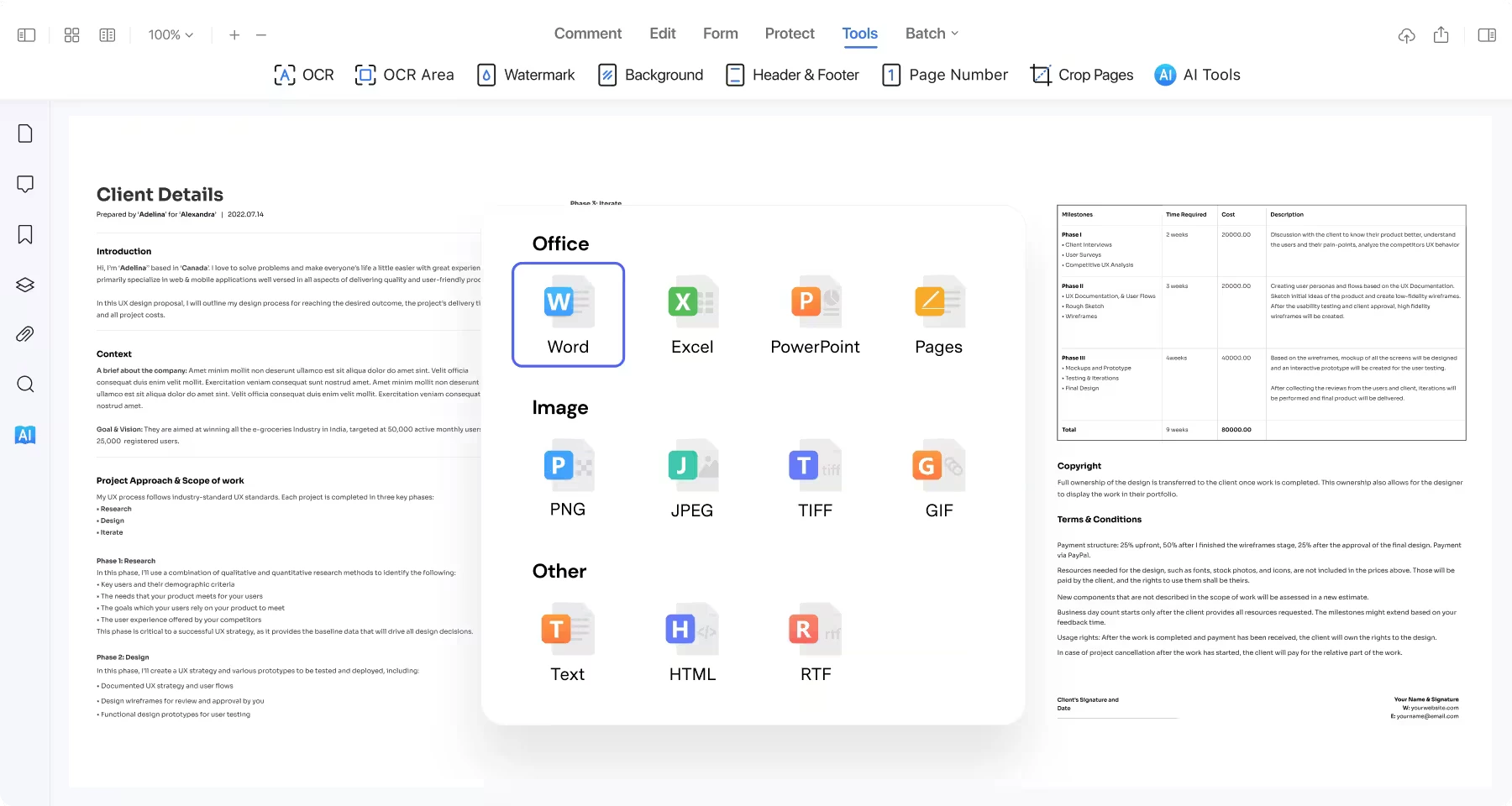
- Feature Name: Broad Format Conversion: Users can export static documents into editable formats like Word, Excel, and PowerPoint while retaining the original margins and graphics. The software also handles specialized exports, allowing users to turn reading materials into ePub files for e-readers or Markdown files for coding environments. Alternatively, users can convert standard office documents back into fixed layouts with a single click in the export menu.
- Feature Name: Interactive Form Creation: The software automatically detects blank spaces and lines on static layouts, allowing users to overlay interactive form fields quickly. Document creators can insert functional radio buttons, check boxes, dropdown menus, and digital signature blocks onto any page. This turns standard intake sheets into digital forms that clients can fill out on their own devices without needing a printer.
- Feature Name: Redaction and Security Controls: For legal and financial workflows, the application provides permanent redaction tools that black out sensitive names or account numbers. This permanently removes the hidden metadata behind the text, ensuring it cannot be recovered by document inspection tools. Users can also apply encryption passwords to prevent unauthorized printing, copying, or viewing of the file contents entirely.
- Feature Name: Integrated AI Processing: A built-in side panel accesses multiple external models, including ChatGPT and DeepSeek, to analyze the active document. Users can ask the chat interface to summarize long legal agreements, translate specific paragraphs into different languages, or proofread text for grammatical errors. This keeps the user inside the application instead of copying text into web browsers.
How to Install Wondershare PDFelement on Windows
- Download the official Windows installer package directly from the vendor's download page.
- Open your system downloads folder and double-click the setup executable to launch the installation wizard.
- Review the end-user license agreement, accept the terms, and specify a local drive path for the installation directory.
- Click the install button and wait for the installer to extract the core application files to your system drive.
- Once the extraction completes, click the final prompt to close the setup window and launch the software.
- Upon the first launch, the application will require you to log in with a Wondershare ID to verify your account status and unlock the interface.
- Open the settings menu to manually download specific optical character recognition language packs if you plan to process scanned documents in languages other than English.
Wondershare PDFelement Free vs. Paid
The software operates on a freemium model where the free tier functions primarily as a restricted trial. Anyone can download and run the trial, but it enforces strict limitations on document output. Any document edited, commented on, or altered in the free tier will feature a permanent watermark upon saving or exporting. Additionally, the trial restricts file conversions to a maximum of three pages, limits batch processing tasks to just two files at a time, and blocks access to advanced file compression tools.
To remove these restrictions, users must purchase a license through an annual subscription or a one-time perpetual license. The individual annual plan unlocks all local editing tools, conversion capabilities, and batch processing functions while completely removing the export watermark. The perpetual license costs more upfront but allows users to keep the software indefinitely without recurring annual charges, though future major upgrades may require a separate fee.
It is critical to understand that the artificial intelligence features rely on a separate token system, regardless of whether you buy the annual or perpetual base license. The paid software includes a limited quota of initial AI credits for translation, summarization, and text generation. Once those included credits run out, users must navigate to their account dashboard and purchase a separate AI add-on subscription to continue utilizing the prompt-based tools.
Wondershare PDFelement vs. Adobe Acrobat Pro vs. Foxit PDF Editor
Adobe Acrobat Pro remains the legacy standard for document management, heavily entrenched in corporate environments and professional print shops. It offers extensive integration with graphic design applications and excels at managing complex interactive forms, precise pre-press color separations, and strict accessibility tagging. However, Adobe requires an expensive, mandatory recurring subscription, making it a heavy financial burden for occasional users or independent contractors who only need to adjust text or merge pages.
Foxit PDF Editor targets enterprise deployments that require strict security compliance, such as HIPAA or SOC 2 standards, along with advanced group policy controls. It renders files quickly and handles massive portfolios well, but its interface packs so many administrative toggles into the ribbon menus that basic users often struggle to locate standard annotation or editing tools. Users should choose Foxit when managing organization-wide software rollouts with strict data governance rules.
Wondershare PDFelement focuses on a cleaner, more approachable ribbon interface that mimics standard office software. It is the better choice for individuals, small businesses, and academic users who want direct text editing, broad format conversion, and built-in text summarization tools without paying top-tier enterprise prices. Because it offers a perpetual license option and avoids burying standard tools behind complex menus, it allows everyday users to complete document tasks with significantly less friction.
Common Issues and Fixes
- Watermarks appearing on exported documents. The free trial automatically applies a prominent overlay to any file you modify and save. To fix this, purchase a valid license, log into your account, open the original unmodified file in the registered application, and save it again to produce a clean copy.
- Optical character recognition fails to detect text. This usually happens when the source document is too blurry or the correct language pack is missing. Navigate to the OCR settings panel, download the exact language used in your scanned file, and ensure the source image has high enough contrast before running the scan again.
- Artificial intelligence tools stop responding. The translation and summarization sidebar operates on a strict quota system tied to your account. If the tools refuse to generate text, check your account dashboard to see if you have depleted your included AI tokens, which will require purchasing a separate add-on package to restore.
- Unable to type into specific form fields. If you cannot modify text or check boxes in a document, the original author likely applied a permission password to lock the file. You must click the enable editing banner and enter the correct administrative password to remove the security restrictions.
- Activation emails failing to arrive. Sometimes network firewalls block the automated messages containing the account setup links. Check your spam or junk folder, verify the email used for the initial purchase, and use the account retrieval tool on the official website to resend the authorization link.
Version 12.1.1 — November 2025
Added:
- Smart Redact: AI-driven detection to automatically find and permanently black out sensitive information like names and IDs.
- AI Model Switching: Option to toggle between different AI models (e.g., specialized for speed or accuracy) in the chat sidebar.
- Shape Comment Tool: New annotation tools including stickers and precise shape drawing for feedback.
- Distance Measure Tool: Capable of measuring perimeter and area directly on technical drawings and floor plans.
- Batch Sign & Crop: Expanded batch tools to digitally sign or crop multiple PDF files in a single operation.
Improved:
- User Interface: Redesigned workspace with a cleaner layout and customizable pinned tools for faster access.
- AI Translation: Enhanced 'Expert' and 'Quick' modes for more precise domain-specific translations.
- Performance: Faster document loading speeds and smoother scrolling for large files.
Fixed:
- Resolved minor layout shifts when converting specific complex Word documents to PDF.
- Fixed an issue where the floating toolbar would occasionally disappear during text selection.
- Corrected stability issues during bulk OCR processing on older hardware.
Security:
- Enhanced permission settings for copying and editing restrictions.