Managing digital documents requires a dedicated desktop environment that handles text modification, file conversion, and data security without forcing users to upload sensitive files to an external web server. EaseUS PDF Editor provides a unified workspace for Windows users who need to alter existing PDF files as easily as they would edit a standard word processing document. By keeping the processing local, the application ensures that confidential contracts, financial reports, and personal records remain on the host machine, bypassing the privacy concerns associated with cloud-only alternatives. This tool is built for professionals, administrators, and individuals who routinely encounter strict formatting requirements and need a practical way to manage their daily document workflows.
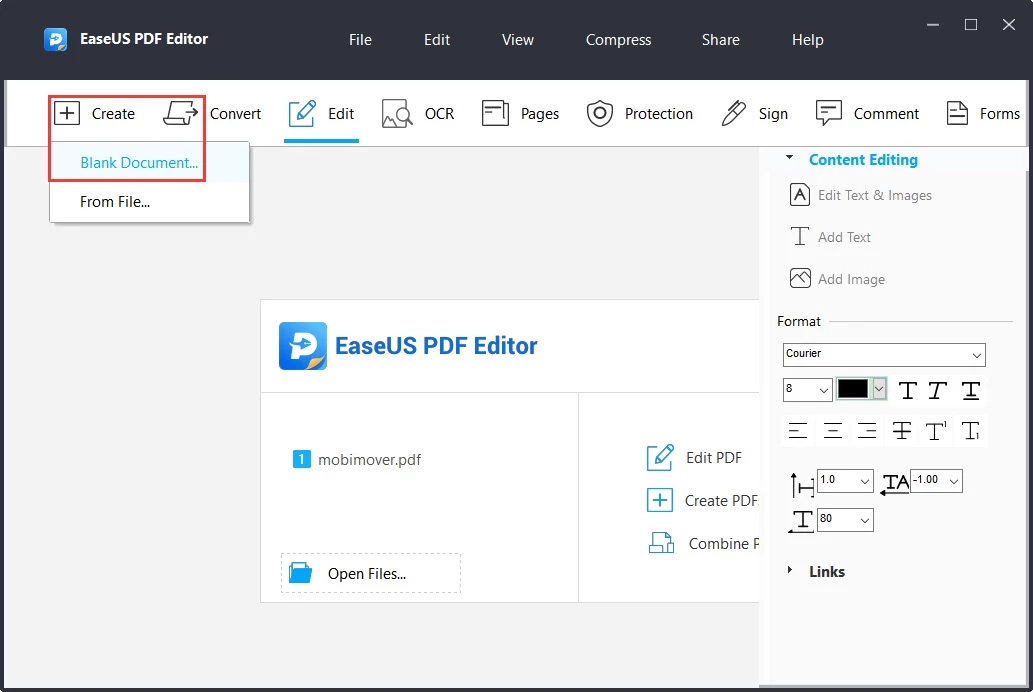
Rather than relying on specialized programs for every single task, users can rely on this single interface to handle the entire lifecycle of a document. The software eliminates the frustrating barrier of locked text by introducing dynamic bounding boxes that make existing paragraphs completely editable. When a typo needs fixing or a clause requires an update, users do not need to hunt down the original source file. They simply click into the document, adjust the text, change the typography, and save the result. This immediate access dramatically reduces the time spent recreating lost assets or begging colleagues for original project files.
Beyond basic text manipulation, the application serves as a bridge between rigid file types and flexible office formats. Converting a stagnant financial table into an editable spreadsheet or extracting specific pages for a separate presentation takes only a few clicks. The interface is purposefully designed to surface standard tools like annotation markers, redaction blocks, and digital signature fields without burying them beneath complex menus. Whether preparing a real estate contract for client approval or assembling an internal company manual from various disparate sources, the application delivers the exact tools necessary to finalize the job on a Windows desktop.
Key Features
- Direct Text and Layout Editing: The software maps out the structure of a document and places bounding boxes around text and image elements. Users can click inside any paragraph to add new sentences, delete outdated information, or change the font size, color, and alignment. This approach allows for direct layout adjustments, meaning you can resize images, move entire text blocks across the page, and insert new graphic assets without breaking the underlying format.
- Optical Character Recognition (OCR): Scanning physical paperwork usually results in a flat, unsearchable image that is difficult to update. The built-in OCR engine analyzes these scanned pages and translates the visual data into selectable, editable text. It supports multiple languages and allows users to export the newly recognized content directly into Microsoft Word, Excel, or plain text formats for further manipulation.
- Multi-Format Document Conversion: Moving data out of a rigid document format is entirely automated through the conversion module. Users can convert their files into editable Office formats or image files like JPG and PNG while retaining the original tables, headers, and visual layout. The software also works in reverse, allowing users to compile existing spreadsheets, slide decks, and images into a single, standardized document for easier distribution.
- Advanced Security and Redaction: Protecting sensitive data is critical when sharing contracts or financial records over the internet. The application allows users to apply 256-bit AES encryption and set strict permission passwords that prevent unauthorized parties from printing, copying, or altering the file. For visible security, users can apply redaction blocks to permanently blackout personal identification numbers or confidential clauses before distribution.
- Interactive Form Creation: Building a questionnaire or an application form from scratch is managed entirely within the application using six distinct interactive controls. Users can drag and drop push buttons, checkboxes, radio buttons, combo boxes, list boxes, and text fields onto any page. This transforms a static document into an interactive data-collection tool that clients can fill out digitally without needing to print and scan the paperwork.
- Page Management and Merging: Handling massive reports is simplified through a dedicated page organization tab. Users can extract specific pages to create a separate file, delete unnecessary sections, or split a massive manual into smaller pieces based on file size or top-level bookmarks. The merging tool easily combines disparate file types, allowing users to stack images, spreadsheets, and text pages into one cohesive, sequential document.
- Digital Signatures and Watermarking: Authenticating official paperwork is handled through the integrated signature and branding tools. Users can import an image of their signature or use a certified digital ID containing a date and time stamp to legally sign contracts directly on their desktop. Additionally, users can stamp custom text or image watermarks across every page, adjusting the opacity and rotation to secure copyright ownership before sending drafts to clients.
How to Install EaseUS PDF Editor on Windows
- Download the official Windows installer executable directly from the vendor's primary website to ensure you receive an unmodified, secure package.
- Navigate to your designated download folder and double-click the setup file to launch the installation wizard.
- Select your preferred interface language from the initial prompt and click OK to proceed to the End User License Agreement screen.
- Read through the software terms and click the agreement toggle to move forward to the destination folder selection.
- Review the default installation path, which is typically located within your local Program Files directory, or click Browse to select a different storage drive if you prefer to keep your primary partition clear.
- Choose whether to create a desktop shortcut and a quick launch icon for faster access, then click the Install button to begin extracting the application files.
- Wait for the progress bar to complete as the setup copies the necessary libraries and executable files to your local system.
- Click Finish to close the installer wizard. On the first launch, you will be greeted by the main dashboard where you can either begin evaluating the trial edition or enter your purchased license code in the Activation window, which requires a temporary internet connection to authenticate.
EaseUS PDF Editor Free vs. Paid
The business model for EaseUS PDF Editor is structured around a limited free trial designed for software evaluation, alongside several premium tiers for active users. When operating under the free trial, the application allows users to navigate the interface, test the editing tools, and see how the software performs on their local Windows machine. However, the trial strictly enforces a permanent watermark on any document that is saved or exported. Additionally, the trial restricts the document conversion feature, allowing users to convert only five pages per file into formats like Word or Excel. These restrictions make the trial suitable for testing the workflow, but completely impractical for professional document distribution.
To remove the watermark and unlock unlimited batch processing and file conversion, users must upgrade to a paid license. The vendor offers flexible payment structures depending on the user's timeline. Short-term needs are covered by a one-month subscription priced at $19.95, while an annual subscription is available for $49.95. Both subscription tiers include full access to all editing features, the OCR engine, and technical support for the duration of the active billing cycle. These options are aimed at users who only need advanced editing capabilities for a specific, time-limited project.
For individuals and businesses looking to avoid recurring subscription fees, the vendor offers a perpetual license branded as Lifetime Upgrades for a one-time payment of $79.95. This perpetual option covers a single computer and guarantees that the user will not lose access to the software if they stop paying a monthly fee. Because the price of the lifetime license is significantly cheaper than paying for two years of the annual subscription, it serves as the most economical choice for anyone who manages digital paperwork on a regular, ongoing basis.
EaseUS PDF Editor vs. Foxit PDF Editor vs. Adobe Acrobat Pro
Foxit PDF Editor is widely recognized for its deep integration into enterprise environments and its extensive feature set tailored for power users. It provides advanced tools like AI-assisted smart redaction, heavy cloud storage options, and complex form logic that goes beyond standard text entry. However, these advanced capabilities come at a noticeably higher cost, often demanding expensive annual commitments or large upfront enterprise fees. Users who need to deploy software across hundreds of corporate workstations or require intense collaborative cloud features will find Foxit PDF Editor to be a capable, albeit expensive, workflow engine.
Adobe Acrobat Pro remains the legacy standard for document management, offering a sprawling ecosystem that connects desktop, web, and mobile environments. Its OCR accuracy and color management for print production are refined, making it the default choice for graphic designers and commercial print shops. The downside to Adobe Acrobat Pro is its strict reliance on a relatively expensive monthly or annual subscription model, with no option for a one-time perpetual purchase. Furthermore, the application is notoriously heavy on system resources, which can slow down older Windows machines during basic tasks.
EaseUS PDF Editor is the better fit for budget-conscious professionals and home office users who want straightforward editing tools without paying for forced cloud ecosystems or complex enterprise features. By offering a one-time purchase option, it provides substantial long-term financial savings compared to the mandatory subscriptions of Adobe Acrobat Pro and Foxit PDF Editor. It runs efficiently on standard hardware and keeps the interface focused purely on practical tasks like text modification, basic OCR, and format conversion. When you need to simply alter a contract or convert a scanned invoice without navigating a complicated corporate toolset, EaseUS PDF Editor delivers exactly what is necessary at a much fairer price.
Common Issues and Fixes
- Watermarks appear on exported documents. The free trial strictly enforces a permanent visual watermark on every saved or printed file. To fix this, you must purchase a valid license and enter the code in the Activation window before saving your final draft.
- File conversion stops after five pages. Users running the unactivated evaluation edition will hit a hard limit when attempting to convert large files into Word or Excel formats. To fix this, upgrade to a paid subscription or perpetual license to unlock unlimited page conversions.
- OCR fails to process standalone image files. The built-in text recognition engine cannot directly scan an open JPG or PNG file from the main interface. To fix this, you must first use the Create tool to convert your image into a standard PDF format, and then run the OCR process on the newly generated file.
- Cannot activate the software offline. The application requires server validation to authenticate your purchased license code and unlock the premium features. To fix this, ensure your computer has an active internet connection while you paste the code into the Activation window; offline activation is not officially supported.
- Changes to form fields are not saving correctly. When building interactive forms, users sometimes forget to lock the fields, causing data to reset or layout shifts when the client opens the file. To fix this, always verify that you have finalized the form controls and save the document as a new flat file before distributing it to external clients.
Version 6.2.0.2 — July 2025
Added:
- New AI-powered workflow enhancements for smarter text recognition.
- Additional interactive form field templates for quicker document creation.
- Support for converting HEIC images to PDF.
Improved:
- OCR accuracy for complex layouts and mixed-language documents.
- Rendering speed for large PDF files with high-resolution images.
- User interface responsiveness and ribbon menu organization.
Fixed:
- Resolved formatting issues when converting specific Excel tables to PDF.
- Fixed a bug where digital signatures were occasionally not validated.
- Minor stability fixes for Windows 11 compatibility.