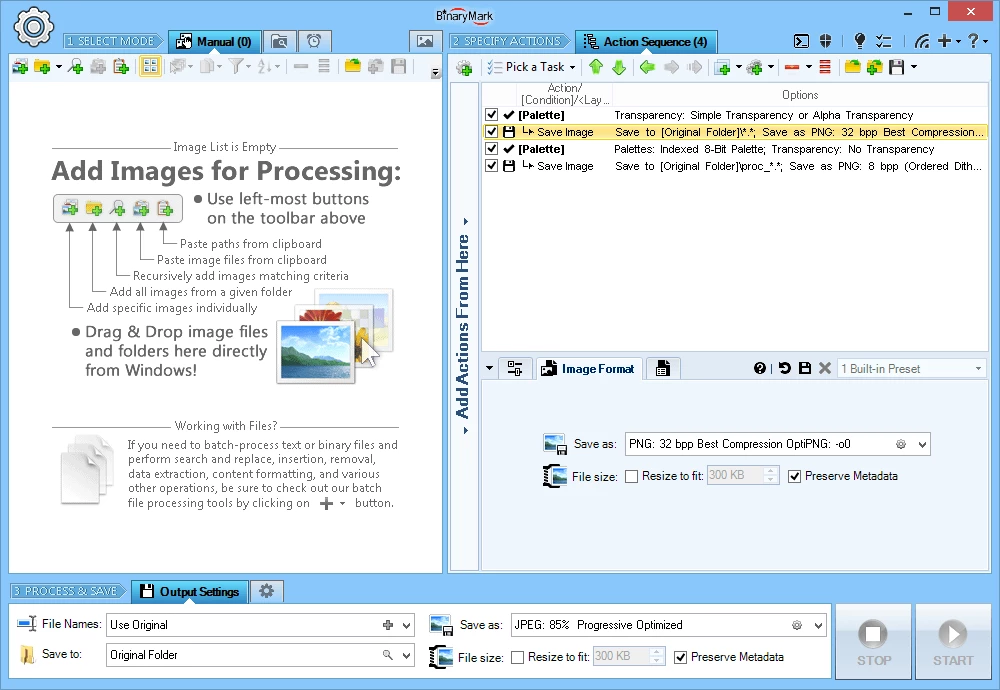
Images form the backbone of modern digital communication, yet the sheer variety of file formats continues to cause friction across different departments, devices, and platforms. Whether dealing with raw photography assets, web-optimized graphics, or legacy scanned documents, an organization quickly amasses a chaotic library of incompatible files. Attempting to manually open, edit, and export these files one by one using heavy graphic design software is a massive drain on time and hardware resources. A dedicated desktop application like Batch Image Converter bypasses this manual labor, providing a centralized control panel to process hundreds or thousands of files simultaneously.
Unlike browser-based conversion services that require users to upload their files to a remote server, this desktop application processes everything locally on the host machine. This offline capability is crucial for corporate environments, medical offices, and legal firms handling confidential documents or proprietary assets where cloud uploads would violate strict data privacy policies. By operating entirely on the local hard drive, it also avoids the bandwidth bottlenecks associated with transferring gigabytes of high-resolution files over an internet connection, ensuring the conversion pipeline runs as fast as the local hardware will allow.
Designed primarily for IT administrators, archivists, and technical users, the software goes beyond simple format swapping. It serves as an automated image manipulation engine that can be deeply integrated into existing server workflows. Instead of relying purely on a graphical interface, administrators can configure complex conversion jobs that automatically trigger color corrections, resizing, and format standardizations without any human intervention. This makes it an essential utility for businesses that need to ingest varied image formats from multiple sources and standardize them into a uniform format for web deployment, archiving, or internal distribution.
Key Features
- Extensive Format Conversion: The software efficiently handles the ingestion and export of a wide array of image types, bridging the gap between modern web standards and legacy archives. Users can convert widely used files like JPG, PNG, and GIF, alongside older or more specialized formats such as TIFF, BMP, PCX, TGA, WMF, and J2K. This broad compatibility eliminates the need for administrators to install multiple specialized viewer applications just to access archived materials.
- Command-Line Automation: One of the strongest assets of this utility is its deep command-line interface, which operates entirely invisibly at runtime. System administrators can trigger conversions using standard Windows batch files, PowerShell scripts, or programmatic calls from other applications. This allows the conversion engine to sit silently in the background of a larger corporate workflow, processing incoming files automatically without ever displaying a graphical window to the end user.
- Saved Conversion Jobs: Rather than configuring the same settings every time a batch needs processing, users can build a complex sequence of tasks and save them as an .sii job file. This proprietary file stores all source paths, destination paths, target formats, and manipulation parameters. When a new batch of images arrives, the user simply loads the job file to instantly restore the exact configuration, guaranteeing complete consistency across daily or weekly conversion tasks.
- Geometric Manipulation: The application does much more than change file extensions; it can physically alter the dimensions and orientation of the images during the conversion pass. Users can apply batch operations to resize, rotate, flip, shift, skew, and adjust the perspective of thousands of files at once. This is particularly useful for standardizing a folder of varied smartphone photos or scanned documents into uniform thumbnails or web-ready assets with identical pixel dimensions.
- Color and Contrast Tuning: To ensure visual consistency across a diverse batch of images, the software includes a suite of automated color correction tools. Users can apply autocontrast and autolevel functions to fix poorly lit photos, or manually adjust sliders for hue, saturation, gamma, and specific RGB channels. These color normalization features are critical when combining images from different cameras or scanners into a single cohesive catalog or presentation.
- Filters and Effects: Advanced visual modifications can be baked directly into the batch process, saving users from needing a dedicated photo editor. The tool offers options to apply noise reduction, dilation, embossing, erosion, blur, and mosaic effects. Additionally, technical filters like high pass, low pass, Laplas, and line detection are available, which are highly beneficial for extracting text or enhancing edge visibility in technical drawings and scanned blueprints.
- Built-In Task Scheduler: For true unattended operation, the software includes its own calendar-based scheduling system. Administrators can set up a conversion job to run at specific intervals—such as every night at midnight—to process all new images dropped into a designated watch folder throughout the day. The scheduler can also be configured to automatically move or delete the original source files once the conversion is successful, keeping server storage clean and organized.
How to Install Batch Image Converter on Windows
- Download the official Windows installer executable for the software directly from the verified vendor website to ensure you are receiving the untampered package.
- Locate the downloaded installation file in your default downloads directory and double-click the executable to launch the setup wizard.
- Read through the End User License Agreement presented on the screen, and accept the terms to proceed with the system installation.
- Review the default installation path, which routes to the standard Windows Program Files directory, and adjust this destination if your IT policy requires it.
- Select your preferred shortcut options, deciding whether you want an icon placed on your desktop and an entry added to your Start menu for quick graphical access.
- Click the final installation button and wait a few moments as the setup wizard unpacks the core files and registers the necessary system components.
- Launch the application for the first time to reach the main interface, where you can choose to begin your evaluation period or enter your purchased license details.
Batch Image Converter Free vs. Paid
Softinterface operates on a commercial software model for this application, targeting business environments, IT departments, and technical users who require heavy-duty automation. The software is not fully free; instead, the developer provides a limited-time free trial that allows network administrators to thoroughly test the graphical interface, the command-line execution, and the overall processing speed before committing to a financial investment.
While exact current pricing figures and volume discount tiers are not universally listed on public consumer software directories and require checking the vendor's official checkout system, the licensing strategy relies on permanent, perpetual commercial licenses. Users seeking to implement the tool across multiple workstations, or those deploying it on a central processing server, will generally need to purchase these commercial volume licenses rather than signing up for a monthly subscription.
Because of its strict enterprise and automation focus, the cost of entry is positioned higher than basic consumer-grade image resizers. For organizations that need a highly dependable, repeatable, and scheduled command-line conversion pipeline—without the security risks of uploading sensitive corporate assets to third-party web converters—the investment replaces hours of manual labor. Home users with only occasional photo resizing needs might find the paid license hard to rationalize, whereas businesses rely heavily on the trial to validate their internal server workflows before buying.
Batch Image Converter vs. XnConvert vs. FastStone Photo Resizer
XnConvert is a widely adopted alternative that supports over 500 input formats and operates smoothly across multiple desktop environments. It is completely free for personal use, making it the go-to recommendation for casual photographers and hobbyists who need to apply batch watermarks, edit metadata, and execute basic color corrections across personal albums without paying for an enterprise-level tool. However, its commercial use requires a paid license per seat, and while it boasts an incredibly intuitive drag-and-drop interface, IT administrators often prefer the rigid focus on proprietary job files and deep command-line scheduling found in Batch Image Converter when building unattended automation pipelines.
FastStone Photo Resizer is a lightweight Windows utility famous for its straightforward, no-nonsense interface and zero-cost license for non-commercial home users. It excels at rapid, basic tasks like renaming, cropping, and converting common photo formats in a few clicks. While FastStone is highly accessible and fast for standard desktop users, it lacks the advanced architectural features of the Softinterface application, such as a built-in calendar task scheduler, programmatic developer interfaces, and the ability to trigger third-party application launches midway through a batch conversion process.
Batch Image Converter is the superior choice when the conversion process must be entirely detached from human interaction and integrated directly into corporate infrastructure. If a user simply needs to shrink a folder of holiday photos to save hard drive space, XnConvert or FastStone will handle the job perfectly and at no cost. Conversely, if a business needs to automatically convert, resize, and route hundreds of scanned documents into a secured network archive every night at midnight using hidden batch scripts, this specialized tool provides the necessary industrial framework.
Common Issues and Fixes
- Scheduled batch jobs fail to execute unattended. This usually occurs because the Windows Task Scheduler lacks the required administrative privileges to run background tasks. Ensure the active user account has full read and write access to the designated source and destination folders, especially if those directories reside on a secured network drive.
- Command-line executions return an error or do nothing. This is frequently caused by incorrect syntax or missing parameters in your executing batch script. Check the file to ensure all mandatory command switches are present, and verify that any file paths containing spaces are fully enclosed in double quotation marks so the parser reads them correctly.
- Converted images appear distorted with incorrect aspect ratios. When setting absolute pixel dimensions for a resize operation, original files with varying orientations will become stretched. Open the graphical interface, navigate to the geometric settings, and verify that the option to preserve the original aspect ratio is checked before saving the configuration file.
- Legacy image formats fail to open in older target applications. Certain vintage software relies on strict color depth limits or specific uncompressed algorithms that modern formats ignore. Check the output configuration in your job file and manually force the software to export using an 8-bit indexed color profile to ensure compatibility with older systems.
Version 2.1.1 — 2025
- Transitioned to a 64-bit architecture to significantly enhance support for processing large image files.
- Improved overall stability and memory management when handling extensive batch lists.
- Refined error handling mechanisms to ensure smoother conversions across diverse formats.