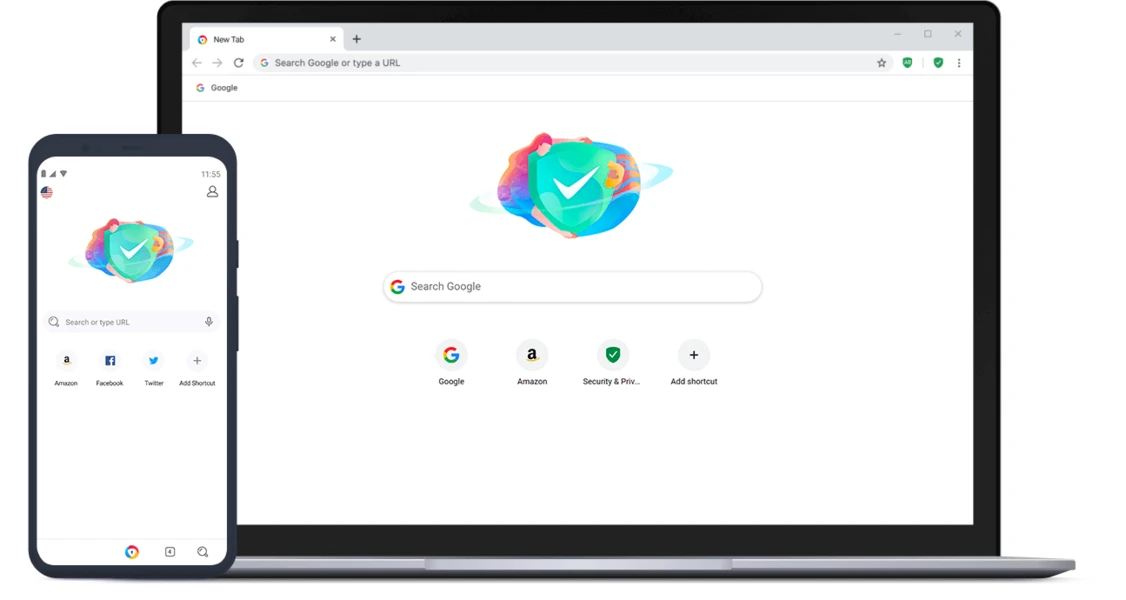
AVG Secure Browser serves as a dedicated internet navigator engineered for individuals and professionals who require elevated digital safety without sacrificing the familiarity of a mainstream application. Rather than relying on a patchwork of third-party extensions to block trackers, force encrypted connections, and manage passwords, this software integrates those core privacy functions directly into its foundation. Built upon the widely adopted Chromium architecture, the application renders web pages identically to Google Chrome or Microsoft Edge, ensuring that compatibility with complex web applications, corporate dashboards, and media streaming platforms remains completely intact. The primary difference lies in how the software handles user data and background scripts by default, immediately stripping away the telemetry and tracking mechanisms that standard browsers typically allow.
For users handling sensitive client data, managing financial accounts, or simply wanting to stop aggressive online profiling, the desktop application offers a highly controlled environment. It actively prevents websites from identifying your unique hardware configuration—a practice known as browser fingerprinting—and intercepts tracking cookies before they can load into your local cache. While generic web tools might offer basic incognito modes that only clear local history upon closing, a dedicated desktop privacy browser enforces persistent security rules across every single session. It actively intercepts potentially malicious downloads, removes intrusive advertisements, and forces unencrypted websites to use HTTPS protocols whenever available.
This structural approach to web navigation ensures that your daily workflow, from researching competitors to accessing web-based productivity suites, remains shielded from external observation and data harvesting. It solves the concrete problem of data leakage. Many users do not realize how many background scripts follow their cursor movements, log their search queries, and build advertising profiles based on their browsing habits. By consolidating anti-tracking, ad-blocking, and phishing protection into a single executable, the application eliminates the need to research, install, and update multiple separate browser add-ons. It provides a hardened workspace that is ready for secure web usage from the moment the installation completes, making it highly practical for users who want strict privacy enforcement without the technical overhead of configuring complex network rules.
Key Features
- Security & Privacy Center: Instead of hiding security toggles deep within nested configuration menus, the software provides a centralized control panel accessible via a prominent shield icon next to the address bar. From this unified interface, users can instantly review their active defense status, toggle specific protections like stealth mode on or off, and monitor exactly how many tracking attempts the application has intercepted during the current session.
- Anti-Tracking and Anti-Fingerprinting: Advertisers often identify users by reading their unique hardware specifications, installed fonts, and screen resolution. The application actively scrambles this fingerprint data, making your specific machine appear generic to external servers. Combined with aggressive third-party cookie blocking, this prevents advertising networks from building a profile of your browsing habits across different domains.
- Built-in Ad and Script Blocker: By stopping advertisements, pop-ups, and background analytics scripts at the network level, the software prevents unwanted elements from rendering on your screen. This hardware-level blocking noticeably decreases page loading times, reduces bandwidth consumption, and prevents malicious scripts from executing hidden crypto-mining tasks on your computer.
- Bank Mode Virtual Desktop: When paired with the developer's desktop antivirus software, the browser can launch a completely isolated virtual desktop session. This specialized environment separates your browser from other active Windows applications, preventing background keyloggers or hidden screen-capture malware from recording your keystrokes and viewing your screen while you access financial institutions.
- Credential and Hack Check Integration: The built-in password manager securely stores login credentials and actively monitors global data breach repositories. If the email address or password associated with one of your saved accounts appears in a known database leak, the browser immediately alerts you via the interface, prompting you to update your security details before a compromise occurs.
- Performance and Resource Management: Chromium-based applications are notorious for consuming high amounts of system memory. To combat this, the software includes a performance management system that automatically suspends background tabs when they remain inactive for a specific period. This frees up crucial RAM and CPU cycles for your active tasks, preventing system slowdowns and extending laptop battery life.
How to Install AVG Secure Browser on Windows
- Download the official Windows installer package from the developer's website and locate the executable file in your designated downloads directory.
- Double-click the installer file to launch the setup wizard, granting Windows User Account Control permissions when prompted to allow the application to make necessary local changes.
- Review the initial setup screen, which displays the default installation path and provides a checkbox option to set the application as your default system browser.
- Select the import options if you wish to migrate your existing bookmarks, browsing history, and saved passwords from your current primary browser into the new environment.
- Click the primary install button and allow the setup utility to extract the required files, write local application data, and configure the desktop shortcut.
- Upon the first launch, the browser will open directly to the Security & Privacy Center, prompting you to review your preferred ad-blocking strictness and tracking prevention levels.
- Navigate to the settings menu to configure your default search engine, adjust interface language preferences, and review the performance tab to enable automatic tab suspension.
AVG Secure Browser Free vs. Paid
The core desktop application is available entirely for free, providing all users with the essential privacy tools, Chromium-based rendering, integrated ad blocking, and standard anti-tracking features without requiring a financial commitment. The free tier does not rely on injecting sponsored content or selling user data to maintain its operations; instead, it serves as an entry point into the developer's broader ecosystem of desktop security utilities. Users can utilize the standard browser indefinitely without encountering forced paywalls for basic web navigation and standard privacy enforcement.
For users who require network-level anonymity and geographic location masking, the developer offers a paid upgrade known as AVG Secure Browser PRO. The primary addition in the PRO tier is a fully integrated Virtual Private Network (VPN) that operates directly within the browser interface. Unlike standard proxy extensions, this built-in VPN provides advanced encryption for all browser traffic, allows users to select specific geographic server locations to bypass regional content restrictions, and imposes no data bandwidth limits on active connections.
The PRO subscription operates on a recurring billing model, offering flexibility depending on the length of the commitment. A standard monthly subscription costs approximately $5.99 per month. Users willing to commit to longer terms can choose an annual plan, heavily discounted to around $39.99 for the first year, or a two-year plan at approximately $55.99 for the first billing cycle. The PRO license covers up to five concurrent devices, allowing users to extend their encrypted browsing capabilities across a mix of supported hardware. The developer backs the paid subscription with a 30-day money-back guarantee, allowing new users to evaluate the VPN performance and geographic unblocking capabilities before finalizing their purchase.
AVG Secure Browser vs. Brave Browser vs. Avast Secure Browser
Choose Brave Browser if you require a highly independent privacy tool that operates entirely outside of traditional security company ecosystems. Brave caters heavily to power users by incorporating a built-in Tor network mode for extreme anonymity, an independent search engine, and a native cryptocurrency wallet. Its unique rewards system allows users to view privacy-respecting advertisements in exchange for tokens, differentiating it from standard ad-blocking paradigms. If you want maximum decentralization and are comfortable navigating alternative web environments, Brave is the better choice.
Avast Secure Browser shares nearly identical underlying architecture, interface design, and security feature sets with its competitor, as both products are developed under the same corporate umbrella. The primary distinction between the two lies entirely in their respective software ecosystems. Avast's application is engineered to communicate directly with Avast Antivirus, unlocking specific features like the isolated Bank Mode environment. If your computer already runs Avast security software, their proprietary browser will integrate more smoothly into your existing setup.
AVG Secure Browser is the better fit when you already rely on AVG security products for your local system maintenance and want a highly accessible, privacy-focused application without unnecessary complexity. It provides a familiar user experience that tightens default security policies, strips away trackers, and blocks advertisements out of the box. It avoids the complex cryptocurrency integrations found in Brave, focusing purely on delivering a clean, fast, and protected web environment for users who want strict privacy fundamentals without a steep learning curve.
Common Issues and Fixes
- Browser crashes immediately upon opening. This often happens due to a corrupted cache or conflicts with background security software. To fix it, force close the application via the Windows Task Manager, then restart your PC. If the issue persists, reinstalling the browser while keeping your user data intact usually resolves the conflict.
- Downloads are blocked or failing to complete. The browser's aggressive security protocols sometimes flag unfamiliar files as dangerous. If you see a "File not verified" warning for a trusted download, click the Keep button to override the block, or check your connected antivirus quarantine settings to whitelist the file.
- VPN Kill Switch blocks all internet access. If you use the PRO version and lose connection, the Kill Switch might be preventing external pages from loading to protect your IP address. Open the browser menu, go to Settings, select Privacy and security, click VPN Settings, and toggle the Kill Switch off to restore standard connectivity.
- Websites fail to load correctly due to blocked cookies. Strict anti-tracking settings can break site functionality, especially on banking or shopping portals that require persistent session data. To fix this, open the Security & Privacy Center and temporarily disable strict anti-tracking for that specific domain, or add the site URL to the allowed cookies list in the Privacy settings.
- High memory usage when multiple tabs are open. Despite built-in optimizations, Chromium browsers can still consume significant RAM over time. To resolve this, open the browser Settings, navigate to the Performance tab, and ensure that the option to suspend inactive tabs is turned on, which will force background pages to sleep until you click them again.
Version Latest — 2025
- Revamped the Security & Privacy Center dashboard for easier access to protection tools like Privacy Guard and Web Shield.
- Updated the underlying Chromium engine to the latest version, ensuring faster page loads and better stability.
- Enhanced the Privacy Cleaner tool to provide more comprehensive removal of tracking cookies and browsing artifacts.
- Resolved minor bugs and optimized memory usage for smoother performance on lower-end devices.