AdsPower Browser operates as an antidetect application built for digital marketers, traffic arbitrage professionals, and e-commerce managers who need to isolate multiple online identities. Standard web navigators leak hardware data, IP addresses, and browsing habits, linking separate accounts together and triggering automated bans. By isolating cookies, local storage, and digital fingerprints inside independent containers, this software lets users log into dozens of merchant or advertising accounts from a single computer without raising security flags. The architecture ensures that each session maintains its own isolated cache, preventing third-party tracking scripts from correlating traffic across different tabs.
Instead of running heavy virtual machines or relying on easily detected private browsing modes, users manage their profiles through a centralized desktop dashboard. The application runs locally on your Windows machine to accurately emulate hardware parameters, intercept tracker requests, and map individual proxies to specific containers. This local processing approach ensures that graphics rendering, font loading, and mouse movements appear authentic to anti-fraud systems on platforms like Amazon, Facebook, and TikTok. Because the heavy lifting relies on your local CPU and RAM rather than remote cloud rendering, navigating complex web pages remains fast and responsive, avoiding the input lag often associated with virtual desktop infrastructure.
Working within the desktop environment allows teams to assign specific profiles to remote employees without sharing raw login credentials. The tool handles the technical complexity of spoofing Canvas, WebGL, and User-Agent metrics in the background, allowing advertising agencies and crypto enthusiasts to focus on scaling their campaigns rather than troubleshooting account restrictions. By centralizing operations, administrators can audit login times, track exactly which proxy is assigned to which client account, and safely back up session cookies to ensure consistent access even if a platform updates its security protocols.
Key Features
- Dual Engine Emulation: Users can build profiles using either the Chromium-based SunBrowser or the Firefox-based FlowerBrowser. This engine diversity prevents anti-fraud algorithms from clustering all your accounts under a single browser type. By mimicking the exact rendering behavior of different engines, the tool successfully passes advanced JavaScript engine checks that often flag single-engine spoofers.
- Hardware Fingerprint Spoofing: The application intercepts tracking requests and supplies modified parameters for WebGL, Canvas, Audio context, and system fonts. You can randomize these variables for a completely fresh identity or lock them to match specific target demographics. It also overrides media devices, network interfaces, and battery status APIs so that the target website reads consistent, believable hardware metrics.
- No-Code RPA (Robotic Process Automation): A visual editor lets users build automated task sequences—such as adding items to a cart, liking posts, or gathering page data—without writing complex Python or Node.js scripts. You simply drag and drop operation blocks into a timeline, define the target CSS selectors or interface buttons, and let the software execute the routine across multiple profiles simultaneously.
- Multi-Window Synchronizer: When managing repetitive actions across multiple accounts, you can designate one master window. Any typing, clicking, or scrolling performed in the master window instantly mirrors across all active slave windows. This is particularly useful for tasks like crypto airdrop farming or bulk data entry, where you need to navigate identical website layouts across dozens of isolated sessions at the exact same time.
- Granular Proxy Integration: Each container accepts distinct HTTP, HTTPS, or SOCKS5 proxy credentials. The interface includes a built-in proxy checker to verify connectivity and location data before launching the container. Once verified, the software strictly routes all traffic for that specific profile through the assigned proxy, effectively masking your true local IP address and matching your location to the desired regional market.
- Team Permission Management: Administrators can group profiles and assign them to specific staff members with restricted access levels. Employees can open the accounts to do their work, but they cannot view the underlying account passwords or export the session cookies. This security model allows agencies to outsource account management tasks without risking total loss of the underlying digital assets if a contractor leaves the project.
- Local API Control: For developers requiring advanced automation, the software provides a REST API and supports integration with standard frameworks like Puppeteer, Playwright, and Selenium. This allows technical teams to trigger profile launches, inject cookies, or extract specific page elements programmatically, fully bypassing the graphical interface for server-side management tasks.
How to Install AdsPower Browser on Windows
- Download the Windows executable installer directly from the official vendor website to ensure you receive the unmodified setup package.
- Double-click the downloaded setup file to launch the installation wizard and initiate the deployment process.
- Review the end-user license agreement, verify the software terms, and click the "I Agree" button to proceed to the next step.
- Select your preferred installation directory on your local drive, or leave the default path provided by the setup tool if you have sufficient space.
- Click the "Install" button to unpack the core application files, interface components, and necessary runtime libraries onto your local machine.
- Click "Finish" to exit the installation wizard, allowing the application to launch automatically and establish its initial network connections.
- On the first run, sign in with your existing account credentials or create a new account to access the main profile dashboard.
- Navigate to the settings menu to download the specific SunBrowser or FlowerBrowser kernel versions required to launch your target profiles successfully.
AdsPower Browser Free vs. Paid
The developer offers a permanent Free tier designed specifically for individuals who need to test the antidetect environment before committing to a larger budget. This entry tier includes two browser profiles, basic fingerprint configuration capabilities, and one user seat. It provides a practical way to verify how the containers interact with your specific target platforms, test local proxy configurations, and ensure the basic interface aligns with your daily account management workflow.
For growing operations, the Base or Professional plans start around $5.40 to $9 per month, unlocking between 10 and 50 profiles depending on the exact configuration you choose at checkout. These paid tiers enable critical features like profile sharing, advanced automation options via the visual editor, and profile synchronization across multiple machines. Adding extra team member seats incurs an additional monthly fee per user, usually around $5 per seat, allowing agencies to scale their access dynamically as they hire new contractors or remote employees.
Larger teams and enterprise users can opt for Business tiers, which support hundreds of profiles and include advanced features like automatic proxy matching, batch permission adjustments, and local API priority support. The vendor typically offers significant billing discounts ranging from 20% to 40% for users who choose quarterly or annual billing cycles instead of month-to-month payments. Custom plans are also available for organizations that require specific profile limits or dedicated technical assistance beyond the standard support channels.
AdsPower Browser vs. Multilogin vs. Dolphin Anty
Multilogin is a respected antidetect tool heavily focused on enterprise clients and technical automation workflows. It includes built-in residential proxy traffic across its subscription tiers, meaning users do not necessarily have to source and buy separate third-party proxies to get started. Multilogin also excels in complex API integrations and strictly controlled team permissions, making it the preferred choice for large-scale operations with higher budgets. However, its starting price is significantly higher, which can price out solo freelancers or smaller boutique agencies.
Dolphin Anty targets users who need fast, manual account switching, particularly in the cryptocurrency and affiliate marketing sectors. It features a streamlined interface that makes launching and organizing profiles very fast, and it offers a generous permanent free tier for up to ten profiles. However, it relies entirely on third-party proxies and lacks the visual no-code automation editor found in other tools, requiring technical scripting knowledge if you want to perform bulk repetitive tasks across your accounts.
AdsPower Browser fits comfortably between these two extremes, providing a balanced daily workflow for the mid-market. It offers a much lower entry price than Multilogin while including a native visual RPA builder that Dolphin Anty completely lacks. For mid-sized teams that need reliable dual-engine fingerprinting, straightforward task automation without writing code, and affordable scaling as their client base grows, it provides a practical middle ground.
Common Issues and Fixes
- Error 100044 (Waiting for browser to start timeout): This initialization error occurs when the browser kernel fails to launch due to corrupted local files or severe network delays. Fix this by navigating to the global settings menu, deleting the cached engine, and re-downloading the specific Chrome or Firefox engine version your profile requires.
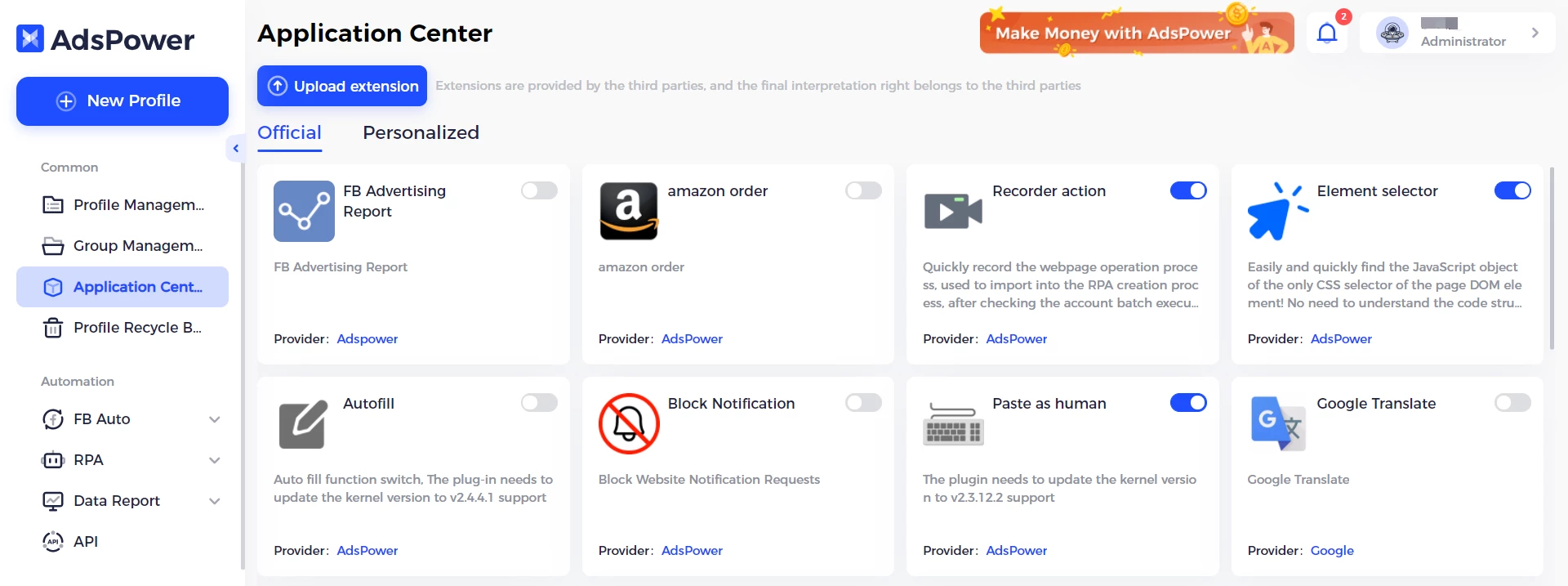
- Extensions missing on a new device: If an installed extension does not sync across your machines, it was likely installed locally directly inside a single profile window. To fix this, install the extension globally through the built-in Extensions Center and enable the "Extension Data" synchronization toggle in your team settings.
- Proxy authentication failure: The built-in proxy checker will fail to connect if your credentials are incorrect or if your local firewall is blocking the designated port. Verify the host IP and port numbers, and ensure your current local IP address is explicitly whitelisted in your proxy provider's dashboard.
- High RAM consumption during bulk operations: Opening multiple active containers simultaneously can quickly exhaust your available system memory, leading to interface freezes or sudden application crashes. Limit the number of concurrently active profiles, or use the Synchronizer tool to manage tasks across a smaller, controlled batch of windows at one time.
Version 6.5.28 — June 2024
- Added support for the Chrome 142 kernel to enhance the accuracy of fingerprint simulations.
- Introduced RPA Plus, featuring a redesigned and more intuitive interface for automation tasks.
- Added a "Disable UDP" option within WebRTC settings to prevent potential network IP leaks.
- Implemented a one-click feature in Local Settings to upload logs from the previous 7 days.
- Improved security configurations for browser extensions to ensure a safer browsing experience.
- Improved the logic for serial number auto-incrementing to streamline profile organization.
- Fixed a display issue in Firefox where menus would split incorrectly across multiple monitors with custom resolutions.