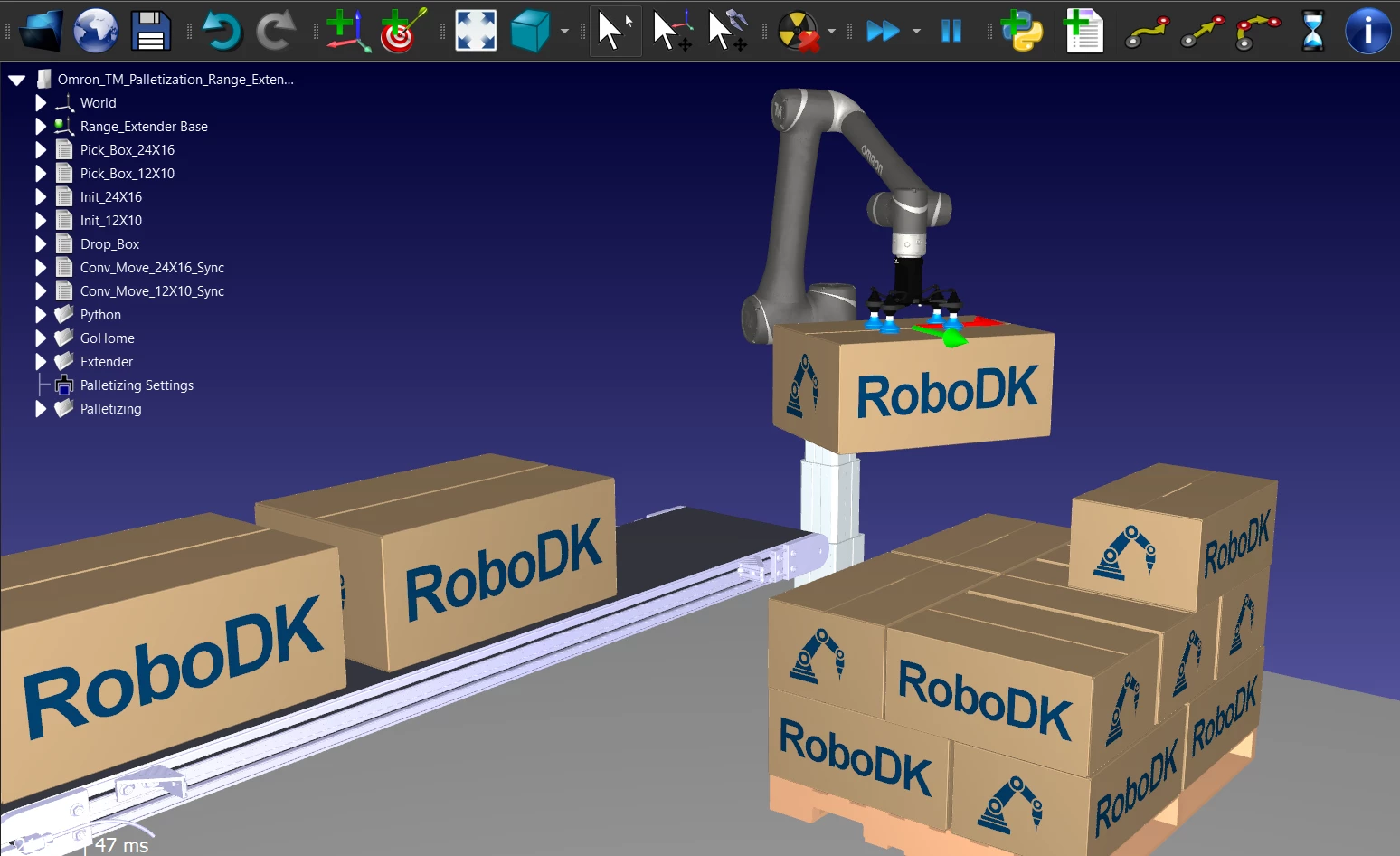
RoboDK is a dedicated offline programming and 3D simulation platform built for robotics engineers, integrators, and industrial manufacturers. Instead of manually jogging a robotic arm with a physical teach pendant on the shop floor, engineers use this software to map out highly detailed toolpaths directly on a desktop computer. The application translates generic machining files, such as G-code or APT-CLS, into manufacturer-specific robot instructions. By moving the programming phase entirely into a virtual environment, production lines can continue running their current batches without experiencing downtime while the next task is coded.
The software is specifically engineered to handle high-mix, low-volume manufacturing environments. Tasks such as robot milling, 3D printing, welding, painting, and deburring require thousands of coordinate points. Manually inputting these targets on a physical controller is mathematically impractical and heavily prone to mechanical errors. The platform imports the physical constraints of the robotic cell, applying kinematics calculations to generate error-free paths. Users load a virtual replica of their work cell, assign a tool center point (TCP), and let the software calculate the joint movements required to follow a surface contour smoothly.
Operating as a heavy-duty desktop application is necessary due to the intensive graphical and computational requirements of kinematic calculations. Calculating the precise joint angles for a six-axis arm interacting with imported 3D CAD geometries requires localized processing and immediate access to GPU resources. The desktop environment also ensures stable, offline operation for facilities that restrict internet access on their engineering workstations for security reasons. Users manage post-processors locally, generate the text-based robot programs, and transfer them via USB drive or local Ethernet straight to the robot controller.
Key Features
- Offline Programming and Post-Processing: The software acts as a universal translator between standard toolpaths and specific robot controllers. Users generate generic paths using internal tools or external CAM software, and the built-in post-processors convert these paths into the proprietary language required by brands like KUKA, FANUC, or Universal Robots.
- Kinematic Singularity Avoidance: Industrial robots frequently lock up or behave unpredictably when joint axes align perfectly, a mechanical trap known as a singularity. The platform automatically calculates approach angles and rotates the tool around the Z-axis to avoid wrist and shoulder singularities, adjusting thresholds via the Tools menu to ensure smooth physical execution.
- Extensive Hardware Library: Users do not need to model their own equipment from scratch. The interface provides a direct link to download over 500 accurate robotic arm models, complete with predefined joint limits, payloads, and reach dimensions, allowing users to drag and drop them directly into the active station tree.
- CAD and CAM Software Integration: The platform accepts native 3D geometry from standard formats like STEP and IGES, allowing engineers to import physical parts and fixtures for accurate path planning. Users can extract curves directly from the imported 3D models using the Create Targets on Surface tool, establishing precise approach and retract vectors for painting or welding tasks.
- External Axis Synchronization: Complex manufacturing setups often involve moving the robot on a linear rail or rotating the workpiece on a motorized turntable. The software synchronizes the movements of the primary robotic arm with these external axes, updating the reference frame dynamically so the tool remains aligned with the workpiece during continuous motion.
- Visual Collision Detection: Operating heavy machinery requires strict safety verification before executing code. The software provides a Collision Map menu that visually highlights physical interference between the robot structure, the end-of-arm tooling, and surrounding station objects during the simulated run, preventing costly hardware damage on the physical shop floor.
- Application Programming Interface: For highly customized workflows, the software exposes a Python API that allows engineers to script automated repetitive tasks. Users can write custom scripts to automatically load specific stations, modify target coordinates based on external sensor data, or tweak how the post-processor formats the output text file.
How to Install RoboDK on Windows
- Download the executable Windows installer package directly from the official vendor website.
- Launch the downloaded setup file to initiate the installation wizard, requiring standard administrative privileges to proceed.
- Accept the end-user license agreement and verify the destination folder, which defaults to the C:RoboDK directory on the local drive.
- Select the specific components to include during the installation process, taking care to keep the offline robot library and default post-processors checked for standard offline functionality.
- Review the optional CAD/CAM integration add-ins presented by the installer, checking the boxes for any supported modeling software currently installed on the local machine.
- Click Install to extract the core application files, Python dependencies, and documentation to the local disk.
- Once the extraction completes, leave the Start RoboDK box checked and click Finish to close the setup wizard.
- Upon first launch, the software presents an empty 3D station; navigate to the Options menu to verify that the default Python settings are correctly pointing to the internal interpreter.
RoboDK Free vs. Paid
RoboDK provides a 30-day free trial that unlocks the entire suite of simulation tools, allowing prospective engineers to test full post-processor generation, save complex station setups, and evaluate the Python API without immediate commitment. During this period, users can generate exact code for their physical robot controllers and verify the mathematical accuracy of the kinematics engine.
Once the trial period concludes, the application reverts to a restricted free version. This basic tier is intended for viewing existing RDK station files and running simple, non-commercial simulations. In the free tier, the ability to export large industrial robot programs is restricted, and users encounter strict limitations when attempting to save complex, multi-robot work cells.
The paid commercial tiers are divided into Educational, Professional, and Enterprise structures. The Professional license is the standard requirement for industrial integrators, providing unrestricted access to all post-processors, singularity avoidance parameters, and CAM integrations. Licenses are offered primarily as perpetual floating network licenses, allowing multiple engineers to install the software while limiting simultaneous active usage. For manufacturing environments with strict security protocols, the vendor also offers a USB dongle license, ensuring the software remains fully activated on offline Windows machines without requiring continuous cloud verification.
RoboDK vs. Robotmaster vs. ABB RobotStudio
When evaluating offline programming environments, Robotmaster presents a strong alternative for users strictly focused on heavy material removal and complex CNC-style toolpaths. Robotmaster excels at deep CAM integration, providing highly specialized tools for calculating aggressive milling, trimming, and welding paths. Facilities whose entire workflow revolves around converting multi-axis CAM trajectories into robot code often favor Robotmaster for its specialized material-removal features.
ABB RobotStudio represents the proprietary standard for facilities exclusively operating ABB hardware. Because RobotStudio uses the exact virtual controller code that runs on the physical ABB pendant, its cycle time estimations and axis behavior calculations are entirely exact, with zero deviation from the physical machine. Engineers programming a dedicated ABB fleet rely on this absolute controller parity to tune pick-and-place times down to the millisecond.
RoboDK is the better fit for integrators and facilities that manage a high mix of robot brands. Instead of purchasing, learning, and managing separate proprietary simulation software for FANUC, KUKA, and Universal Robots, engineers can standardize their entire offline programming process within a single platform. Its brand-agnostic library of over 500 robot arms and highly accessible Python API make it the most practical choice for teams dealing with heterogeneous manufacturing hardware.
Common Issues and Fixes
- Kinematic singularities halting the simulation. When the tool path forces the robot to align joint four and joint six, the simulation will abruptly stop. Navigate to the Motion tab in the Options menu and increase the tolerance to avoid wrist singularity, or adjust your initial target offset by slightly rotating the tool around the Z-axis.
- Robot 3D models fail to load from the library. The internal command to open the robot library requires an active internet connection to fetch hardware geometries. If working on an offline terminal, download the specific file from a connected machine, transfer it via USB, and manually drag it into the station tree.
- Physical controller rejects the exported code. If the teach pendant throws a syntax error when reading the program file, the wrong post-processor was used during generation. Right-click the program in the left panel, select the option to choose a post-processor, and pick the exact model variant that matches your specific controller hardware.
- 3D workspace lags during manipulation. Importing high-density STEP files with complex curves can overload the rendering engine. Go to the Display tab in the Options menu and change the performance setting to force GPU rendering, which will automatically hide microscopic geometric details during camera movement.
- Unpredictable joint flips during linear moves. When executing a linear path between two distant targets, the robot arm may suddenly reconfigure its elbow or shoulder joint. Insert an intermediate target between the two points, or change the instruction from a linear move to a joint move if strict TCP tracking is not required for that specific segment.
Version 5.9.5 — December 2025
- Enhanced the driver functionality for Leica laser trackers to ensure better connectivity and performance.
- Fixed an issue where robot tools were not loading correctly for CNC-style robots, such as MABI systems.
- Improved the accuracy of cycle time estimates when exporting simulations to HTML.
- Updated license status messages to provide clearer information to the user.
- Refined mesh optimization settings, offering more control over 3D model performance.
- Upgraded post processors for JAKA robots and renamed/improved the Schneider Electric post processor.
- Modified the plugin manager to display the list of unloaded default plugins by default.
- Streamlined the calibration measurements menu for better usability.
- Enhanced the API capabilities for constructing and managing external axes.