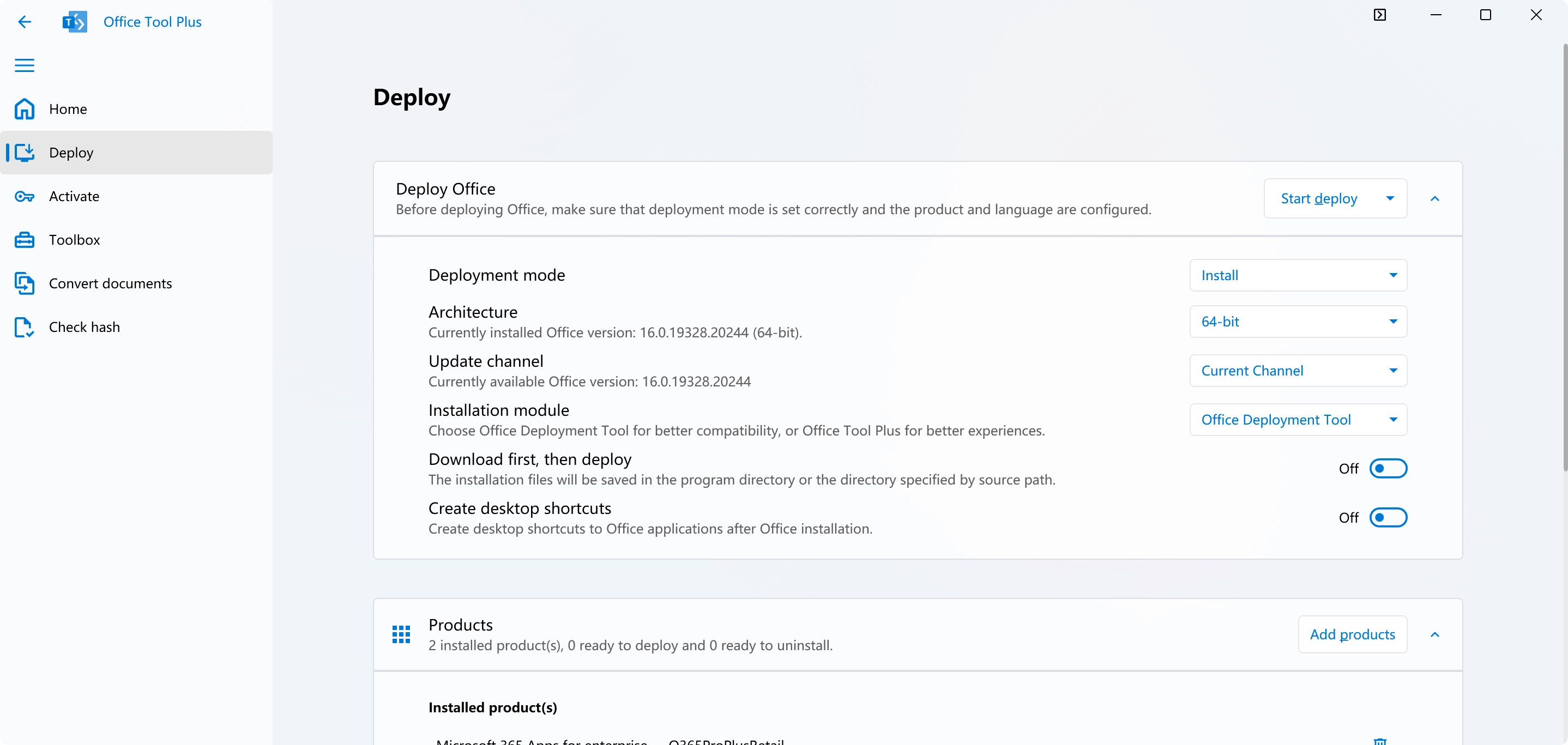
Office Tool Plus provides a graphical interface for the Microsoft Office Deployment Tool, allowing system administrators and individual Windows users to dictate exactly how their productivity suites install on local machines. Instead of running the default Click-to-Run installer that blindly bundles every available application onto the primary hard drive, users can isolate and select specific programs to download. This modular approach means you can exclude unnecessary components such as Publisher, Skype for Business, or Access, saving gigabytes of disk space and reducing telemetry processes. The utility handles the entire process locally, from fetching the raw installation files directly from Microsoft’s content delivery networks to managing the final local configuration parameters.
Because enterprise and home environments often require different update channels and language packs, this deployment utility centralizes those settings into a single visual dashboard. Administrators do not need to manually write complex XML configuration files or rely on obscure command-line prompts to control how the software behaves. The application supports full offline deployments by downloading the required source files exactly once. These files can then be packaged into an ISO image or copied to an external network drive for mass deployment, ensuring that setting up multiple offline workstations does not repeatedly consume external internet bandwidth.
Beyond the initial setup phase, the software includes a dedicated maintenance environment for repairing and managing existing installations. When an older setup becomes corrupted, refuses to update, or fails to uninstall through the standard Windows control panel, the utility can execute a hard removal to clear out broken registry keys and leftover cached files. It also provides integrated document conversion utilities and license management screens, giving IT staff and power users concrete visibility into their current product status, update channels, and volume management network addresses without having to navigate through hidden Windows menus.
Key Features
- Granular Application Selection: Users can specify exactly which components of the suite to install by interacting with visual checkboxes in the main deployment menu. This prevents the automatic installation of peripheral programs like Access, OneNote, or OneDrive, saving disk space and reducing the number of background processes that run on system startup.
- Multiple Download Engines: The utility incorporates Aria2, Thunder, and the official Microsoft downloader protocols to fetch the necessary installation files. This multi-engine approach ensures high-speed, multi-threaded retrieval of heavy multi-gigabyte packages directly from official content delivery networks, making it reliable even on unstable or throttled internet connections.
- Offline Installation Support: Network administrators can download the full installation directory locally and use the application to export it as an ISO file. This disk image can be mounted on offline machines or distributed via USB drives, bypassing the need for individual endpoint downloads during hardware rollouts.
- XML Configuration Export: For IT environments that require automated and repeatable setups across hundreds of computers, the software generates and saves deployment rules as standard XML files. These text files can be loaded into other instances of the tool or integrated directly into unattended Windows deployment scripts for zero-touch installations.
- Integrated Troubleshooting Toolbox: A dedicated maintenance tab features a collection of recovery tools designed to reset broken application settings to their factory defaults. It also includes a forced removal utility that manually strips away corrupted Office directories and registry entries when the standard uninstaller hangs or throws error codes.
- Batch Document Conversion: The program utilizes an Office COM-based utility to convert batches of Word documents, Excel spreadsheets, and PowerPoint presentations into alternative formats, such as PDF. This bulk conversion happens in the background, without requiring the user to open each document manually in its respective application.
- Local License Management: The dashboard provides a dedicated interface to view current product licenses, purge old or expired keys from the system, and configure local volume licensing server addresses. This gives administrators clear oversight over network-based activation routing without relying on external command scripts.
How to Install Office Tool Plus on Windows
- Download the correct Windows package from the official repository, choosing either the standalone lightweight archive or the larger version bundled with the necessary .NET Desktop Runtime files, depending on what your system currently has installed.
- Extract the contents of the downloaded ZIP archive into a dedicated folder on your local drive, such as the desktop or a network share; the application acts as a portable executable and does not utilize a traditional Windows setup wizard to write itself into the registry.
- Run the main executable file located in the extracted folder. If the required framework dependencies are missing and you downloaded the unbundled version, the Windows operating system will halt the launch and prompt you to download the correct runtime libraries from Microsoft.
- Navigate to the "Deploy" tab situated on the left-side navigation menu to begin configuring your local installation parameters, selecting your system architecture (x86 or x64) and the specific suite edition you intend to install.
- Toggle the individual application switches to the off position for any components you do not want installed on the drive, and use the drop-down menus to assign primary and secondary language packs.
- Click the "Install" button located at the top or bottom of the interface to initiate the download phase; the software will reach out to the official content servers to pull only the specific files dictated by your custom configuration.
- Wait for the official Microsoft setup window to spawn and complete its visual progress bar, indicating that the files are being written to your program files directory.
- Navigate to the "Activation" tab upon completion to verify your product details, input your purchased retail keys, or point the system toward your internal volume licensing server.
Office Tool Plus Free vs. Paid
The application operates entirely as freeware and does not utilize any paid tiers, subscription models, or locked enterprise features. The developer distributes the utility without inserting third-party advertisements, bundled adware, or hidden data collection scripts, positioning it strictly as a community-driven tool for managing local software deployments. Users have access to the exact same feature set, including the offline ISO creator and the bulk document converter, regardless of whether they are setting up a single home computer or deploying across a corporate network.
Because the software relies exclusively on fetching official installation files from external servers, the freeware status of this deployment utility does not bypass or alter Microsoft's own commercial licensing requirements. Users must still possess valid retail keys, volume agreements, or institutional network credentials to legally use the productivity suites they install. The deployment tool simply acts as a mechanical configuration and management interface, providing no workarounds for commercial licensing restrictions or subscription validations.
The project is actively maintained through voluntary community donations and open-source localization contributions from its user base. All codebase updates, bug fixes, and new feature integrations are pushed to the public immediately upon release. There are no restricted downloads hidden behind a paywall, and the developer provides routine updates to ensure the application maintains compatibility with the latest content delivery network changes and operating system updates.
Office Tool Plus vs. Microsoft Office Deployment Tool vs. LKY Office Tools
The official Microsoft Office Deployment Tool (ODT) is the underlying foundational engine that actually executes these installations, but it operates strictly through a text-based command-line interface. IT administrators must manually write and carefully edit XML files to define which applications, architectures, and language packs to download, which often leads to syntax errors and significant frustration for users unfamiliar with markup languages. ODT remains the standard for automated enterprise environments, but it lacks any interactive visual feedback, progress bars, or built-in troubleshooting features.
LKY Office Tools provides a highly automated, script-based alternative that scans the current Windows environment and silently installs a predefined, optimized configuration. It removes the configuration guesswork entirely but heavily sacrifices granular user control in the process. Users who need to specify exact update channels, exclude specific minor applications, or build an offline ISO file for a segregated local network will find LKY Office Tools far too restrictive, as it prioritizes one-click convenience over modular configuration.
Office Tool Plus serves as the practical middle ground, wrapping the raw command-line capabilities of ODT within a fully interactive, mouse-driven graphical interface. It is the optimal choice for users who demand exact control over their local setup—such as picking exact application components, managing local volume licenses, and creating offline installation media—without needing to manually write configuration code or stare at a blank terminal window.
Common Issues and Fixes
- Antivirus blocking the multi-threaded download engines. Third-party security software frequently flags the Aria2 or Thunder download engines as suspicious behavior due to their aggressive multi-threading and rapid network requests. Temporarily pausing the active antivirus shields or adding the application's extracted folder to the security exclusion list allows the download phase to finish without artificial interruption.
- Corrupted previous installations preventing setup. If the official setup engine fails immediately upon launch or throws numeric error codes, leftover registry keys and locked files from an older, broken installation are usually the culprit. Navigating to the Toolbox tab and running the "Force Remove" utility thoroughly clears these corrupted remnants from the drive before attempting a fresh deployment.
- Missing framework runtime errors on launch. The application interface is built utilizing modern UI libraries and will crash or simply refuse to open if the host machine lacks the required background dependencies. Downloading the archive specifically labeled "With Runtime" or manually fetching the latest .NET Desktop Runtime from the official developer portal resolves this hard startup failure.
- Blank application icons after configuration. Occasionally, the Windows shell cache does not refresh immediately after a custom deployment finishes, resulting in blank white shortcut icons on the start menu. Restarting the Windows Explorer process directly from the Task Manager or performing a full system reboot forces the operating system to render the new executable icons correctly.
- XML configuration file parsing errors. When importing a previously saved deployment profile, the tool may throw a formatting error if the file was manually edited in a basic text editor and saved with the wrong encoding. Opening the broken file in a code-aware editor and re-saving it strictly as UTF-8 resolves the parsing failure and allows the import to proceed.
Version Latest — 2025
- Added support for HTTP/2.0 to enable header compression and multiplexing features.
- Improved accessibility of the navigation bar for better usability.
- Optimized theme colors for a more consistent visual experience.
- Added an automatic help document prompt if the Office installation process fails.
- Implemented a check for the operational status of Office when verifying updates or running repairs.
- Fixed an issue where an "update failed" message was incorrectly displayed even after a successful update.
- Resolved a bug that caused unexpected error messages when attempting to repair Office without administrator privileges.
- Corrected the calculation of border values to ensure proper display dimensions.
- Fixed a problem where proxy credentials could not be set when using the Thunder download engine.