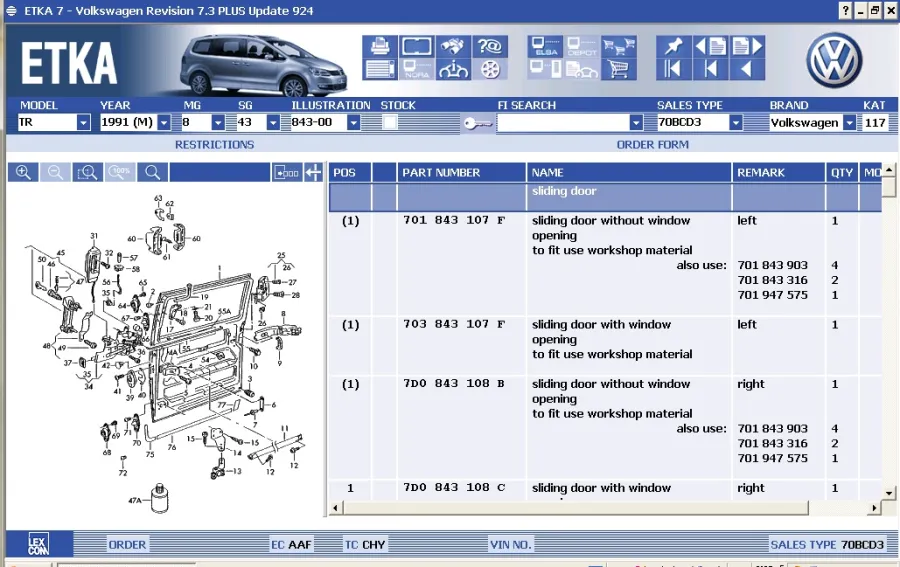
ETKA serves as the primary electronic parts catalogue for the Volkswagen Group, handling part identification and ordering workflows for mechanics, dealership consultants, and independent service centers. Instead of relying on manual cross-referencing or generic aftermarket databases, automotive professionals use this application to query exact vehicle configurations. By entering a specific 17-character Vehicle Identification Number (VIN), the system filters thousands of components to display only the parts installed on that exact chassis at the factory. This direct link to manufacturer assembly data prevents ordering mistakes, reduces repair bay downtime, and ensures that repair teams source the correct genuine components for Audi, Volkswagen, SEAT, Škoda, and Cupra vehicles.
Operating as a dedicated Windows desktop application, the catalog provides a controlled and responsive environment. The desktop architecture allows repair centers to integrate the catalog directly with their in-house Dealership Management Systems (DMS). A service advisor can look up a required part, check local dealership inventory, pull the current manufacturer recommended retail price, and transfer the part number straight to a customer repair order without retyping data. The local client processes heavy graphical assets, such as high-resolution exploded view diagrams, without waiting for slow page loads during an active service consultation. Users can rapidly switch between different vehicle sub-assemblies, utilizing advanced zoom functions to inspect hardware details before making purchasing decisions.
Because automotive part supersessions happen frequently, the software requires strict, periodic data updates to remain functional. Users must download updated price lists, superseded part numbers, and newly documented assemblies directly from LexCom servers. This constant synchronization ensures that a mechanic ordering a replacement component receives the newest active part number rather than an obsolete iteration. The software actively alerts users if a requested part has been dropped or replaced by a newer revision. This desktop tool is fundamentally built for commercial workshops that need strict accuracy when managing daily inventory and processing parts orders.
Key Features
- VIN and PR Code Filtering: Users input a specific 17-character vehicle identification number to immediately filter the entire catalogue. The interface grays out incompatible components and highlights only the specific production codes (PR codes) installed on that exact chassis, removing the guesswork from identifying complex wiring harnesses or model-specific trim pieces.
- Exploded Diagram Navigation: The interface provides highly detailed, interactive assembly diagrams for mechanical, exterior, and electrical systems. Technicians can click directly on a visual component callout in the drawing to jump straight to the corresponding part number, hardware specifications, and required quantities in the data table.
- Part Supersession Tracking: When the manufacturer updates a component design or changes a supplier, the software tracks the historical chain of part numbers. The application displays a direct visual notification if a requested part has been dropped, indicating the exact replacement part number required for the repair.
- Dealership Management System Integration: The desktop client connects directly to standard workshop management environments. Service advisors can highlight a list of required components and export them directly to a repair order or inventory picklist using the COMbox interface, reducing transcription errors and automatically syncing local pricing.
- Parts Locator and Networking: If a local dealership lacks a specific component, the application allows users to search the inventory of other affiliated regional dealers. The interface displays the physical distance to the part, the holding dealer's contact information, and current stock levels for rapid fulfillment.
- Chemical and Hardware Catalogues: Beyond vehicle-specific assemblies, the software includes dedicated menus for generic shop materials. Technicians can look up bulk fasteners, sealants, fluids, electrical terminals, and standardized hardware using dimensions, thread pitches, or material properties rather than vehicle applications.
- Quick-View Component Data: A dedicated quick-view toggle allows users to pull up essential technical annotations and associated fitting parts without opening entirely new windows. This tool instantly advises the technician if additional hardware, such as single-use stretch bolts, must be ordered alongside the primary component.
How to Install ETKA on Windows
- Connect the official hardware license dongle (Hardlock) to an available USB port on the target Windows computer before beginning the setup process, as the installer must detect the physical key.
- Launch the primary setup executable from the installation media and select the desired regional market parameters, which will dictate local pricing, default language settings, and specific vehicle availability.
- Follow the on-screen prompts to write the core application files to the local disk, ensuring the designated drive has sufficient storage capacity for large diagram databases and frequent update caches.
- Complete the base setup and restart the computer to initialize the hardware dongle drivers and establish communication with the secure licensing service.
- Open the newly installed application and navigate to the integrated Update Manager module to authenticate your commercial account credentials with the central LexCom servers.
- Download the latest brand-specific data packages for Volkswagen, Audi, SEAT, and Škoda, allowing the system to process all pending database modifications in sequential order until the catalog matches the live server status.
- Verify the successful application of the latest data patch, as the software will intentionally block access to the parts catalog if the local database falls more than four weeks behind the central server.
- Configure the local Dealership Management System connection parameters in the settings menu, inputting the correct COMbox interface addresses to enable direct part exporting.
ETKA Free vs. Paid
This software operates exclusively under a commercial licensing model designed for authorized dealerships and professional automotive repair centers. There is no free tier, freeware edition, or standard consumer trial available for the official client. Access is strictly controlled through authorized hardware dongles, tied to active enterprise contracts negotiated directly with LexCom or the Volkswagen Group. These contracts involve regular billing cycles that cover both the desktop application and the mandatory, continuous database updates required to keep the system functional. Pricing is highly customized based on the size of the dealership, the number of active terminal installations, and the specific geographic market.
Independent repair shops or technicians who cannot secure a full enterprise contract for the standalone application usually opt for the official web-based alternative, Partslink24. This subscription service, also operated by LexCom, provides similar access to genuine manufacturer diagrams and part numbers without the heavy upfront costs or hardware dongle requirements of the localized client. Partslink24 operates on a straightforward monthly or annual subscription fee, typically ranging around 20 to 25 Euros per month depending on the region, making it the standard route for non-dealership mechanics to access the catalog data.
Because the system relies on physical licensing hardware and central server authentication, unauthorized or repacked builds quickly lose functionality. The official software contains hardcoded expiration timers that lock the user out if the local database does not receive verified updates every four weeks. Operating the catalog requires maintaining an active, paid commercial account to ensure constant access to accurate supersessions and current retail prices.
ETKA vs. Partslink24 vs. ElsaWin
Partslink24 serves as the primary browser-based alternative for independent mechanics who need official parts data without an enterprise software contract. Because Partslink24 covers multiple automotive groups beyond just Volkswagen brands, including BMW, Ford, and Porsche, it offers a broader utility for general repair shops dealing with various vehicle makes. However, it relies entirely on a constant internet connection for every query, meaning page loads can slow down during complex diagram rendering. Furthermore, it lacks the deep, localized Dealership Management System integration that high-volume franchise dealers require to instantly export massive parts lists.
ElsaWin addresses a completely different phase of the automotive repair workflow. While the parts catalogue identifies specific hardware components and their corresponding diagrams, ElsaWin is the official service and repair manual system. ElsaWin provides step-by-step disassembly instructions, detailed wiring diagrams, specific torque specifications, and factory maintenance intervals. Technicians cannot use ElsaWin to order parts, check local inventory, or view retail prices, nor can they use the parts catalogue to look up mechanical repair procedures. The two systems are designed to sit side-by-side on a workshop terminal, handling separate administrative tasks.
Users choose ETKA when operating an authorized dealership or a highly specialized, high-volume repair center that requires direct ordering integration and offline database caching for rapid searches. Its ability to export picklists directly to local inventory systems makes it essential for dedicated parts departments moving hundreds of components daily. Conversely, general independent shops usually find Partslink24 to be the more practical and economical fit for daily parts identification across mixed fleets, while both environments rely on tools like ElsaWin for actual physical wrenching instructions.
Common Issues and Fixes
- Problem description: The application displays an expiration warning and refuses to open the catalog. This occurs because the local database is hardcoded to lock if updates are not applied every four weeks. Open the Update Manager and download the latest data patches sequentially from the central server to restore full functionality and clear the lockout screen.
- Problem description: The hardware dongle is not recognized during launch. The system requires continuous communication with the physical Hardlock device to verify the software license. Verify that the USB dongle is securely connected directly to the motherboard, reinstall the specific dongle drivers from the setup directory, and ensure no virtual machine hypervisors are blocking USB passthrough.
- Problem description: Missing local pricing information or incorrect currency displays. This usually stems from incorrect regional market settings during installation or a disconnected COMbox interface. Access the internal configuration menu to verify that the local market code matches your geographic location and ensure the Dealership Management System link is active and configured.
- Problem description: The software cannot connect to the LexCom licensing server. Dealership firewalls often block the specific URLs required for authentication and data downloads. Ensure your network administrator has whitelisted the required LexCom domains, including the dedicated license server addresses, on port 443 to permit secure HTTPS traffic.
- Problem description: High-resolution diagrams load slowly or fail to render. This issue typically occurs if the local data drive lacks sufficient read speeds or storage space to uncompress the image cache. Verify that the installation drive has adequate free space, run the built-in database integrity check, and consider moving the primary folder to a solid-state drive.
Version Latest — 2026
- Added comprehensive support for 2026 and early 2027 model year vehicles across Volkswagen, Audi, SEAT, Škoda, and VW Commercial lines.
- Introduced an integrated 3D parts view for select assemblies to assist with precise component identification.
- Expanded the master database to include over 2 million part entries, reflecting the most recent OEM supersessions and regional pricing adjustments.
- Improved compatibility and stability for Windows 11 64-bit environments, resulting in faster VIN decoding and search query performance.
- Fixed intermittent connectivity issues with the online price updater tool and resolved minor graphical glitches in the illustrated parts breakdown interface.