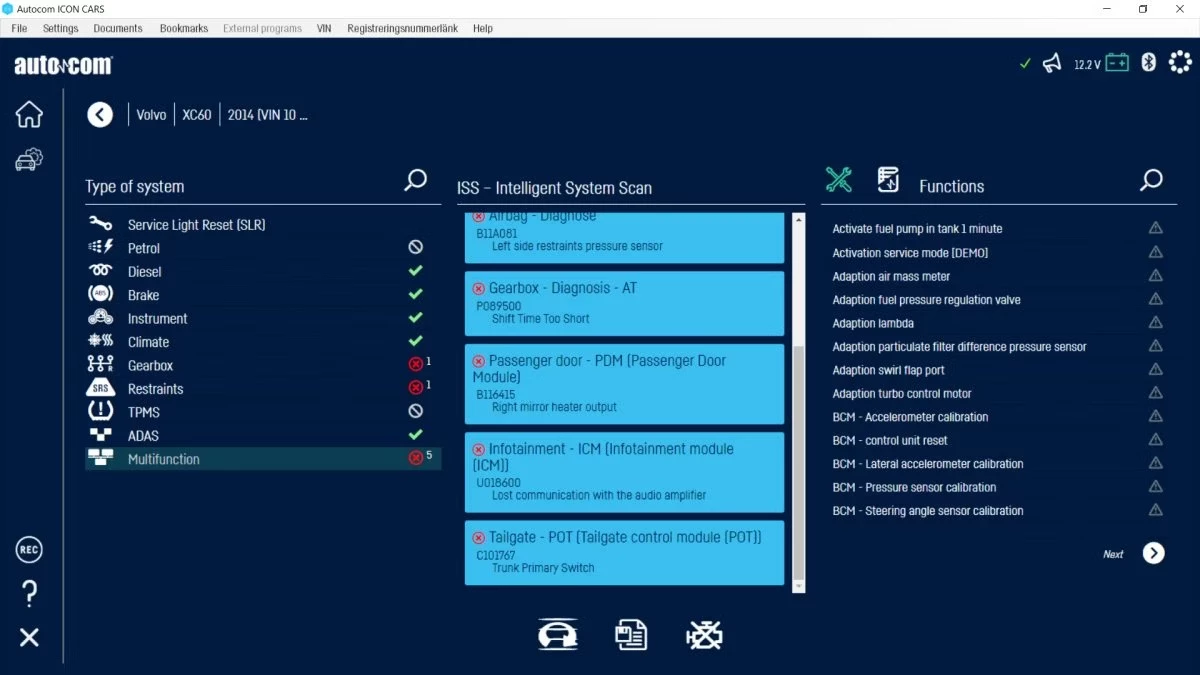
Autocom is a professional-grade automotive diagnostic software designed for independent workshops, fleet managers, and mechanics who need to read and clear fault codes across a wide range of vehicle brands. Operating primarily as a Windows desktop application, it connects to physical Vehicle Communication Interfaces (VCIs) such as the ICON or Classic hardware. Rather than relying on a basic handheld scanner that only pulls generic emissions data, technicians use this desktop suite to access proprietary control modules for the engine, transmission, climate control, ABS, and airbag systems. This deep access is required for executing service resets, component activations, and complex parameter coding that standard OBD-II readers cannot reach. By utilizing a laptop or workshop tablet, technicians gain the visual space needed to handle complicated data analysis.
The desktop environment provides a distinct advantage in a chaotic workshop. Modern vehicle diagnostics involve reviewing dense electrical diagrams, graphing live sensor data, and following intricate guided troubleshooting trees. A full desktop interface allows mechanics to view multiple live parameters side by side on a large monitor, print detailed pre-repair and post-repair reports for customers, and navigate heavy technical databases without the cramped constraints of a smartphone or browser-only tool. Furthermore, specialized workshop setups rely on local software installations to ensure stable communication with the VCI during critical operations, such as firmware flashing or ADAS calibrations, where an interrupted cloud connection could render a control module unresponsive and cause expensive damage.
Independent technicians choose this platform to consolidate their equipment. Instead of buying a separate dealer-level tool for every car brand that enters the bay, they use the CARS or TRUCKS modules to switch rapidly from resetting a service light on a European passenger car to calibrating the suspension on a heavy commercial trailer. The software reads the vehicle identification number to load the correct system topography automatically, allowing the mechanic to run a complete system scan in minutes. By handling everything from basic service intervals to security-locked gateway bypasses, it minimizes the time spent switching between different diagnostic ecosystems and keeps the repair process moving efficiently from the initial scan to the final test drive.
Key Features
- Intelligent System Identification (ISI): The software automatically extracts the chassis number from the connected vehicle to determine the exact make, model, and production timeline. It then selects the correct controller protocols for the engine, transmission, and body modules, eliminating manual entry errors that could lead to misdiagnosis. This ensures the technician is communicating on the correct digital pathway before executing any commands.
- Flight Recorder Data Logging: Technicians can record live parameters while driving a vehicle without keeping a laptop open in the passenger seat. By pressing a physical button on the connected hardware interface, the mechanic bookmarks specific hesitation events or misfires. They can then plug the interface back into the desktop computer and review the graphed data chronologically to pinpoint exact failures under load.
- Secure Gateway Access: Manufacturers actively lock modern control units behind firewalls to prevent unauthorized access. This suite integrates direct portal authentication, allowing certified users to log in with two-factor SMS verification and bypass security walls on specific brands. This direct link allows mechanics to perform active tests and coding on modern locked vehicles without needing an OEM factory tool.
- Guided Diagnostics Information: The interface connects directly to external technical databases to link specific fault codes with verified repair procedures. When a technician clicks on a trouble code, the software pulls up relevant electrical wiring diagrams, component locations, and factory torque specifications. This turns a generic error code into a concrete action plan, saving time spent searching online forums for repair steps.
- Advanced ADAS Calibration: As modern vehicles rely heavily on cameras and radar sensors, the software includes dedicated routines for Advanced Driver Assistance Systems. It guides the mechanic through the exact physical placement of calibration targets, initiates the internal resetting protocol, and verifies that the blind-spot monitors and lane-keep assist modules are reading correctly after a windshield replacement or suspension adjustment.
- Live Data Graphing: Mechanics can select multiple sensors, such as mass air flow, fuel rail pressure, and oxygen sensor voltage, and overlay their outputs on a shared timeline. The graphical view makes it easy to spot intermittent voltage drops or erratic sensor behavior that might not trigger a hard fault code. Users can save these graphs to compare against known good baselines.
- Complete System Scan Reporting: The Intelligent System Search function pings every available electronic control unit on the network to compile a master list of active and stored faults. The technician can then generate a formatted PDF report with workshop branding, providing the customer with a transparent overview of the vehicle's health before and after the repair. This provides concrete proof of the completed work.
How to Install Autocom on Windows
- Download the official setup archive from the vendor portal and extract the installer package to a local directory on your Windows 10 or Windows 11 machine.
- Insert the physical USB security dongle into an available port on your computer, as the installer script will immediately halt if it cannot detect the hardware key.
- Launch the main setup executable as an administrator and follow the installation wizard, leaving the default program path unchanged to prevent database routing errors.
- Allow the License Activation Tool to open automatically; it will connect to the internet to verify your subscription status against the unique identification number of your dongle.
- Connect your diagnostic interface unit to the computer using the supplied USB cable, ensuring the device has adequate power either from the vehicle diagnostic port or an external source.
- Open the newly installed CARS or TRUCKS desktop shortcut, click the account creation prompt, and complete the Secure Gateway login using your mobile phone for SMS verification.
- Navigate to the Hardware Setup tab under the Settings menu, select your connection method (USB, Bluetooth, or Wi-Fi), and execute the Search function to lock in the communication port.
- Click the Firmware Update button within the hardware menu to flash the latest operating instructions to the diagnostic interface, keeping the USB cable connected until the process finishes completely.
Autocom Free vs. Paid
Autocom operates strictly as a premium, professional-grade diagnostic platform and does not offer a free tier, trial version, or ad-supported model. Accessing the software requires purchasing a physical diagnostic interface interface and maintaining an active commercial license. The system is designed for professional repair environments, and the pricing reflects the deep proprietary database and continuous updates required to communicate with modern vehicle modules.
The pricing structure typically involves either an annual subscription or a fixed perpetual license. A standard yearly subscription for the passenger vehicle module costs around £625, while the heavy commercial truck module runs approximately £820 annually. These subscriptions guarantee continuous access to the latest vehicle model updates, security updates, and cloud-based features. If a subscription lapses beyond a specific grace period, users are often required to pay a catch-up fee to reinstate their update eligibility.
For workshops that prefer to avoid recurring software overhead, the vendor offers a fixed license option. Purchasing a fixed license for passenger cars costs roughly £810 and allows the software to run indefinitely without further payments. However, this perpetual option locks the database to the specific timeframe of purchase, meaning future car models will not scan properly. Add-on features, such as the HaynesPro technical information database or specialized Secure Gateway unlock access for specific manufacturers, are billed as separate annual subscriptions regardless of the core license type.
Autocom vs. Delphi vs. Bosch KTS
Delphi diagnostic software shares the identical underlying codebase and hardware architecture with Autocom, making their core capabilities and vehicle coverage practically indistinguishable. Delphi is often favored by entry-level technicians or hobbyists because its graphical user interface features cleaner menus that make basic OBD-II tasks straightforward. However, Autocom is generally regarded as having a slight edge for advanced users who want to dig deeper into specific module coding, adaptations, and complex parameter modifications, even if the menu layout requires more technical navigation.
Bosch KTS, utilizing the ESI[tronic] software ecosystem, represents the highest tier of European vehicle diagnostics and is known for its detailed guided fault-finding trees. Bosch excels when dealing with deep electrical troubleshooting, offering direct oscilloscope integration and component-level testing that goes beyond standard module communication. The major drawback to the Bosch ecosystem is the significantly higher initial hardware cost and steep mandatory subscription fees, which can price out smaller independent garages that do not specialize exclusively in complex electrical teardowns.
Autocom stands out as the ideal middle ground for general repair workshops and fleet managers who require broad multi-brand coverage across both passenger cars and heavy commercial trucks. It offers deeper module access than basic handheld scanners and avoids the high financial overhead of the Bosch ecosystem. Technicians choose it when they need a reliable, everyday diagnostic interface that handles everything from basic service resets to ADAS calibrations and gateway unlocks within a single, unified desktop application.
Common Issues and Fixes
- Firmware update fails during initial setup. This happens when the diagnostic interface loses power or data connection while flashing. Keep the interface connected via the physical USB cable rather than Bluetooth, ensure the vehicle battery is fully charged, and restart the firmware flash from the Hardware Setup menu.
- Wireless Bluetooth pairing drops frequently. The software will lose connection if the Windows Bluetooth stack goes to sleep or if the COM port changes. Go to Windows Device Manager, disable power management for the Bluetooth adapter, and manually map the interface to a fixed COM port in the software settings.
- Secure Gateway bypass denies access. Mechanics often encounter access errors when trying to clear codes on modern security-locked vehicles. This indicates that the session token has expired; log out of the portal within the software, request a new two-factor SMS code, and log back in to refresh the authentication ticket.
- License Activation Tool cannot reach the server. The installation will hang if restrictive network policies block the activation ping. Open your Windows firewall or third-party antivirus, add the entire program installation folder to the exception list, and run the activation executable again as an administrator.
Version 2025.12 — November 2025
- Expanded diagnostic coverage significantly for Land Rover and Range Rover models, including deep system support and service resets for Evoque, Discovery, Defender, and Velar (up to 2025).
- Introduced comprehensive system updates for the 2024 Citroën C3 and C3 Aircross, covering EV components, multifunction video cameras, and gearbox adjustments.
- Added support for the 2025 Mazda CX-30, including DCDC converter diagnostics.
- Enhanced Fiat coverage with updated engine variants for the Tipo and Doblo, plus extensive TPMS and multimedia module updates for the Ducato.
- Improved Kia capabilities with new activations for Blind Spot systems, DSG gearboxes, and ADAS camera/radar calibration on Ceed and XCeed models.
- Updated the "TRUCKS" database with improved battery management functions for DAF and expanded system support for Scania, Volvo Bus, and Renault commercial vehicles.
- Refined the software interface to provide specific explanatory messages when diagnostic test conditions are not met, replacing generic negative responses.
- Optimized service reset functions for Dacia Sandero II and integrated new EV system diagnostics for the Opel Frontera.