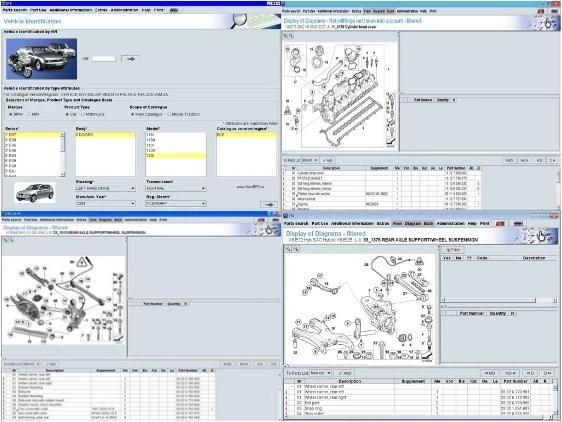
The BMW ETK (Elektronischer Teilekatalog) functions as the definitive electronic parts catalog for BMW, MINI, and Rolls-Royce vehicles. Designed primarily for automotive technicians, dealership parts departments, and independent repair specialists, this desktop application provides granular, offline access to the original equipment manufacturer (OEM) database. Rather than relying on third-party aftermarket systems or guessing compatibility, professionals use this catalog to identify exact factory components down to the smallest fastener. The software replaces paper manuals and microfiche systems with a searchable digital environment built to handle complex vehicle architectures.
When a vehicle enters the shop for collision repair or mechanical overhaul, technicians need exact part numbers to order replacements. The application allows users to input a Vehicle Identification Number (VIN) to filter the database, immediately hiding incompatible parts and displaying only the components originally fitted to that specific chassis on the assembly line. It covers everything from engine blocks and transmission internals to interior trim pieces, electrical wiring harnesses, and specialized service fluids. Users navigate through hierarchical menus grouped by vehicle systems, utilizing exploded assembly diagrams to understand how components fit together and to ensure no hidden clips or mounting brackets are missing from a repair order.
While lighter browser-based alternatives exist, the locally installed desktop application remains a critical tool for professional environments. In a busy workshop where internet connectivity might be restricted or unreliable, a locally hosted database guarantees immediate, uninterrupted access to heavy technical diagrams. Furthermore, the desktop architecture supports the integration of localized pricing databases and interfaces with specialized administration tools. This setup allows repair centers to generate exact repair estimates and track part supersessions without experiencing the latency or downtime associated with a purely cloud-based web portal.
Key Features
- Vehicle Identification Number (VIN) Decoding: Entering the last seven digits or the full 17-character VIN filters the entire catalog to match the exact specification of the vehicle currently being serviced. This automatically restricts the visual view to the correct engine variant, transmission type, and factory options, preventing the accidental ordering of incompatible hardware.
- Exploded Assembly Diagrams: The interface provides highly detailed, zoomable schematics for all mechanical, electrical, and body systems. These visual aids allow mechanics to click directly on a graphical representation of a part—such as a specific suspension bushing or an intake manifold bolt—to reveal its corresponding factory part number and the required installation quantity.
- Part Number Cross-Referencing: Automotive parts are frequently updated, superseded, or discontinued over a vehicle's multi-year lifespan. The catalog tracks the complete history of these manufacturing changes, displaying the older part numbers alongside the active current replacements, ensuring users order the correct updated component for an aging chassis.
- Accessory and Retrofit Catalogs: Beyond standard replacement repair parts, the database includes official documentation for factory accessories, retrofit kits, and specialized workshop tools. Technicians can look up the specific wiring harnesses, control modules, and mounting hardware required to install factory upgrades like performance brake kits or updated infotainment modules.
- Price List Integration: The system supports the manual importation of external pricing files distributed to dealer networks. By loading these localized databases via the administration tool, users can view current retail or trade costs directly alongside the part numbers, allowing for immediate quoting and accurate financial estimates without consulting a separate accounting system.
- Local Server Architecture: The application operates using a Transbase SQL backend and a local Tomcat server infrastructure to deliver the catalog interface to the user. This design ensures the massive, image-heavy parts database is processed entirely on the local machine hardware, eliminating reliance on external cloud servers and providing instant load times for complex technical drawings.
How to Install BMW ETK on Windows
- Obtain the official installation media or download the full Windows installer package and extract the archive contents to a local drive on your machine.
- Navigate to the extracted directory folder and launch the setup.exe file to initiate the primary installation flow.
- Review the initial setup prompts and select your preferred interface language for the installation wizard and the subsequent database administration environment.
- Allow the installer program to configure and deploy the SYSADM (System Administration) utility onto your computer, which serves as the required control panel for managing the various parts databases.
- Open the newly installed SYSADM utility using the generated desktop shortcut or by locating the application in the Windows Start menu.
- Click on the EPC menu option within the administration toolbar and select the install command to begin mounting the core vehicle parts database to your local storage drive.
- Configure the local Tomcat server settings if prompted by the setup tool, ensuring that default local network communication ports such as 49778 and 49779 are not blocked by Windows Firewall.
- Wait patiently for the heavy database extraction process to finish completely; do not interrupt the file operation or click the final confirmation prompt until the background extraction is entirely finalized, as interrupting this step will corrupt the SQL data files.
BMW ETK Free vs. Paid
BMW ETK is structured exclusively as an enterprise-grade tool for authorized dealerships and professional repair facilities, rather than as standard commercial software for individual consumer purchase. Because it is an official manufacturer resource, BMW does not offer a traditional retail checkout, a perpetual license option, or a standard free trial download for the standalone desktop application on their public website. Official access is managed strictly through corporate dealership licensing or through paid professional subscriptions to the web-based Aftersales Online System (AOS), which is billed at hourly, daily, monthly, or yearly enterprise rates depending on the geographical region and shop certification status.
For independent mechanics and specialized non-dealer workshops, accessing the offline desktop catalog often involves navigating third-party automotive software distributors who bundle the installation media with remote configuration services. These specialized third-party providers typically charge between $300 and $400 for a one-year subscription or initial setup fee, which includes the core offline database files and periodic price list updates. However, because these are independent technical brokers rather than direct sales channels from the manufacturer, the exact recurring costs, update frequency, and technical support terms vary heavily depending on the vendor you choose.
Enthusiasts or independent mechanics looking for a fully free option will not find an official free tier of the official desktop software anywhere. Instead, they must rely on free, ad-supported web alternatives that host older, static dumps of the database. If your professional workflow demands the official, locally installed desktop client with the most current part revisions, offline speed, and local server reliability, you must secure access through professional automotive diagnostic channels or official dealer network programs, as the vendor strictly controls the distribution of the heavy offline client.
BMW ETK vs. RealOEM vs. TecDoc
RealOEM is a widely used, free web-based platform that hosts older versions of the BMW parts database directly in a standard web browser. It is popular among DIY mechanics and hobbyist enthusiasts because it requires no software installation, no local server configuration, and provides immediate visual access to exploded diagrams and part numbers. However, RealOEM is not always updated with the absolute latest superseded part numbers for brand-new chassis releases, it lacks offline capability, and it does not allow shops to import custom local price lists for accurate quoting.
TecDoc, developed by TecAlliance, is a multi-brand aftermarket catalog designed for general automotive repair shops that service a wide variety of vehicle makes rather than just one brand. Instead of focusing solely on factory OEM diagrams, TecDoc connects technicians with aftermarket replacement parts from brands like Bosch, Mahle, and Lemförder, making it ideal for standard maintenance jobs where factory original parts are not strictly required. While TecDoc is excellent for cross-referencing aftermarket alternatives across many manufacturers, it does not provide the exact factory-level exploded chassis diagrams found in manufacturer-specific engineering tools.
BMW ETK is the necessary choice for specialized repair centers, dedicated collision shops, and brand-specific technicians who require exact accuracy for factory repairs. When rebuilding a complex engine, ordering specific electrical wiring harnesses, or performing strict warranty work, professionals choose this software because it guarantees accurate OEM part numbers based on exact factory VIN decoding. If you manage a facility that exclusively works on BMW, MINI, or Rolls-Royce vehicles and needs to operate completely offline with localized dealership pricing data, the official desktop catalog is the required standard over generic web portals or multi-brand aftermarket databases.
Common Issues and Fixes
- Transbase database connection failure on startup. If the software displays a Transbase or login error when attempting to load the catalog, the database was likely not saved to the disk properly during the initial setup. This frequently occurs when users click the final confirmation prompt before the background file extraction is fully completed. To fix this, you must completely uninstall the application using the setup utility and reinstall it, ensuring you wait for all disk activity to stop before closing the final window.
- SYSADM utility blocked by security software. During the initial deployment, aggressive antivirus programs may flag the administration tool or the local Tomcat server executables as a threat, preventing the database interface from opening. You should temporarily disable your antivirus software before running the installer and add the entire installation directory to your security whitelist to ensure the core operational files remain untouched by quarantine protocols.
- Port conflict errors preventing catalog access. The local application relies on internal server ports (commonly 49778 and 49779) to communicate between the user interface and the background database. If another web server or diagnostic tool on your computer is already utilizing these specific network ports, the catalog will fail to load in the browser view. You must either reconfigure the conflicting background application or manually assign different network ports during the ETK configuration phase.
- Pricing fields show zero or missing financial data. The core database installation only includes the mechanical part numbers and exploded diagrams, not the localized financial data. To resolve missing costs, you must obtain the separate price list file for your specific region, extract it to your local computer, and use the SYSADM utility to manually import the pricing file into the active catalog database.
Version Latest — 2026
- Expanded Vehicle dаta: Integrated complete parts catalog support for 2026 model year chassis, including the all-new X3 (G45), M5 Sedan (G90), and the refreshed i4/4 Series Gran Coupé (G26 LCI).
- Updated Price Files: Synchronized global price lists with the latest 2026 manufacturer MSRP data, ensuring accurate quoting for repair facilities and parts counters.
- Enhanced VIN Decoding: Improved accuracy for the VIN interpretation engine to correctly identify specific options and trim levels for the newest electric and hybrid powertrains (XM Label, iX variants).
- Interface Optimization: Refined the search algorithm for faster part number retrieval and implemented clearer "supersession" chains to better track replaced or obsolete components.
- Bug Fixes: Resolved minor stability issues causing connection timeouts during high-volume server queries and fixed display errors for specific retrofit kit diagrams.