Over years of regular usage, standard Windows installations accumulate significant digital clutter that actively degrades system responsiveness. Operating systems generate temporary cache files, retain massive update logs, and store crash dumps long after they stop being useful. At the same time, installing and removing third-party applications leaves behind orphaned registry strings and broken file associations that slow down basic directory indexing. Advanced SystemCare Pro functions as a centralized maintenance utility built to strip away this built-up file bloat and restore baseline operating speed. It targets the underlying causes of system degradation, cleaning gigabytes of wasted storage and untangling the hidden background processes that consume critical processor cycles on aging hardware.
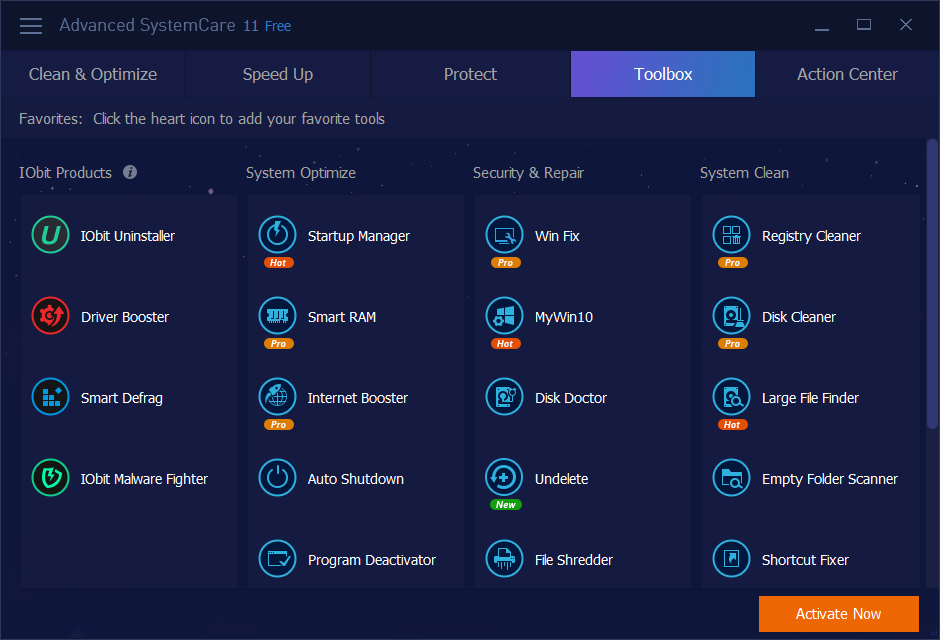
This application is specifically structured for Windows users who need routine maintenance handled automatically, without forcing them to manually investigate Task Manager or parse complex Windows Event logs. While manual cleanup methods exist within the operating system, they are highly fragmented across different administrative menus. Users normally have to run Disk Cleanup, adjust MSConfig, verify driver signatures, and flush DNS settings individually to maintain top speed. Advanced SystemCare Pro consolidates these distinct maintenance tasks into a single visual dashboard. By combining scheduled junk removal with active memory management, the software takes over the routine upkeep of aging desktop environments and heavily utilized workstations, ensuring they remain responsive even under heavy multitasking loads.
A dedicated desktop utility is strictly necessary to perform these deep system interventions. Browser-based cleaners and lightweight script tools lack the necessary administrative permissions to interact with core system components. Advanced SystemCare Pro runs locally, granting it the low-level access required to physically defragment mechanical hard drives, actively block unauthorized tracking scripts at the network adapter level, and modify hidden startup directives in the registry. This deep system integration allows the software to optimize local file structures and memory allocation in ways that surface-level diagnostics utilities simply cannot execute, creating a noticeably faster computing environment for daily operations.
Key Features
- AI-Powered System Scan: Instead of executing a rigid, linear cleaning process every time, the software analyzes current system habits and machine status to determine which specific modules need immediate attention. It scans for temporary file buildup, obsolete registry entries, and broken shortcuts based on recent application usage patterns. This targeted approach prevents the software from wasting time analyzing untouched storage sectors and delivers a faster, more efficient daily cleanup routine.
- Internet Booster Optimization: The software modifies underlying TCP/IP parameters and MTU sizes to maximize network bandwidth efficiency. By adjusting how Windows handles data packet requests and connection limits at the system level, it reduces latency during heavy web browsing or large file transfers. Users often see improved browser loading times because the utility optimizes the specific network pathways that standard Windows configurations leave at conservative default settings.
- Deep Privacy Sweep: Active web browsing leaves a trail of tracking cookies, localized history files, and digital fingerprint data that advertisers use to map user behavior. This privacy module actively erases these tracking elements across multiple installed browsers, including Edge, Chrome, and Firefox. It also attempts to mask your unique hardware footprint, making it significantly harder for third-party trackers to profile your cross-site activity.
- Software Health Updater: Outdated local applications present significant security risks, yet manually checking for new versions is tedious. The built-in updater scans installed programs against a central database and automatically fetches the latest stable software revisions. It executes these installations in the background, closing known software vulnerabilities and ensuring compatibility without requiring the user to navigate to multiple vendor websites.
- Startup App Manager: Many applications silently add themselves to the Windows boot sequence, increasing the time it takes to reach a usable desktop environment. This module identifies non-essential background services, update checkers, and helper tools, allowing users to safely disable them or delay their launch. By strictly controlling what executes during the boot sequence, the software drastically reduces initial loading delays.
- Real-Time Performance Monitor: Users gain a localized desktop widget that displays live memory consumption, CPU utilization, and system temperatures without opening a separate window. When resource-heavy applications cause the system to stutter, clicking the widget's quick-release button immediately flushes the standby memory list. This instantly frees up hardware resources, providing a manual override when automated memory management falls behind.
How to Install Advanced SystemCare Pro on Windows
- Download the official Windows installer executable directly from the vendor's primary distribution server to ensure you receive the unmodified application.
- Launch the downloaded setup file and grant the necessary administrative permissions when the Windows User Account Control prompt appears on the screen to allow core system modifications.
- Select the Custom Install option rather than the default express route. This critical step allows you to review the installation terms and explicitly decline any bundled promotional software, browser toolbars, or secondary system utilities that the setup wizard might attempt to add to your environment.
- Choose your preferred installation directory, typically located within the primary system drive, and allow the extraction process to complete its file writing sequence.
- Launch the application from the new desktop shortcut. Navigate to the activation interface located at the bottom corner of the main dashboard and enter your purchased subscription credential to unlock the restricted modules.
- Run the initial baseline scan. The software will analyze your storage drives and startup configurations to generate a primary health report, allowing you to review its proposed changes before authorizing the first automated cleanup.
Advanced SystemCare Pro Free vs. Paid
The software operates on a strict freemium business model, dividing its maintenance tools between a basic tier and a premium subscription. The Free version acts as an introductory maintenance tool, allowing users to scan for general temporary files, manage basic startup items, and fix broken desktop shortcuts. However, it severely restricts access to deep system optimization. Free users cannot utilize the active internet connection booster, the automated software updater, or the real-time background memory management. Furthermore, the free interface heavily features promotional banners and persistent alerts urging users to upgrade to the premium tier.
Upgrading to Advanced SystemCare Pro requires an annual subscription, typically priced between $16 and $30 depending on active promotions and the number of covered devices. A standard license covers either a single Windows machine or up to three computers within a household. The Pro tier removes all in-app advertising and unlocks the full suite of automation tools. Paying users gain the ability to schedule deep registry defragmentation, enable active digital fingerprint masking, and allow the software to automatically clean the system while the computer sits idle.
For users seeking combined optimization and security, the vendor also offers an Ultimate tier. This specific package includes every performance module found in the Pro version but adds a licensed Bitdefender antivirus engine for active malware blocking. While this creates a unified maintenance and security dashboard, users who already pay for a dedicated third-party antivirus program generally prefer the standard Pro subscription. Sticking to the Pro tier avoids paying for redundant security features and prevents resource conflicts between overlapping anti-malware scanners.
Advanced SystemCare Pro vs. CCleaner vs. Glary Utilities
CCleaner remains the preferred option for users who want a strictly manual, predictable junk file remover without aggressive background monitoring. It features a highly straightforward interface focused almost entirely on clearing temporary browser data, unneeded application caches, and basic registry remnants. Because it does not run heavy AI-driven scans or push real-time network optimization by default, CCleaner is ideal for users who simply want to reclaim local storage space on command without altering deeper system configurations.
Glary Utilities serves a different demographic, targeting highly technical users who demand modular, granular control over specific administrative tasks. Rather than automating the entire process behind a single button, Glary Utilities presents its tools as an expansive list of independent utilities. Administrators can manually defragment specific disk sectors, analyze folder-level storage distribution, or back up device drivers individually. It requires more technical knowledge to use effectively, as the software relies on the user to decide exactly which maintenance tasks are necessary.
Advanced SystemCare Pro is the better fit when users want a highly visual, automated maintenance dashboard that handles the decision-making process for them. It excels for individuals who prefer an all-in-one approach, where network boosting, aggressive startup management, and background software updating happen automatically based on machine status. Its real-time performance widget and AI-driven scan logic make it the superior choice for maintaining consistent system responsiveness without forcing the user to learn the intricacies of Windows administration.
Common Issues and Fixes
- Security software blocks the installation or flags the executable. Because aggressive system optimizers modify core registry keys and low-level background services, programs like Malwarebytes frequently detect the executable as a Potentially Unwanted Program. To resolve this, navigate to your primary antivirus settings and add the entire IObit installation directory to the active exclusion list before running the setup.
- Website logins disappear after running a scan. The default configuration of the Privacy Sweep module aggressively removes all browser cookies to prevent tracking, which inadvertently logs you out of frequently visited websites. Open the manual scan settings, navigate to the Privacy section, and manually uncheck the cookie removal option for your primary web browser to preserve your active sessions.
- The application frequently displays promotional pop-ups on the desktop. The software includes an Action Center that frequently alerts users about other vendor products, such as driver updaters or dedicated uninstallers. To stop these desktop interruptions, open the main application settings, navigate to the User Interface or Notifications tab, and actively disable all promotional messages and cross-selling alerts.
- The computer experiences severe slowdowns during scheduled background scans. The deep AI scanning mode can consume significant processor cycles and disk read bandwidth when analyzing large storage arrays. To prevent this performance hit during active work hours, switch the application to Manual Mode to disable disk defragmentation, or adjust the scheduling options so that full system scans only trigger when the operating system detects that the computer is completely idle.
Version 19.1.0.176 — December 2025
- Enlarged the startup optimization database to significantly speed up system boot time and overall responsiveness.
- Expanded the Anti-Spyware definition library to detect and remove a wider range of modern security threats in real-time.
- Updated the Software Updater engine to support the latest versions of major browsers including Chrome 143, Edge 142, and Firefox 145.
- Enhanced the Surfing Protection database to provide a safer online experience by blocking more malicious websites and tracking scripts.
- Improved the AI scanning engine for more accurate detection of junk files and registry errors.
- Optimized multi-language support for better localization across the interface.
- Resolved a memory leak issue that could occur when the system remained idle for extended periods.
- Fixed known bugs to ensure better stability and smoother performance.