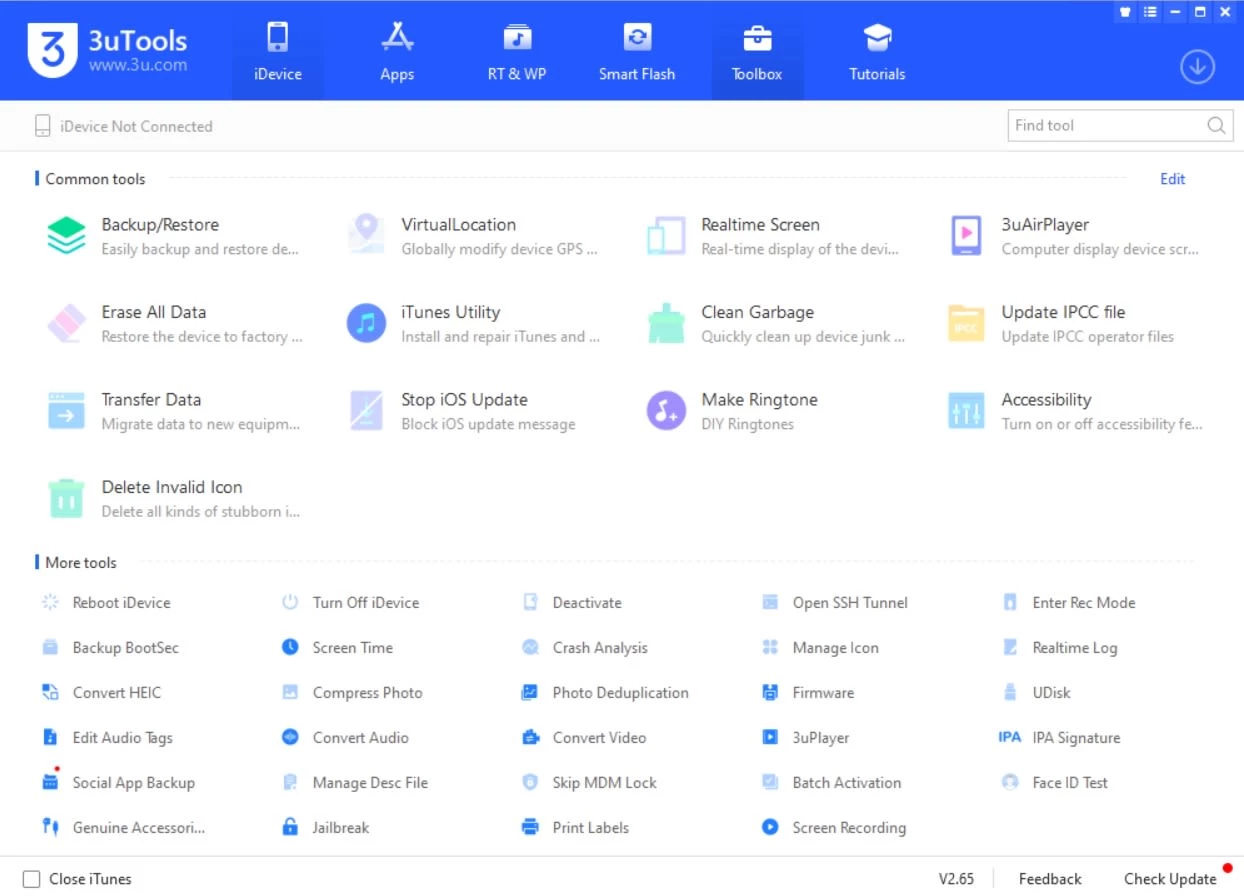
Managing iPhones and iPads directly from a desktop computer often requires more flexibility than official syncing software provides. 3uTools serves as a highly technical utility designed to give PC users deep control over their Apple mobile devices. Instead of hiding system details behind simplified menus, this application exposes raw hardware data, file structures, and firmware options. It is built specifically for users who need to perform advanced tasks like flashing system software, diagnosing battery degradation, or extracting specific files without syncing an entire media library. The application stands apart by treating the connected hardware as a fully accessible external drive and diagnostic subject, rather than a locked consumer product that can only be updated through official channels.
The utility caters primarily to mobile hardware technicians, repair shops, and advanced device owners who demand transparency from their hardware. When dealing with a phone stuck in a boot loop or a tablet that refuses to update over the air, a dedicated desktop application becomes strictly necessary. Relying solely on wireless updates or cloud backups limits your ability to troubleshoot severe software faults effectively. By connecting the device directly to a PC, users can bypass network restrictions, download heavy firmware files directly to their local drive, and execute precise modifications to the device's operating state. This localized approach ensures that you do not depend on intermittent internet connections while writing critical system files to the phone's internal storage.
Choosing this utility over simpler media managers changes the workflow from basic syncing to total device administration. Users can manually manipulate internal file systems, verify the authenticity of internal components, and manage local backups precisely on their own terms. Whether you need to downgrade a phone to an earlier software version, push custom ringtones without accessing a digital storefront, or verify that a refurbished tablet contains original parts, the application handles these practical jobs through a dense, practical interface. The ability to visually map out exactly what is taking up storage space, and delete hidden cache files directly from a Windows desktop, makes it an essential tool for maintaining device performance over several years of daily usage.
Key Features
- Smart Firmware Flashing: The utility allows users to install system software manually using specialized modes. You can select "Retain User's Data" to preserve personal files during a system update, or use "Quick Flash Mode" to completely wipe a device for a clean installation, bypassing standard over-the-air update restrictions.
- Hardware Verification Reports: Connecting a phone instantly generates a detailed hardware report on the main dashboard. This report compares factory values against current hardware, highlighting replaced screens, battery charge cycles, actual battery health percentages, and motherboard serial numbers to verify component authenticity.
- Selective Backup and Restore: Instead of enforcing all-or-nothing system backups, the application lets you extract specific data categories. You can back up only your contacts, text messages, or photo albums to a local PC drive, and restore them incrementally to a different device without relying on cloud storage availability.
- Advanced Media Management: The software acts as a direct file manager for mobile hardware. You can drag and drop MP4 videos, MP3 tracks, and PDF documents directly between your Windows computer and the mobile device without navigating through restricted syncing libraries or dealing with format conversions.
- Custom Ringtone Maker: A built-in audio editor lets you create custom alerts without buying them from a digital storefront. You can load an audio file from your PC, trim the waveform to select a specific chorus or segment, and push the resulting file directly to the phone's internal ringtone list.
- Virtual Location Modification: Developers and testers can manipulate the GPS coordinates of a connected device. By navigating a visual map interface in the Toolbox tab, you can input specific latitudes and longitudes, forcing the phone to report a simulated location to installed applications for testing purposes.
- Real-Time Screen Mirroring: Users can display their mobile device screen directly on their computer monitor. This function allows you to record screen activity to your local drive or demonstrate application workflows on a larger display without needing external capture hardware or third-party streaming services.
How to Install 3uTools on Windows
- Download the official Windows installer package from the developer's website to ensure you receive an unmodified setup file.
- Locate the downloaded executable file in your system's download folder and double-click it to initiate the setup wizard.
- Review the user agreement and select your preferred installation directory, or leave the default path pointed to your primary system drive for optimal performance.
- Click the main install button and wait for the extraction process to place the required program files and background services onto your computer.
- Once the progress bar finishes and the setup confirms success, click the prompt to launch the application for the first time.
- Upon opening the main dashboard, the software will automatically check your PC for necessary communication drivers; click the prompt to install these Apple hardware drivers if they are not already present on your system.
- Connect your iPhone or iPad to the computer using a verified USB data cable, unlock the device screen, and tap "Trust This Computer" to establish a secure data connection with the desktop interface.
3uTools Free vs. Paid
The application is entirely available at no cost to download and operate. There are no premium tiers, pro versions, or paid subscriptions required to unlock specific tools. Users gain full access to the entire suite of utilities, including firmware flashing, hardware diagnostics, and unlimited file transfers, without hitting paywalls or trial limitations. Unlike many commercial device managers that ask for an upfront fee before allowing you to export your text messages or photos, this utility operates completely unrestricted from the moment of installation.
Because the software does not rely on a conventional licensing model, there are no artificial restrictions placed on the number of devices you can manage or the amount of data you can back up. Features like the virtual location modifier, the custom ringtone maker, and the real-time screen mirroring function operate indefinitely without requiring a purchase or entering a product key. The developers sustain the project by offering tools tailored to the hardware repair ecosystem, focusing on industry usage rather than monetizing individual software downloads.
When using the utility, you will not encounter watermarks on exported files, nag screens, or limits on how many times you can flash a device. This zero-cost approach is highly beneficial for users who only need to fix a single device stuck in a recovery loop and do not want to purchase a thirty-dollar utility for a one-time repair. If you are comparing it against commercial alternatives that charge per device or require yearly renewals, this utility provides an unrestricted path for deep device administration, provided you are comfortable navigating its highly technical interface and handling raw firmware files.
3uTools vs. iTunes vs. iMazing
Apple's official desktop software remains the standard choice for simple media syncing, purchasing digital content, and creating heavily encrypted local backups. It offers a highly regulated environment that is safe for general users who only need to update their devices or sync carefully curated music libraries. However, it completely lacks diagnostic tools, selective file extraction, and the ability to flash specific firmware versions using custom retention modes. You cannot view battery charge cycles or inspect component serial numbers through the official software, making it less useful for troubleshooting damaged hardware.
iMazing operates as a premium commercial utility focused on data extraction and granular archiving. It excels at reading messaging threads, exporting call logs into clean PDF formats, and managing wireless backups over a local network. Its highly polished interface is geared toward consumers and business professionals who want an elegant way to back up their data without touching complex system files. However, it requires purchasing a paid license to unlock its full file transfer and backup extraction capabilities, which can be a significant barrier for users seeking a quick, one-time fix.
You should choose 3uTools if you require a highly technical, completely free utility for hardware repairs, battery cycle checking, and advanced firmware flashing. While it lacks the slick, modern interface of premium commercial tools like iMazing, it provides unmatched low-level control for PC users who need to verify hardware components, bypass standard update restrictions, or manually manage internal file systems. It is the definitive choice for technicians and enthusiasts who prioritize practical functionality, raw data access, and unrestricted usage over visual polish.
Common Issues and Fixes
- Device fails to connect or prompts a "Connection Timeout" error. This typically happens due to a faulty USB cable or missing communication drivers. Use an original data cable, plug it directly into a rear motherboard USB port for stable power delivery, and click "Repair Driver" within the application's Toolbox menu to reinstall the communication protocols.
- Firmware flashing stops at a specific percentage. Interruptions during a system update often indicate a disrupted USB connection or insufficient local storage space. Ensure your Windows primary drive has at least 10GB of free space to extract the firmware file, and do not move the phone or cable while the progress bar is actively writing data.
- Virtual Location feature fails to load the map interface. Network restrictions or active security software can block the mapping server from loading visual assets. Temporarily disable your Windows firewall or switch your network adapter to a public DNS provider to allow the external map data to render correctly within the application.
- Application cannot detect the connected phone. The desktop software relies on specific background services to read the hardware state. Ensure you have unlocked your phone's screen and tapped the "Trust This Computer" prompt, or reinstall the required hardware drivers directly from the program's main dashboard to reestablish the software handshake.
- Battery health percentage differs from the device settings. The utility reads raw battery cycle data directly from the hardware, which can differ from the smoothed estimates shown in the device's internal settings menu. Trust the application's cycle count for a more accurate representation of actual battery wear.
Version Latest — 2026
- Added support for the new iPhone 17 series and the latest iOS firmware versions.
- Introduced a "Secure Erase" feature to permanently wipe device data beyond recovery.
- Redesigned the "Smart Flash" interface with a modern, colorful visual style.
- Improved the success rate and speed of the Easy Flash and jailbreak processes.
- Fixed a display issue where certain newer device models were not correctly identified.
- Optimized real-time log filtering for better debugging and system monitoring.