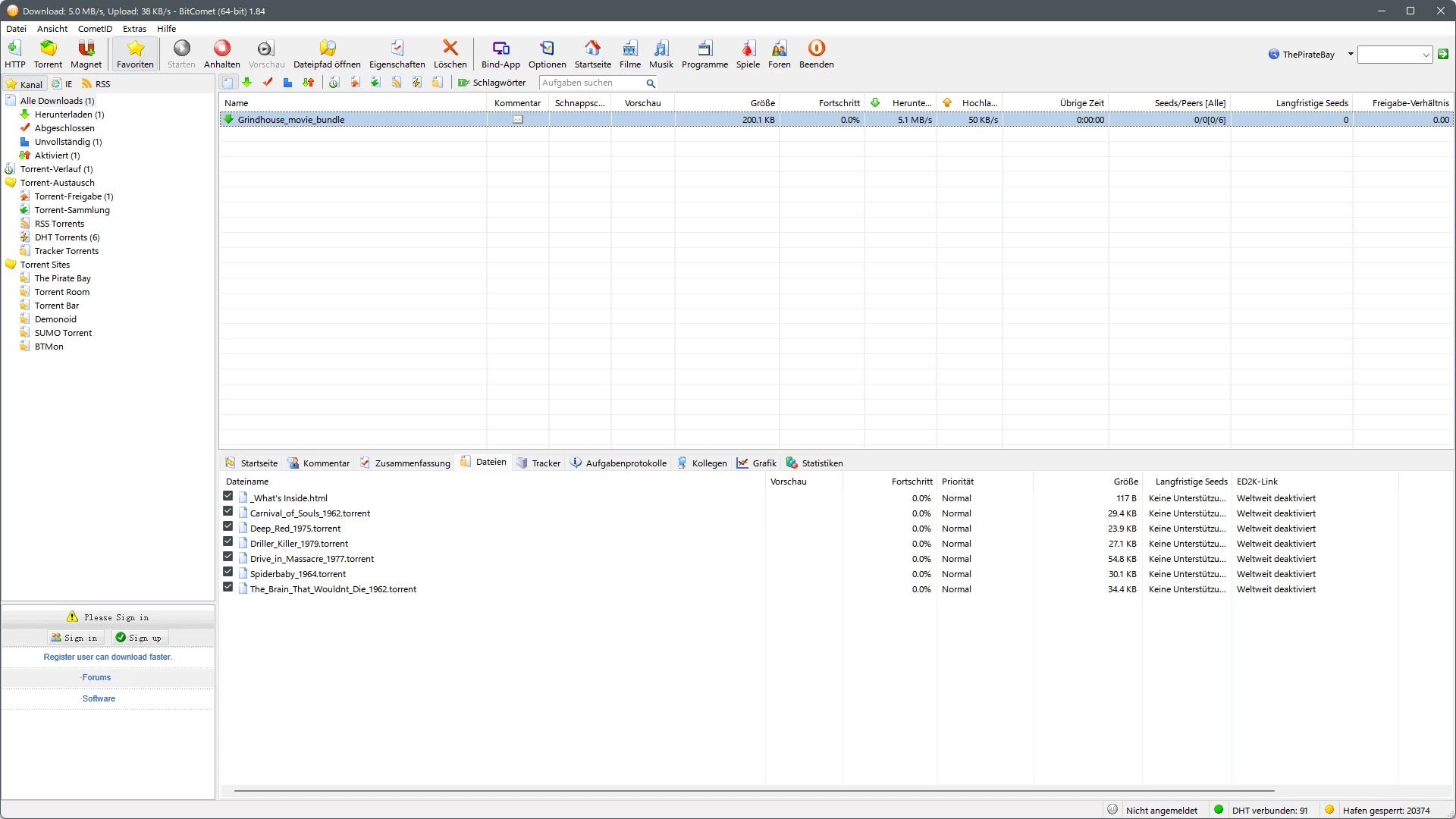
BitComet functions as a hybrid file transfer client that bridges the gap between traditional web server protocols and peer-to-peer networking. While standard web browsers handle simple file retrievals from single servers efficiently enough, they struggle significantly with massive datasets, unstable connections, and sudden network interruptions. This application solves that exact friction by treating standard HTTP and FTP links similarly to torrent swarms. It breaks large files into smaller, manageable segments and pulls them from multiple mirrored sources simultaneously. For users managing heavy data loads on Windows environments, this protocol consolidation means fewer failed transfers, exact resume capabilities after a network drop, and much more predictable bandwidth utilization.
The desktop application serves a highly specific audience: digital archivists, media professionals, and data hoarders who require strict control over how files are written to their local hardware. Standard web browsers write incoming data sequentially and often directly to the hard drive, which causes mechanical wear and severe disk fragmentation when handling gigabytes of incoming data from multiple simultaneous streams. BitComet intercepts this destructive process by buffering incoming file pieces in the system memory. It organizes the scattered data blocks in RAM and writes them to the storage drive in larger, contiguous chunks. This intelligent caching preserves long-term disk health and prevents the Windows operating system from locking up or freezing during heavy network activity.
Beyond basic file retrieval, the software acts as a centralized command hub for complex download queues. It includes dedicated tools for scheduling daily traffic limits, prioritizing specific files within a larger archive package, and forcing incomplete swarms to search for missing pieces through an extended peer network. Users choose this specific tool over lighter, browser-based alternatives because it actively manages the hardware side of the downloading process—specifically system memory and storage input constraints—ensuring that long-running tasks do not degrade the overall performance of the computer while they run in the background.
Key Features
- Intelligent Disk Caching: This memory management tool intercepts incoming data streams and holds them in system RAM before committing them to permanent storage. By buffering the data, it drastically reduces the number of read and write operations requested from the physical hard drive. This hardware protection is critical for users running older mechanical drives that struggle to keep up with high-speed internet connections.
- Long-Term Seeding Network: When a peer-to-peer transfer stalls because the original host leaves the network, this tool queries a proprietary backup network to find the missing pieces. It actively searches for users who have completed the file in the past and caches their availability. This resolves the frustrating scenario where a massive archive gets stuck permanently at 99 percent completion.
- Media File Preview: The client alters the standard random-piece downloading algorithm to explicitly prioritize the first and last megabytes of video files. Once the header and tail data arrive, users can open the partial file directly in a standard desktop media player to verify the video resolution, encoding quality, and language track. This immediate verification prevents the wasted bandwidth associated with retrieving a mislabeled or corrupted media file.
- Hybrid Protocol Downloading: Instead of relying exclusively on user swarms, the software accepts direct HTTP and FTP mirror links for the same target file. It fragments the data and simultaneously requests pieces from traditional web servers and peer-to-peer users. This redundancy ensures that if a web server limits its bandwidth, the client can make up the difference by pulling from other peers.
- Intelligent Disk Allocation: Before a massive transfer begins, the application communicates directly with the Windows file system to reserve the exact amount of storage space required for the final file. It allocates this space in large, contiguous blocks on the hard drive rather than expanding the file dynamically as random data pieces arrive. This prevents the severe disk fragmentation that typically occurs when multiple large files are queued concurrently.
- Bandwidth Scheduling: The interface includes a detailed timetable grid where users can dictate exact upload and download speed limits based on the specific time of day or day of the week. This allows the client to operate at maximum capacity during overnight hours while automatically restricting its network footprint during daytime work hours. The scheduler ensures the application never chokes the local network router when other household members need priority bandwidth.
How to Install BitComet on Windows
- Navigate to the official website and retrieve the standard Windows executable installer package to your local drive.
- Launch the downloaded setup file and grant administrative privileges when the Windows User Account Control prompt appears on your screen.
- Click through the initial welcome screens and carefully read the optional software prompts, as the installer frequently includes bundled third-party browser extension offers that you must manually decline.
- Select your preferred installation directory, keeping in mind that the default path on the primary system drive works best, but verify you have sufficient space for the application cache.
- Check the boxes to associate the application with magnet URIs and standard torrent file extensions, ensuring that clicking these links in a web browser automatically routes the request to the desktop client.
- Complete the installation wizard, launch the application for the first time, and immediately click "Allow access" when the Windows Defender Firewall prompts you to permit traffic across private and public networks.
- Open the application preferences pane to define your default save folder, setting it to a secondary storage drive if your primary partition lacks the capacity for large media files.
- Navigate to the connection settings to configure a specific listening port, ensuring it does not conflict with other network applications, and verify that the client can accept incoming connections for optimal peer discovery.
BitComet Free vs. Paid
The core software operates on a freeware model, meaning the primary desktop application is available at no monetary cost. However, this free version is supported by advertising. Users will see visual banner ads integrated into the main interface, and the installation process historically includes optional bundled software offers that generate revenue for the developers. Despite the presence of advertisements, all fundamental features—including the hybrid downloading engine, disk caching mechanisms, and protocol integrations—are fully unlocked and function without restrictions in this free tier.
For users seeking specific routing benefits, the developer offers an optional premium tier known as the VIP plan. This paid service is not a traditional software license but rather a subscription for anonymous download bandwidth. The VIP tier routes user traffic through the developer's private servers, masking the user's local IP address from the public swarm and accelerating access to the Long-Term Seeding network. This is particularly useful when dealing with strictly monitored networks or highly congested swarms where direct connections fail.
The VIP pricing structure is based on strict data allowances and time limits rather than a permanent upgrade. Users can purchase a 10-gigabyte anonymous bandwidth limit that expires after 60 days for roughly $5, or opt for a larger 100-gigabyte limit valid for 90 days at a cost of $20. Once the data allowance is consumed or the time limit expires, the client reverts to standard, direct peer-to-peer connections until the user purchases another data pack. Because the base client handles local routing and standard transfers so efficiently, the vast majority of users never need to purchase a VIP data plan.
BitComet vs. qBittorrent vs. uTorrent
qBittorrent operates as a strict open-source project, entirely free of advertisements and bundled software, making it a favorite for users who want a clean, utilitarian interface. It handles standard peer-to-peer swarms with minimal background resource consumption and offers extensive search plugin integrations. However, qBittorrent focuses exclusively on torrent protocols and lacks the hybrid HTTP/FTP capabilities of BitComet. Users managing standard web downloads alongside peer-to-peer files will find qBittorrent too limited for cross-protocol consolidation.
uTorrent remains one of the most recognizable names in the file-sharing category, offering a familiar layout and a strong remote management web interface. While its core engine is fast, the software heavily monetizes its free tier with intrusive visual advertisements and aggressive prompts to upgrade to its premium versions. Furthermore, uTorrent does not offer the same level of transparent hardware protection, lacking the deep, customizable memory caching and precise disk allocation controls that define BitComet's approach to local storage health and longevity.
BitComet is the logical choice for data hoarders and users operating on aging mechanical hard drives. While it shares the ad-supported nature of uTorrent, its technical toolkit goes much further by blending traditional web server transfers with swarm intelligence. The inclusion of the Long-Term Seeding network and strict memory buffering gives BitComet a distinct advantage when retrieving obscure, poorly seeded files that would stall indefinitely in both qBittorrent and uTorrent.
Common Issues and Fixes
- Transfers stall permanently at 99 percent completion. Navigate to the task properties and enable the Long-Term Seeding option. This instructs the client to search alternative backup networks for users who have the missing file chunks, bypassing the dead primary tracker.
- The application triggers a "disk write cache too large" alert. Open the advanced preferences and locate the Intelligent Disk Cache settings. Reduce the maximum allowed memory size so the software is forced to write its buffer to the storage drive more frequently, freeing up system RAM.
- Download speeds remain unusually slow despite a fast internet connection. Look at the port indicator in the bottom right corner of the main window. If it displays a yellow or red icon, your router is blocking incoming connections. Log into your router's administration panel and manually forward the designated listening port, or ensure UPnP is enabled in both the router and the software settings.
- Web browsers do not launch the client when clicking magnet links. Open the software options menu and navigate to the integration settings. Click the button to associate the client with magnet URIs and torrent files, which forces the operating system to rewrite the registry keys and properly route browser requests to the desktop application.
- The interface freezes momentarily when adding new files. This happens when the application struggles to pre-allocate massive blocks of storage space on a fragmented hard drive. Close background applications that are actively reading or writing to the same drive, and ensure the target partition has at least ten percent free space remaining before starting the transfer.
Version 2.19 — 2026
- Introduced a new "Untagged" button in the label toolbar to quickly filter tasks without categories.
- Improved the Options dialog by converting the IP Filter page into a more organized tabbed layout.
- Enhanced memory management with a new advanced setting to unload torrent share data when disabled.
- Updated core dependencies (Boost and RapidJSON) to improve overall application stability and performance.
- Removed legacy code related to Internet Explorer browser plugins to streamline the interface.
- Fixed a bug where sorting the task list by health failed to correctly order seeding tasks.
- Resolved an issue causing the application tray icon to behave abnormally after the system resumes from sleep.
- Corrected a WebUI error that prevented downloading files with special characters in their names.
- Fixed an issue in the WebUI where banning peers with unknown listening ports would cause operations to fail.