Aqua Data Studio functions as a universal database integrated development environment designed to consolidate connections to over 40 distinct relational, NoSQL, and cloud-based data platforms. Rather than relying on separate management tools for SQL Server, PostgreSQL, Oracle, and MongoDB, database administrators and data analysts use this application to query, modify, and analyze data from a single graphical interface. Built using Java, the desktop application ships with a bundled Java Virtual Machine, allowing it to handle complex execution plans and memory-intensive result sets without requiring external dependencies on Windows 8.1, Windows 10, or Windows 11 systems.
The software addresses the practical reality of modern enterprise environments where data is scattered across legacy local servers and modern cloud warehouses like Snowflake or Amazon Redshift. Data analysts use the tool to execute complex join statements and immediately render the output into charts or pivot grids, bypassing the need to export flat files into external spreadsheet software. Meanwhile, database developers rely on the built-in syntax formatting, procedure debuggers, and version control integrations to write and deploy code safely.
Choosing a heavy, dedicated desktop client over a lightweight browser-based SQL editor provides strict advantages for data professionals. A local installation grants direct disk access for importing massive CSV or JSON datasets directly into tables, utilizing local system memory to render dense entity-relationship models. It also allows administrators to securely manage SSH tunnels and LDAP authentication directly from their workstation, ensuring that proprietary schema definitions and raw query results do not pass through intermediate third-party web servers.
Key Features
- Visual Analytics: Instead of stopping at flat text tables, the interface allows users to drag and drop query result columns onto a visual canvas to generate bar charts, line graphs, and pivot grids. Users can arrange multiple visualizations into a unified dashboard, save the layouts as templates, and export the final reports to PDF, HTML, or Excel formats for distribution to management teams without requiring external business intelligence software.
- Query Analyzer and Builder: The editor provides database-specific syntax highlighting, auto-completion for tables and columns, and visual execution plans to help developers identify slow queries. For users unfamiliar with a specific SQL dialect, the visual builder offers a graphical canvas where dragging tables and linking foreign keys automatically generates the correct underlying JOIN statements.
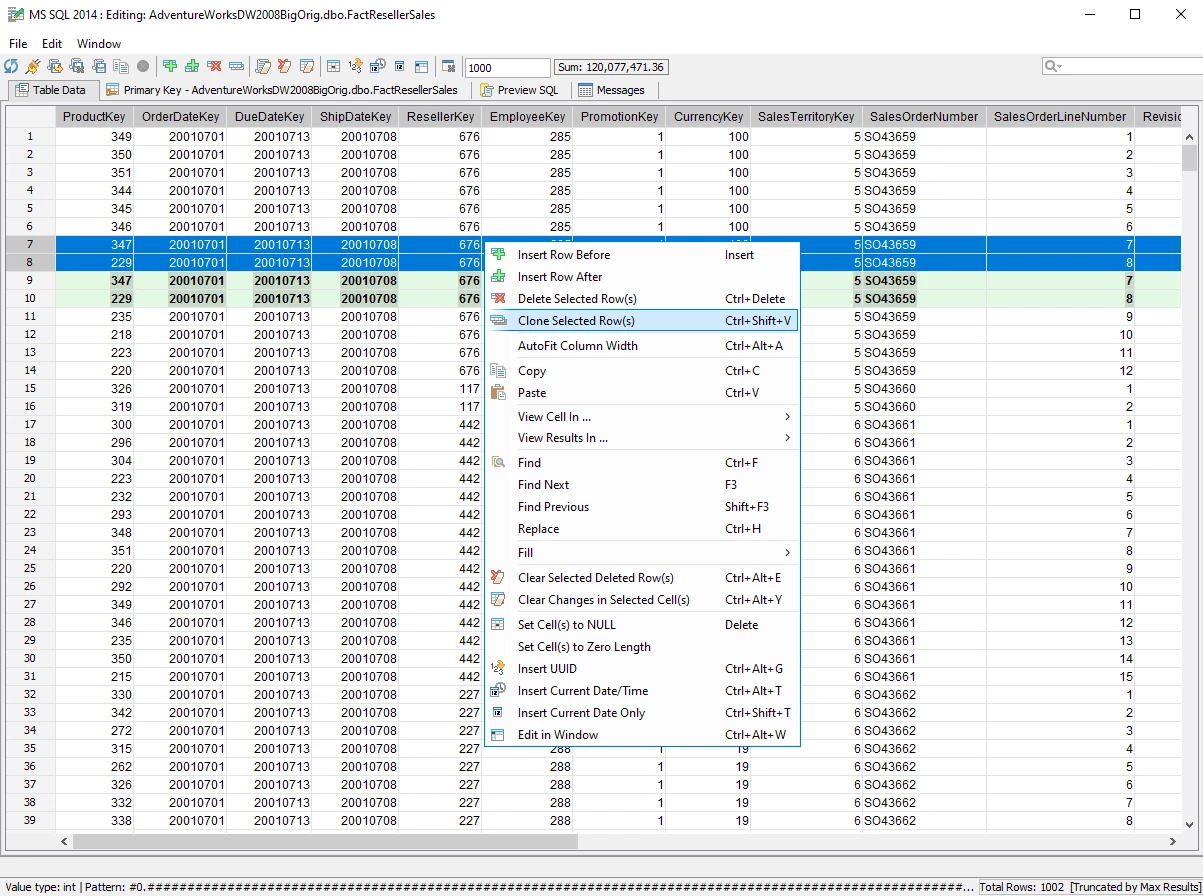
- Table Data Editor: Users can modify database records directly through an Excel-like graphical grid without manually writing UPDATE or INSERT statements. Editing a cell, deleting a row, or pasting blocks of data stages the modifications locally; the application only applies the changes to the live database when the user clicks the commit button, preventing accidental overwrites.
- ER Modeler: The application connects to existing databases and reverse-engineers the live schema into visual Entity-Relationship diagrams. Architects can map out primary keys, indexes, and relationships, rearrange the physical layout, and generate comprehensive HTML data dictionary reports to document the environment before planning structural changes.
- Compare and Synchronize: Administrators can run side-by-side comparisons of physical files, query result sets, or entire database schemas. When comparing schemas across two environments, the interface highlights missing tables or altered column types, and then generates the exact Data Definition Language (DDL) synchronization script required to make the target database match the source.
- Import and Export Utilities: A wizard-driven interface handles moving large volumes of data in and out of tables. Users configure column mappings between external files and target tables, specify character encoding formats such as UTF-8, and set transaction batch sizes to optimize load times when importing millions of rows from CSV or JSON files.
- FluidShell: This integrated command-line shell bridges the gap between database queries and operating system tasks. Users write scripts that execute a SQL statement, extract the results, compress the file into an archive, and move it across local directories, thereby automating repetitive data extraction workflows directly inside the application.
How to Install Aqua Data Studio on Windows
- Download the Windows executable installer package from the official Idera customer portal or through the verified trial email link.
- Double-click the downloaded executable to initiate the installation wizard. If Microsoft Defender SmartScreen intercepts the file launch, click "More info" to verify the publisher is listed as Idera, Inc., then click "Run anyway".
- Accept the Windows User Account Control (UAC) prompt to grant the installer permission to write files to the local disk.
- Review and accept the End User License Agreement displayed on the first screen of the setup wizard.
- Select the destination folder. By default, the installer suggests a new, version-specific directory name rather than overwriting existing folders, which allows users to run different editions side-by-side if needed for testing.
- Wait for the application to extract its core files, which includes laying down the bundled OpenJDK environment so the software can run without a separate system-wide Java installation.
- Click Finish to close the wizard and launch the application from the Start menu. Upon the first launch, a dialog box will prompt you to enter commercial license credentials or activate the 14-day evaluation period.
Aqua Data Studio Free vs. Paid
Aqua Data Studio operates on a strictly commercial licensing model focused on professional database developers and enterprise environments. There is no permanent free tier or community edition. New users can download the application and activate a fully functional 14-day evaluation period to test the database drivers, query execution, and charting tools before committing to a purchase.
The standard pricing model is structured as an annual subscription per user. The Standard edition costs $499 per user annually. This base tier covers all the core functions required for daily database management, including the query analyzer, visual analytics, table data editor, entity-relationship modeling, and schema comparison utilities across all supported relational and NoSQL platforms.
For organizations requiring advanced data governance and automation, the Ultimate edition costs $699 per user annually. Upgrading to the Ultimate tier adds specialized features such as the ability to schedule project tasks, generate secure synthetic data for software testing environments, and utilize advanced JSON import and export functions designed specifically for MongoDB. Both commercial tiers include technical support and maintenance updates as long as the subscription remains active.
Aqua Data Studio vs. DBeaver vs. DataGrip
DBeaver is an open-source alternative built on the Eclipse Rich Client Platform that connects to virtually any database through JDBC drivers. Users who prioritize budget constraints and require a capable, free universal query tool often choose DBeaver Community Edition. It handles SQL formatting, basic data viewing, and schema navigation well, but it entirely lacks the integrated dashboarding and visual charting capabilities found in commercial alternatives.
JetBrains DataGrip is a commercial SQL editor built on the IntelliJ framework, designed specifically for software engineers. It excels in pure code mechanics, offering deep code inspection, intelligent refactoring, and a user interface that feels immediately familiar to developers who use other JetBrains IDEs. However, DataGrip strictly focuses on schema management and code authoring, intentionally omitting business intelligence features, reporting tools, or visual ER diagram generation.
Aqua Data Studio is the better choice for data analysts and architects who need to blend database administration with immediate data visualization. While DataGrip focuses on code and DBeaver focuses on broad accessibility, Aqua Data Studio allows a user to query an Oracle database, join the results with a PostgreSQL table, and instantly generate a pivot chart or exportable ER diagram within the same window. This eliminates the friction of exporting raw data sets into external spreadsheet applications or dedicated visualization software just to interpret the results.
Common Issues and Fixes
- The application runs out of memory or crashes during massive query exports. Because it relies on a Java Virtual Machine, the application is constrained by a default memory limit. To fix this, locate the
datastudio.inifile in the Windows installation directory, open it in a text editor, and increase the maximum memory allocation value. For example, changevmarg.2=-Xmx256Mtovmarg.2=-Xmx4096Mto grant 4GB of RAM. - Interface experiences severe lag when displaying text results. The plain text output console consumes roughly three times more memory than the structured data grid, causing slowdowns on large queries. To improve performance, navigate to the application options, disable Text Results and Pivot Grid Results, and rely exclusively on the standard Grid Results tab.
- Scripts containing multiple statements fail with syntax errors. Database command line tools often use client-side delimiters that the server does not recognize. Open the Query Analyzer settings and adjust the statement separator configuration to match the exact dialect requirements of your target database platform.
- The database connection drops after a short period of inactivity. Many enterprise firewalls or cloud database servers are configured to terminate idle TCP connections automatically. To prevent disconnections, open the Server Properties for the affected database, navigate to the Advanced tab, and configure a keep-alive query to execute in the background at regular intervals.
- Fonts and icons appear blurry on high-DPI Windows displays. The Windows desktop environment scaling sometimes misinterprets the dimensions of Java applications. Right-click the application shortcut, select Properties, go to the Compatibility tab, click to change high DPI settings, and check the box to override scaling behavior, setting it to be performed by the application.
Version 25.5.0 — August 2025
- Added support for Oracle Kerberos authentication, enabling Single Sign-On (SSO) and eliminating the need for plain-text credential storage.
- Introduced a major GUI rebranding refresh designed to improve accessibility with higher contrast, color-blind friendly palettes, and enhanced font readability.
- Fixed a critical issue where changes made within the Table Data Editor were occasionally not saved.
- Resolved a file association bug on macOS that prevented .sql files from opening correctly.
- Corrected the Snowflake schema tree behavior to accurately display overloaded stored procedures and populate the Roles dropdown.
- Addressed a graphics library conflict (libglapi) that previously caused unexpected application shutdowns on Linux platforms.