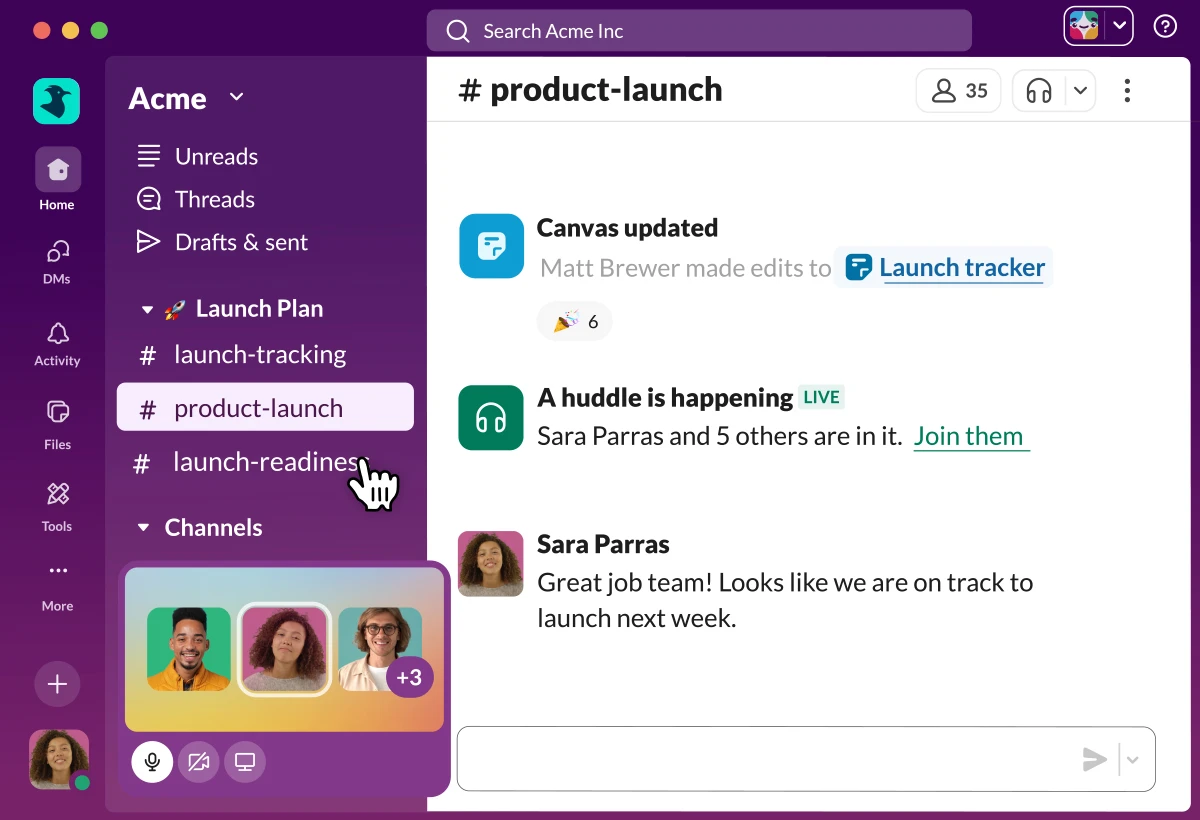
Slack operates as a centralized workplace communication client that organizes corporate conversations, internal file transfers, and daily operational alerts into dedicated text channels. Instead of relying on traditional inbox structures where internal discussions easily become fragmented or buried under external correspondence, this application forces a structured, transparent approach to internal messaging. Project managers, software engineers, administrative staff, and executive teams utilize the platform to separate discrete projects, departmental announcements, and automated system alerts into distinct, readable streams. By isolating different types of communication into specific channels, organizations reduce the friction associated with tracking long-term decisions and managing incident responses.
Running the dedicated desktop application on Windows provides distinct operational advantages over accessing the platform through a standard web browser tab. The local client integrates directly with the Windows Action Center, ensuring that critical direct messages or mentions bypass browser-level notification suppressions. Furthermore, the application minimizes directly to the Windows system tray, allowing it to maintain persistent background connectivity for incoming calls without occupying active taskbar space. Users can configure the client to launch automatically upon system boot, ensuring they immediately connect to their respective corporate workspaces, download new configuration rules, and sync overnight chat history without manual intervention.
In daily practice, the client functions as a primary digital headquarters for remote and hybrid teams. Users can instantly drag and drop error logs, design assets, and compiled documents directly from Windows File Explorer into any active channel, immediately distributing those assets to relevant team members. The interface emphasizes speed and keyboard navigation, allowing professionals to jump between specific departmental channels, direct messages, and external vendor communication using dedicated shortcut keys rather than relying strictly on mouse navigation. This emphasis on rapid context switching makes the application a practical requirement for teams handling rapid incident response, continuous software deployment, or complex editorial calendars.
Key Features
- Workspace Channels: The interface divides conversations into specific public or private channels based on individual topics, departments, or long-term projects. Users press Ctrl+K to open the Quick Switcher, allowing them to type a few letters and instantly jump across the workspace to a different channel without manually scrolling through the left sidebar hierarchy.
- Huddles and Screen Sharing: The application supports spontaneous audio and video discussions that open in a dedicated, compact pop-out window separate from the main chat interface. Participants can share specific Windows application windows or their entire screen, utilizing built-in cursor highlighting and drawing tools to point out specific data points during live presentations.
- Message Threads: Rather than dumping every reply directly into the main channel feed, users can respond to specific messages in dedicated side threads. This behavior keeps the primary channel clean and scannable for announcements, while detailed troubleshooting discussions or minor clarifications remain organized in a dedicated right-hand panel.
- Advanced Search Modifiers: The internal search engine accepts precise logical modifiers to locate historical decisions or lost files across massive corporate archives. Users can type specific queries using filters such as "from:@username", "has:link", or "in:#marketing-materials" to narrow down thousands of messages into a highly specific list of relevant results.
- Third-Party Integrations: The platform interfaces natively with external enterprise applications, monitoring tools, and cloud storage providers. Users can execute specific slash commands like "/zoom" to instantly generate video meeting links, or configure GitHub webhooks to automatically post code commit details directly into a dedicated engineering channel.
- Workflow Builder: Administrators and standard users can automate repetitive administrative tasks using a visual, drag-and-drop workflow configuration interface. A user can set a specific trigger, such as applying a specific emoji reaction to a message, which automatically logs a helpdesk ticket, requests manager approval, or routes the message text to a triage channel.
- Slack Canvas: The application provides a persistent digital document surface attached to individual channels or direct message threads. Teams can collaboratively format project plans, store onboarding checklists, and embed external reference links directly within the workspace interface, eliminating the need to constantly open separate word processing applications.
How to Install Slack on Windows
- Download the official Windows installer executable directly from the vendor's primary distribution server to your local drive.
- Locate the downloaded installation file within Windows File Explorer and double-click the package to initiate the deployment sequence.
- Observe the installation process as the software automatically extracts its necessary application files directly into your local Windows user directory (specifically the AppData folder) without requiring you to click through a traditional manual setup wizard.
- Wait for the extraction to finish, at which point the desktop application will automatically launch and place a persistent icon within the Windows system tray.
- Click the prominent sign-in button within the newly opened application window, which temporarily redirects the authentication flow to your default Windows web browser.
- Enter your specific workspace URL and user credentials into the browser page, or select an existing active session if you are already authenticated on the web.
- Accept the security prompt presented by your browser requesting permission to hand the authentication token back to the local client, automatically returning your focus to the desktop application.
- Allow the client a few moments to initialize the websocket connection, synchronize your channel list, and cache recent message history before configuring your local notification preferences in the settings menu.
Slack Free vs. Paid
The platform operates on a structured freemium model, offering a baseline free tier intended for small teams, informal groups, and trial evaluation. On the free tier, workspaces are subject to a strict 90-day visibility limit on all message history and uploaded files. Any communication or file transfer older than 90 days becomes hidden from the user interface and search results, though the vendor retains the data on their servers. Additionally, free workspaces are restricted to a maximum of 10 third-party application integrations and can only utilize 1:1 direct audio and video huddles, lacking support for multi-person group screen sharing.
Upgrading to the Pro tier fundamentally changes the application's utility by permanently unlocking the entire workspace message and file history, regardless of age. The Pro tier removes the limitation on third-party application integrations, allowing administrators to connect an unlimited number of external development, project management, and monitoring tools. It also enables multi-participant group huddles, grants full administrative access to Slack Connect for communicating securely with external partner organizations, and provides complete access to the Slack Canvas document creation tools.
For larger organizations, the Business+ and Enterprise Grid tiers introduce strict corporate compliance controls and advanced network administration features. The Business+ tier requires a higher per-user monthly fee but includes mandatory SAML Single Sign-On (SSO) enforcement, rigorous data export capabilities for legal discovery, and guaranteed uptime Service Level Agreements (SLAs). Enterprise Grid expands upon this by allowing vast corporate entities to manage dozens of distinct, interconnected workspaces under a single central administrative umbrella, applying unified data loss prevention (DLP) policies and HIPAA compliance standards across the entire corporate network.
Certain modern features, such as the Slack AI suite, require an additional per-user monthly add-on fee regardless of the base subscription tier. This artificial intelligence component scans channel history to generate automated thread summaries, extracts action items from completed huddles, and provides natural language answers to complex internal search queries based on the exact context of the company's historical channel discussions.
Slack vs. Microsoft Teams vs. Discord
Microsoft Teams functions as the primary alternative for organizations heavily invested in the broader Microsoft 365 ecosystem. Because Teams natively intertwines with SharePoint for file storage and Exchange for calendar management, it excels at scheduling formal video meetings and collaborating on complex Office documents. However, many users find the Teams interface rigidly structured around large organizational units, and its heavy reliance on background resource consumption makes it slower to navigate when attempting to quickly bounce between rapid, text-based project discussions.
Discord originally targeted the gaming community but frequently serves as an alternative for informal groups or open-source projects requiring massive scale. Discord provides permanent, drop-in voice channels and handles incredibly large community member counts at no direct cost. Despite these benefits, Discord entirely lacks the complex threading model required to keep professional project management organized, and it fundamentally lacks the enterprise-grade compliance, data retention policies, and formal SAML SSO integrations required by IT departments managing strict corporate security requirements.
Slack remains the stronger choice for organizations that prioritize fast, text-first, asynchronous communication and rely on an independent toolchain. Because it is not locked into a single vendor's ecosystem, its third-party integration directory is significantly broader and more flexible than its competitors. The user interface prioritizes high-density text reading, keyboard navigation, and logical channel threading, making it the preferred client for software engineering groups, editorial teams, and operational departments that need to track complex, fast-moving text data without the overhead of constant video meetings.
Common Issues and Fixes
- Problem description: The application consumes excessive computer memory during extended use. Navigate to Help within the main menu, select Troubleshooting, and click "Clear Cache and Restart" to dump bloated temporary files. Alternatively, navigate to Preferences, open the Advanced tab, and toggle off hardware acceleration to reduce GPU resource overhead on older Windows machines.
- Problem description: Desktop notifications fail to appear in the Windows interface. Open the native Windows Settings panel, navigate to System, then Notifications, and verify the toggle specifically for this client is active. Furthermore, check that Windows Focus Assist or Do Not Disturb modes are not actively suppressing incoming alerts from background applications.
- Problem description: The local microphone fails to register audio during an active Huddle. Click the specific gear icon located inside the active Huddle pop-out window to manually select the correct audio input device. The software occasionally defaults to virtual audio cables, disconnected Bluetooth headsets, or disabled webcam microphones upon initial launch.
- Problem description: Links clicked within chat threads fail to open in the external web browser. Navigate to the client's Preferences menu, open the Advanced section, and toggle the default browser routing settings. If the client remains stuck attempting to route external URLs, manually clearing the local AppData temporary files forces the software to re-establish its default Windows protocol handlers.
- Problem description: The application interface goes entirely black upon launching the executable. This typically indicates a local graphics driver conflict with the application's rendering engine. Right-click the desktop shortcut, open Properties, and append "--disable-gpu" to the target path string, which forces the client to bypass the local graphics card and render using software processing.
Version 4.48.99 — March 2026
- Implemented minor background security enhancements to ensure better protection for your workspace.
- Optimized internal safety protocols to keep your communications and data secure.
- Highly recommended update for all users to maintain the safest possible experience.