Microsoft Teams serves as a centralized digital workspace that consolidates business communication, video conferencing, and document management into a single desktop application. Built specifically to handle the daily operations of modern organizations, the software replaces fragmented email chains with persistent chat channels, voice over IP calling, and dedicated project spaces. It provides groups with a structured environment where text conversations, schedule planning, and shared files exist side-by-side. This arrangement makes it practical to track project history, coordinate immediate tasks, and maintain operational alignment across entirely different departments without leaving the main dashboard.
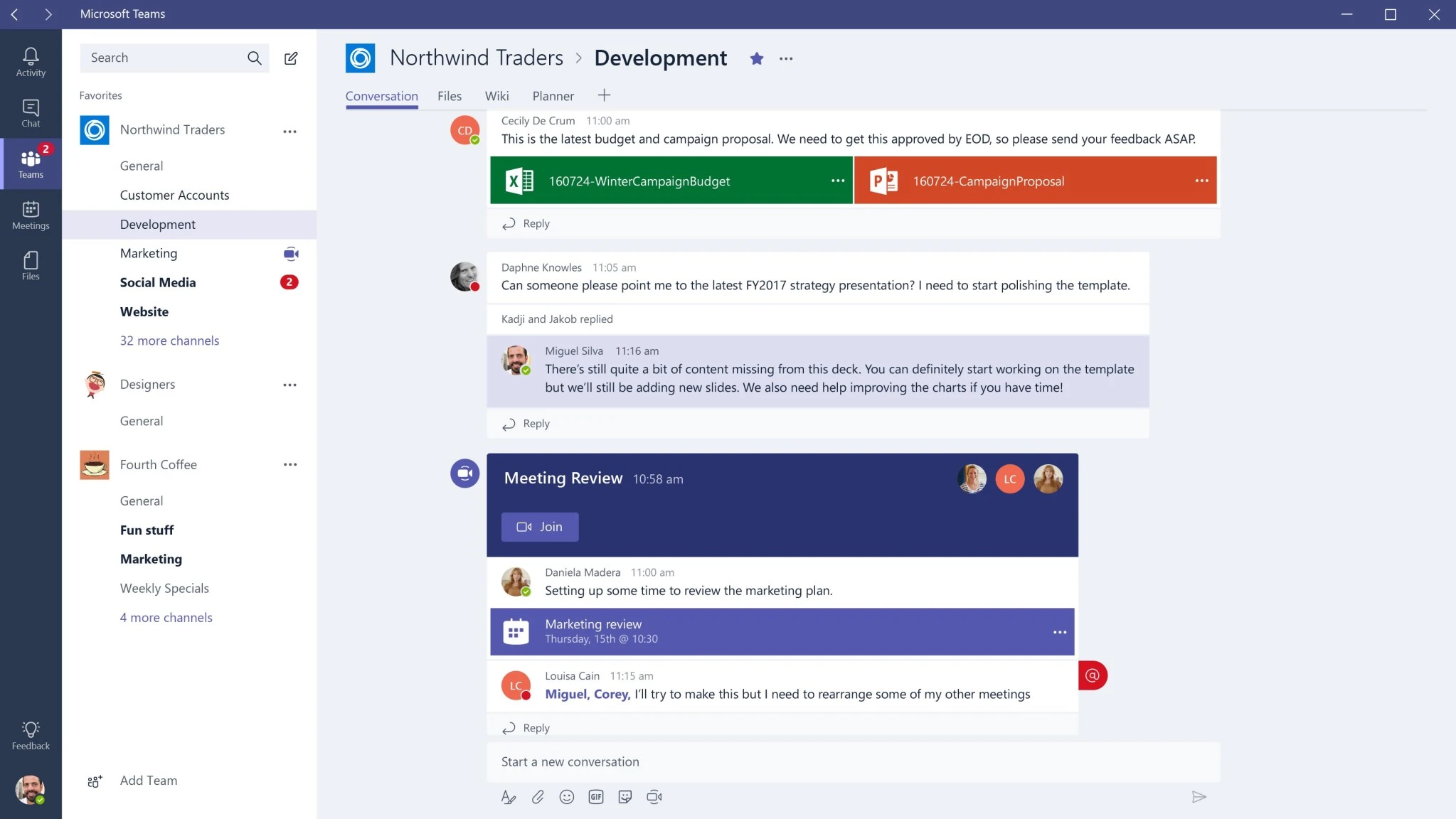
The platform is primarily utilized by businesses, remote workers, and educational institutions that need to coordinate complex workflows across multiple time zones. Instead of relying on a standalone video client for meetings, a separate instant messenger for quick questions, and disparate network drives for file storage, users rely on this single interface to schedule virtual meetings, review documents in real-time, and manage departmental announcements. The main application window revolves around a persistent left-hand navigation bar, which grants immediate access to core modules such as Activity, Chat, Teams, Calendar, and Calls. By keeping these primary functions anchored to the side of the screen, users can rapidly pivot from reviewing an upcoming schedule to answering a direct message without losing their place in a shared document.
Running the dedicated desktop application offers significant operational advantages over its browser-based counterpart. The local installation provides deeper hardware integration for audio processing, ensures persistent background notifications, and enables the ability to pop out multiple chat threads or active calls into separate floating windows for simultaneous multitasking. Furthermore, recent architectural shifts moving the underlying framework away from resource-heavy legacy wrappers have drastically reduced local memory consumption and disk space usage, resulting in much faster meeting join times and a substantially more responsive local interface.
Key Features
- Unified Chat and Channels: The interface combines direct personal messaging and broader channel-based discussions into a streamlined sidebar layout. Users can press Ctrl+Shift+F to quickly filter views by unread activity, pin priority conversations to the top of the list, and organize distinct project threads so that historical data remains easily searchable.
- Batch Message Forwarding: To reduce the repetitive task of relaying information, the software allows you to select up to five specific messages simultaneously and forward them as a single block. This preserves the original context and chronological order of the statements when sharing decisions or technical updates with a different department.
- Advanced Voice Isolation: Utilizing local audio processing, the application filters out complex background noises during live calls. This ensures your spoken words remain clear even when working from a busy office or a loud public space, while administrators can enforce specific speaker recognition profiles for enhanced accuracy.
- Pop-Out Multitasking Windows: You can break out specific application modules from the main dashboard to optimize your desktop layout. By right-clicking an active chat, an ongoing call, or a calendar appointment from the sidebar, you can tear it off into an independent floating window, making it easier to reference a document on one monitor while maintaining visual contact on another.
- Native Document Collaboration: The software connects directly to your cloud storage architecture, allowing participants to open standard formats like .docx, .xlsx, and .pptx entirely inside the communication client. Multiple users can edit the exact same file simultaneously during a video meeting, complete with live cursor tracking and instant auto-saving.
- AI-Assisted Meeting Recaps: When appropriately licensed, the software analyzes call transcripts and presentation materials to generate intelligent summaries after a session ends. The post-meeting view automatically highlights critical decisions, identifies action items, and attributes follow-up tasks to specific attendees, reducing the burden of manual note-taking.
- Real-Time Language Interpretation: For multinational organizations, the platform supports speech-to-speech translation across VoIP calls and scheduled video conferences. An automated interpreter agent listens to the active speaker and delivers real-time audio translation in up to nine different languages, effectively removing communication barriers during global operations.
How to Install Microsoft Teams on Windows
- Download the official installer package directly from the vendor website, taking care to select the specific executable intended for work or school accounts rather than the built-in personal edition.
- Locate the downloaded setup file in your local directory and double-click the executable to launch the installation engine.
- Wait for the background setup process to unpack the necessary files, as the installer typically bypasses manual destination path selection and installs the required components directly to your user profile directory.
- Once the main application window launches, enter your organizational or personal Microsoft account credentials to sign in.
- Complete the multifactor authentication prompt if your company IT administrator enforces secure login protocols for software access.
- Review the first-run hardware configuration screen to select and test your preferred microphone, speaker output, and webcam devices before joining any live sessions.
- Allow the software a few moments to synchronize your existing chat history, calendar appointments, and active channels before beginning your daily operations.
Microsoft Teams Free vs. Paid
Microsoft Teams operates under a freemium model, offering a baseline tier at no cost while restricting advanced administrative controls and capacity maximums to paid commercial subscriptions. The free tier allows individuals and small groups to utilize unlimited chat messaging, host video calls lasting up to 60 minutes, and gather up to 100 participants in a single meeting. Users on this tier also receive 5 GB of personal cloud storage, making it functional for casual project coordination but restrictive for heavy corporate document sharing.
Organizations outgrowing these limits typically move to the entry-level commercial tier, which costs approximately $4 per user per month. This paid subscription extends the maximum meeting duration to 30 hours, increases the participant limit to 300, and doubles the individual cloud storage allowance to 10 GB. It serves as a direct upgrade for smaller businesses that primarily need reliable video conferencing and persistent chat without committing to a broader software ecosystem.
For full corporate deployment, the communication client is usually bundled directly into larger commercial suite plans, ranging from approximately $6 to over $39 per user per month depending on the exact enterprise level. These higher tiers unlock deep connections with desktop office applications, expansive 1 TB storage capacities, webinar hosting capabilities, and advanced security compliance tools. Additionally, specialized artificial intelligence functions, such as automated meeting summaries and chat context analysis, require a separate add-on license that adds roughly $30 per user per month to the base subscription costs.
Microsoft Teams vs. Slack vs. Zoom
Slack serves as a primary alternative for organizations that prioritize asynchronous, text-heavy communication over structured corporate hubs. While both tools offer channel-based messaging, Slack provides a more flexible interface with thousands of third-party bot connections that appeal heavily to software development and creative teams. Users typically choose Slack when they want faster navigation through dense text threads and prefer building custom automated workflows, whereas Microsoft Teams enforces a rigid, folder-like structure that works better for formal document storage and corporate governance.
Zoom focuses almost exclusively on minimizing friction during video communication, making it the preferred choice for external client meetings and large-scale webinars. Unlike Microsoft Teams, which requires guests to navigate a complex lobby environment or manage account permissions, Zoom allows external participants to join high-definition calls simply by clicking a web link without logging in. Furthermore, Zoom includes its automated artificial intelligence companion in most standard paid tiers at no extra charge, contrasting heavily with the expensive add-on requirements found in Microsoft's commercial plans.
Microsoft Teams remains the superior choice for organizations that already manage their daily operations through the Microsoft 365 environment. The platform outpaces both Slack and Zoom when it comes to internal corporate alignment, as its ability to open, edit, and co-author internal spreadsheets or presentations directly inside the chat window eliminates constant application switching. If your primary goal is keeping internal employees focused on shared project files with strict enterprise controls, Microsoft Teams provides the most practical and secure architecture.
Common Issues and Fixes
- Persistent lagging or sluggish interface performance. If the application consumes excessive memory or delays text input, the local cache may be overloaded. You can clear this by opening Windows Settings, selecting Installed Apps, locating the communication software, and clicking Reset under the Advanced Options menu.
- Microphone or camera not detected during live meetings. Hardware access problems often stem from operating system restrictions rather than application failures. Open the Windows Privacy and Security settings, navigate to both the Camera and Microphone tabs, and ensure the toggle switch allowing desktop apps to access these devices is actively enabled.
- Messages failing to send or status continuously showing offline. A broken background synchronization thread or a stale network token can prevent messages from dispatching properly to the server. Force-quit the application by right-clicking its icon in the system tray, then locate and delete the contents of the local application data directory containing the caching folder before relaunching.
- Incorrect meeting times displaying on the internal calendar. If you have recently traveled across time zones, the application might fail to sync with the local clock immediately. Open the general settings menu within the software and verify your regional preferences, or simply restart the application to force it to pull the current system time from the operating system.
Version 26005.204.4249.1621 — February 2026
- Added the ability to select and forward up to five messages simultaneously from any chat or channel while preserving the original conversation context.
- Introduced a visual grid layout for file search results, allowing users to easily distinguish and identify documents through thumbnail previews.
- Added Trust Indicator badges that automatically display next to external collaborators to verify their relationship and enhance communication security.
- Enhanced AI-generated meeting recaps by integrating visual references from screen shares and offering customizable formatting templates.
- Improved meeting layout flexibility by giving users the ability to manually resize the top and right video galleries during presentations or spotlighted moments.
- Improved system efficiency by automatically synchronizing the app's time zone with the device's operating system without requiring a client restart.
- Added a shared call and voicemail history view within the Queues app to help service representatives track missed and incoming customer interactions collaboratively.
- Introduced co-branding for Teams Phone, allowing the active Operator Connect partner's name and logo to appear on dial pads and active call screens.
- Unified the Microsoft 365 Copilot interface across meetings, chats, and channels for more cohesive insights, message rewriting, and data summarization.
- Added administrative controls to deploy custom in-meeting notification banners whenever recording or transcription features are activated.