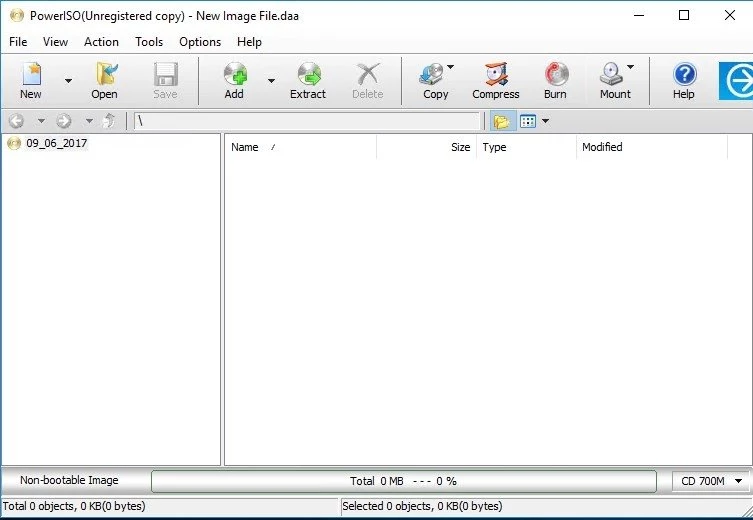
Modern computing has largely left physical optical media behind, with the vast majority of new desktop computers and laptops shipping without a CD, DVD, or Blu-ray drive. Despite this hardware shift, the disc image—a direct, sector-by-sector digital replica of physical media—remains a critical standard for software distribution. Operating systems, large application suites, and legacy game archives are still packaged as ISO or BIN files to ensure that complex directory structures and boot sectors remain completely intact during transfer. PowerISO functions as a complete command center for disc image management, allowing you to open, edit, and mount virtual files without needing a physical drive. By simulating hardware at the software level, it bridges the gap between modern storage methods and legacy optical formats.
The application serves a wide range of technical users who need precise control over file archives. System administrators rely on it to modify large deployment packages, injecting updated drivers or custom configuration files directly into an operating system installer without having to extract and rebuild the entire structure from scratch. Retro computing enthusiasts use it to digitize aging physical discs, creating permanent backups that can be mounted instantly, preserving the original media from scratches and laser rot. PC builders and technicians frequently utilize its built-in USB tools to turn standard flash drives into bootable recovery media or installation disks. In each of these scenarios, the software eliminates the friction of dealing with cumbersome physical discs or slow extraction times.
While modern operating systems include basic, native mounting capabilities, a dedicated desktop application remains necessary for advanced workflows. Built-in tools cannot modify the internal contents of an archive, nor can they handle proprietary or encrypted formats like DAA or CDI. Furthermore, web-based extraction tools are entirely useless for this category of work; a browser cannot interact with the Windows kernel to assign a virtual drive letter or format a raw USB boot sector. The application connects directly to the Windows shell, placing direct extraction, conversion, and emulation commands right inside the standard right-click context menu, ensuring that heavy file operations are always just a click away.
Key Features
- Direct Image Editing: Instead of extracting a massive archive just to update a single text file, the internal file explorer allows direct manipulation of the archive's contents. Users can open an existing standard ISO, navigate through its directory tree, delete unwanted folders, drag in new updated drivers, and save the changes instantly. This saves significant hard drive space and processing time.
- Virtual Drive Mounting: By navigating to the Mount option, users can assign a dedicated drive letter to an image file, tricking the operating system into recognizing it as physical hardware. The software supports up to 23 simultaneous virtual drives, allowing users to run complex legacy applications or multi-disc installation suites natively without ever inserting a real disc.
- Bootable USB Creation: Located under the Tools menu, the Create Bootable USB Drive utility formats a target flash drive and writes the master boot record correctly. This feature is necessary when preparing system recovery media or building an installation drive for a fresh operating system deployment, supporting both standard writing methods and raw sector-by-sector copying.
- Audio CD Ripping and Burning: For digitizing physical music collections, the software reads standard audio tracks and converts them into lossless or compressed digital formats, including MP3, FLAC, APE, and WAV. It simultaneously generates an accurate CUE sheet, ensuring that metadata, track order, and precise gap lengths are preserved accurately for future playback or disc burning.
- Proprietary DAA Format Compression: Large archival backups can quickly consume expensive solid-state storage. The Direct-Access-Archive (DAA) format applies specific compression algorithms to reduce the overall footprint of standard disc images. Furthermore, it supports volume splitting to fit massive data sets onto smaller FAT32 storage devices and offers password encryption to secure sensitive files.
- Disc Format Conversion: Users frequently encounter obscure proprietary formats generated by older imaging applications, such as NRG or CDI. The built-in conversion tool reliably translates these legacy files into the universally accepted standard ISO format. This ensures long-term accessibility, preventing data lock-in and guaranteeing compatibility with virtually all standard archive extractors.
How to Install PowerISO on Windows
- Download the Windows installer package from the official site, ensuring you select the architecture that matches your system processor.
- Double-click the downloaded executable to launch the setup wizard; note that you must have administrative privileges because the application installs core hardware drivers.
- Review the end-user license agreement carefully and click the confirmation button to proceed to the directory selection screen.
- Choose the destination folder for the application files; the default path is standardly set to the Program Files directory, which is recommended for optimal performance.
- During the setup process, configure the file associations when prompted, checking the boxes for formats like .iso, .bin, and .daa so they open automatically upon double-clicking.
- Select the initial number of virtual drives you want the software to emulate in the background, which can be adjusted later in the application settings.
- Finish the installation wizard and allow the program to restart your computer, a required step to initialize the newly installed virtual hardware drivers at the kernel level.
- Upon the first launch, clear the registration dialogue box if you intend to test the unregistered trial, or input your purchased license credentials to unlock unrestricted file saving.
PowerISO Free vs. Paid
The software operates on a traditional shareware business model, offering an unregistered trial alongside a paid perpetual license. Anyone can download and run the trial indefinitely to evaluate the core functionality. When operating in unregistered mode, the primary restriction is a strict 300MB file size limit imposed on creating or editing any disc image. This means you cannot modify a large operating system installer or package a heavy game backup without encountering a hard stop. However, the trial does not restrict the file size when extracting existing archives or mounting them to a virtual drive, allowing users to access large files freely.
Users relying on the free version must also navigate a registration prompt dialog box every time they launch the application. This prompt introduces a brief delay before granting access to the main interface. For users who only occasionally mount existing backups or extract small files, this trial model provides significant utility without requiring an immediate purchase.
Upgrading to the registered version eliminates the startup prompt and completely removes the 300MB save limit, supporting image files up to 8TB in size. The licensing model is straightforward: a single purchase grants a lifetime license. The developer provides free lifetime software upgrades to registered users. This guarantees that a single purchase ensures access to all future bug fixes, system compatibility updates, and feature improvements without the burden of recurring subscription fees.
PowerISO vs. DAEMON Tools vs. Rufus
DAEMON Tools caters to users who need complex virtual drive emulation. It offers technical options like iSCSI initiator connections, virtual hard disk mounting, and RAM disk creation for temporary storage. If your workflow involves enterprise-level network storage or bypassing strict copy-protection on legacy physical media, DAEMON Tools provides the specialized settings required to handle those edge cases. However, its interface carries more overhead, and users who only want to quickly edit a standard archive or extract a few files will find its dense feature set overly complicated.
Rufus serves a single, specific purpose: creating bootable USB flash drives. As a lightweight, open-source utility, Rufus excels at taking an operating system image and writing it to a flash drive as quickly as possible. It is entirely free and bypasses optical disc legacy features altogether. If your sole objective is to build a Windows installation drive or deploy a recovery environment, Rufus is the faster and more efficient choice. It does not, however, offer any ability to edit the contents of the image before writing or mount it to a virtual drive.
PowerISO represents the middle ground, offering a unified workspace for diverse storage management tasks. It is the better option when your workflow requires multiple steps—such as opening an existing archive, adding custom driver files to the directory, saving the modified image, and then mounting it virtually to test the changes before finally burning it to a physical disc or USB drive. It provides a capable mix of editing, extracting, and emulation tools in a single desktop interface.
Common Issues and Fixes
- Virtual drive fails to mount (Error Code 32). This error often occurs when the virtual drive driver conflicts with a recent system update or antivirus scan. To resolve it, open the application, navigate to the virtual drive settings, set the number of drives to zero, apply the changes, and reboot your PC. Once restarted, re-enable the desired number of drives.
- Cannot save edits to an existing archive. If the save operation aborts and displays a warning prompt, the total size of the project has exceeded the 300MB restriction of the unregistered version. You must either remove files to keep the total size below 300MB or register the software to unlock unlimited file capacities.
- Antivirus flags the setup executable during installation. Security software occasionally blocks the installer because it contains low-level system drivers necessary for virtual hardware emulation. If this happens, temporarily pause your real-time protection, complete the installation and system reboot, then immediately restore your security settings.
- Application cannot format or write to a bootable USB. Writing boot sectors requires low-level disk access that standard user accounts lack. Right-click the application shortcut and select "Run as administrator" to grant the elevated permissions required for the Create Bootable USB Drive tool to format the target flash drive correctly.
- File associations do not work after installation. If double-clicking an image file does not open the program, the default app settings may have overridden the installer. Open the application options, navigate to the file associations tab, re-check the desired extensions, and click apply to force the operating system to recognize the program as the default handler.
Version 9.2 — October 2025
- Added support for zst, br, and lzip compression formats when creating bootable USB drives.
- Introduced the ability to generate ISO files directly from a USB drive.
- Enabled customization options for Windows installations when building bootable media.
- Added functionality to modify and customize Windows ISO files.
- Implemented new settings to adjust user interface fonts.
- Fixed minor bugs and improved overall stability.