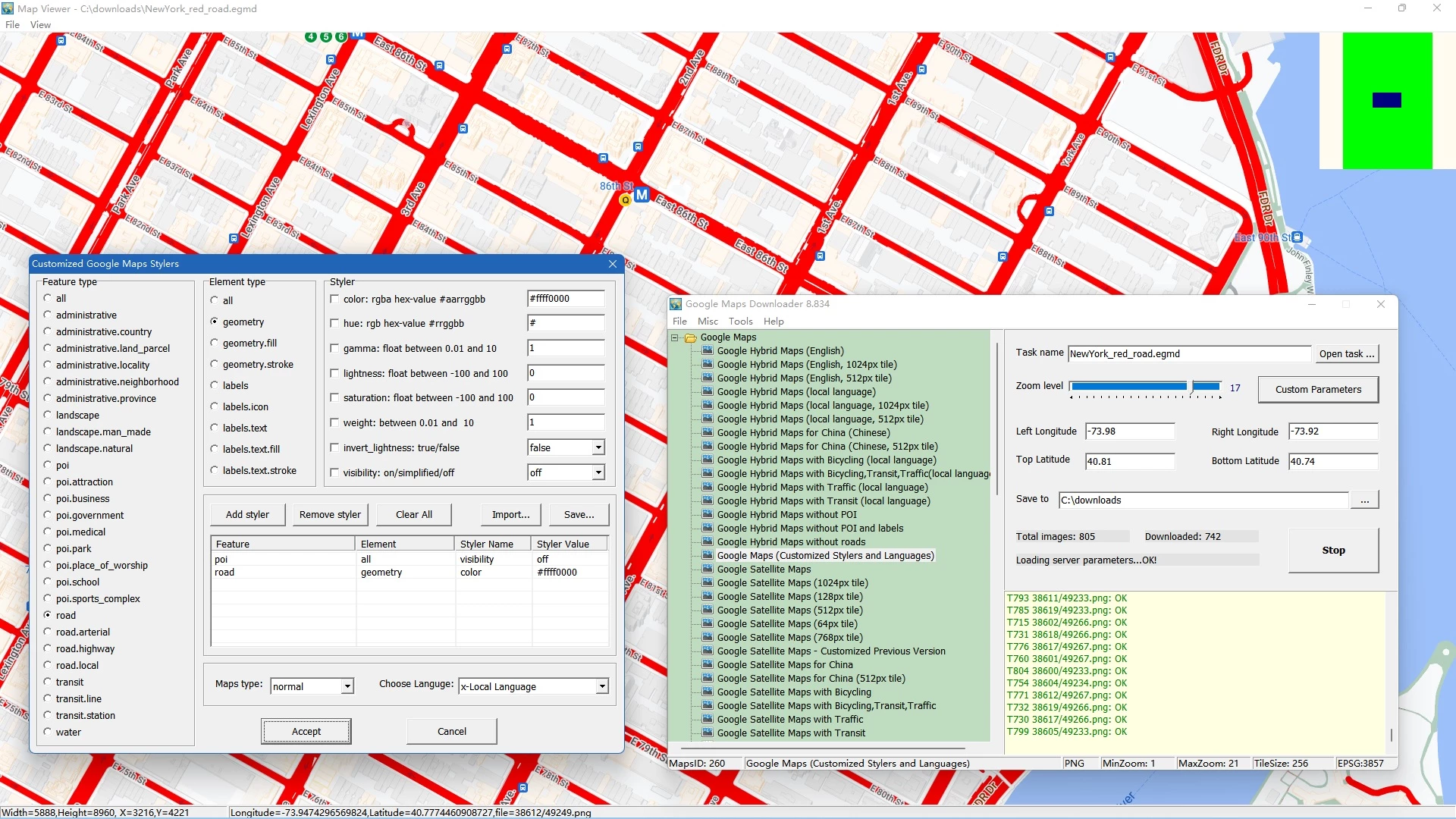
Getting raw map data out of a web browser and onto a local hard drive is a logistical challenge for offline navigation, academic research, and municipal geographic planning. The standard Google Maps web interface is specifically built for live, internet-connected browsing, caching only small areas temporarily in volatile memory. This restricts users who need permanent, large-scale maps. Google Maps Downloader by AllMapSoft bypasses this limitation by acting as a direct client that queries Google's map servers and retrieves raw tile data over HTTP protocols. Instead of relying on a fragile browser cache, operators can define a precise rectangular boundary using geographic coordinates, scrape the exact graphical tiles they need, and store them permanently on a local disk for true offline use.
This desktop application caters specifically to researchers, outdoor enthusiasts, and local planners who need enormous, high-resolution geospatial images without internet dependency. When working in remote areas, conducting rural surveys, or building custom geographic reference materials, standard web maps fail the moment the network connection drops. By automating the retrieval of thousands of individual 256 by 256 pixel graphical tiles, this software builds a localized directory of map imagery directly on your personal computer. It completely removes the need to take manual screenshots and piece them together in photo editing software, saving hours of manual labor while maintaining strict geographic alignment across vast distances.
The software is strictly built for the Windows ecosystem, supporting Windows 7, Windows 8, Windows 10, and Windows 11 environments natively. It operates as a lightweight, specialized utility rather than a massive Geographic Information System suite. While major enterprise platforms require extensive training to operate effectively, this downloader focuses entirely on the straightforward acquisition and assembly of Google-specific map layers. Whether a user needs standard street layouts, detailed satellite photography, terrain topologies, or hybrid maps, the application pulls the exact requested layer from the host servers and prepares it for export into standard image formats or database files compatible with third-party mapping software.
Key Features
- Coordinate Bounding Box: Users define their exact target area by inputting the Left Longitude, Right Longitude, Top Latitude, and Bottom Latitude in decimal degrees. This strict boundary system ensures that the software only requests graphical tiles within the specified perimeter, preventing unnecessary data consumption and keeping project storage sizes manageable.
- Multiple Map Types: The application supports pulling data from several distinct server layers, including standard street layouts, satellite photography, terrain maps, and hybrid satellite-street views. It also supports customized styler maps, allowing users to download maps with hidden points of interest or modified road colors if they possess the specific styling parameters.
- Zoom Level Control: Before initiating a download task, users must specify a zoom scale ranging from minimal detail to maximum street-level clarity. Because the number of required tiles increases exponentially with each zoom step, this control allows operators to balance their need for granular imagery against their available hard drive space and bandwidth constraints.
- Integrated Map Combiner: Downloading raw tiles results in thousands of small image files that are difficult to browse manually. The built-in Map Combiner utility automatically reads the geographic metadata of these graphical files and stitches them together into a single, continuous image file formatted as BMP, TIFF, JPG, or PNG.
- Database Exporting: For users who need to import their offline maps into specialized GIS applications or mobile navigation tools, the software can compile the individual tiles into an SQLite database or an MBTiles file. These database formats are natively recognized by third-party tools like QGIS, Global Mapper, and RMaps.
- Offline Maps Viewer: To verify the integrity of a downloaded project before spending time and processing cycles stitching it together, the software includes a standalone viewing utility. This viewer reads the local tile cache and displays the map exactly as it would appear online, allowing users to pan the camera and check for missing chunks without an active internet connection.
How to Install Google Maps Downloader on Windows
- Download the Windows installer package directly from the vendor's site to ensure you receive the latest server configuration files.
- Execute the setup file and approve the Windows User Account Control prompt to allow the installer to write to your local disk.
- Review and accept the end-user license agreement, which outlines the rules for personal, non-commercial use of the retrieved map data.
- Choose the installation directory. The default path defaults to the Program Files folder, but you may route it to a secondary drive if your primary partition has limited space.
- Select whether to create a desktop shortcut and a Start Menu folder for quick access to the main downloading interface, the Map Combiner, and the Maps Viewer.
- Click install to extract the application files. The process completes quickly due to the minimal footprint of the core executable.
- Launch the program for the first time. The Windows Defender Firewall may prompt you to allow the application access to the internet; you must grant this permission for the software to contact the mapping servers.
- Define a new project file and specify a destination folder where the heavy raw map tiles will be saved. Ensure this destination has ample storage capacity, as high-zoom projects routinely consume gigabytes of disk space.
Google Maps Downloader Free vs. Paid
The developer distributes this application under a shareware model, allowing users to test the core downloading and stitching mechanics before committing to a purchase. The trial tier is fully functional regarding the basic workflow, letting users define bounding boxes, select map types, and export the results to various formats. However, the trial strictly caps the maximum zoom tier at level 13. At zoom level 13, users can view broad city layouts and regional highways, but they cannot access the close-up details required for street-level analysis, property inspection, or precise off-grid hiking trails.
To unlock the application's full depth, users must purchase a registration code, which currently costs $59 for a perpetual license. Entering the registration code removes the zoom scale restriction, granting access to the deepest zoom tiers available on the servers. This unlocks the extraction of crisp satellite imagery and intricate street maps. The paid tier also ensures that projects requiring massive tile counts can proceed without the artificial caps imposed by the trial limitations.
Users must note the vendor's licensing stipulations regarding the acquired data. Even with the paid license, the developer explicitly states that the downloaded map imagery is for personal, non-commercial use only. The $59 fee covers the functionality of the software itself—its scraping, stitching, and exporting utilities—not the commercial rights to the proprietary satellite and mapping data. Users utilizing the software for personal navigation, academic research, or offline reference remain compliant with the intended use case.
Google Maps Downloader vs. GMapCatcher vs. SAS.Planet
GMapCatcher is an open-source alternative designed primarily as an offline map viewer rather than a bulk scraping utility. It operates by caching the map tiles you view while connected to the internet, saving them automatically so you can browse the exact same areas later when offline. This approach works well for casual users who just need to remember a specific route or neighborhood without calculating decimal coordinates. However, for professionals or researchers who need to proactively download a defined rectangular grid of satellite imagery without manually scrolling over every inch of it, Google Maps Downloader offers a vastly superior, automated workflow.
SAS.Planet is a complex freeware mapping application that can download and view imagery from dozens of different providers, including Google, Bing, and Yandex. It features an extensive array of measuring tools, GPS tracking integrations, and export options, making it a favorite among hardcore GIS operators. The downside to SAS.Planet is its dense, complicated interface and steep learning curve, which frustrates users who just want a basic image file of a specific area. Furthermore, SAS.Planet often requires manual text-file configuration of map source URLs when server addresses change.
Google Maps Downloader is the better fit for users who want a strictly focused, single-purpose tool with a minimal learning curve. If your only goal is to type in four coordinate points, select a zoom scale, and click a button to receive a giant stitched JPG or MBTiles file, this software eliminates the interface clutter and configuration headaches found in broader, multi-source mapping suites. It trades the expansive multi-provider ecosystem of its competitors for absolute operational simplicity.
Common Issues and Fixes
- Server connection blocked due to IP ban. Google temporarily blocks your IP address, causing downloads to halt or return error messages because requesting thousands of tiles in rapid succession triggers the server's automated anti-scraping defenses. To fix this, pause your active project immediately and either wait 24 hours for the temporary block to expire or use a Virtual Private Network to assign your computer a new IP address before resuming the job.
- Map Combiner outputs a solid black image. This issue occurs when the requested output file exceeds your computer's available Random Access Memory or the physical limits of the chosen image format, such as the maximum pixel dimensions of a standard JPG. To fix this, export the tiles to an MBTiles database instead, or break the geographic bounding box into smaller, separate projects to keep the final image sizes manageable.
- Downloaded tiles appear as blank white squares. Google frequently updates the internal routing numbers of its map servers, rendering older scraping URLs invalid and resulting in a server error watermark. To fix this, you must update the software to the newest build available from the developer, as the vendor regularly releases minor patches specifically to update these internal server strings and restore connectivity.
- Downloaded map area does not match intended location. This is almost always caused by data entry errors when typing the bounding coordinates into the task window. To fix this, verify your decimal degrees, ensuring that locations in the Southern Hemisphere use negative values for Latitude, and locations in the Western Hemisphere use negative values for Longitude, because a missing minus sign will send the scraper to the opposite hemisphere.
Version 8.885 — December 2025
- Updated core connectivity protocols to ensure full compatibility with the latest Google Maps server changes.
- Refined the image stitching algorithm, resulting in clearer and more accurate map merges at high zoom levels.
- Implemented minor interface adjustments to streamline navigation and improve overall usability.
- Resolved known stability issues and optimized the download engine for greater reliability.