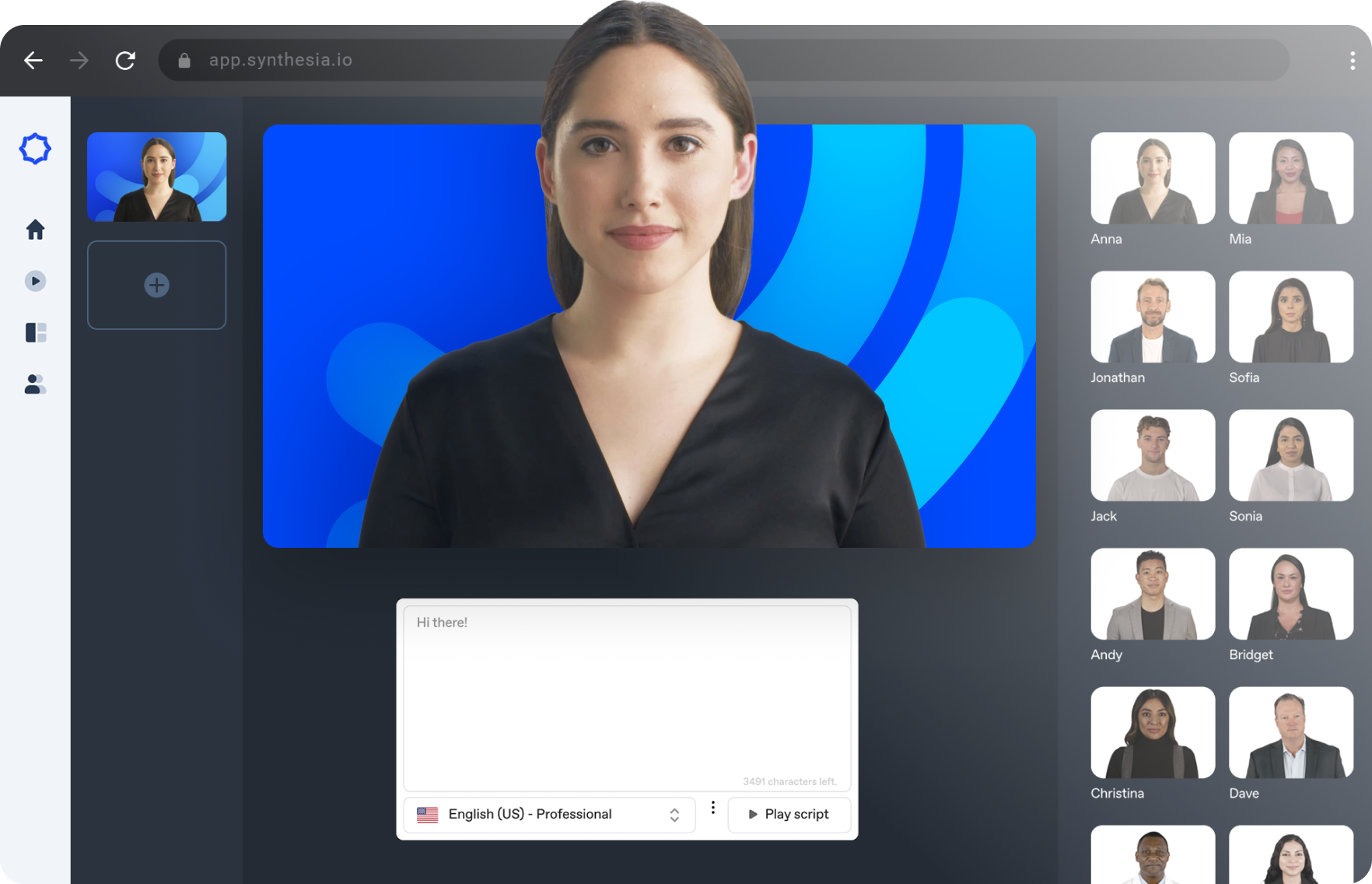
Synthesia is a specialized text-to-video generation platform that allows professionals to build high-quality video content using artificial intelligence avatars and synthesized voiceovers. Instead of managing complex video timelines, setting up physical lighting, or recording live footage, editors and corporate trainers simply type a script into a central text field. The system processes that text, applies an animated human avatar, and outputs a highly realistic video complete with accurate lip-syncing. Designed explicitly for corporate communications, sales enablement, instructional design, and customer support, it bypasses traditional media production pipelines entirely. Organizations no longer have to rent expensive studio space, hire external actors, purchase high-end camera equipment, or spend days matching audio tracks to separate video clips. You simply type the dialogue, assign an avatar, set the visual background, and the application renders the final media directly through its cloud infrastructure.
Operating this tool as a standalone Windows desktop application offers a distinct workflow advantage over running it in a standard web browser. In a busy corporate environment, browser tabs frequently become disorganized, get accidentally closed, or become suspended by the operating system to save memory, interrupting the video editing process. By utilizing a dedicated desktop window, users isolate their video production workspace from daily email and web research. This dedicated setup allows for highly focused scriptwriting, faster window switching during multi-monitor editing sessions, and immediate access right from the Windows taskbar. Furthermore, a standalone client ensures that accidental browser closures do not disrupt active rendering sessions or unsaved layout changes on the timeline. The desktop approach keeps the core tools, media library, and avatar selection menus securely anchored in their own localized workspace, ensuring that heavy media uploads and precise script adjustments happen without interference from other web applications or browser extensions.
Key Features
- Text-to-Video AI Avatars: Users select from a library containing over 240 diverse, highly realistic human avatars, or they can undergo a specific video capture process to generate a custom digital twin. Once an avatar is placed on the editing timeline, users paste their script into the primary text editor, and the platform animates the character to deliver the lines with exact lip movements, natural eye blinks, and appropriate micro-expressions.
- Multilingual Voiceover Processing: The platform supports automatic text-to-speech conversion in more than 160 languages, dialects, and localized accents without requiring external audio tools. Editors can utilize the drop-down language menu to select specific regional tones, allowing a single English script to be translated and voiced by a localized avatar for international training modules without hiring native speakers or booking recording studios.
- Customizable Corporate Templates: The main dashboard includes over 60 professionally designed layout templates optimized specifically for onboarding modules, product explainers, and corporate announcements. Editors can modify these templates by dragging and dropping internal assets, snapping text boxes to predefined grid lines, and uploading specific brand elements like hex color codes, typography files, and transparent company logos to maintain strict visual consistency.
- ChatGPT-Powered Script Assistant: An integrated text generation prompt window assists users in structuring their video narratives directly from basic instructions. An editor can type a short prompt defining the target audience, preferred video length, and overall tone, and the internal system will output a fully formatted spoken script alongside suggested on-screen text placements that map directly to the active timeline.
- Integrated Media and B-Roll Library: The right-hand sidebar provides direct access to a searchable database of stock images, background video clips, animated stickers, and background music tracks. Users can layer these visual assets behind their selected avatar, apply simple fade or slide transition animations, or utilize the built-in screen recorder to capture and insert software walkthroughs directly into the active scene.
- Automatic Video Translation Engine: The interface includes a single-click translation button that converts an entire finished video project into a different language instantly. The system automatically rewrites the on-screen text elements, translates the spoken script, swaps the voiceover track to the target language, and recalculates the avatar's lip-sync data to match the newly generated audio, delivering a complete localized file ready for export.
How to Install Synthesia on Windows
- Download the Synthesia Windows installer package from the provided software portal directory and save it securely to your local hard drive.
- Navigate to your default Windows Downloads folder and double-click the executable setup file to initiate the local installation process.
- Review the on-screen installation prompts, confirming the default extraction path, which is typically set to the primary program files directory on your system drive.
- Select the option to create a dedicated desktop shortcut and pin the application directly to your Windows taskbar for immediate access during daily production tasks.
- Finish the setup wizard, close the installer, and launch the application directly from the newly created Start menu entry.
- Upon the initial launch, the desktop client will display a mandatory login screen; enter your registered account credentials or use your enterprise single sign-on to authenticate the session.
- Ensure your Windows environment maintains an active, stable internet connection, as the application requires continuous secure access to cloud servers to render video outputs, stream high-resolution avatars, and synthesize complex voice models.
Synthesia Free vs. Paid
Synthesia structures its pricing around a credit-based consumption model rather than offering a perpetual offline desktop license. The platform offers a Free plan, listed inside the dashboard as the Basic tier, which provides users with 1,200 monthly credits. This tier is designed primarily for testing the text-to-speech engine and experimenting with a limited selection of ready-made avatars, allowing users to understand the interface and timeline controls before committing to a commercial workflow. It is highly restricted in terms of final export capabilities.
For individuals and small production teams, the Starter tier is priced around $22.50 per month when billed annually. This paid level provides an increased allowance of video generation minutes per year and unlocks access to a wider variety of standard avatars and premium voices. The Creator plan steps up the capacity further, offering enhanced video minute limits suitable for regular content output and adding the ability to generate specific custom avatars for highly localized corporate branding.
Large organizations require custom Corporate plans, which involve direct vendor negotiation and formal contracts. These enterprise agreements remove the strict standard limits, offering high-capacity video rendering times, dedicated API access for automated video generation workflows, and advanced multi-user collaboration tools. At this tier, specialized add-ons, such as the Studio Express avatar generation, are available for approximately $1000 per year, allowing companies to secure highly detailed, broadcast-quality digital twins of their executives or official spokespeople for permanent internal use.
Synthesia vs. HeyGen vs. Descript
HeyGen operates as a highly aggressive competitor in the artificial intelligence video space, focusing intensely on ultra-fast, highly stylized avatar generation. The platform prioritizes social media content creation, offering templates specifically formatted for vertical video formats like TikTok, YouTube Shorts, and Instagram Reels. HeyGen users often utilize the platform to create rapid-fire marketing clips or personalized outreach messages, as its rendering pipeline is optimized for quick turnarounds and highly expressive, informal avatar movements. It is an excellent choice for independent creators or small marketing agencies whose primary objective is generating high volumes of short-form promotional content for fast-moving social feeds.
Descript takes a completely different approach to video production, operating fundamentally as a transcript-based audio and video editor rather than a synthetic avatar generator. With Descript, users import real footage of human speakers, and the software generates an interactive text document on the screen. Editors then cut, copy, or delete words in the text document, which automatically edits the underlying video file, removing filler words, awkward pauses, or mistaken sentences. Descript is the correct choice for teams producing podcasts, recording live interviews, or editing physical camera footage, as it optimizes recorded reality rather than synthesizing an artificial presenter from scratch.
Synthesia remains the superior choice for structured corporate communications, enterprise-level instructional design, and internal training curriculums. While HeyGen focuses on social media trends and Descript requires actual camera footage, this platform excels at turning dry corporate documentation into professional, standardized presentation videos. Its massive library of supported languages, strict adherence to corporate security protocols, and refined, professional avatar aesthetics make it the most reliable tool for large organizations that need to produce hundreds of localized training modules without organizing physical camera shoots or hiring external editing agencies.
Common Issues and Fixes
- Avatar lip-sync appears misaligned with custom audio uploads. Verify that the uploaded voiceover track is a clean MP3 or WAV file without background noise, room echo, or heavy compression artifacts. Delete the audio file from the timeline, re-export it from your audio tool, and re-upload it, forcing the rendering engine to recalculate the mouth movements based on a clearer waveform.
- Video rendering processes get stuck at a specific percentage. Complex projects containing multiple high-resolution background videos, custom slide transitions, and extensive script translations require heavy server-side processing. Keep the desktop window open, verify your local internet connection is not dropping packets, and check the official vendor status page to confirm there are no active cloud outages delaying the rendering queue.
- The application displays a blank white screen upon launch. Aggressive Windows firewall settings or third-party network ad-blockers can interrupt the secure connection between the desktop client and the central processing servers. Whitelist the executable file in your Windows Defender network settings and disable VPN routing for the application to allow the necessary outbound traffic.
- Uploaded brand fonts do not apply to the timeline text boxes. Ensure the custom typography files are formatted strictly as standard TTF or OTF files before uploading them into the brand kit menu. After uploading, highlight the specific text on the canvas and manually select the new font from the right-hand properties panel to force the visual update on the timeline.
Version 10.9 — December 2022
Added:
- Simple multi-track recorder added to the Free Play screen.
- Key signature selection in Free Play for better chord information.
- Support for opening MusicXML files alongside standard MIDI.
- New 'next note' marker animation for improved visibility.
Improved:
- Sheet music rendering now supports down-pointing note stems.
- Major performance improvements for note labels to reduce stutter and battery usage.
- Full-screen sheet music navigation and scaling.
- Access to more settings (like style volume) directly from the gear menu.
Fixed:
- Resolved high CPU usage issues on specific configurations.
- Fixed various bugs related to MIDI device connectivity and playback.