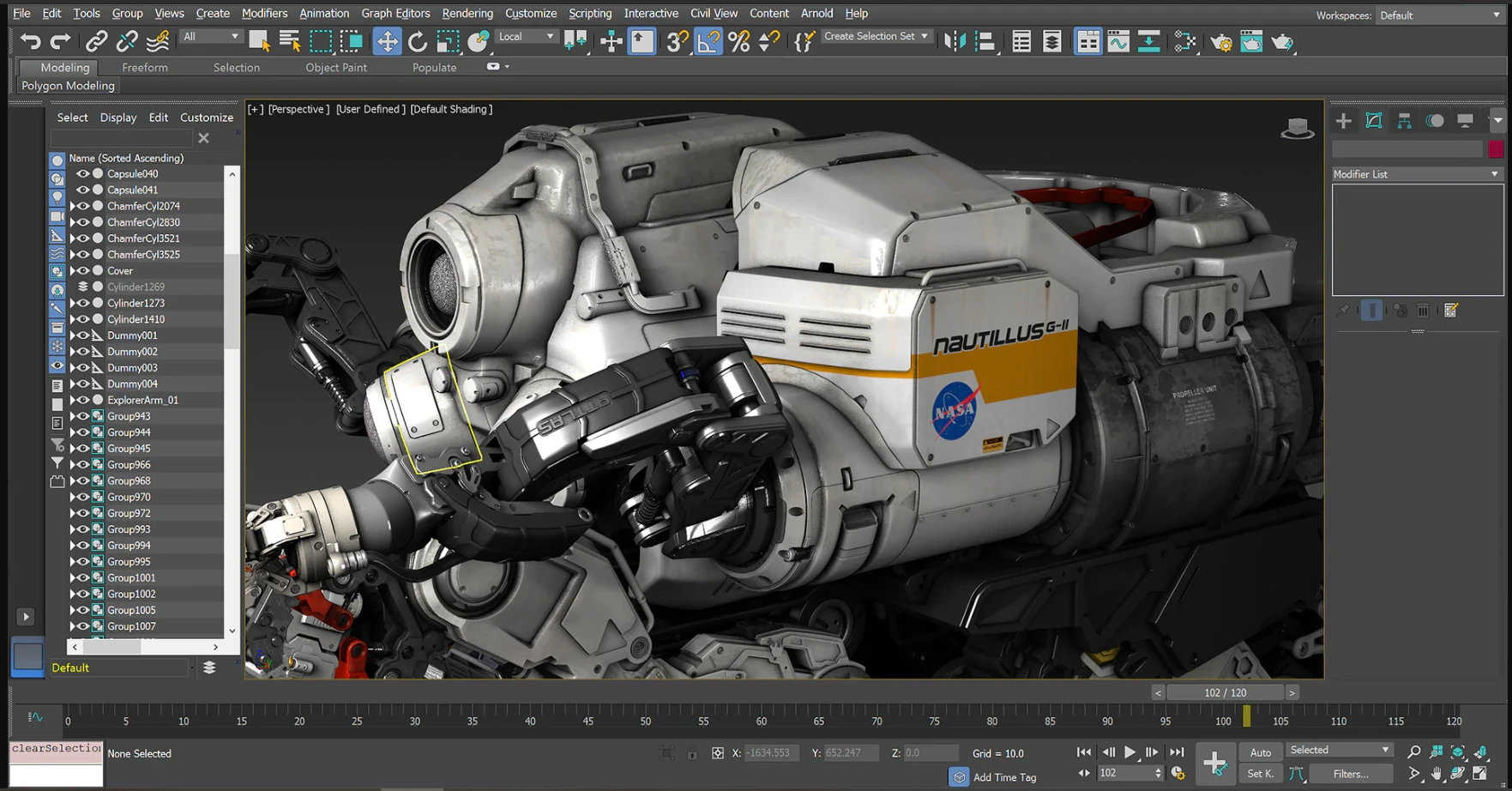
Autodesk 3ds Max is a professional 3D modeling, animation, and rendering desktop application built specifically for architectural visualization, game development, and complex hard-surface design. Rather than relying on simple brush-based sculpting, the software uses a deeply procedural approach to building geometry. Artists and designers work within a dedicated command panel and a dynamic modifier stack, layering non-destructive edits to construct intricate environments, detailed vehicles, and realistic interior spaces. The toolset is heavy and highly technical, built to manage scenes with millions of polygons, massive texture libraries, and complex lighting calculations that browser-based applications cannot handle.
Because modern 3D production requires rendering massive visual data, a native desktop architecture is strictly required. The application utilizes high-end local hardware resources to calculate physically accurate lighting, material reflections, and complex particle simulations in real time. Professionals working on architectural walk-throughs or game assets depend on this local processing capacity to preview physically based rendering materials and camera effects directly in the interactive viewport. The software is distinctly oriented toward environment and object creation, rather than just abstract digital art, making it a staple in pipelines that import computer-aided design data and translate it into photorealistic output.
Beyond basic geometry manipulation, the application serves as a complete scene assembly environment. Users can import diverse asset types, assign intricate shader networks, and orchestrate camera paths to generate final broadcast-ready sequences or static promotional images. The interface is highly modular, allowing artists to tear off viewports, customize toolbars, and configure dedicated layout workspaces for different stages of the production pipeline. This level of control ensures that lighting technical directors, environment modelers, and rendering specialists can tailor the application to their specific daily tasks, using custom keyboard shortcuts or MAXScripts to automate repetitive operations.
Key Features
- Smart Extrude: Interactively pull and push faces on 3D objects using flexible extrude operations like cut-through and overlap. The tool automatically rebuilds and stitches adjacent faces, eliminating the need to manually weld vertices or fix broken geometry after complex polygon manipulation.
- Retopology Tools: Automatically reconstruct messy polygonal mesh data into clean, quad-based topology. This is highly useful for optimizing heavy photogrammetry scans or boolean operations, reducing the polygon count while maintaining geometric accuracy for smoother animation and faster rendering.
- Modifier Stack Workflow: Conceptualize and iterate designs using a panel of non-destructive commands. Users can apply modifiers like Symmetry, Relax, and Weighted Normals, adjust their spinner parameters, and reorder them in the stack at any time without permanently destroying the base mesh.
- Integrated Arnold Renderer: Access advanced shading and lighting tools directly within the active shade window. The integrated Arnold engine allows artists to preview complex node-based materials, subsurface scattering, and volumetric effects with real-time feedback before committing to a final, high-resolution batch render.
- Spline Workflows: Construct curved or angular 3D shapes using intuitive line and spline drafting tools. This feature is heavily used in architectural pipelines to trace floor plans, generate lofted surfaces, and create sweeping structures that would be difficult to build using standard box modeling.
- Graphite Modeling Tools: Access dedicated polygon manipulation commands directly from the top ribbon interface. This customizable panel groups advanced selection tools, loop controls, and specific geometry editing functions into one visually accessible area, reducing the need to dig through nested menus.
- Color Management Pipeline: Maintain strict color accuracy across different monitors and software applications using the built-in color management tools. This pipeline ensures that texture hues and lighting values remain consistent from the initial viewport preview all the way to the final exported compositing sequence, preventing unexpected color shifts during post-production.
How to Install 3DS Max on Windows
- Navigate to the official Autodesk Account portal or the Virtual Agent to access the Windows installer package for the application.
- Download the multipart installation files, ensuring all executable segments are fully saved to the local drive before proceeding.
- Double-click the primary setup executable to extract the installation files, which will default to a new folder within the main system drive directory.
- Launch the extracted setup application and review the installation settings, including the default installation path and optional components like the Arnold renderer.
- Accept the end-user license agreement and click the Install button to begin writing the core application files to the disk.
- Allow the installer to download and configure any remaining software prerequisites, such as required runtime libraries or material libraries, over the active internet connection.
- Open the application from the Start menu once the setup confirms completion.
- Sign in using an active Autodesk ID on the first launch to verify the subscription license, check server entitlements, or initiate a trial session.
- Customize the default units setup upon the first launch by navigating to the Customize menu and selecting Units Setup to ensure the system units match the architectural or gaming scale required for the project.
3DS Max Free vs. Paid
Autodesk does not offer a perpetual license or a completely free tier for commercial use. The software is strictly available through a subscription model, either billed monthly, annually, or every three years. A standard commercial subscription costs roughly $1,900 to $2,000 per year, which includes the core modeling application, the integrated Arnold renderer, and access to official technical support. This commercial license is designed for large agencies and enterprise studios that require guaranteed uptime, advanced deployment tools for IT administrators, and priority access to Autodesk support technicians. Studios with fluctuating staffing needs can also use the Autodesk Flex system, purchasing daily tokens to grant temporary access to the software without committing to a full yearly contract.
For individual creators, freelancers, and small businesses, the pricing becomes much more accessible through the Indie license program. If a user or studio earns under $100,000 in gross annual revenue, they can purchase the Indie tier for approximately $280 to $330 per year, depending on the specific regional pricing. This is the exact same application as the standard commercial release, with no feature restrictions, no render watermarks, and no save limits. The only difference is the legal revenue cap applied to the user. They do not ask for upfront tax documents during the purchase, but users are legally bound to the terms and can face audits if they violate the revenue restrictions.
Additionally, academic users can access the software at no cost. Students, educators, and qualifying academic institutions can apply for a free educational license. This grants full access to the modeling and rendering toolsets for learning and non-commercial portfolio work. The educational license is typically valid for one year and can be renewed as long as the user maintains their academic eligibility.
3DS Max vs. Maya vs. Blender
Maya is another high-end 3D application developed by Autodesk, but its core focus is character animation, complex rigging, and cinematic visual effects. While both programs share overlapping modeling capabilities, Maya uses a different node-based architecture that excels in building flexible character rigs and managing complex animation curves. Users typically choose Maya when working in film pipelines or game studios where character performance and organic motion are the primary technical requirements.
Blender is a completely free, open-source 3D creation suite that handles modeling, sculpting, animation, and rendering within a single environment. It has gained massive popularity due to its lack of subscription fees and its highly capable built-in rendering engines. Independent creators, hobbyists, and smaller studios often choose Blender to avoid strict licensing costs. However, users migrating to Blender must adapt to a drastically different interface, shortcut logic, and community-driven add-on ecosystem that diverges from standard corporate software pipelines.
3DS Max is the better fit when the workload is heavily focused on architectural visualization, hard-surface modeling, and procedural object generation. Its modifier stack provides an incredibly fast way to iterate on building designs, environments, and industrial models. Furthermore, its deep integration with standard computer-aided design formats makes it the industry standard for studios that need to ingest floor plans and engineering models to produce photorealistic marketing renders.
Common Issues and Fixes
- Black or blank Arnold renders. When the viewport displays the scene correctly but the final render outputs a pure black frame, the camera clipping planes are often configured incorrectly. Adjust the near clip to a low value like 0.01 and the far clip to 10000, and ensure that at least one light source has a non-zero intensity value.
- MAXtoA plugin DLL errors on startup. If the application throws a MAXtoA error during the initial launch sequence, the Arnold renderer plugin is likely suffering from a version mismatch or an incomplete installation. Downloading the latest Arnold for 3DS Max installer from the official user account and reinstalling the plugin usually resolves the broken dynamic link libraries.
- Unexplained freezes and slow interface performance. When the software hangs temporarily without a hard crash, the underlying cause is often heavy background auto-save operations or imported mesh assets containing ALC MAXScript malware. Users can fix this by increasing the auto-save interval in the preferences menu and running the official Autodesk Security Tools to purge malicious scripts from the scene.
- Network rendering pipe ended 109 error. Distributed rendering jobs sent through Backburner may fail with a pipe has been ended 109 message, indicating that the command line process crashed silently on the node. This is almost always a memory exhaustion issue. To fix it, reduce texture sizes, convert heavy uncompressed bitmaps to the optimized TX format, and check the node for maximum RAM limits.
- Missing external files warning. When opening a downloaded scene, the software often displays a missing external files error for textures and proxy objects. This happens because the original file paths are hardcoded to the previous creator's local drive. Use the Asset Tracking dialog to highlight the missing bitmaps, strip the old paths, and set a new path pointing to the local texture folder.
Version 2026.3 — November 2025
- Added new distance and falloff parameters to the Conform modifier's Shrink Wrap projection, allowing for more precise mesh alignments.
- Added animation support for the material index within the Material Switcher tool.
- Upgraded USD to version 0.13, introducing a new Asset Resolver, straightforward viewport prim manipulation (duplicate, rename, delete, and reparent), MaterialX import compatibility, and Shell material exporting.
- Integrated Arnold plugin version 5.8.3.2, which features a new Inference imager for ML-based stylized rendering, plus overall performance boosts for GPU volumes and Global Light Sampling.
- Optimized the Slate Material Editor's thumbnail caching system to prevent redundant swatch recalculations when switching color management settings.
- Fixed a simulation discrepancy in the Cloth engine to ensure outputs consistently match the reliable behaviors of older 3ds Max versions.