Blender operates as a professional-grade 3D creation suite that handles the entire pipeline, from initial polygonal modeling and digital sculpting to simulation, rendering, and compositing. Digital artists, independent game developers, and animation studios use this desktop application to construct complex 3D environments, rig character models for motion, and generate photorealistic images or stylized animations. By consolidating multiple disciplines into a single workspace, the software eliminates the need to export assets between separate specialized programs for UV unwrapping, texturing, or video editing.
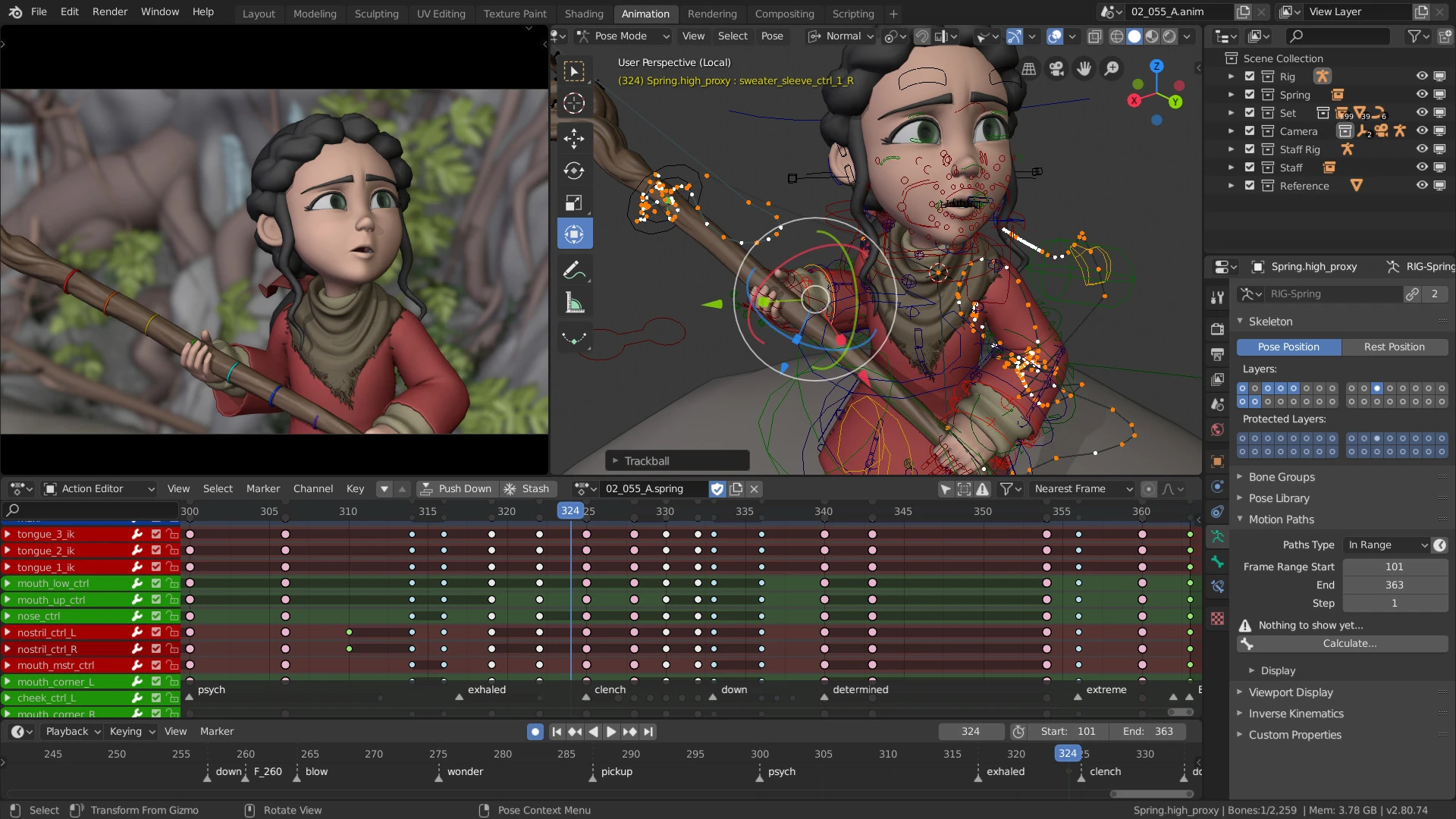
Users interact primarily with the 3D Viewport, manipulating vertices, edges, and faces to build meshes. The workflow frequently involves applying modifier stacks—non-destructive operations like Subdivision Surface, Boolean, or Mirror—to alter geometry dynamically without permanently changing the base mesh. For surface detailing, artists switch to the Shader Editor, connecting mathematical nodes and image textures to define how light interacts with materials, adjusting parameters like roughness, metallic properties, and subsurface scattering. Beyond static modeling, the toolset includes a dedicated animation timeline, graph editor, and dope sheet, allowing animators to set keyframes for object transforms or character armatures and interpolate motion over time.
Running this software natively on a desktop computer running Windows 8.1, Windows 10, or Windows 11 provides direct access to local system hardware, which is critical for demanding 3D processing tasks. Browser-based alternatives cannot allocate the massive amounts of random access memory required for scenes containing millions of polygons or high-resolution texture maps. Furthermore, native execution allows the application to utilize dedicated graphical processing units through APIs like Nvidia OptiX and CUDA, dramatically accelerating ray-traced rendering times and fluid simulations. This local processing architecture ensures artists can handle high-density sculpts and complex volumetric calculations without relying on constant internet connectivity or cloud-server queuing.
Key Features
- Cycles Render Engine: Operates as a physically based path tracer designed to calculate highly realistic light bounces, global illumination, and physically accurate shadows. Artists use the Shader Editor to construct complex material setups with the Principled BSDF node, controlling parameters like index of refraction and anisotropic reflection. The engine supports multi-GPU rendering and utilizes hardware-accelerated ray tracing to significantly reduce the time needed to generate final cinematic frames.
- EEVEE Real-Time Renderer: Functions as a rasterized rendering engine that provides instant visual feedback directly within the 3D Viewport. Rather than calculating physically accurate light paths, EEVEE uses screen-space reflections, ambient occlusion, and volumetric approximations to achieve fast visual results. This engine serves as an optimal tool for look development, allowing artists to adjust lighting, materials, and camera depth-of-field without waiting for progressive samples to clear.
- Geometry Nodes System: Replaces manual object placement with a node-based procedural workflow, allowing users to define mathematical rules for generating and scattering geometry. By connecting input nodes to math operations and outputting to instances, artists can procedurally construct entire forests, complex architectural facades, or intricate abstract patterns. The system evaluates dynamically, meaning users can adjust base parameters in the modifier tab to instantly recalculate the entire scene layout.
- Advanced Sculpting Workspace: Features a dedicated layout filled with specialized brush tools designed to manipulate high-resolution meshes as if they were physical clay. Users select tools like Clay Strips, Crease, Inflate, and Grab to define forms, while the dynamic topology system automatically adds or removes triangles based on brush strokes. A voxel remeshing tool is also available to quickly merge separate geometric shapes into a single, contiguous mesh with uniform polygon distribution.
- Grease Pencil Toolset: Introduces dedicated 2D drawing capabilities directly into the 3D space, allowing artists to draw strokes, fills, and lines that interact with 3D objects, lighting, and cameras. Animators use this system for storyboarding, creating animatics, or producing full 2D animations using traditional frame-by-frame techniques with onion skinning. The toolset includes its own modifier stack, enabling users to add procedural noise, automated build effects, or thickness variations to their drawn strokes.
- Animation and Rigging: Provides a structured environment for character articulation and motion, utilizing armature systems built from interconnected digital bones. Riggers apply constraints like Inverse Kinematics to control complex chains, while artists use weight painting tools to define exactly how the character mesh deforms around the joints. Animators then manage motion using the Graph Editor to fine-tune interpolation curves and the Non-Linear Animation editor to mix and layer separate action sequences.
How to Install Blender on Windows
- Download the Windows installer package in MSI format from the official website to your local storage.
- Double-click the downloaded MSI file to initiate the setup wizard and proceed past the welcome screen.
- Review and accept the terms of the GNU General Public License to activate the Next button.
- Specify the installation directory; the wizard defaults to C:Program FilesBlender FoundationBlender, which is recommended unless specific drive space management requires a different location.
- Click Install to begin the extraction and file-copying process, authorizing the Windows User Account Control prompt if it appears.
- Wait for the wizard to register the application, create system shortcuts, and finalize the setup before clicking Finish.
- Launch the application from the desktop shortcut or Start menu.
- On the initial launch, configure the Quick Setup splash screen to set your preferred language, keymap layout, spacebar behavior, and visual theme.
Blender Free vs. Paid
Blender is distributed under the GNU General Public License, meaning the software is entirely free to download, use, modify, and distribute for both personal and commercial projects. Users never face paywalls, mandatory subscription fees, or trial expirations. The rendering outputs, including still images, animations, and exported 3D models, contain no watermarks and remain the sole property of the creator without any royalty obligations to the developers.
The ongoing development of the software is funded primarily through the Blender Development Fund, which collects voluntary donations from individual users and secures grants from major technology and entertainment corporations. Additionally, the Blender Studio offers a separate, optional subscription that provides access to training materials, open movie production files, and character rigs, with all proceeds directly supporting the core engineering team.
While the base application requires no payment, users operate within an ecosystem that includes a commercial marketplace for third-party extensions. Artists frequently purchase premium add-ons, Python scripts, material libraries, and pre-rigged models from independent developers on platforms like Blender Market or Gumroad to automate specific tasks or expand functionality. However, these purchases are entirely optional and not required to utilize the native toolset.
Blender vs. Autodesk Maya vs. Cinema 4D
Autodesk Maya serves as the dominant industry standard for high-end character animation and visual effects pipelines in major film and game studios. It features deep integration with custom studio pipelines through its extensive Python API and a highly advanced referencing system that allows dozens of artists to work on the same scene simultaneously. However, it requires a substantial annual subscription fee, making it cost-prohibitive for hobbyists and smaller independent teams.
Cinema 4D focuses heavily on motion graphics, broadcast design, and advertising workflows, offering an intuitive MoGraph toolset that simplifies complex procedural animations like text fracture and cloner systems. It integrates directly with Adobe After Effects, providing a highly efficient pipeline for 2D and 3D compositors. Like Maya, it operates on a commercial subscription model and targets specialized studio environments rather than generalist open-source users.
Blender provides a clear advantage for independent creators, freelance generalists, and small studios who need access to a full 3D pipeline without absorbing the overhead of commercial licensing fees. While it may not match Maya's large-scale studio referencing capabilities or Cinema 4D's specialized motion graphics ease-of-use out of the box, its unified workspace, rapid iteration speed with EEVEE, and lack of financial barriers make it the most accessible and versatile option for the majority of standalone artists.
Common Issues and Fixes
- The software does not use the GPU for rendering, resulting in slow CPU render times. Navigate to the top menu and select Edit, then Preferences, and open the System tab. Select the appropriate hardware API, such as CUDA or OptiX, and check the box next to your installed graphics card to enable hardware acceleration.
- 3D models appear bright magenta or purple in the viewport. This indicates missing image texture files, usually because the project file was moved or downloaded without its associated assets. Go to File, select External Data, click Find Missing Files, and navigate to the directory containing the required image textures to re-link them.
- Objects render with dark artifacts or shading errors despite appearing flat. This frequently occurs when polygon face normals are flipped inside out. Enter Edit Mode by pressing Tab, press A to select all faces, and press Alt+N to open the Normals menu, then select Recalculate Outside to realign the geometry direction.
- The viewport becomes unresponsive or stutters when viewing dense geometry. Open the Render Properties panel and check the Simplify box to set a maximum subdivision level specifically for the viewport. Alternatively, place background objects into separate Collections in the Outliner and uncheck the monitor icon to hide them from viewport processing.
Version 5.0.1 — December 2025
- Deployed over 130 corrective bug fixes to enhance overall software stability without introducing new features.
- Fixed a severe issue where using the ALT + F12 shortcut in a default scene would cause the application to crash.
- Resolved an EEVEE rendering glitch that caused lights and materials to display inconsistently across different frames of an animation.
- Addressed a bug that caused the software to freeze indefinitely during the rendering process.
- Corrected the behavior of the 'Lattice Deform Selected' function to properly add a modifier for Grease Pencil elements instead of showing an error warning.
- Fixed a geometric crash linked to BMesh float booleans generating duplicate edges.
- Resolved a texture baking failure that occurred when attempting to bake from selected to active meshes using a cage.
- Corrected an API flaw where the Python render command would execute using an incorrect frame range.
- Fixed a snapping issue where Absolute Increment Snapping would improperly snap to the 2D grid.