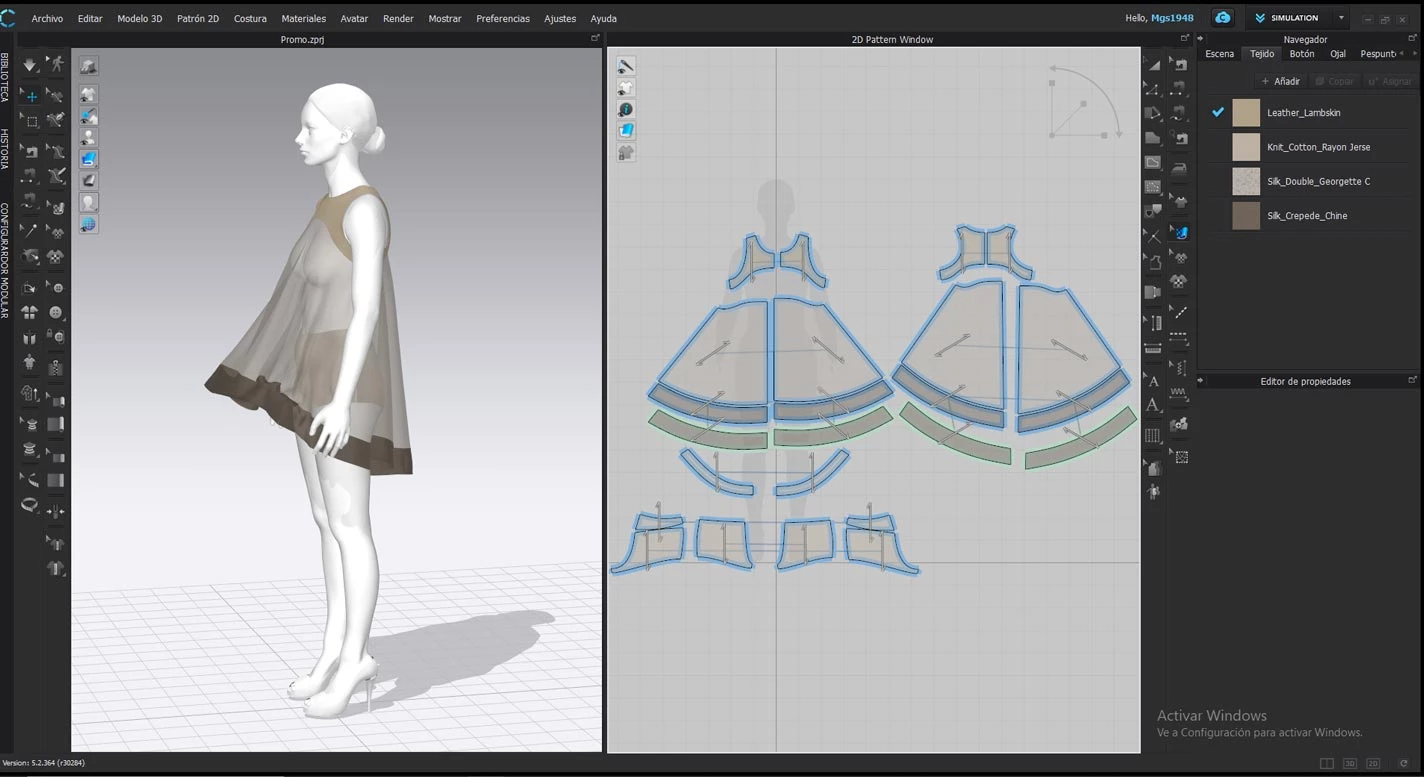
CLO D is a specialized virtual garment simulation and 3D fashion design software that translates flat 2D CAD patterns into realistic 3D apparel. Target audience includes independent fashion designers, pattern makers, and apparel brands who need to test garment fit, drape, and visual aesthetics before cutting physical fabric. By utilizing a high-precision physics engine, the application allows users to see exactly how different materials stretch, fold, and hang on digital avatars, solving the costly and time-consuming problem of physical sampling in the modern fashion industry. Instead of waiting for a factory to sew a muslin prototype, a pattern maker can digitize the paper pattern, stitch the seams digitally, and instantly evaluate the structural integrity of the design on a customized mannequin.
A dedicated desktop application is necessary for this type of demanding calculation because browser-based alternatives lack the local hardware access required for real-time gravity and high-resolution fabric collision processing. CLO D requires direct access to local GPU and CPU resources to render complex textiles—ranging from stiff leather jackets to lightweight silk dresses—with accurate tension and pressure mapping. This local processing ensures that designers can adjust seam lengths, scale avatars to exact anthropometric measurements, and modify grading rules without experiencing severe lag. The software maintains a live synchronization between the 2D pattern workspace and the 3D viewing window, directly linking technical flat adjustments to immediate visual feedback on the simulated model.
Within the broader apparel production pipeline, this tool replaces the traditional sketch-and-wait iteration cycle. Creators can draft initial patterns from scratch using built-in drawing tools, apply digital sewing relationships, and export the resulting technical packages directly to manufacturing partners. The application fits into existing workflows by accepting standard DXF files from legacy CAD systems and outputting OBJ or FBX files for external use in e-commerce platforms or third-party rendering engines. This bridges the gap between creative conceptualization and technical execution, making the design iteration loop drastically shorter while reducing the material waste typically associated with producing physical sample garments.
Key Features
- True-to-Life Fabric Simulation: Computes the physical properties of textiles based on real-world weight, stretch, and bending data. Users can select from a built-in library of common fabrics or input custom physical property values to see exactly how a rigid denim will behave compared to a highly elastic spandex.
- Real-Time 2D and 3D Synchronization: Modifications made to the 2D flat pattern are instantly reflected in the 3D viewing window. When a pattern maker lengthens a hem or widens an armhole in the 2D drafting mode, the 3D garment automatically recalculates the tension and fit on the avatar.
- Virtual Sewing and Assembly: Users apply specific sewing line types to connect pattern edges in the digital space. The interface provides tools for segment sewing, free sewing, and layered cloning, allowing for complex constructions like pockets, cuffs, and collars with defined sewing angles and topstitching.
- Avatar Customization and Fit Analysis: The software includes tools for modifying the base avatars to match specific sizing standards or custom client measurements. Designers use built-in strain maps to visualize areas where the garment is too tight or too loose, ensuring the physical counterpart will fit the target demographic properly.
- Texture Mapping and Colorway Management: Creators can import custom graphics, logos, and all-over print patterns to apply directly to the 3D fabric. The colorway mode allows designers to quickly generate multiple variations of the same garment by swapping base colors and trim materials without needing to rebuild the underlying 3D structure.
- Pattern Grading and Export: Provides a dedicated grading mode for sizing garments up and down across a defined size chart. Pattern makers can apply grading rules to the 2D pieces and instantly preview how the larger or smaller sizes will fit on corresponding scaled avatars before exporting the final nested patterns as DXF files for factory cutting.
How to Install CLO D on Windows
- Navigate to the official vendor website, register for a user account using an email address, and select either the trial or a paid subscription plan.
- Download the Windows standalone installer executable to your local storage drive, ensuring sufficient disk space for the core program and material libraries.
- Launch the setup executable and approve the standard Windows security prompts to begin the installation wizard.
- Review the end-user license agreement, select your preferred destination folder on your primary drive, and allow the installer to extract and copy the application files.
- Finish the setup process and launch the application directly from the newly created desktop shortcut or the Start menu.
- On the initial startup, enter your registered account credentials at the login prompt, as the software requires an active internet connection to authenticate your license.
- Select your preferred user interface language, set your default unit measurements, and choose your mouse navigation preset from the initial configuration menu before starting a project.
CLO D Free vs. Paid
CLO D operates entirely on a subscription-based business model and does not offer a free tier for ongoing commercial use. New users can sign up for a 30-day free trial to evaluate the tools, which requires creating an account and providing payment information. During this trial period, designers have access to the full toolset without artificial export restrictions or watermarks, allowing for a proper evaluation of the physics engine, pattern drafting capabilities, and high-resolution rendering tools before committing to a paid plan.
For individual freelancers, sole proprietors, and hobbyists, the standard individual subscription costs $50 per month, with a discounted annual billing option available. This tier covers single-person usage and grants access to the desktop application, all routine software updates, and the vendor's online community marketplace for downloading additional avatars, trims, and fabrics. Designers who are currently enrolled in accredited educational institutions can access a specific student discount, which reduces the subscription cost by half, making the tool more accessible while learning digital 3D garment construction.
Businesses, large design teams, and apparel corporations must purchase the enterprise or corporate licenses, which involve custom pricing negotiated directly with the vendor. These higher tiers often include network licensing options for deploying the software across multiple workstations, enhanced technical support, and direct integration with product lifecycle management (PLM) systems like CLO-Vise. There is no perpetual license available for any user tier, meaning customers must maintain an active internet connection for periodic license checks and a recurring subscription to keep the software functional and to retain the ability to open, edit, or export proprietary project files.
CLO D vs. Marvelous Designer vs. Browzwear
Marvelous Designer shares the same underlying cloth simulation engine as CLO D, as both applications are developed by the same parent company, but it caters heavily to the gaming, animation, and visual effects industries. Marvelous Designer focuses strictly on making clothing look realistic on digital characters for media production, omitting strict manufacturing tools like true DXF pattern export, tech pack generation, and precise industry-standard grading. Users should choose Marvelous Designer if they are modeling costumes for 3D character art, film, or game assets, whereas professional apparel designers need CLO D for actual physical garment production workflows.
Browzwear, specifically its VStitcher module, targets large-scale enterprise apparel brands and places a heavy emphasis on manufacturing integration rather than highly polished visual rendering. It excels at technical design, offering deep integration with traditional 2D CAD systems, factory-ready outputs, and strict compliance with physical fabric testing standards, but its interface and real-time visual feedback are often considered less fluid than CLO D's environment. Technical pattern makers at large retail companies often prefer Browzwear for its strict production constraints and PLM integrations, while independent designers and visual-first creators usually find CLO D more intuitive for rapid iteration.
CLO D remains the better fit for independent fashion designers, small-to-medium apparel studios, and pattern makers who require a balance between high-quality visual rendering and accurate 2D pattern construction. Its user interface is more approachable for those transitioning from traditional fashion design, and the built-in rendering engine produces marketing-ready imagery much faster than Browzwear. When the goal is to prototype a real physical garment, iterate on fit using a highly visual 2D-to-3D workflow, and generate presentation-ready assets without needing a separate rendering pipeline, CLO D offers the strongest overall toolset.
Common Issues and Fixes
- Puffy or floating fabric layers during simulation. This occurs when the simulation engine struggles with fabric collision, often because the hardware is running on GPU simulation instead of CPU, or the thickness collision settings are too high. To fix this, switch the simulation mode to CPU for more accurate collision handling, and lower the Thickness Collision value in the property editor to reduce the invisible gap between pattern pieces.
- Slow rendering or heavy viewport lag on high-end hardware. The application may not fully utilize the available graphics card by default, causing standard tasks like moving internal lines to delay significantly. Users can resolve this by opening the NVIDIA Control Panel, setting the global setting to High-Performance NVIDIA Processor, and enabling Use VBOs within the application's user settings to improve rendering speed and viewport responsiveness.
- Network license authentication fails on startup. When using a corporate network license, the application might fail to connect to the server because Windows Firewall blocks the required communication port. To fix this, network administrators must manually open Port 1947 for both TCP and UDP traffic in the firewall settings, allowing the local client machine to authenticate against the dongle key located on the central server.
- Darts export distorted when saving to vector formats. Because the application treats darts as 90-degree slashes on the pattern outline rather than traditional folded darts, exporting the flat pattern directly to a PDF can result in messy outer lines or missing notches. The standard workaround is to export the pattern as a DXF file instead, and then open it in a vector graphics editor like Adobe Illustrator to manually correct the dart angles and add proper seam allowances before printing.
Version 2025.2.256 — December 2025
- Added a specialized Knit Swatch Editor, allowing for precise design of knit fabrics with adjustable stitch structure and yarn thickness.
- Added a comprehensive Pattern Drafter tool for quickly generating trouser and skirt patterns via text descriptions or image uploads.
- Improved simulation efficiency by implementing GPU acceleration for Soft Body Simulation, resulting in faster and more stable garment fitting.
- Improved application stability during pattern editing within the schematic render view, specifically addressing a reported crash instance.
- Fixed a rendering issue where the final frame of turntable animations would occasionally fail to update in the output properties.
- Fixed a compatibility bug that caused the software to crash when importing USD files with garment simulation data into Unreal Engine.
- Fixed an error where the Auto Scale function did not operate correctly when loading DXF pattern files.