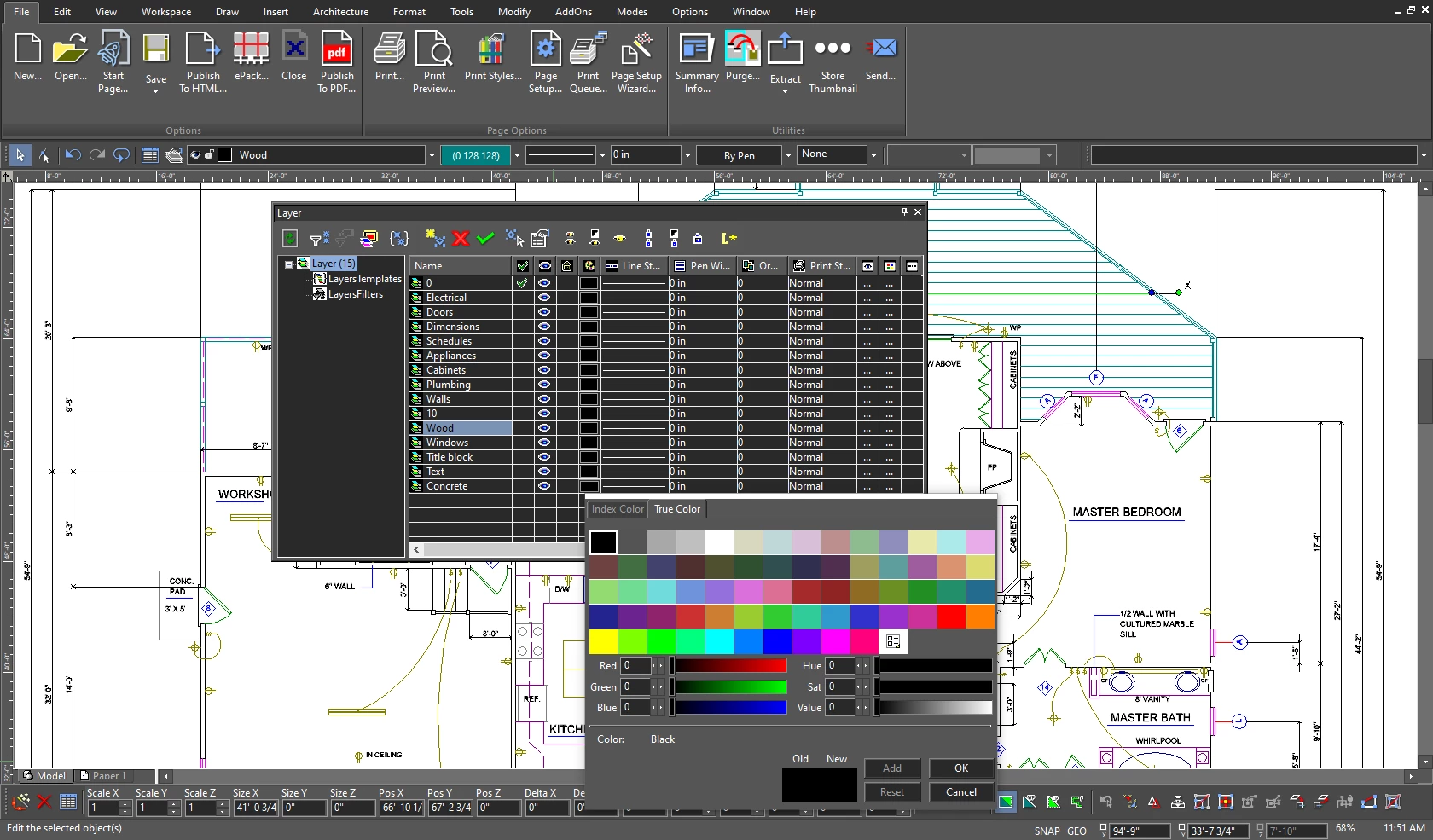
TurboCAD provides a highly detailed computer-aided design environment tailored for architects, mechanical engineers, and makers who require precise 2D drafting and 3D modeling tools without the massive enterprise-level overhead. This desktop application operates as a standalone design environment, meaning users do not have to rely on browser-based tools that slow down or freeze when handling complex assemblies or large architectural floor plans. Instead, it utilizes local system resources to handle demanding tasks like rendering, geometric calculations, and managing intricate layered documents. The software is built around a hybrid workflow, allowing professionals to execute standard line drawing before extruding those flat concepts into fully realized spatial models.
By bridging the gap between flat schematic drawing and structural visualization, the software gives technical illustrators and draftsmen a unified interface for their entire project lifecycle. Users can start by sketching a 2D floor plan with exact dimensional constraints, extrude those walls into a 3D space, insert parametric doors and windows, and finally generate rendering outputs complete with lighting and material textures. Rather than forcing users into a generic vector drawing tool, this program includes specialized architectural and mechanical modules designed to output standard industry formats. This reduces the friction of moving a project from a conceptual sketch to a final manufacturing blueprint. The software supports both raster and vector management, allowing users to underlay PDF blueprints and trace over them with exact vector lines. This makes it an ideal choice for renovation projects where original paper plans have been scanned and need to be converted into digital CAD models.
A local desktop installation remains crucial for designers working under strict confidentiality agreements or in areas with unreliable internet connections. While cloud collaboration tools exist in the broader market, a dedicated desktop drafting client ensures that heavy files open immediately and respond directly to hardware inputs. Independent contractors, small fabrication shops, and dedicated hobbyists choose this environment because it delivers the specific command-line interface and handle-based editing they expect, directly on their own workstations. It provides the exact snapping tools, grid controls, and coordinate systems necessary to translate an idea into a physical object with mathematical exactness.
Key Features
- 2D Drafting and Annotation: Gives users exact control over lines, arcs, bezier curves, and splines. The interface features a command-line input and dynamic cursor, allowing draftsmen to type commands exactly as they would in other standard drafting applications. It also includes smart dimensioning tools that automatically update measurements when the underlying geometry changes.
- 3D Solid and Surface Modeling: Upgrades basic extrusions by incorporating advanced operations, sweeps, and revolves. In the premium tiers, the application utilizes the ACIS solid modeling engine, enabling engineers to design complex mechanical parts with precise volume, mass, and center of gravity data needed for actual manufacturing.
- Photorealistic Rendering Engine: Includes the TurboLux rendering system to turn bare geometry into realistic visual presentations. Designers can apply physically based materials, adjust environmental lighting, and calculate ground shadows to preview how an architectural facade or mechanical product will look under real-world lighting conditions.
- Parametric Architectural Objects: Accelerates floor plan creation by providing self-healing walls, parametric doors, and scalable window objects. When a user drags a door onto a wall segment, the software automatically trims the wall and creates the opening, generating schedules and elevation views directly from the active model.
- Broad File Interoperability: Prevents vendor lock-in by supporting a massive array of industry formats for importing and exporting. Users can open standard DWG and DXF files from external contractors, import SKP files while retaining material assignments, and export clean STL files directly to 3D slicing software for rapid prototyping.
- Smart Workspaces and Command Finder: Customizes the layout based on the specific design discipline. A built-in search tool allows users to type partial tool names, such as "Li" for line, to immediately execute commands without clicking through nested ribbon menus, reducing friction during complex drafting sessions.
- Part Tree Management: Maintains a non-destructive history of the mechanical design process. If an engineer needs to change the diameter of a drilled hole or adjust a chamfer applied early in the modeling phase, they can modify the parameter in the history tree without having to rebuild the entire 3D object from scratch.
- PDF Underlay and Tracing: Allows users to import vector or raster PDF files directly into the workspace to use as a reference layer. Draftsmen can snap to the geometry of vector PDFs, trace over scanned blueprints, and extract essential floor plan data without having to measure and redraw every single line from a blank canvas.
How to Install TurboCAD on Windows
- Download the unified Windows installer package from the official vendor portal or authorized reseller, ensuring the file is saved to a local drive rather than a network folder.
- Right-click the executable file and select "Run as administrator" to prevent Windows permission conflicts from blocking registry writes during the setup phase.
- Review the end-user license agreement, accept the terms, and enter your purchased license code when the installation wizard prompts you for verification.
- Choose the "Typical" installation path for standard features, or select "Custom" if you need to manually include or exclude specific symbol libraries, default templates, and help files to save disk space.
- Wait for the setup wizard to unpack the required components, create the program directories, and place the necessary shortcut icons on your desktop.
- Launch the application from the new desktop shortcut. On the initial startup, a prompt will require an activation code; ensure your computer has an active internet connection so the software can ping the licensing server.
- Select your preferred user interface style from the startup menu—such as the standard ribbon layout or the classic command-line arrangement—to match your past drafting experience.
TurboCAD Free vs. Paid
The vendor structures the software entirely as a paid commercial product, though new users can typically access a time-limited trial to evaluate the tools before committing. There is no permanent free tier. Instead, the product line is divided into specific editions—Designer, Deluxe, Professional, and Platinum—each targeting a different level of technical complexity and budget. The Designer edition handles basic 2D schematic work, while the Deluxe tier introduces essential 3D modeling. The Professional and Platinum tiers are required for advanced mechanical drafting, the ACIS solid modeling engine, and high-end rendering workflows.
Users must choose between two distinct licensing models: annual subscriptions or perpetual licenses. Subscriptions require a recurring payment, often starting around $130 per year for the Deluxe edition and scaling up to approximately $600 per year for the Platinum tier. This model includes ongoing updates and customer support. However, it requires periodic internet validation to keep the application active. If the subscription lapses, the software typically reverts to a restricted viewer mode or locks out editing capabilities entirely.
For individuals or businesses that prefer fixed costs, the vendor continues to offer perpetual licenses for a higher upfront fee. This option allows users to own the software indefinitely without monthly charges. It is highly favored by offline fabrication shops and independent contractors who keep stable, long-term workstations and only upgrade when specific new formats or workflow tools become necessary. This flexibility provides a stark contrast to competitors that force all users into cloud-based billing cycles.
TurboCAD vs. AutoCAD vs. SketchUp
AutoCAD represents the dominant standard in the commercial drafting market, offering extensive enterprise collaboration features, deep cloud integration, and highly specialized toolsets for civil, electrical, and mechanical disciplines. However, Autodesk enforces a strict, subscription-only pricing model that can exceed $2,000 annually, which places a heavy financial burden on independent contractors or casual draftsmen. The heavy background services and constant cloud connectivity demands also make AutoCAD less appealing for users who strictly want a local, self-contained drawing application.
SketchUp takes an entirely different approach, focusing heavily on rapid 3D conceptualization and spatial blocking. Its push-pull interface allows architects and set designers to block out a room or a building facade in minutes. While highly intuitive for visual modeling, SketchUp lacks the rigorous 2D mechanical drafting capabilities, strict dimensional constraints, and command-line precision required to output complex manufacturing schematics or high-tolerance machine parts.
TurboCAD operates as a middle ground between these two extremes. It provides the strict command-line drafting and precise 2D geometry tools expected by AutoCAD veterans, alongside capable 3D architectural and mechanical modeling features. By offering both subscription and perpetual licensing options, it gives budget-conscious professionals and advanced makers a highly capable drafting environment without forcing them into an expensive ecosystem or limiting them to conceptual surface modeling.
Common Issues and Fixes
- Keyboard shortcuts and custom tools stop responding. Configuration files occasionally become corrupted, causing the interface to lose keybinds or drop menus. Close the application, open the Windows Run dialog, type %APPDATA%, navigate to the IMSIDesign folder, and delete the "Built-in" profile folder so the software can rebuild a clean configuration on the next launch.
- Activation prompt loops continuously on startup. If the software fails to write the activation code to the Windows registry, it will repeatedly ask for validation. Close the program entirely, right-click the desktop shortcut, and select "Run as administrator" before entering the code again to grant the necessary write permissions.
- 3D walkthroughs stutter or stall on complex floor plans. The live rendering engine can overload standard graphics hardware when calculating lighting for thousands of individual objects. Simplify your model by hiding high-polygon furniture layers or disabling live ground shadows before initiating the camera walkthrough.
- Imported DWG files appear drastically oversized or undersized. This scaling error happens when the units in the external file do not match your current workspace template. Always check the import dialogue settings and ensure that the conversion scale precisely matches the source file's original units, such as matching millimeters to millimeters.
- UI text and icons appear too small on high-resolution displays. Older configuration settings or specific display scaling configurations can cause the interface elements to shrink on 4K monitors. Open the Workspace customization menu, navigate to the Options tab, and enable the large icon settings, or adjust the Windows DPI override properties for the application shortcut.
Version 2025.1 — December 2025
- Added support for floating licenses to provide greater flexibility in software deployment and management.
- Introduced smarter crash diagnostics to assist in identifying and resolving stability issues more efficiently.
- Improved graphics processing performance for a smoother and more responsive design environment.
- Enhanced rendering compatibility to ensure more consistent and reliable visual outputs.
- Refined license visibility to give administrators and users better insight into activation status.
- Fixed over 50 specific issues and bugs to increase overall system stability and predictability.