PeStudio is a specialized static analysis utility built to inspect Windows Portable Executable (PE) files. It allows incident responders, malware analysts, and security researchers to examine unknown binaries—such as executable programs, dynamic link libraries, system drivers, and control panel applets—without running the code. By parsing the internal file structure rather than executing the payload, the application guarantees zero risk of host infection during the initial triage phase. The software dissects headers, metadata, and embedded resources, presenting a highly organized view of exactly what a suspicious file is built to do.
Professionals rely on this desktop utility instead of generic hex editors or web-based scanners because it aggregates multiple low-level inspection tasks into a single, offline-capable interface. Rather than manually extracting strings via command-line utilities or hunting down obscure API calls, investigators can drop a binary into the main window and immediately see a prioritized list of threat indicators. The application identifies obsolete functions, hidden secondary files, and anomalous compile timestamps that suggest intentional tampering or obfuscation. Once the static analysis phase highlights specific registry modifications or network calls, incident responders can use that data to write targeted detection rules or configure network firewalls. This drastically reduces the time spent in the subsequent dynamic analysis phase, where the file is actively detonated in a controlled sandbox environment.
Operating as a standalone desktop application is critical for secure malware analysis. Many incident response workflows take place on isolated virtual machines with strict network controls to prevent malware from calling out to command-and-control servers. Because the core parsing engine relies on local configuration files rather than cloud processing, analysts can maintain strict operational security. Even when internet access is permitted, the tool limits external communication to sending only cryptographic file hashes to VirusTotal, ensuring that proprietary or highly sensitive executable payloads are never inadvertently uploaded to public repositories for attackers to monitor.
Key Features
- Threat Indicator Scoring: The application evaluates the target executable against a local set of XML rules to flag anomalous behavior. It populates the Indicators tab with a severity-based list, showing immediately if a file attempts to bypass User Account Control, demands administrative privileges, or uses deprecated Windows APIs.
- Import Address Table Inspection: By parsing the imports and exports, the utility reveals the exact Windows functions the binary expects to call. In the Imports tab, blacklisted APIs are pushed to the top of the grid, giving analysts immediate context regarding potential persistence mechanisms, keylogging functions, or network communication attempts.
- VirusTotal Hash Lookups: When network access is available, the software automatically queries the VirusTotal database using the MD5 hash of the target file. This retrieves known detection scores from multiple antivirus engines without uploading the actual file contents, maintaining strict confidentiality for sensitive investigations.
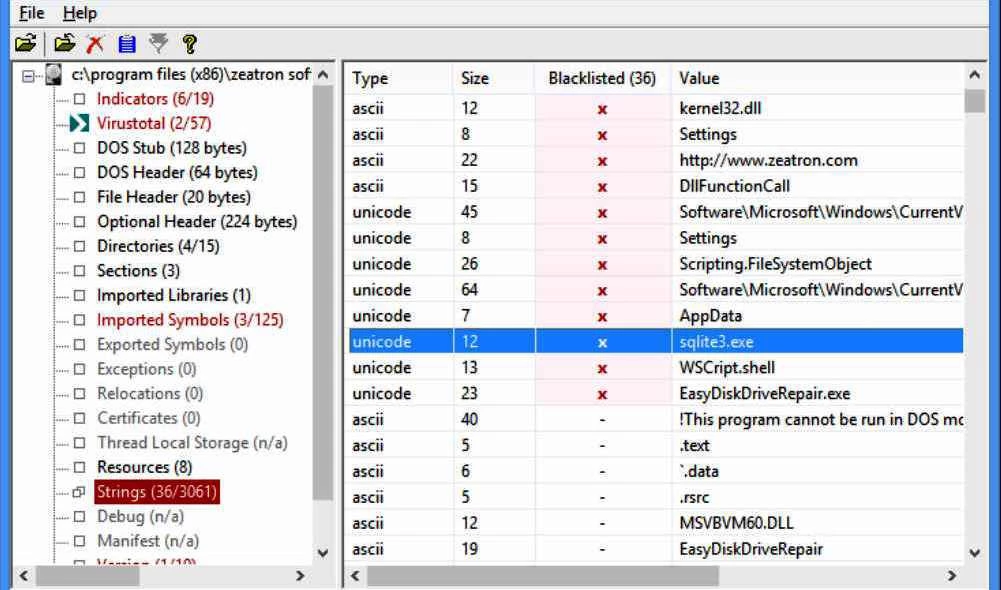
- Strings and Obfuscation Detection: The tool extracts all human-readable ASCII and Unicode strings from the binary, comparing them against known blacklists. It flags registry run keys, suspicious user-agent strings, and hardcoded IP addresses, while also detecting common software packers like UPX or MPRESS that developers or attackers use to compress and hide code.
- Embedded Resource Extraction: Malware authors frequently conceal secondary payloads or configuration data within the resource section of a host file. The Resources tab lists all embedded items, including bitmaps, icons, CAB archives, or secondary DLLs, allowing the analyst to identify and export these hidden files for independent analysis.
- File Header and Architecture Parsing: The application breaks down the PE header to display compiler signatures, linker versions, and raw compile timestamps. This data helps reverse engineers verify whether they are dealing with a native C++ application or a .NET assembly, and whether the compilation date has been artificially altered to confuse investigators.
- Certificate and Signature Verification: The software checks the digital signature of the executable against trusted root authorities. It displays the certificate issuer, validity period, and thumbprint. Identifying a stolen or spoofed digital signature is a critical step in attributing an attack to a specific threat actor, as many modern malware campaigns attempt to blend in by signing their payloads with compromised corporate certificates.
How to Install PeStudio on Windows
- Download the official ZIP archive containing the Windows application from the vendor website.
- Extract the contents of the ZIP archive to a dedicated directory on your local storage drive, or place it on a portable USB drive for use on isolated analysis machines.
- Verify that the extracted folder contains both the main executable and the required xml subdirectory, as the application relies on these configuration files for its threat detection rules.
- Because the utility is commonly used by security professionals to analyze threats, aggressive endpoint protection tools may mistakenly flag the parser itself. If this occurs, add the application folder to your antivirus exclusion list to prevent the executable from being quarantined.
- Double-click the main executable to launch the interface directly; the application is fully portable, requires no traditional setup wizard, and does not write configuration data to the Windows registry.
- If you are working in an air-gapped virtual machine, open the configuration XML files in a text editor to disable the VirusTotal lookup feature, preventing the application from attempting unnecessary network connections.
- To begin a static analysis session, drag an executable file from Windows Explorer and drop it into the main application window to trigger the parsing engine.
PeStudio Free vs. Paid
The software operates on a freemium licensing model designed to separate personal education from commercial incident response. The Basic version is entirely free for non-commercial and private use. This free tier provides full access to the core static analysis engine, allowing individual researchers to parse PE headers, extract strings, detect software packers, and query VirusTotal hashes. It is fully capable of handling standard malware triage tasks and includes all the graphical interface tabs required for deep binary inspection.
For enterprise environments, security operations centers, and commercial malware analysis labs, a Professional license is required. The Professional tier costs 159 Euros per user annually. Purchasing this license permits the use of the tool within a professional context and unlocks advanced capabilities tailored for high-volume analysis and reporting workflows that enterprise teams require.
Upgrading to the Professional version provides access to a separate command-line executable, which allows analysts to run batch processing operations on multiple files simultaneously. The paid tier also introduces the ability to export the findings into structured XML reports for ingestion by other security tools. Additional Professional features include mapping threat indicators directly to the MITRE ATT&CK framework, exposing .NET namespaces, and enabling the direct dumping of embedded .NET files from within the interface.
PeStudio vs. PE-bear vs. CFF Explorer
PE-bear is a lightweight, freeware reverse engineering tool explicitly built to handle malformed executables that often cause other parsers to crash. While PeStudio focuses heavily on automated threat scoring and highlighting suspicious indicators for immediate triage, PE-bear offers a more visual, low-level breakdown of the PE structure and section headers. Reverse engineers who need to manually inspect obfuscated code blocks or visualize section alignments tend to rely on PE-bear for its raw parsing stability.
CFF Explorer is part of a broader suite of reverse engineering utilities and functions as both a PE parser and an active PE editor. Unlike PeStudio, which operates strictly as a read-only static analysis dashboard, CFF Explorer allows users to modify section headers, rebuild import tables, and directly alter the executable structure. This active editing capability makes CFF Explorer the preferred choice for analysts who are actively attempting to manually unpack a compressed file or fix intentionally broken headers.
PeStudio is the better fit for initial incident response workflows where the primary goal is to quickly determine the risk level of an unknown file. Its automated severity indicators, integrated VirusTotal hash checking, and predefined XML blacklists provide immediate operational context without requiring the user to interpret every raw API call. When a security team needs to rapidly classify a threat before deciding if deeper reverse engineering is necessary, this tool provides the most direct path to an answer.
Common Issues and Fixes
- VirusTotal lookups fail to return results. This typically happens if the analysis workstation lacks internet access or if the public API query limit has been exceeded. Verify your network connection and ensure that the VirusTotal hash submission feature has not been manually disabled within the local XML configuration settings.
- Missing threat indicators and empty blacklists. If the application stops highlighting suspicious strings or APIs, the folder containing the detection rules is likely missing or inaccessible. Re-extract the original ZIP archive and ensure the rules directory remains in the exact same folder as the main application executable.
- The command-line batch tool refuses to execute. Attempting to use the batch processing executable for automated analysis will fail if you are running the Basic version. This specific utility is strictly restricted to the Professional license and requires a valid commercial key to operate.
- Legitimate files trigger severe threat warnings. The parsing engine frequently flags common software packers, such as UPX, which are actively used by legitimate software developers to compress their applications. Treat these specific alerts as a sign that the binary requires unpacking for accurate analysis, rather than taking the compression warning as definitive proof of malicious intent.
Version 9.61 — March 2025
- Expanded detection capabilities to identify a wider range of anomalies and indicators.
- Enhanced the Sections View to provide more detailed analysis and visibility.
- Fixed an issue where embedded executables located outside the resource section were not being correctly detected.
- Resolved a bug affecting the handling and generation of analysis report files.