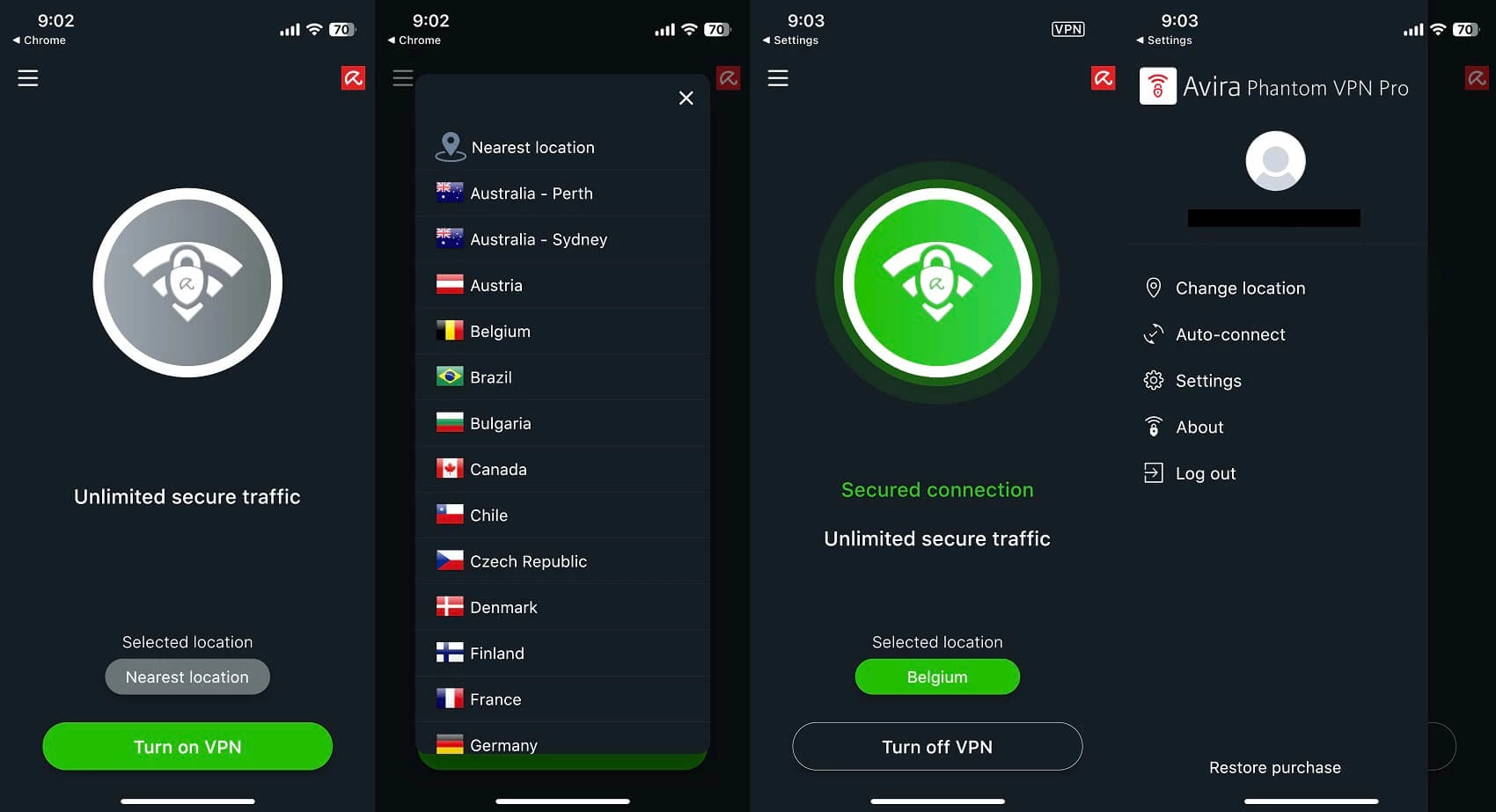
Avira Phantom VPN is a straightforward privacy application built to secure your internet traffic and mask your physical location. Operated by the German security company Avira, this desktop client creates an encrypted tunnel between your computer and the open web. It prevents internet service providers, local network administrators, and third-party trackers from monitoring the websites you visit or intercepting your unencrypted data on public Wi-Fi networks. Instead of navigating complex network configuration menus, users interact with a minimal interface that connects to a secure server with a single click.
While web browsers often include built-in proxy extensions, a dedicated desktop VPN application secures all incoming and outgoing data across the entire operating system. This means background updates, email clients, standalone video game launchers, and external media players are routed through the same encrypted connection as your primary web browser. Avira Phantom VPN focuses heavily on ease of use, making it practical for casual home users, remote workers on unsecured public networks, and travelers who need to access geo-blocked services abroad. The software handles all the complex cryptographic handshakes in the background, requiring no manual intervention from the end user.
People choose this application when they want immediate privacy without managing port forwarding rules, manual protocol selection, or complicated routing tables. It acts as a set-and-forget background service. By replacing your true IP address with one from Avira’s server pool, the software bypasses regional content blocks and protects local file-sharing traffic from targeted bandwidth throttling. It is particularly useful for avoiding the strict data retention policies enforced by many commercial internet service providers, ensuring that your daily browsing habits remain private and inaccessible to advertising networks.
Key Features
- AES-256 Encryption: All traffic routed through the client is secured using the Advanced Encryption Standard with a 256-bit key. This cryptographic standard prevents unauthorized parties on your local network from reading intercepted data packets. It makes it safe to handle sensitive logins on public Wi-Fi hotspots, ensuring that plain-text data cannot be extracted by malicious actors monitoring the local traffic.
- Automatic Wi-Fi Protection: The application can be configured to automatically engage the encrypted tunnel whenever the device connects to an untrusted or open wireless network. This prevents accidental data exposure when working from coffee shops, hotels, or airport transit lounges. Users can specify known safe networks in the settings to bypass this auto-connect behavior when working from a secure home connection.
- Windows Kill Switch: Located in the settings menu via the gear icon, this security protocol actively blocks all internet connectivity if the encrypted tunnel drops unexpectedly. This fallback mechanism ensures your true IP address and unencrypted data are never exposed during momentary network interruptions. The block remains active until the software successfully re-establishes a secure connection to the selected server.
- P2P File Sharing Support: Unlike restrictive privacy tools that block torrent traffic or limit it to specific specialty servers, this service allows peer-to-peer connections across all server locations. This ensures your file-sharing habits remain private and prevents bandwidth throttling from internet service providers targeting specific transfer protocols. It operates efficiently in the background while you manage large downloads.
- Malware and Ad Blocking: A built-in filtering system stops unsolicited advertisements and known malicious domains from loading at the network level. Because the block happens on the server side before the data reaches your machine, web pages render faster and intrusive tracking scripts are eliminated. This feature actively references a database of known threats maintained by Avira's security research team.
- Location Spoofing: Users can manually select their virtual location from dozens of available countries using the main interface drop-down menu. This changes the regional identity of your web traffic, bypassing geographic restrictions placed on streaming libraries, news sites, and international sporting events. The interface also displays latency estimates for each region to help you choose the most responsive server.
How to Install Avira Phantom VPN on Windows
- Download the official Windows installer package from the vendor's primary website.
- Double-click the downloaded setup executable to initiate the installation wizard. You will need to grant administrator privileges when the User Account Control prompt appears, as the software must modify system network adapters.
- Review the end-user license agreement and follow the on-screen prompts to confirm the default installation directory on your primary storage drive.
- Allow the installer to unpack the core application files. During this phase, the setup wizard will install a virtual TAP network adapter, which is explicitly required for the operating system to route your traffic through the encrypted tunnel.
- Launch the application from the newly created desktop shortcut or the Start menu once the progress bar completes.
- On the first launch, sign in with your registered Avira account credentials to unlock your allotted data allowance, or proceed as a guest if you intend to use the heavily restricted unregistered tier.
- Click the main connection button on the central dashboard to secure your traffic immediately. Alternatively, open the location menu to select a specific regional server before initiating the connection.
Avira Phantom VPN Free vs. Paid
Avira Phantom VPN operates on a strict freemium model, offering a heavily restricted free tier alongside premium paid subscriptions. The free version does not require a credit card and provides the exact same core AES-256 encryption as the paid client. However, it imposes a hard data cap of 500 MB per month for unregistered users. If you create an account and register your email address, this monthly allowance increases to 1 GB. Additionally, free users cannot manually select their server location; the client automatically connects to the nearest available server to optimize speed. The free tier also completely lacks the internet kill switch, meaning your real IP address could leak if the connection drops.
The premium tier, marketed as Avira Phantom VPN Pro, removes the data cap entirely, granting unlimited bandwidth for streaming, gaming, and large file transfers. Subscriptions are generally priced at $10 per month, or roughly $78 if billed annually. Pro users gain full access to the server location selector, allowing them to bypass regional blocks by choosing from over 1,400 servers across multiple countries. The Pro license also activates the kill switch, includes the malicious site blocker, and grants access to priority customer support.
For users who only need protection on a mobile device, the company offers a smartphone-specific plan for approximately $5.99 per month. However, desktop users will need the standard Pro plan. Furthermore, for users invested in the broader Avira ecosystem, the VPN is often bundled with Avira Prime, which includes antivirus and optimization tools for a slightly higher monthly fee. Users who strictly want the VPN and no additional security software should ensure they select the standalone Phantom VPN Pro subscription during the checkout process to avoid paying for unneeded extras. All long-term premium plans are backed by a 60-day money-back guarantee.
Avira Phantom VPN vs. Proton VPN vs. Mullvad VPN
Proton VPN is the better choice for users who strictly need a free privacy tool without hitting sudden data limits. While Avira Phantom VPN restricts free users to a maximum of 1 GB of data per month, Proton VPN’s free tier offers completely unlimited data, making it viable for daily browsing. Proton VPN also includes advanced configuration options like split tunneling, which Avira lacks, making Proton more suitable for technical users who want to exclude specific local applications or games from the encrypted tunnel.
Mullvad VPN caters to users seeking absolute anonymity and a transparent, flat-rate pricing model. Mullvad charges a flat 5 Euros per month, requires no email address or account registration, and focuses entirely on hardcore privacy rather than unblocking commercial streaming sites. Its interface is highly technical, offering granular control over port forwarding and specific WireGuard configurations. It does not offer a free tier, prioritizing paying customers with strict privacy demands.
Avira Phantom VPN is the right fit for casual users who want a simple, one-click interface without navigating complex network settings. It works best for people who already use Avira's security products or those who prioritize an easy-to-read location menu over advanced protocol management. Its unlimited paid tier is highly effective for basic streaming and general public Wi-Fi protection, requiring almost zero technical knowledge to operate correctly compared to the steep learning curves of more advanced network tools.
Common Issues and Fixes
- The internet connection feels unusually slow after turning on the application. This often happens when connecting to a server located on another continent, which naturally increases physical latency and reduces transfer speeds. Open the location menu and switch your setting to the "Fastest Connection" option, which automatically routes your traffic to the nearest, least congested server.
- The free version stops securing traffic after watching a few videos or downloading a small file. The unregistered free tier restricts users to 500 MB of data per month, which is quickly consumed by modern web browsing and video streaming. To resolve this, you must either register an account to double the limit to 1 GB or upgrade to the Pro plan for unlimited bandwidth.
- Local internet access completely drops when the VPN disconnects. This is the expected behavior of the built-in kill switch on the Pro version, which intentionally halts all traffic to prevent your real IP address from leaking. If you prefer to maintain internet access during VPN server dropouts, click the settings gear icon and disable the kill switch, keeping in mind your traffic will temporarily be unencrypted.
- The client displays a "VPN cannot connect to server" error message upon launch. This indicates that the automatically selected server is temporarily down for maintenance or blocked by your local network firewall. Manually open the location selector and choose a different country from the list to re-establish a successful tunnel.
- Streaming services display a proxy error and refuse to play video content. Many commercial streaming platforms actively block known VPN IP addresses to enforce regional licensing agreements. To bypass this block, disconnect the VPN, select a different server location within the same target country, and reconnect to obtain a new IP address that has not yet been blacklisted.
Version 2.45.1 — July 2025
Improved:
- General stability improvements for Windows 11 compatibility.
- Enhanced connectivity reliability on public Wi-Fi networks.
Fixed:
- Resolved minor bugs affecting server switching.
- Fixed potential interface lag during connection establishment.
Security:
- Updated OpenVPN protocols for enhanced tunnel security.