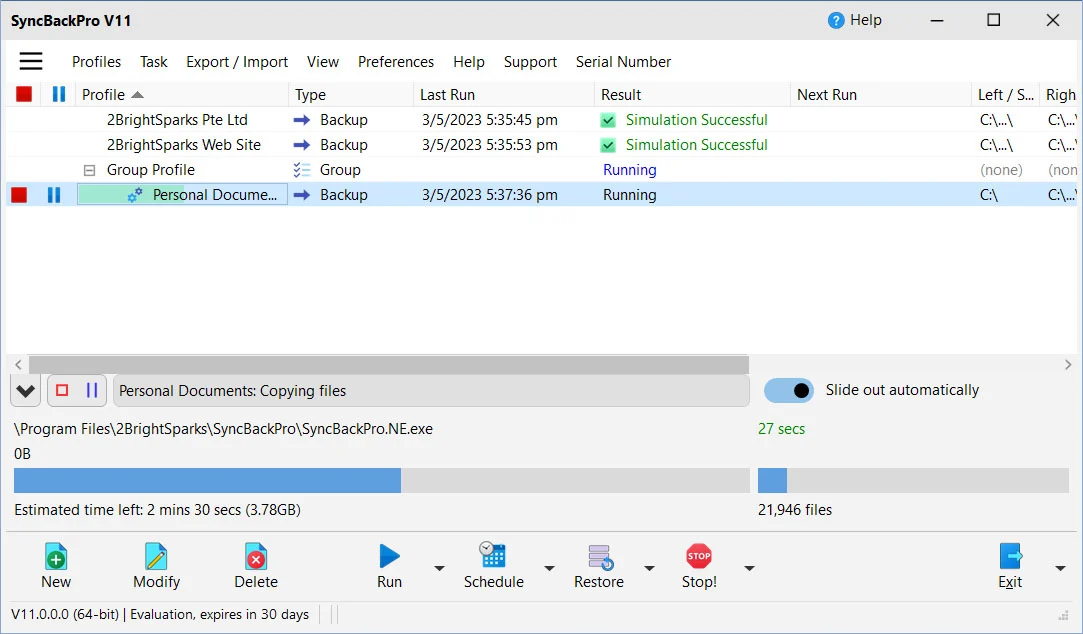
2BrightSparks SyncBack operates as a highly configurable data replication and disaster recovery engine for Windows environments. Rather than relying on opaque, background cloud clients that hide file operations from the user, this utility provides explicit, profile-based control over exactly how, when, and where files are moved. System administrators, IT professionals, and exactingly organized home users rely on it to automate tedious file management tasks, ranging from basic local drive mirroring to complex, encrypted off-site archives. By handling everything locally on the desktop workstation, the software accesses the file system directly, bypassing the limitations and latency often associated with browser-centric uploads.
The application is built around the concept of profiles. A profile contains a precise set of rules dictating the source, the destination, and the specific behavior required—whether that is a strict one-way backup, a two-way synchronization, or an exact mirror that deletes orphaned files. Because it runs as a native desktop application, it can read directly from mapped network drives, attached Network Attached Storage (NAS) devices, and physical external disks without requiring intermediary bridging software. Users configure the rules once, and the engine executes the file transfers precisely as defined, ensuring that critical documents, sprawling media libraries, and ongoing project folders are replicated exactly according to plan. This architecture proves especially useful for users managing large volumes of raw media or extensive folder trees that standard web-based tools struggle to index.
Choosing a dedicated desktop utility instead of a basic drag-and-drop workflow ensures reliability over time. Unattended operations are a core focus, allowing the software to wake the system, execute the necessary file transfers, log any errors or skipped files, and safely unmount drives or shut down the computer when finished. This level of predictability is essential for real disaster recovery, where incomplete backups or silent failures can result in total data loss. The interface provides both an Easy mode for quick setups and an Expert mode that exposes hundreds of granular variables, from file collision decisions to network timeout limits. This clear separation of complexity ensures that standard users can establish a quick local backup while network engineers can define precise network retry logic.
Key Features
- Feature Name: Intelligent Synchronization and Mirroring: The profile creation wizard forces users to explicitly define the relationship between the source and destination. "Backup" performs a safe one-way copy, "Synchronize" compares modification dates to ensure both directories hold the newest edits, and "Mirror" forces the destination to perfectly match the source by deleting extraneous files. This strict categorization prevents accidental data loss during automated runs.
- Feature Name: Volume Shadow Copy Service (VSS) Integration: Copying active databases, running virtual machines, or open email archives normally results in access denial errors. The engine hooks directly into the native Windows VSS architecture, taking a temporary snapshot of the disk. This allows the software to safely extract and copy open or locked files without requiring the user to shut down their active applications.
- Feature Name: Granular Versioning and Delta-Copy: Instead of simply overwriting the previous day's backup, the software can be configured to retain a specific number of historical file versions. When dealing with massive files, such as video projects or disk images, the delta-copy function analyzes the file structure and transmits only the modified bytes, significantly reducing network bandwidth and shortening execution time.
- Feature Name: Cloud Storage and Network Protocol Support: The engine is not restricted to local hardware. It includes native API connectors for major object storage providers like Amazon S3, Google Drive, and Microsoft Azure. For traditional remote server setups, the software includes a dedicated FTP engine that supports standard FTP, secure FTPS, and SSH-based SFTP connections, allowing direct transfers to web servers or remote data centers.
- Feature Name: Parallel File Compression and Encryption: Archiving sensitive data before it leaves the local network is handled natively. The software compresses files into standard ZIP or ZIP64 formats using multi-threaded parallel processing, utilizing multiple CPU cores to speed up the compression rate. Archives can be secured using AES encryption, ensuring that off-site or cloud-bound data remains unreadable without the correct decryption key.
- Feature Name: Deep Windows Task Scheduler Integration: The utility does not rely on a custom, potentially unstable background service for timing. Instead, it registers profiles directly within the Windows Task Scheduler. This allows administrators to trigger backups based on complex system events, such as user login, system idle time, specific chronological intervals, or even the physical mounting of a designated USB volume.
- Feature Name: File Integrity Checking: To guard against silent data corruption, faulty cables, or degrading hard drives, the software can perform cryptographic hash verifications after a transfer is complete. By comparing the checksums of the source and the newly written destination file, the engine confirms that every bit arrived perfectly intact, logging a clear error if a mismatch is detected.
How to Install 2BrightSparks SyncBack on Windows
- Download the official Windows installer package directly from the 2BrightSparks website to ensure you receive the unmodified setup executable.
- Locate the downloaded executable file in your default downloads folder and double-click it to launch the installation wizard.
- Review and accept the end-user license agreement when prompted by the installer.
- Select the destination directory for the application files; the default path inside the Program Files directory is recommended for most configurations.
- Choose whether to create a Start menu folder and a desktop shortcut for quick access to the main dashboard.
- Click "Install" to extract the required files to your local disk, which usually completes in under a minute depending on your disk speed.
- Upon completion, check the option to launch the application immediately and exit the setup wizard.
- On the first run, the interface will present the Profile Creation Wizard, prompting you to name your first task and choose between Easy or Expert mode to define your initial source and destination directories.
2BrightSparks SyncBack Free vs. Paid
The developer offers a clear, tiered licensing model designed to accommodate everyone from casual home users to enterprise system administrators. The foundational tier is entirely free for both personal and commercial use. This free edition provides the core mirroring, standard FTP support, and basic backup functionality without requiring an account, forcing a subscription, or collecting telemetry data. It is a strictly standalone desktop application that handles everyday local and network copying tasks effectively.
For users requiring deeper system access, the SE tier introduces a perpetual license model for a one-time fee of $44.95. This mid-level tier unlocks crucial workstation capabilities, primarily the ability to copy open and locked files via VSS, granular file versioning, and delta-copy for large file modifications. The SE license also includes parallel compression and better encryption standards, making it the practical baseline for remote workers and small office setups.
The Pro tier, priced at $59.95 for a perpetual license, is built for extensive network and cloud environments. It adds native API integration for enterprise cloud targets like Amazon S3, Azure, and Google Drive, alongside SFTP support and advanced scripting capabilities. Both paid tiers allow a single home user to install the software on up to five personal devices. While the licenses are perpetual for the purchased software, major future architectural upgrades may require an upgrade fee unless the user opts into the optional annual Upgrade Assurance plan.
2BrightSparks SyncBack vs. FreeFileSync vs. GoodSync
FreeFileSync is an open-source alternative that focuses heavily on manual, visual folder comparison. It presents users with a side-by-side graphical breakdown of two directories, making it easy to spot specific file differences before clicking a button to synchronize them. While it handles basic background batch jobs, it lacks the deep integration with the Windows Task Scheduler, the granular VSS handling, and the extensive cloud object storage connectors found in the 2BrightSparks utility.
GoodSync is a commercial competitor known for its proprietary GoodSync Connect protocol, which establishes direct, peer-to-peer connections between multiple devices over the internet without relying on a third-party cloud server. It is highly effective for users who need real-time, block-level synchronization across geographical distances. However, it requires an ongoing subscription model for many of its advanced networking features, and its interface can feel less rigid for users who prefer strict, traditional one-way backup rules.
The 2BrightSparks engine remains the better fit for Windows power users, IT administrators, and anyone who treats file replication as a strict, scheduled administrative task rather than a real-time collaboration tool. Its reliance on precise, rule-based profiles, the absence of forced subscription fees, and its ability to act as a set-and-forget disaster recovery agent make it highly predictable. When absolute control over file collision decisions, logging, and scheduled triggers is required, this utility provides a superior, strictly analytical workflow.
Common Issues and Fixes
- Problem description. Profile fails to run on a schedule. This usually indicates a permissions error within the Windows Task Scheduler. Open the profile schedule settings and ensure that the correct Windows login password is saved. Blank passwords often cause Windows to block automated execution; if you use a blank password, you must explicitly allow blank passwords in the program's global scheduling settings.
- Problem description. Access denied errors on locked files. If you are attempting to copy an open database, a running virtual machine, or an active PST file, the operation will fail unless Volume Shadow Copy is active. Ensure you are using the SE or Pro tier, verify that the VSS service is set to "Manual" or "Automatic" in Windows Services, and confirm the software is running with elevated administrator privileges.
- Problem description. Cloud backups fail with HTTP Error 429. This error means you are hitting the transfer rate limits of your cloud storage provider, such as Google Drive or Amazon S3. To fix this, open your profile in Expert mode, navigate to the network or cloud settings, and configure the exponential backoff retry parameters or set a strict bandwidth limit to avoid flooding the API.
- Problem description. Files are unexpectedly deleted from the source drive. This happens when a user intends to create a safe backup but accidentally selects the "Mirror" profile type, which forces both directories to match exactly. Open your profile settings, navigate to the "Decisions - Files" menu, and change the rule for files existing in the destination but not the source to "Do nothing" instead of deleting them.
Version 11.3.124.0 — October 2025
- Improved reliability for AWS S3 and compatible cloud services by adding automatic command retries when HTTP 503 errors occur.
- Fixed an issue where refreshing Upgrade Assurance details within the About window would fail unless the application was restarted.
- Fixed a bug regarding cloud uploads where locked local files were not correctly treated as warnings despite being configured to do so.
- Resolved specific issues with folder names and Unicode characters in email subjects when performing email backups via the MS Graph API.
- Corrected the detection logic for junction points to ensure they are properly handled when already scanned but not selected.